
In 2026, the best production scheduling and planning software for metal fabrication is less about just “making a plan” and more about helping you stay on-plan when everything changes mid-week. Lead times are tighter, buyers expect faster updates, and most shops are still operating with a skilled labor gap. At the same time, more teams are investing in digitizing shop-floor signals (time, status, materials) and using automation and AI to reduce admin work and spot issues earlier. Your production scheduling and planning software should act like a co-pilot and assist you in your workflow. If scheduling is only part of what you need, our comparison of metal fabrication software covers 16 full systems.
That’s why the best production scheduling and planning software in 2026 tend to share a few traits:
- Finite capacity + real-time feedback loops (not just a static schedule)
- Fast rescheduling (drag-and-drop is table stakes)
- Mobile-friendly shop updates (tablets, phones, barcode workflows)
- Clear plan vs actual visibility (labor hours, progress, bottlenecks)
- Integration-first (accounting, CAD/CAM/Nesting, inventory, purchasing, customer comms)
Unplanned bottlenecks crop up when tasks aren’t sequenced properly or when materials aren’t allocated on schedule. Missed deadlines not only dent your revenue but also chip away at your company’s reputation. Rework due to design errors or poor communication is both time-consuming and expensive, while confusion over job statuses can cause you chaos in your shop, making it difficult for team members to follow through on tasks effectively.
If these are some of the issues you see yourself battling with more often than not, it’s a good indicator that it’s time for you to adopt a specialized production planning and scheduling software.
The good news is, that there’s plenty of amazing production scheduling and planning software out there. But which one to go for?
When choosing a production planning software, there are some distinctive factors specific to your use case, industry and needs that you might want to consider:
- Budget and total cost of ownership
- Initial cost (setup, licensing, hardware if on-premise)
- Ongoing subscription fees or maintenance costs
- Hidden costs (customization, integrations, training)
- Complexity and ease of use
- Learning curve for new users
- Level of training and support available
- Industry-specific features
- Custom workflows and routing tailored to your manufacturing niche
- Tools designed for specific production processes (e.g., metal fabrication)
- Customization and flexibility
- Ability to tailor modules and dashboards
- Configurability of reports and data views
- Integration capabilities
- Compatibility with existing ERP, CRM, accounting, and other business systems
- Availability of APIs and support for data import/export
- Third-party app integrations
- Scalability
- Suitability for small teams versus large enterprises
- Options for adding or removing features as your business grows
- Ability to handle increasing data volumes or multiple production sites
- Modular design that allows for phased implementation
- Deployment and implementation
- Cloud-based versus on-premise solutions
- Estimated time for setup and full deployment
- Customization services and consultancy support
- Intuitiveness of the user interface
- Vendor support and training
- Availability and responsiveness of customer service
- Quality of training materials and onboarding programs
- Performance and reliability
- Real-time data tracking and reporting capabilities
- System uptime guarantees and backup strategies
- Performance under high data loads
- Security and compliance
- Security protocols
- Compliance with industry regulations (GDPR, FDA, ISO)
- Role-based access controls and audit trails
We get it, it’s a lot to consider and take it. But we’re here to help! In this article we’re highlighting the top vendors for specific use cases, pain points and budgets. Let’s dive in.
Best production scheduling and planning software for small custom metal fabricators in 2026
1. EZIIL Starter: overall best production scheduling and planning software for Small custom metal fabricators
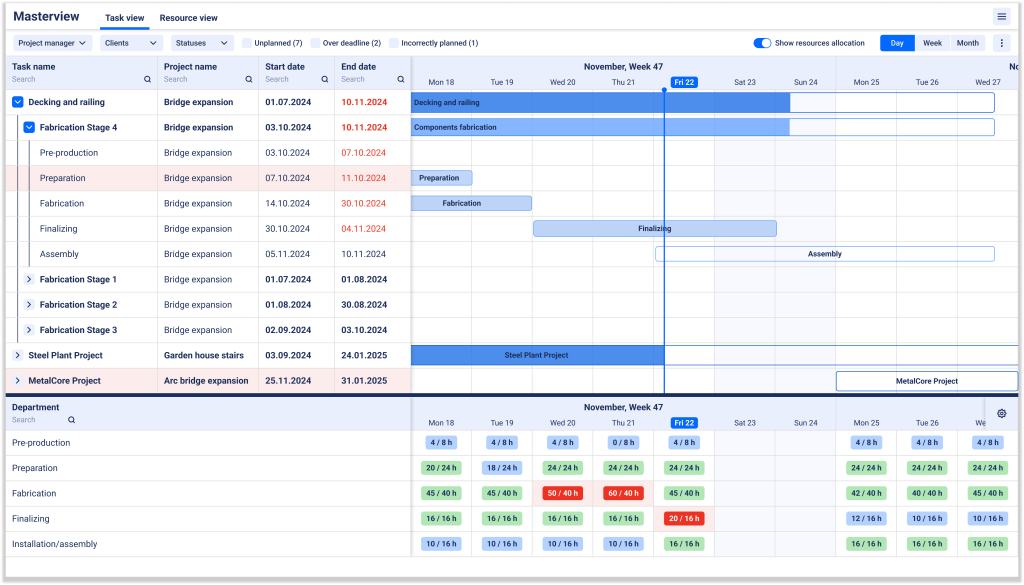
EZIIL Starter is purpose-built for project based metal fabricators who need an easy transition from chaotic spreadsheets and pen-and-paper workflows into a digital platform. Unlike full-blown ERP systems that can overwhelm smaller shops with unused features (and hefty price tags), EZIIL is the sweet spot: it’s powerful, modular, and specifically tailored to custom steel fabrication processes. From quoting and scheduling to real-time capacity management, mobile reporting and productivity tracking.
Key features
- Shop floor planning and scheduling
- Drag-and-drop job assignments
- Real-time capacity visibility
- Department-level task visualization
- Centralized data and collaboration
- Store all customer details, drawings, and documents in one place
- Set standardized input fields to reduce errors
- Integrations with accounting, nesting, CAD tools you already use
- Production and profitability analytics
- Plan vs actual tracking for hours, progress and profitability to identify inefficiencies
- Auto-planning for repeat projects with custom task templates and routing
- Mobile reporting
- Time logging and job status updates via iOS/Android devices
- On-the-go visibility so supervisors and managers can stay informed
- Scalability with add-on modules
- Implement at your own pace and only pay for the features you use
- Advanced add on modules include: BOM and purchase management, warehouse/inventory control, subcontracting management, advanced analytics, and compliance workflows
Pricing
- Starter plan from €120/$140 per month:
- 1–15 users at €120/$140 per month
- 16–50 users at €180/$210 per month
- 51–150 users at €290/$338 per month
- Enterprise: Add advanced modules as needed without committing to the full suite. Book a demo for a custom quote.
Who is EZIIL Starter production planning software best suited for?
- 20-200 person project-based steel fabrication shops that want real shop-floor visibility, simple scheduling, and to move off Excel without the complexity or the hefty price tag of an ERP
- Fabricators who want a flexible and gradual software roll-out with options to scale up and add modules later as they grow
- Job shops focusing on on-time delivery, reducing rework, and improving visibility for all stakeholders
Pros and cons
Pros:
- Built specifically around custom (Make-To-Order) metal fabrication workflows (not a generic project tracker)
- Fast vendor supported implementation (2-3 weeks from kick off to going live)
- Modular software roll out lets your team ease into it at their own pace, supports wider adoption and fits your budget – you only pay for what you need
- Strong visibility and accountability across office + floor
- Intuitive dashboards, drag-and-drop scheduling, and real-time tracking
- Planned vs reality reporting on projects
- Mobile app integration for convenient shop-floor updates
- Highly rated customer support
- Affordable monthly pricing with no long-term lock-ins
- Light weight cloud-based solution
Cons:
- If a shop wants a full accounting suite inside the same system, they may prefer classic job-shop ERPs
- Not a universal manufacturing solution, works best for custom steel fabricators
- Some advanced areas (inventory-heavy operations, deep BOM purchasing, compliance) are typically a later phase
2. JobBOSS²: job shop ERP with strong visual scheduling
JobBOSS² (by ECI) is a job-shop ERP built for quoting, job tracking, purchasing, inventory, and scheduling. In 2026 terms, it’s a solid fit for shops that want ERP breadth plus a scheduling experience that can keep up with constant due-date changes, without building a custom system.
Key features
Production scheduling and planning
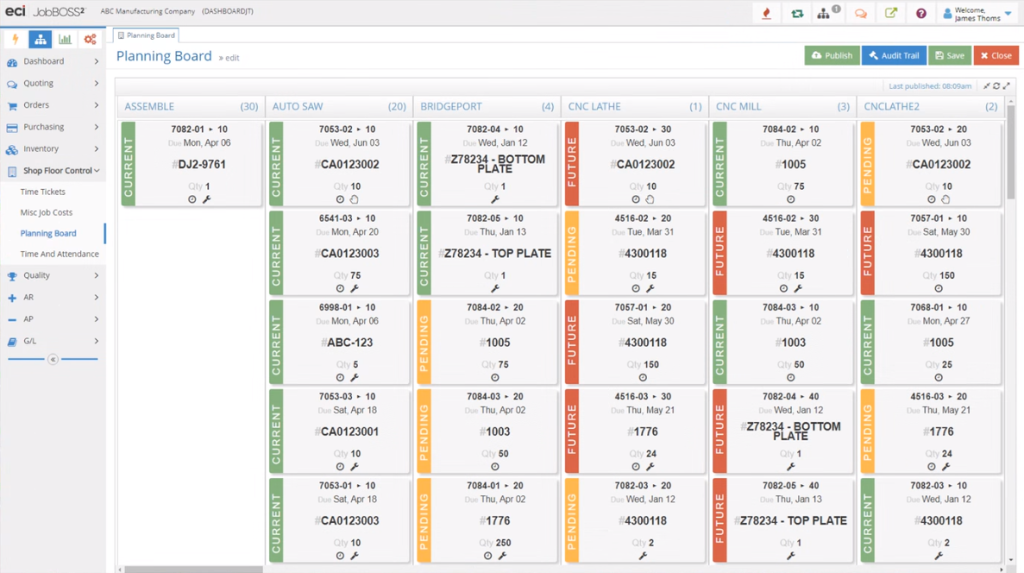
- Two scheduling modes: Planning Board (drag-and-drop) and Whiteboard Scheduler for quick rescheduling and due date changes
- Visibility into bottlenecks and job/machine factors inside scheduling
Job shop ERP fundamentals
- Estimating/quoting, order generation, purchasing, inventory, scheduling, shop data collection, quality control, shipping, accounting-style workflows
Mobile/anywhere access
- “QuickView” style access and mobile apps for visibility without a full seat license (varies by configuration)
Pricing
- Tiered plans (Silver/Gold/Platinum) with custom quote pricing
- Expect additional costs for implementation and services depending on scope (typical for ERP rollouts)
Who is JobBOSS² best suited for?
- Small-to-mid job shops that want one system for quoting → scheduling → purchasing → tracking
- Teams that need quick schedule edits when priorities change daily
- Shops that prefer an ERP-style toolset and are ready to invest in setup and process discipline
Pros and Cons
Pros:
- Scheduling is a core workflow, with two ways to schedule depending on how your team works
- Strong job shop coverage across quoting, purchasing, inventory, tracking
- Mobile/visibility options can help adoption beyond the office
Cons:
- Like most ERPs, implementation still takes effort (routings, data cleanup, training)
- Can feel overwhelming and ERP-ish for teams that want something lighter and faster to adopt
- Custom pricing makes it harder to estimate TCO without a sales cycle
3. E2 Shop System/E2 MFG: best classic job-shop control with scheduling whiteboard
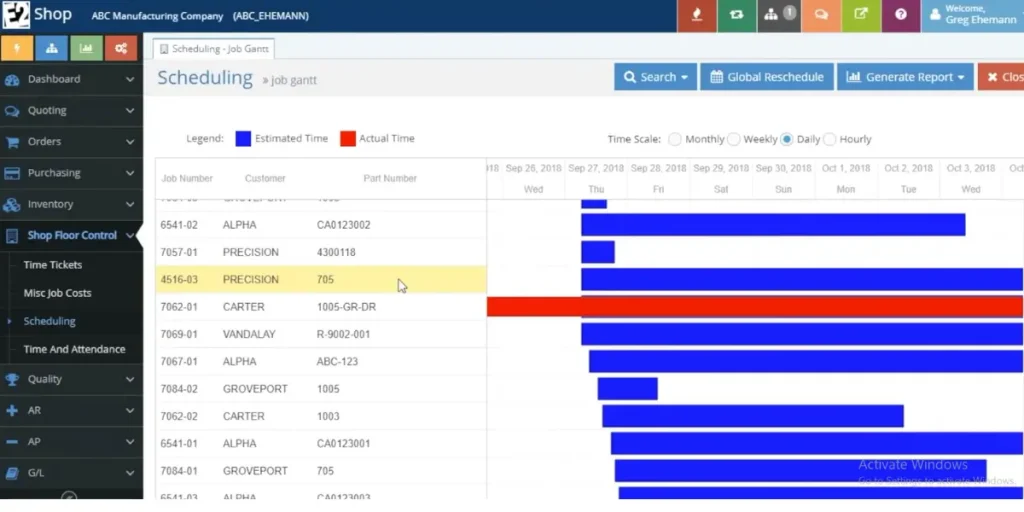
E2 is a long-standing shop management system for job shops and discrete manufacturers. It’s known for its Scheduling Whiteboard and broad job shop coverage, making it a strong pick when you want classic “shop control” workflows plus visual scheduling.
Key features
Scheduling and planning
- Scheduling Whiteboard for machine availability and job schedule snapshots
- Scheduling features like forward/backward scheduling and more accurate percent complete calculations
Job tracking and shop floor
- Shop-floor monitoring, time tracking, productivity tracking
Commercial ops support
- Quote/estimate to order conversion, RFQs, profitability analysis features
Pricing
- Pricing is generally available upon request (varies by deployment and scope)
Who is E2 best suited for?
- Job shops that want a proven, structured job management approach
- Shops that like the idea of a visual scheduling whiteboard and traditional shop control workflows
- Teams willing to invest time in configuration and consistent usage
Pros and cons
Pros:
- Strong “end-to-end shop control” foundation (quote → schedule → track → report)
- Visual scheduling via whiteboard is a practical fit for many job shops
Cons:
Pricing clarity usually requires a vendor conversation
Breadth can increase training burden, especially for smaller teams
Scheduling is powerful, but configuration and data setup can get complex
Best production scheduling and planning software in 2026 for scaling job shops that need deep costing
1. ProShop ERP: best for precision shops that need ERP + MES + QMS discipline
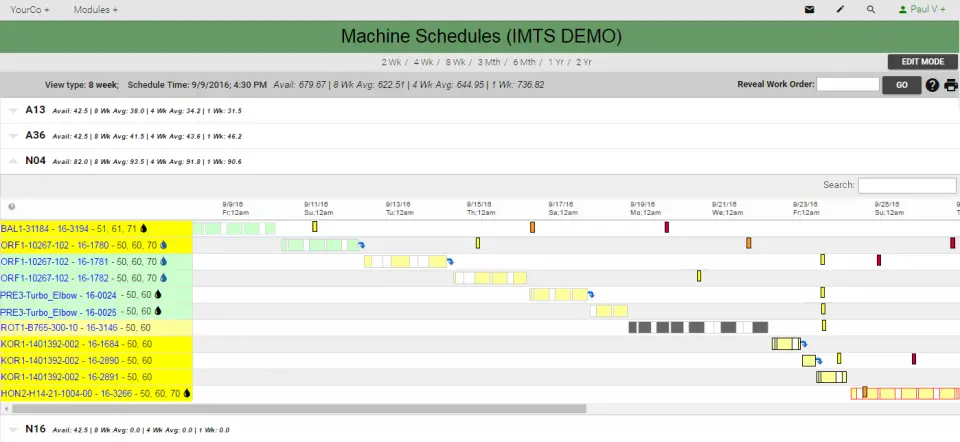
ProShop is an all-in-one ERP built by and for machine shops, with a strong focus on being paperless and process-consistent. It’s a great fit for shops that want scheduling tied tightly to execution, quality, and traceability workflows.
Key features
Scheduling and dispatch
- Work order management with drag-and-drop assignment and real-time visibility into hours, costs, stages, and location
- Users often highlight improved scheduling usability and drag-and-drop improvements over time
ERP + MES style execution
- Connected workflows across job management and shop-floor execution
Quality system alignment
- Strong fit for shops that need controlled processes, inspections, and audit-friendly records
Pricing
- Custom pricing based on users and shop needs
Who is ProShop best suited for?
- Precision manufacturing and compliance-minded job shops (often machining, aerospace-style discipline)
- Shops that want paperless execution and quality workflows integrated with production
- Teams ready for tighter data cleanliness and standardized processes
Pros and cons
Pros:
- Strong end-to-end connected workflow (execution + quality + scheduling)
- Drag-and-drop scheduling and improving UX called out in feedback
- Built for the operational reality of job shops
Cons:
- More “system” than “tool,” so adoption depends on process maturity
- Onboarding can be heavier than lighter scheduling-first products
- Pricing requires a sales process
2. Global Shop Solutions: best for scaling shops that want scheduling tied to cost and OTD
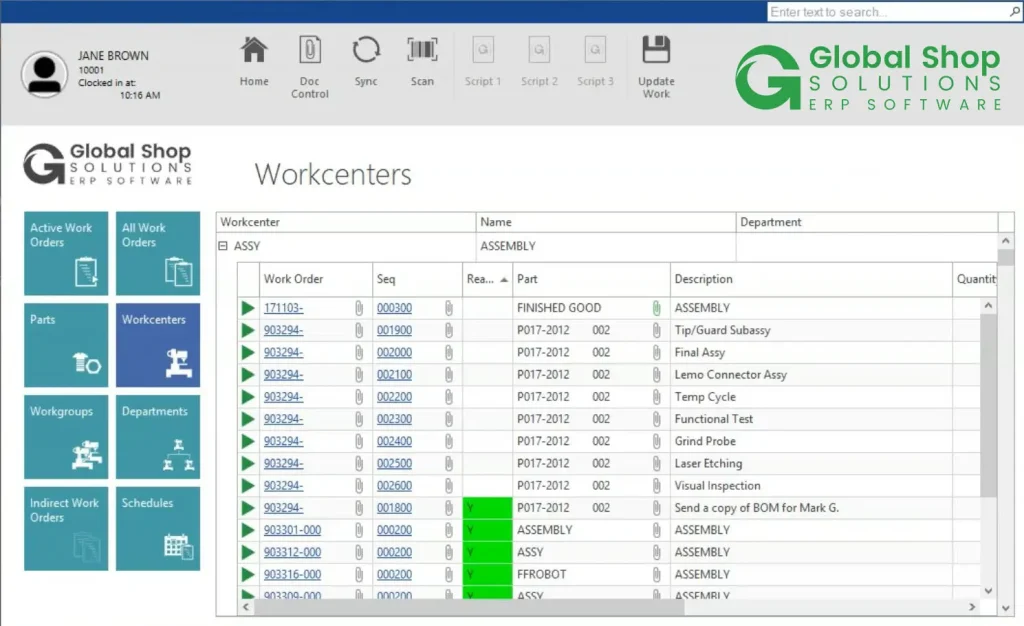
Global Shop Solutions is a manufacturing ERP platform with many modules, including Advanced Planning and Scheduling (APS). Their scheduling message in 2026 is very aligned with what metal shops care about: real-time load visibility, finite scheduling, and quick rescheduling.
Key features
Advanced Planning and Scheduling (APS)
- Finite/infinite scheduling and what-if scenarios for load visibility
- Drag-and-drop reschedule/reroute to protect deadlines
- Real-time job status visibility to make scheduling more reliable
ERP breadth (shop control)
- Planning and scheduling, routing, shop floor data collection, maintenance, quality control, plus more modules
Pricing
- Custom quote (not publicly listed as a standard price)
- Some online sources cite a minimum implementation fee starting around $20,000 (varies by scope)
Who is Global Shop Solutions best suited for?
- Growing manufacturers that want ERP-level coverage plus real APS scheduling
- Shops that want scheduling tightly linked to cost control and on-time delivery outcomes
- Teams that can support a bigger rollout with internal ownership
Pros and cons
Pros:
- Strong APS positioning: finite scheduling, what-if, drag-and-drop rescheduling
- Broad module coverage for quote-to-cash style workflows
Cons:
- Typically heavier implementation than scheduling-first tools
- Custom pricing makes budgeting harder without discovery
- May be more “system” than a 20-50 person shop needs early on
Best production scheduling and planning layers (keep Your existing ERP, fix planning) in 2026
1. Frepple: Best open-source solution for manufacturing and distribution companies
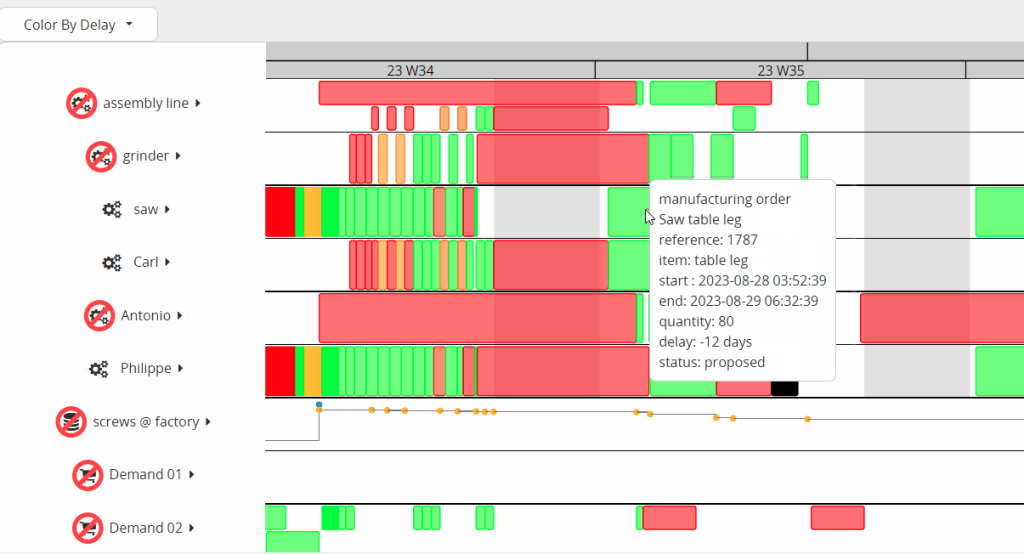
Frepple is an open-source, cloud-based planning tool designed for mid-sized companies that need agile production and inventory planning. Built to extend the capabilities of traditional ERP systems, Frepple covers demand forecasting, inventory management, and production scheduling.
Key features
- Demand forecasting and inventory planning
- Forecast future demand and adjust sales predictions to optimize inventory levels
- Calculate safety stock levels and dynamically adjust plans to minimize stockouts
- Production scheduling
- Visual scheduling via drag-and-drop Gantt charts to manage production orders
- What-if scenarios and real-time adjustments
- Simulate production disruptions (e.g., machine breakdowns, rush orders) to test alternative scheduling options
- Make on-the-fly adjustments based on real-time production progress
- Flexible integration
- Extendable via REST API, CSV/Excel imports, and direct database access
Pricing
- Basic plan: Approximately €612 per month (billed annually)
- Standard plan: Approximately €765 per month (billed annually)
- Implementation services: Additional implementation services range from €2,000–€5,000 for a proof of concept to €5,000–€25,000 for full-scale implementations
Who is Frepple production planning solution best suited for?
Ideal for industries such as injection molding, metal machining, spare parts, and aerospace; values transparency, flexibility, and fast implementation.
- Mid-sized manufacturing and distribution companies looking to transition from spreadsheets to a robust, agile planning system
- Organizations that need comprehensive production planning with the ability to integrate with existing ERP systems
- Companies that value open-source solutions with transparent pricing and a flexible, extendable architecture
Pros and cons
Pros:
- Open-source core with transparent pricing and a community edition for trial
- Fast planning algorithms that can reduce planning time significantly
- Flexible integration options via API, CSV, and Excel
- Effective at aligning production capacity with demand, reducing forecast errors and stockouts
- Agile implementation with a relatively short timeline (10–12 weeks)
Cons:
- May require significant customization for unique production processes
- Implementation can involve steep additional costs for professional services and support
- Some users report that extensive customization is needed to fully adapt the tool to their specific workflows
- Documentation and training materials, while available, may require a learning curve for teams new to open-source planning tools
2. Visual Planning: Best for companies with complex production operations
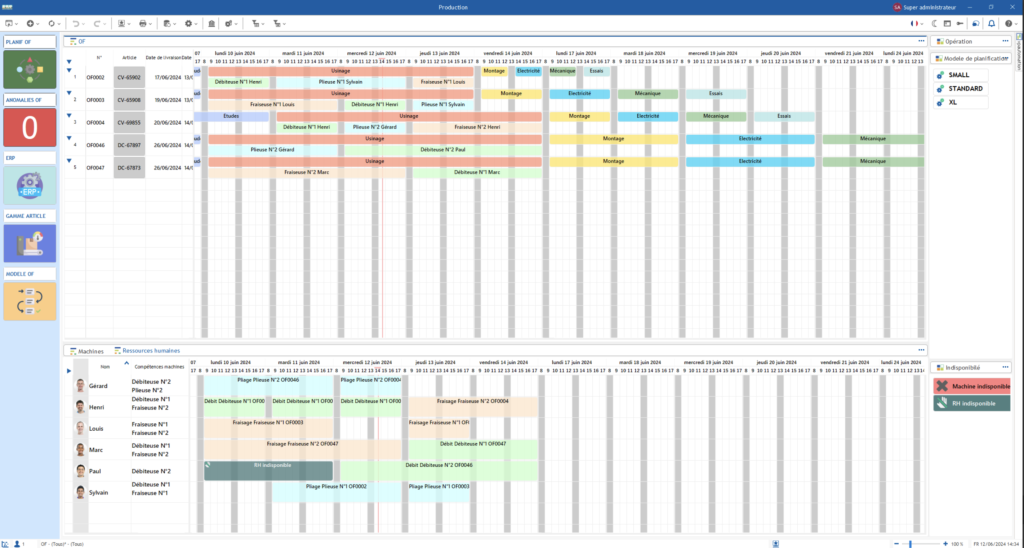
Visual Planning is a flexible, collaborative scheduling and resource management software designed to streamline complex production operations. With a centralized platform that integrates manufacturing order planning, resource allocation, inventory management, and process monitoring, Visual Planning aims to improve efficiency and help make data-driven decisions.
Key features
- Centralized scheduling and resource management
- Comprehensive planning of production orders with real-time updates
- Automation and customization
- VPAutomation for automatic scheduling and resource auto-assignment
- Customizable views (Gantt charts, load plans, control totals) to track performance and costs
- Data centralization and integration
- Import/export features (XLS, CSV, XML, JSON) and a REST API for integration with ERP, MRP, HR, and other systems
Pricing
VP DESK (for main schedulers):
- SaaS: $55 per user/month (annual billing)
- Subscription: $660 per year per user
- Lifetime Licence: $1,270 (plus 20% maintenance per year)
- VP PORTAL (for daily users):
- SaaS: $40 per user/month or $480 per year per user
- Lifetime Licence: $790 (plus 20% maintenance per year)
- VP GO (for mobile users):
- SaaS: $15 per user/month or $180 per year per user
- Lifetime Licence: $290 (plus 20% maintenance per year) (Note: Pricing details are based on annual billing and may vary with license type and configuration.)
Who is Visual Planning solution best suited for?
- Manufacturers and production managers who require a customizable scheduling tool
- Businesses that need to integrate data from multiple systems and want granular control over resource allocation and cost management
Pros and cons
Pros:
- Highly flexible and customizable with robust automation features
- Centralizes diverse production data for informed decision-making
- Multiple delivery and licensing options to fit different business models
- Strong integration capabilities via API and standard data formats
Cons:
- Initial setup and customization can be time-intensive, especially for smaller teams
- Steeper learning curve for users not familiar with advanced scheduling tools
- Some users report occasional glitches in automation or integration with external tools
Best production scheduling and planning software with inventory-first MRPs (light fabrication, assemblies)
1. Katana: Best for manufacturers with multiple warehouse locations with a strong emphasis on inventory visibility
Katana Cloud Inventory is a manufacturing and inventory management platform designed to give you a unified, real-time view of stock levels and order statuses. It supports both simple and more advanced needs like production management, demand forecasting, and warehouse management. With integrations for major e-commerce platforms like Shopify and WooCommerce, plus accounting tools like QuickBooks Online or Xero, Katana is ideal for manufacturers who sell direct-to-consumer or need an omnichannel approach.
For metal fabricators in 2026, it’s most relevant when your operation is closer to light manufacturing, assemblies, repeatable work, or multi-location stock.
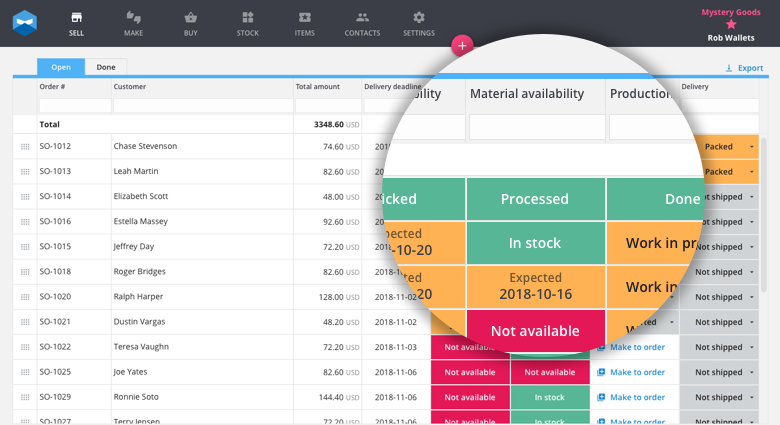
Key features
- Inventory and purchase management
- Real-time stock tracking for raw materials and finished goods
- Automated purchase orders and reordering
- Multi-currency and multi-location support on certain plans
- Production and planning
- Bill of materials (BOM) management for complex products
- Shop Floor App for real-time task assignments and progress updates
- Demand forecasting
- AI-powered demand planning to help replenish inventory proactively
- Reports and analytics to identify top-performing products
- Warehouse app (add-on)
- Barcode scanning, bin location management, mobile picking/packing
- Full traceability for batches, serial numbers, and labeling
Pricing
(Billed annually; quarterly pricing available at a higher rate)
- Free plan
- Includes core manufacturing features with a 30 SKU limit, 3 inventory locations, and unlimited users/integrations
- Starter: $179/month
- 1 inventory location, unlimited SKUs, unlimited users, basic features
- Standard: $359/month
- Includes everything in Starter, plus advanced insights, barcode scanning, up to 3 locations, and multicurrency
- Professional: $799/month
- Adds unlimited inventory locations, full traceability, forecasting, warehouse management, and access to API
- Enterprise: Custom pricing for larger, more complex operations
Who is Katana production planning solution best suited for?
- Fabricators with repeatable workflows, assemblies, or inventory-heavy operations
- Teams that want strong visibility into stock, purchasing, and production orders
- Shops that are not yet ready for a full job-shop ERP, but need more control than spreadsheets
- Teams looking for integrations with Shopify, WooCommerce, and accounting software, plus advanced forecasting and warehouse features
Pros and cons
Pros:
- Strong inventory visibility and approachable entry point via Free plan
- Good fit when materials and stock availability are the main bottleneck
- Paid tiers add traceability and more advanced ops features
- Real-time inventory oversight and demand forecasting
- Straightforward e-commerce integrations (Shopify, WooCommerce)
- Powerful production management features with a Shop Floor App
- Highly rated customer support
Cons:
- For true project-based fabrication (routing changes, lots of subcontracting), you may need workarounds
- Costs can jump as you need higher-tier features (traceability, forecasting, warehouse)
- Not metal-fab-specific, so some fabrication steps may not map perfectly
- Advanced features (like multi-location, forecasting, full traceability) can be pricey for smaller shops
- Limited offline handling of inventory transfers or partial shipments on lower-tier plans
Best production scheduling and planning software in 2026: other notable solutions
1. Monday: Best for industry agnostic cross-department workflows
Monday.com is a popular work operating system that offers flexible task boards, collaborative features, and automation to help teams plan and deliver projects efficiently.
Although not designed exclusively for metal fabrication, Monday can be adapted for basic production scheduling. Thanks to its visual interface, drag-and-drop atures, and robust integrations, it remains a strong pick for businesses that want a single platform to unify operations across multiple departments—production, sales, marketing, and beyond.
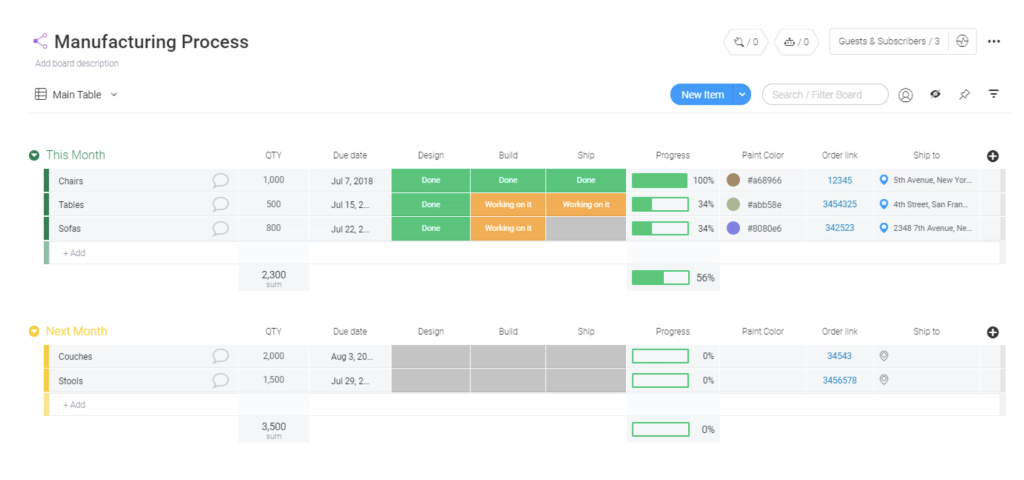
Key features
- Customizable workflows
- Build your own boards with columns for tasks, due dates, owners, progress updates
- Collaboration and automation
- Automate notifications, alerts, and hand-offs between team members
- Collect customer orders or internal requests automatically via embedded forms
- Visual dashboards
- Get a basic overview of production status, pending tasks, or overdue items
- Kanban boards, calendar view, timeline, and Gantt chart (on certain plans)
- Cross-functional connectivity
- Connect with finance, HR, or marketing workflows within the same platform
- Extensive library of integrations
Pricing
(Billed annually; each plan has a free 14-day trial. Pricing below is total per month for 1 seat, multiplied by the number of seats. Includes AI credits on plans.)
- Free
- Up to 2 seats
- Limited boards and features
- Basic: $9/seat/month
- Unlimited free viewers and items, 5 GB storage, basic dashboards
- Standard: $12/seat/month
- Includes Timeline & Gantt, Calendar, guest access, limited automations/integrations
- Dashboards combining up to 5 boards
- Pro: $19/seat/month
- Private boards, time tracking, more generous automation/integration limits
- Dashboards combining up to 20 boards
- Enterprise: N/A
- Includes multi-level permissions, advanced security, and custom onboarding
Who is Monday production planning solution best suited for?
- Teams needing a generalist platform to manage everything from marketing campaigns to production tasks
- Companies wanting broad automation and integration with popular apps, plus a visually appealing interface
- Organizations where multiple departments must collaborate on shared data boards (sales, finance, HR, etc.)
Pros and cons
Pros:
- Great UX, easy adoption, strong internal visibility
- Good for intake workflows, engineering queues, and customer delivery checklists
- Wide range of native integrations and automation templates
- Scalable plans that suit freelancers up to large enterprises
- Clear color-coding and progress updates for quick overviews
Cons:
- Not a real production scheduler (no native finite capacity, routings, MRP)
- Can become fragile at scale if it’s asked to behave like an ERP
- Can quickly consume monthly limits (prompting plan upgrades)
- Customer support feedback is mixed, with some users citing slow or repetitive handoffs
- Some advanced functionalities (time tracking, private boards, etc.) locked behind higher plans
- Pricing can increase steeply as team size and automation needs grow
2. MasterControl Manufacturing Excellence: Best for regulated and quality-intensive use cases
MasterControl Manufacturing Excellence (Mx) is a digital manufacturing platform geared toward heavily regulated industries. It replaces paper-driven processes (like batch records and device history records) with electronic workflows that integrate seamlessly with quality management systems (QMS) and other enterprise tools. By focusing on compliance, audit-readiness, and data integrity, MasterControl helps manufacturers reduce errors, speed up reviews, and meet stringent industry standards.
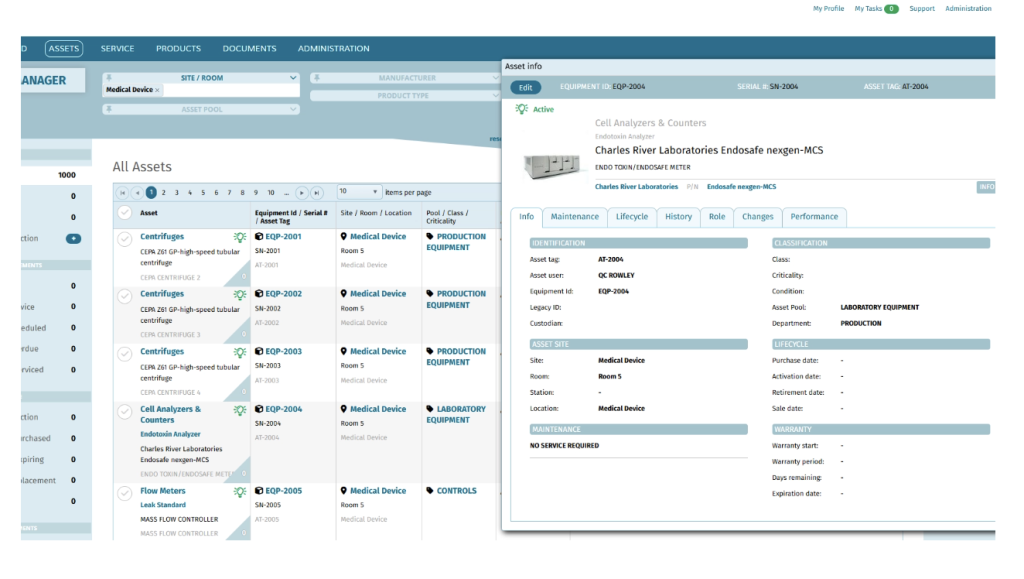
Key features
- Modern MES (Manufacturing Execution System)
- Digitize and streamline production steps with automated data capture
- Real-time tracking of work-in-progress, equipment usage, and operator actions
- Electronic batch records and device history records
- Dynamic process controls, built-in compliance checks, and auto-alerts for deviations
- Significantly reduces paper usage and cycle times in life science settings
- Connected operations and asset management
- Integrates with ERP, LIMS, QMS, IoT devices, and more
- Electronic logbooks, equipment calibration, and maintenance management
- Compliance and audit trails
- Automated record-keeping, e-signatures, and configurable access controls
- Simplifies compliance with FDA, ISO, GMP, and other regulatory standards
Pricing
- Custom quote only: Costs vary based on number of users, modules needed, and scope of integrations
Who is Mx production planning software best suited for?
- Highly regulated manufacturers that need top-tier traceability and compliance
- Companies seeking a paperless, audit-ready environment for batch records and device history records
- Organizations that need seamless integration between production, quality assurance, R&D, and supply chain systems
Pros and cons
Pros:
- Comprehensive compliance controls and error-proofing
- Accelerated review and product release through real-time exception handling
- Strong integration potential (ERP, QMS, LIMS, etc.)
- Significantly reduces paper record handling
- Ideal for regulated life sciences (FDA, GMP, ISO standards)
Cons:
- Complex setup and validation: can be time-consuming for small teams
- Higher price point, typically for larger enterprises or established SMBs with bigger budgets
- Limited manufacturing-specific features if your focus isn’t regulated industries
- Some users note a steep learning curve and rigid workflows
3. Plex Smart Manufacturing Platform: Best for Holistic Smart Manufacturing
Plex offers an all-in-one cloud-delivered solution that connects people, systems, and machines. Covering MES, ERP, quality management, and supply chain planning. It’s engineered to help manufacturers optimize capacity and maintain traceability across the entire production process.
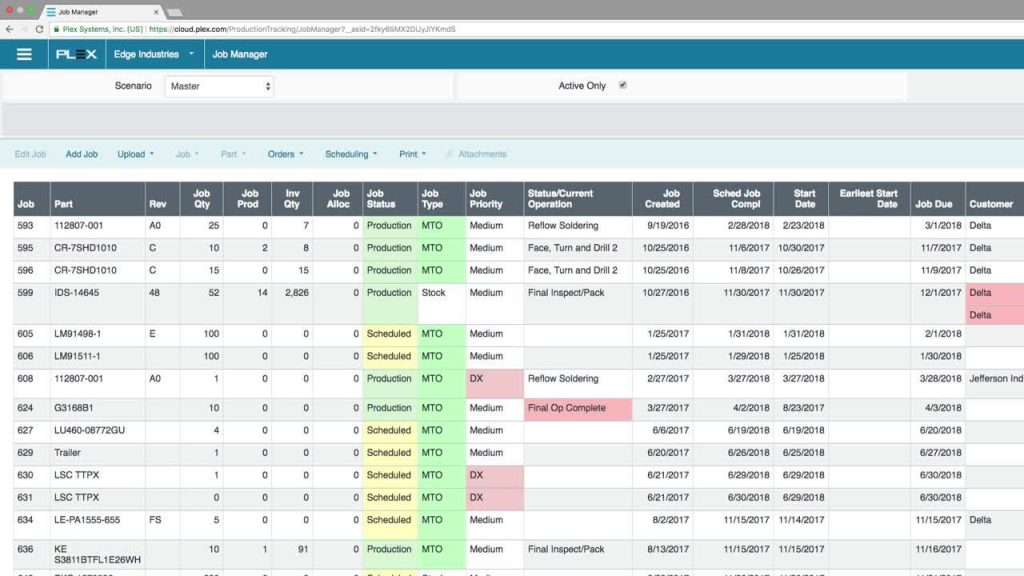
Key features
- Manufacturing production planning and scheduling
- Scheduling with capacity constraint management across work centers
- Materials requirement planning (MRP) for accurate inventory and order forecasting
- Real-time production management
- Centralized control panels for real-time visibility into shop floor activities
- Digital Kanban systems and pull scheduling to reduce overproduction
- Comprehensive integration and data analytics
- Seamless integration with ERP, quality, and asset management systems
- Production analytics dashboards for KPIs such as OEE, scrap rate, and machine availability
- Tooling, maintenance and ssset management
- Integrated modules for preventative maintenance and tooling control to optimize uptime
Pricing
- No public pricing details available
Who Is This Solution Best Suited For?
- Mid-to-large manufacturers seeking an integrated, enterprise-level solution for smart manufacturing
- Companies that need comprehensive production control across discrete and process manufacturing environments
- Organizations that require real-time production visibility, robust analytics, and advanced capacity management to drive lean practices
Pros and Cons
Pros:
- Holistic integration of MES, ERP, quality, and supply chain management
- Strong real-time production visibility and robust analytics capabilities
- Advanced scheduling options with finite capacity and resource optimization
- Enables error-proof production and better communication across departments
Cons:
- Custom pricing may be prohibitive for smaller manufacturers
- Users report usability challenges and a steep learning curve for some modules
- Some screens and interfaces can feel disjointed, requiring time to master
- Customer support experiences are mixed, with some reporting difficulties in timely resolutions
What is a production planning software?
Production planning software is a specialized digital tool designed to help manufacturers schedule, coordinate, and optimize their production processes. At its core, it enables companies to create detailed production plans that allocate tasks, manage resources, track progress, and adjust operations in real time. The software replaces manual methods, such as spreadsheets and paper‑based systems, with an integrated, data‑driven platform that improves accuracy, reduces errors, and enhances overall efficiency.
This type of software is for anyone involved in production, ranging from small job shops to large industrial manufacturers. In particular, production planning software is invaluable for:
- Project-based manufacturers: Companies like metal fabricators who handle custom, one-off projects and need precise scheduling.
- Mid-to-large enterprises: Organizations with multiple production lines that require coordinated resource allocation and real-time monitoring.
- Regulated industries: Businesses in sectors such as pharmaceuticals or medical devices, where compliance and traceability are paramount.
- Companies transitioning from manual processes: Businesses still reliant on spreadsheets, emails, or paper records that are seeking to streamline operations and reduce manual errors.
When should metal fabricators start looking into a specialized production planning software?
If you’re a shop executive, production manager, or project lead in a metal fabrication business with anywhere from 20 to 200 employees, and you’re still juggling Excel spreadsheets, pen-and-paper job tickets, and chaotic email chains, you’ll benefit immensely from a robust planning platform.
Some of the common struggles that a specialized production scheduling and planning software like EZIIL can help with include:
- Accelerating customer demands: Clients want faster turnarounds and tighter customization, meaning your old-school processes might struggle to keep up.
- Increased complexity as shops expand: As you take on more jobs or diversify your product range, manual tracking and scheduling become exponentially harder.
- Desire to avoid ERP bloat and overspending: Many full-blown ERP solutions are costly and come with features you won’t use. By choosing a more focused system, you pay only for what you need now.
Immediate benefits of a production planning and scheduling software:
- Real-time visibility: See at a glance how each job is progressing and where your bottlenecks are.
- Fewer delays and bottlenecks: Automated scheduling helps you allocate resources properly and prevent downtime.
- Enhanced profitability: Better planning cuts out wasted hours and reduces expensive rework.
- Improved collaboration and on-time deliveries: Centralized data makes it easier for teams to align on tasks and keep customers happy.