
If you’re looking for steel fabrication estimating software, you most likely have experienced your quotes turning into “surprises” once the job hits the shop floor: hours run long, materials don’t match what was assumed, and small misses pile up until the margin is gone. Estimating is one part of the picture. For production planning and tracking, see our guide to metal fabrication software.
This guide is for you, if who are quoting under time pressure and juggling too many tools: spreadsheets, email threads, PDFs, and whatever’s in someone’s head. We’ll go through the main quoting struggles that steel fabricators are facing, how to fix them, what to look for in a steel fabrication estimating software and, finally, how to implement a quoting workflow that helps you prevent unpleasant surprises.
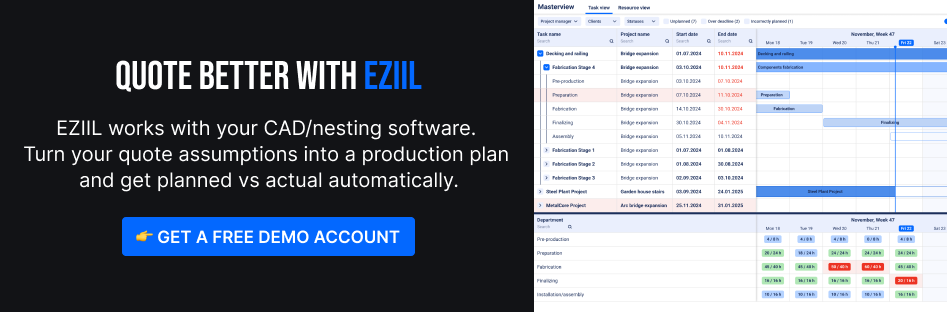
Why steel fab quotes go sideways (7 failure modes you can actually fix)
Many small steel shops quote in the cracks between everything else: calls from the floor, a customer chasing a delivery date, and that one drawing that “should be final” but somehow never is.
This is why steel fabrication estimating software (and, more importantly, a solid quoting workflow) matters. When quotes go sideways, it’s rarely because someone is “bad at estimating.” It’s usually one of these seven failure modes. This section helps you diagnose what to fix before you even compare software.
A quick reality check: “scrap and rework” is a standard manufacturing cost metric, and APQC benchmarking shows a median of 1% of sales for scrap and rework costs across a large cross-industry sample.
1) Scope gaps (the missing 10% that eats 50% of the profit)
Does the system force an estimator to confirm finishes/install/NDT before a quote can be finalized?
What it looks like
- Welds not counted (especially intermittent, seal, or hard-access)
- Hardware, anchors, and small purchased items missing
- Paint, prep, masking, touch-ups not scoped
- Site constraints ignored (access, lifts, fit-up realities, install sequencing)
Fix you can implement this week
- Add a one-page “Scope Lock” checklist to every RFQ (welds, finishes, install, certs, NDT, packaging).
- Write your exclusions the same way every time (so you’re not renegotiating from scratch on each job).
How a steel fabrication estimating software helps
EZIIL can store the “Scope Lock” checklist as part of the job record and keep it attached to the job through production (docs + tasks + ownership). But even if you quote in Excel, you can still enforce the checklist.
2) Routing assumptions live in someone’s head
What it looks like
- Labor is estimated as one blended number (fab: 40 hours)
- No consistent routing by operation (cut, prep, fit-up, weld, grind, drill, paint, pack)
- Two estimators quote the same job differently because they see it differently
Fix you can implement this week
- Create 5-10 routing templates for your most common job types (stairs, railings, frames, baseplates, mezz parts).
- Estimate by department/operation, even if it’s rough at first. Consistency beats precision.
How a steel fabrication estimating software helps
A software like EZIIL can act as the “home” for those routing templates and planned hours by department, so your quote assumptions translate cleanly into production tasks once you win the job. Once you build a routing template in EZIIL, you can reuse it on the next similar job without rebuilding it.
3) Material pricing whiplash (and optimistic remnant assumptions)
What it looks like
- You quote off last month’s price list
- Drops and scrap are hand-waved (“we’ll get it from remnants”)
- Freight, cutting fees, minimums, and supplier lead time premiums get missed
Fix you can implement this week
- Set a simple rule: material pricing is valid for X days, then it’s reviewed.
- Track a basic remnant policy: what actually counts as “available,” who owns it, and when you’ll buy new instead.
Why it matters
- If your material assumption is wrong, the quote is wrong even if labor is perfect.
4) Rework is real, but it isn’t priced consistently
Repairs exist, and pretending they don’t makes your pricing fragile. An industry survey reported average repair rates in the 1-3% range, with much higher peaks in specific conditions.
What it looks like
- Rework is “absorbed” until it becomes a crisis
- You add a buffer sometimes, but not consistently
- Repairs show up late (after multiple weld passes, after paint, after fit-up), when they’re most expensive to fix
Fix you can implement this week
- Pick a rework policy and stick to it:
- either a small standard allowance by job type
- or a “risk line item” that’s triggered by complexity (tight tolerances, poor access, new material grade, rushed schedule)
5) Change orders are treated like a favor
What it looks like
- Customer changes hole patterns, adds clips, changes finish, shifts dates
- You do the work because it sustains the relationship
- The paperwork comes later, if ever
Fix you can implement this week
- Decide what triggers a change order (any drawing revision after approval, any scope add, any schedule pull-in).
- Use a simple template: what changed, why, impact on cost, impact on lead time, approval required.
6) Quote version chaos (email threads, old drawings, which PDF is final?)
This is a bigger deal than most shops admit. When information isn’t clean, people build off the wrong version and you pay for it. NIST estimated $15.8B/year in cost burden tied to inadequate interoperability in the U.S. capital facilities industry, including $2.2B attributed to specialty fabricators and suppliers. It’s not “just admin.” It’s real money.
What it looks like
- The estimator has Rev C, the floor has Rev B
- The PM has a different BOM than purchasing
- You can’t confidently answer “what did we quote, exactly?”
Fix you can implement this week
- Create a single “job packet” rule:
- one approved drawing set
- one quote summary
- one assumptions/exclusions list
- one place where everyone goes to find them
How a steel fabrication estimating software helps
This is where “one source of truth” matters. In EZIIL, you can attach drawings/docs to the job and assign ownership and deadlines so the scope stays stable as the job moves from quote to production.

7) The handoff gap (the quote doesn’t become a production plan)
What it looks like
- Estimating wins the job, then production re-interprets it
- Purchasing orders late because the BOM isn’t clear
- The floor discovers missing details mid-build
Fix you can implement this week
- Add a 10-minute “Quote-to-Job Handoff” step:
- confirm routing and key assumptions
- confirm critical materials and lead times
- confirm due date drivers and priorities
How a steel fabrication estimating software helps
The best structural steel estimating software is great at takeoff and pricing, but you still need a clean bridge into execution. The fewer hand-copied steps, the fewer surprises.
What Is A steel fabrication estimating software
In a nutshell, you can think of a steel fabrication estimating software as a tool that helps you turn messy input into a quote you can stand behind: scope, material, labor, outside processing, overhead, margin, and a clean proposal. Some tools estimate, others execute. You often need both.
At its core, manufacturing estimating software/quoting software for manufacturing is meant to answer one question fast:
“If we take this job, what will it really cost us and what should we charge?”
That typically includes some mix of:
- Scope capture (line items, inclusions/exclusions, assumptions)
- Material costing (weights, sizes, buy lists, drops/remnants rules)
- Labor + routing (cut, prep, weld, grind, paint, assemble, ship)
- Outside services (galv, powder coat, machining, heat treat)
- Quote output (proposal, alternates, revisions, terms)
What you need depends on your job type
A structural steel shop doing BIM-heavy work has different needs than a mixed custom fab shop.
- In structural workflows, digital models can carry more than geometry: scheduling data and cost data can be part of the information model, not just 3D. BIM is often wrongly treated as “just 3D modeling”. BIM information can include scheduling and cost data.
So if you price from models, you’ll care more about BIM/CAD inputs and revision control. - In mixed custom fab (stairs, rails, platforms, frames, one-offs), the bigger risk is usually inconsistent assumptions: routing lives in someone’s head, drops are guessed, and quote revisions get messy. In practice, many small shops still run on spreadsheets and whiteboards, which are flexible but fragment information and reduce real-time visibility.
EZIIL is how small shops keep estimate assumptions intact through production and get planned vs actual automatically for the next quote. The gap EZIIL helps close is what happens after the quote: keeping job info (BOM, drawings, tasks, owners, deadlines) in one place and capturing actuals so your next estimate is based on reality, not memory.
Buyer checklist: what to look for in steel fabrication estimating software
For a small fabrication shop, the best steel fabrication estimating software is the one that stops quotes from living in one person’s head, hands jobs to the floor without rework, and helps you learn after every job (so margins improve over time, not just on your best days).
Must-have Functionalities (for almost every shop)
1) Routing templates + maintainable labor tables
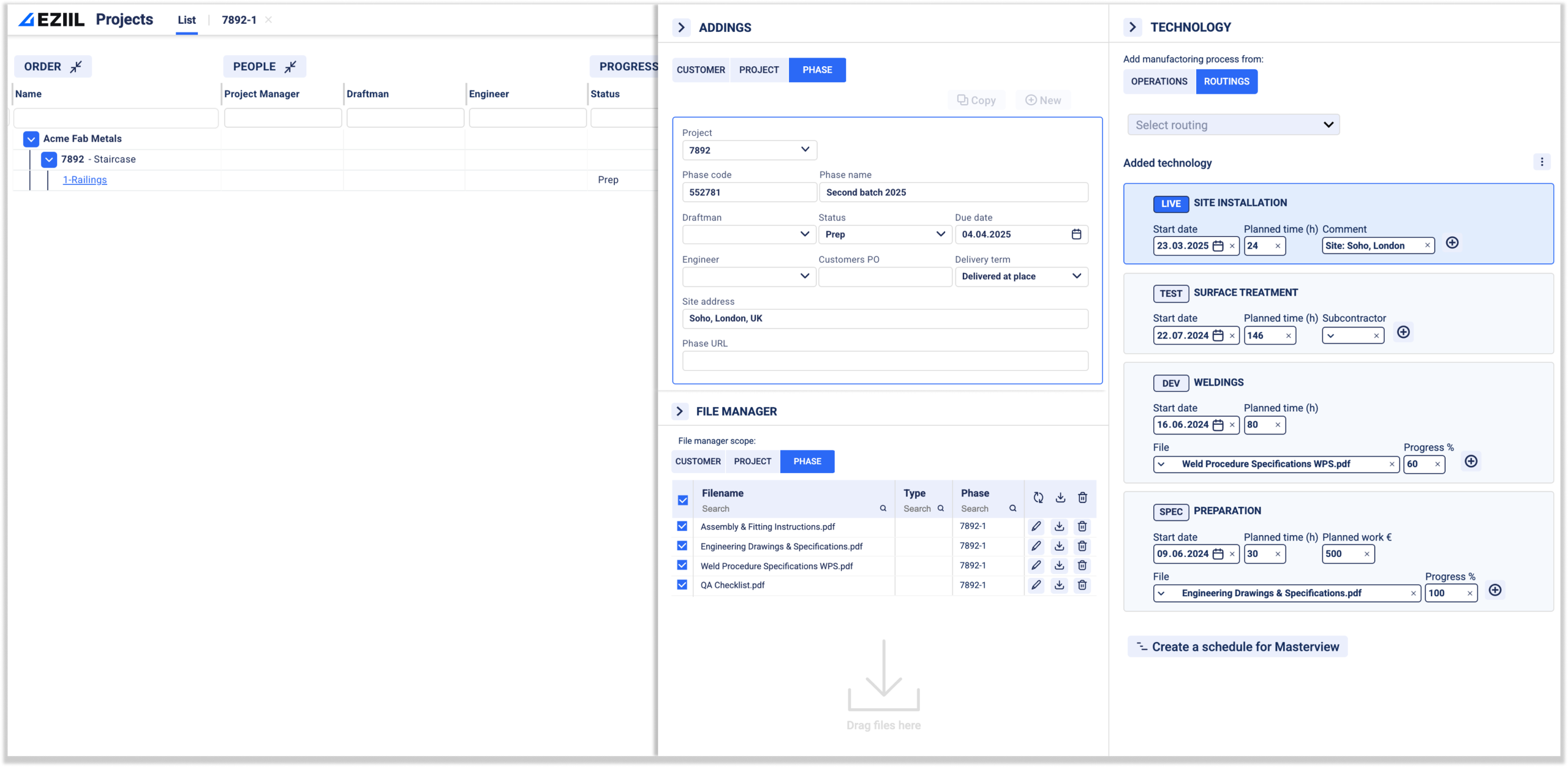
If the system can’t store your real routing (cut → fit → weld → blast/paint → pack/ship) and the labor assumptions behind it, your estimate will always be gut feeling + experience. EZIIL let’s you create routing templates once, reuse them, update them after jobs finish. You don’t need separate ‘reference job cards’ if the routings and actuals live in the EZIIL system.
2) Versioning + audit trail for drawings, BOMs, and quote assumptions
In fabrication, the latest revision is everything. If your team is ISO-driven (or you want to be), controlled “documented information” is not optional. ISO guidance explicitly calls out that documented information in the QMS needs to be controlled.
Practical test: can you answer “what changed, when, and who approved it?” in 30 seconds, without digging through email? Can you see who changed a routing/BOM and when?
3) Quote-to-job handoff without re-entry
The biggest time-waster is quoting in one place, then rebuilding the job plan somewhere else. You want a clean handoff: estimate → tasks/routing → schedule → reporting.
EZIIL ties your project info + tasks + docs together and let’s you duplicate repeat jobs with one click. No re-entry: routing + planned hours become the job plan.
4) Reporting that helps you get better at estimating (not just “print a quote”)
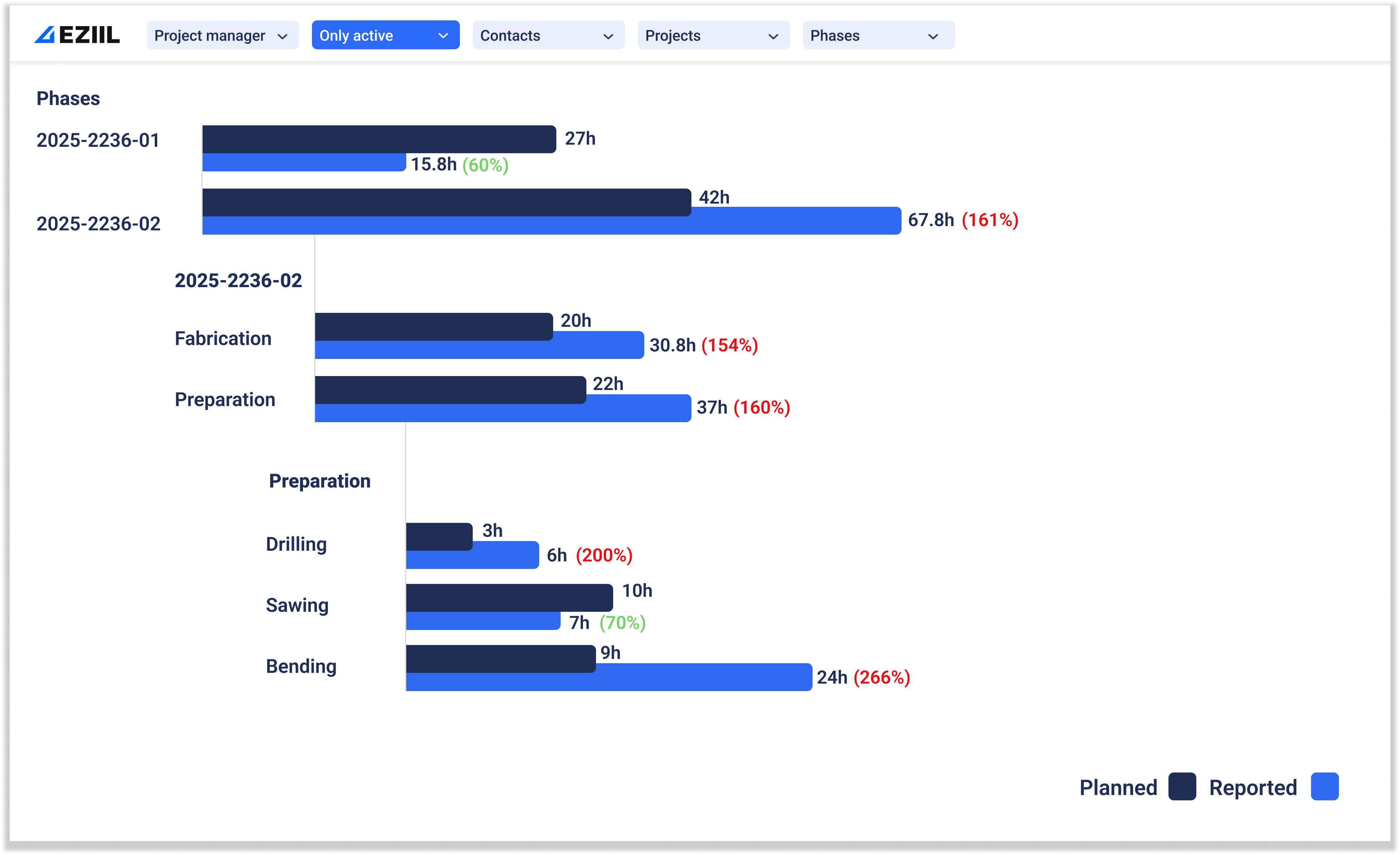
Even small improvements in rework and missed-scope errors pay back fast. You need planned vs actual at the operation/department level, so you can adjust your labor tables and rework allowances based on reality.
In EZIIL you can automatically see planned vs reality reports at job level and by department/operation. So you know exactly what happened and can update labor tables with proof.
Nice-to-have (helps a lot, but not Necessary on day one)
5) Integrations that reduce admin work
At minimum: accounting export, file storage and a sane way to attach emails/PDFs/drawings to the job.
6) Mobile capture on the shop floor
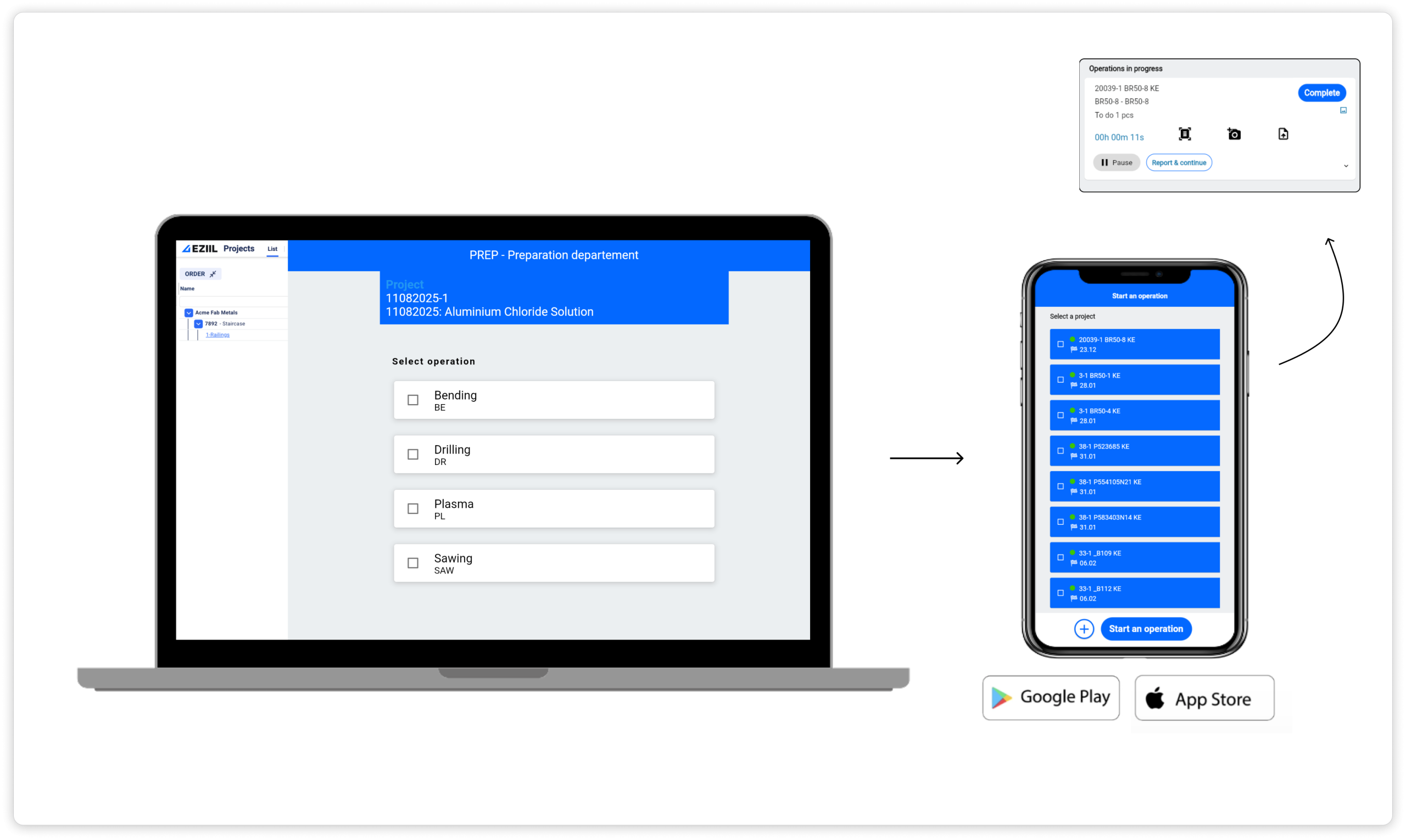
If updates only happen “later at a desk,” you’ll lose accuracy. Mobile reporting helps keep actual hours and status current. For example, EZIIL captures shop floor logging from iOS/Android directly from the hop floor in real time.
Only if you’re BIM-heavy (often overkill for mixed custom work)
7) Deep model-driven estimating (structural/BIM workflows)
If most of your work is structural steel tied to BIM models (and you’re living in Tekla/Revit), model-driven takeoff and BIM-connected estimating can be worth it. If you do mixed custom fab, it can add cost/complexity without moving the needle.
Also worth a reality check: when systems get too heavy or too rigid, teams often end up building side spreadsheets again, or even reverting to Excel after a bad implementation.
The quoting workflow that prevents margin surprises
Rework, scrap, and bad handoffs quietly add up to the cost of poor quality. You don’t need a perfect quoting system to make significant improvements in the beginning, you just need a repeatable workflow that catches the expensive misses before they hit the shop floor. Whether you use fabrication estimating software, manufacturing quoting software, or a lighter job quoting software setup, this is the workflow your tool should support.
1. RFQ intake and “scope lock” (before takeoff)
Goal: make sure you’re all quoting the same job.
- Confirm inclusions/exclusions: finishes, install, tolerances, packaging, certs, NDT/QC, site constraints.
- Write down the assumptions that materially affect price (access, welded vs bolted, surface prep level, who provides anchors).
- Decide who signs off on scope before takeoff.
Quick tip: If you want ISO-style discipline without the paperwork headache, treat scope + latest drawings as controlled “job documents.”
2. Takeoff + BOM that production can actually use
Goal: avoid a quote BOM that can’t become a build plan.
- Split the BOM into Buy/Make/Outsource.
- Capture the “small stuff rules” once (consumables, grinding discs, gas, fasteners) so they’re not forgotten when you’re rushed.
- Flag long-lead items early.
3. Routing and labor assumptions by department
Goal: get labor out of someone’s head and into a template you can maintain.
- Estimate by operation: cut, prep, fit-up, weld, grind, drill, paint, pack/ship.
- Use routing templates tied to job types (stairs, railings, frames, baseplates, mezz components).
- Keep the first version simple. Consistent beats detailed.
Quick tip: EZIIL is built to centralize BOM + operations and keep departments aligned on the same job info (a single source of truth). That makes routing templates and planned hours easier to reuse once the job is won.
4. Cost build-up: material, labor, overhead, subcontractors
Goal: make the math explicit, so you can improve it later.
- Material: current price + freight/minimums + realistic drops/remnants
- Labor: hours by department × your loaded rate
- Overhead: simple burden rate is fine, just write it down
- Subcontract: galvanizing, machining, laser cutting, powder coat, heat treat, etc., with lead times
5. Risk buffer that isn’t just a gut feeling
Goal: price uncertainty consistently instead of randomly.
Pick one policy and stick to it:
- Standard allowance by job type (for example: more buffer for tight tolerances, site installs, heavy weld)
- or a risk line item triggered by clear rules (rush schedule, unclear drawings, new customer, new material grade).
6. Quote output + internal handoff (the Day 1 packet)
Goal: stop retyping and stop surprises.
What production needs on Day 1:
- Approved drawings (latest revision only)
- BOM split by buy/make/outsource
- Routing + planned hours by department
- Due date and the top 2-3 priorities/constraints (lead-time items, site dates, inspection points)
Once the job is won, this same structure becomes the production plan, so you’re not rebuilding everything from scratch. EZIIL Starter as a middle ground: beyond spreadsheets, but simpler than heavyweight suites that can be complex and costly for small shops.
Stop underquoting: turn planned vs actual into a pricing advantage
Most underquoting doesn’t come from bad math. It comes from never updating the math. A job runs long, you feel it, you move on, and the next quote is still based on the same old assumptions. That can be very expensive.
The simplest way to tighten quotes (without turning your process into paperwork) is to treat every finished job as a data point for your next estimate. Any decent fabrication shop estimating software, steel estimating software, or estimating software for manufacturing should help you do one thing: compare what you planned to what actually happened, then adjust.
This feedback loop is where tools like EZIIL earn their keep without changing how you sell. When planned routing, job documents, and actual time/status live in one place, it’s much easier to pull a clean planned-vs-actual view and turn it into better future quotes (instead of doing a one-off post-mortem and losing the learnings in someone’s inbox). In EZIIL, planned vs reality is available automatically once the job is tracked, so you’re not building reports manually.
A simple after-action review (15 minutes per job)
Do this on every meaningful job, or at least the ones that felt “weird” (late, lots of questions, lots of rework).
Job recap
- Job type: stairs/frames/mezz parts/railings
- What changed mid-stream (if anything)
- One sentence on what made it “easy” or “hard”
Planned vs actual (by department)
Create a small table like this:
- Cutting: planned hours vs actual hours
- Fit-up: planned vs actual
- Welding: planned vs actual
- Grinding/finishing: planned vs actual
- Paint/coat: planned vs actual
- Pack/ship/install: planned vs actual
Top 3 variances + why (don’t overthink it)
Pick the biggest gaps and tag the cause:
- Scope gap (missed welds/hardware/finish)
- Routing assumption wrong (sequence or time)
- Material price/drops/remnant assumption
- Rework/repair
- Change order not captured
- Waiting (material, drawings, approvals)
If you only track one thing, track total hours by department.
One action
- Update the routing template for this job type
- Update the scope checklist line that would have caught it
- Add a note to your quote library (see below)
Build a quote library of reference jobs
This is the fastest way to make your estimates feel consistent even when you’re under pressure.
If you run jobs in EZIIL, your ‘quote library’ is the past jobs in your archive. You can duplicate a similar job instead of creating a new card.
If you’re not using EZIIL:
Create 10-30 job cards for your most common work:
- Stairs
- Railings
- Frames
- Mezzanine components
- Baseplates/brackets
Each card should include:
- Photos or a sketch + key dimensions/weight
- The routing used
- Planned vs actual hours by department
- What you’d do differently next time (1–2 bullets)
- Any standard exclusions/assumptions that should travel with this job type
Now when a new RFQ comes in, you’re not starting from a blank page. You’re starting from something real.
Update rules of thumb quarterly
Once a quarter, take 60 minutes and update:
- Labor “typicals” by job family (hours per part/per meter/per ton, whatever fits your shop)
- Your standard rework/risk allowance by job type
- Overhead/burden assumptions if costs have shifted
- Subcontractor lead times and pricing trends
Over time, this turns quoting from “hero estimator mode” into a repeatable system that survives vacations, turnover, and busy weeks.