
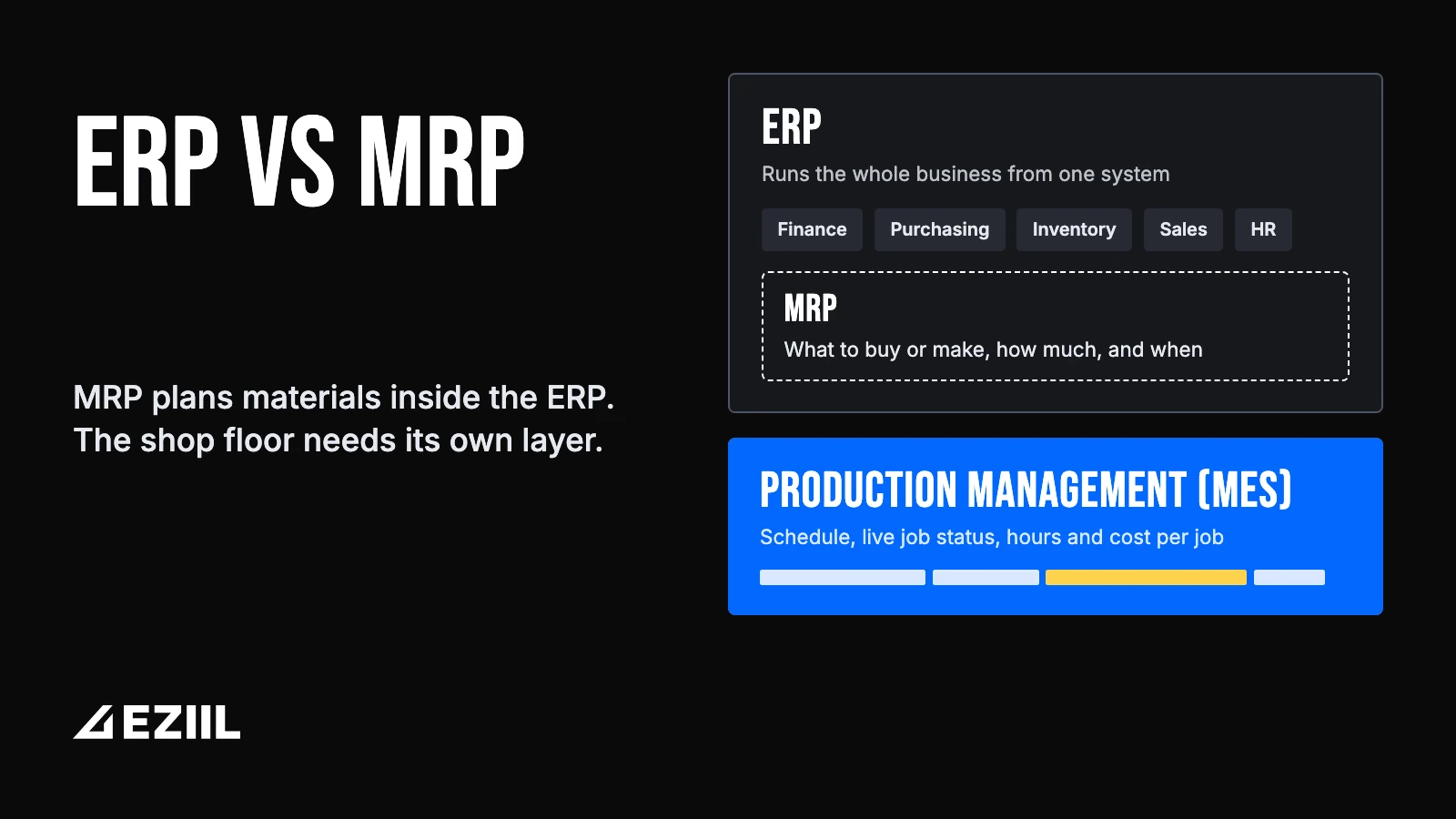
MRP (material requirements planning) works out which materials and parts you need, how many, and when to order them. ERP (enterprise resource planning) runs the whole business from one system, covering finance, purchasing, inventory, sales and HR, and it usually includes MRP as one of its modules. So the useful question is usually how much of the business you want one system to run.
This guide is for manufacturers choosing between the two, and for owners and operations managers of custom and project-based shops who suspect neither one fits how their work actually runs. You’ll get plain definitions, a worked MRP example, a side-by-side table and a decision table by type of shop.
ERP vs MRP: the short answer
MRP plans materials and production timing. ERP runs the whole company and normally contains MRP. Neither is built to run a shop floor of one-off jobs. That is the job of production management software, which does the work of an MES (manufacturing execution system).
- MRP answers “what do we need to buy or make, how much, and by when?”
- ERP answers “are our money, stock and resources under control across the business?”
- Production management (MES) answers “where is every job right now, will it ship on time, and is it making money?”
MRP is usually part of an ERP, not an alternative to it.
What is MRP?
MRP is a planning method, and the software that runs it, that turns a production plan into a list of materials to buy or make, with quantities and dates. It works from the bill of materials (BOM), the stock you already have, what you have to deliver and when, and how long suppliers take to deliver.
IBM engineer Joseph Orlicky formalized MRP in 1964, according to TechTarget. The logic hasn’t changed much since then. A typical MRP run does four things:
- Explodes the BOM. Every product is broken down into its parts and raw materials.
- Nets against stock. Whatever is already on the shelf or on order is subtracted.
- Offsets by lead time. Each purchase is moved back by the supplier’s delivery time, so the material arrives before work starts.
- Suggests orders. The output is a list of purchase and production orders with dates.
A worked MRP example
Say you have an order for 20 steel frames, due in three weeks.
| Step | Calculation | Result |
|---|---|---|
| Gross need | 20 frames × 4 m of 80×80 box section | 80 m |
| Cutting allowance | 80 m + 7% | 85.6 m |
| Net need | 85.6 m minus 30 m in stock | 55.6 m |
| Order quantity | Bars come in 6 m lengths | 10 bars (60 m) |
| Order date | Supplier needs 2 weeks, fabrication takes 1 week | Order this week |
Scroll sideways to see all columns. Illustrative numbers. Your allowance, bar length and lead times will differ.
The point is to have the material arrive just before the job needs it, in the quantity it uses. MRP saves the most time when you build the same products again and again, because the BOMs, lead times and demand are stable enough to calculate in advance.
MRP vs MRP II
MRP II (manufacturing resource planning) came in the 1980s. It added capacity, labor and financial planning to the material calculation. It is the step between MRP and ERP. When MRP II spread to the rest of the business, the result was ERP. For the short definitions, see the glossary entries for material requirements planning and enterprise resource planning.
What is ERP?
ERP is a suite of connected modules that runs the core of a company from one database: accounting and finance, purchasing, inventory, sales orders, manufacturing planning (including MRP), HR and payroll, plus reporting across all of it. Research firm Gartner coined the term at the start of the 1990s, according to TechTarget.
The strength of an ERP is that everyone works from the same numbers. Sales, finance and production see one record of each order, so there is no re-keying between departments. That matters most when several departments or sites have to share finance and stock.
The downside is the weight of it. An ERP needs a lot of setup data, a lot of discipline to keep that data current, and a long project to get live. In Panorama Consulting Group’s 2026 ERP Report, as summarized by ERP Research, a survey of 170 organizations with a median annual revenue of $200.5 million, the median project took nine months, and more than a quarter of projects ran over budget.
ERP vs MRP: key differences
ERP covers the whole business; MRP covers materials and production timing only. ERP takes longer and costs more to implement because it touches every department.
| MRP | ERP | |
|---|---|---|
| Scope | Materials and production timing | The whole business |
| Main question | What do we need to buy or make, and when? | Are money, stock and resources under control? |
| Main users | Planners, purchasing, production | Finance, management, every department |
| Data it needs | BOM, stock, orders, lead times, forecast | All of that, plus accounts, customers, HR |
| Typical setup | Shorter | Longer, often many months |
| Typical cost | Lower | Higher |
| Fits best | Repeat products with stable BOMs | Multi-department or multi-site companies |
Scroll sideways to see all columns.
How do ERP and MRP systems work together?
In most companies they are not two separate purchases. MRP is a module inside the ERP. The ERP holds the orders, stock and supplier records, and the MRP module runs the material calculation on top of that data.
Standalone MRP software still exists, mostly for smaller manufacturers making repeat products who want material planning without full accounting and HR. Many of them pair it with a separate accounting package. When someone asks “do I need ERP or MRP?”, the question underneath is usually “do I need the finance side in the same system as production?” For a 20-person shop with a good bookkeeper, the answer is often no.
Where MRP and ERP fall short for one-off and custom work
Classic MRP and ERP were designed for repeat production. Make-to-order and engineer-to-order shops break their basic assumptions:
- The BOM is new for every job. It is often still changing while engineering finishes the drawings, so there is no stable BOM to plan from weeks ahead.
- There is no forecast. Demand is the order book. You can’t calculate next month’s steel from last month’s sales.
- The routing is one-off too. Cutting, drilling, welding, grinding and coating hours differ on every job, so standard times don’t hold.
- Stock gets borrowed. Steel bought for one job quietly ends up in another, and the plan is wrong before anyone notices.
The pain these shops describe is rarely about materials or accounts. It sounds more like “where is job 214?”, “can we take this order and still hit the 20th?” and “did that job make money?” Fabricators we speak to put it bluntly: ERPs “are geared towards production facilities”, and they want a system “without having to fill in laborious inventory items like majority of ERPs require”. Most of them already have an accounting package or an ERP they are happy to keep.
So the layer that is missing is production management: a schedule balanced against real capacity, live reporting from the floor, and planned versus actual hours and cost on every job. A shop can add that layer without replacing its accounts.
For a closer look at what that layer has to do, see the 7 shop floor control functions ERPs are missing.
ERP vs MRP vs MES
MES (manufacturing execution system) runs the work on the shop floor in real time: who is working on which operation, what is finished, and what is late. MRP plans materials, ERP runs the business, and MES runs execution.
In a fabrication shop, production management software covers most of what an MES does, scaled to the size of the shop. For the full comparison of the two systems, read MES vs ERP: the differences.
Which one does your shop need?
Pick the system by how your work runs.
| If your work is… | And your main problem is… | You need |
|---|---|---|
| Repeat products made to stock | Running out of parts, or buying too much | MRP, standalone or inside an ERP |
| Several sites or departments sharing finance | Consolidated accounts, purchasing and reporting | ERP |
| Repeat job shop work with stable routings | Scheduling and material across many small orders | MRP plus scheduling, or a job shop ERP |
| One-off, custom or project-based jobs | No live job status, missed dates, unknown job margin | Production management (MES), connected to your accounting system |
| A growing custom shop | All of the above at once | Production management first, then material and purchasing modules, keeping your accounting system |
Scroll sideways to see all columns.
If you run a steel or metal fabrication shop and are weighing a full ERP, our guide on whether a small steel fabrication shop needs an ERP walks through what you need at 15, 50 and 150 people. To compare specific tools, see the best manufacturing software for small businesses.
Where EZIIL fits
EZIIL, our own product, is production management and light ERP software for project-based metal fabricators. It is not a high-volume MRP for repeat production. It runs the shop floor from a won job to dispatch, and lets you add the planning and material side one module at a time.
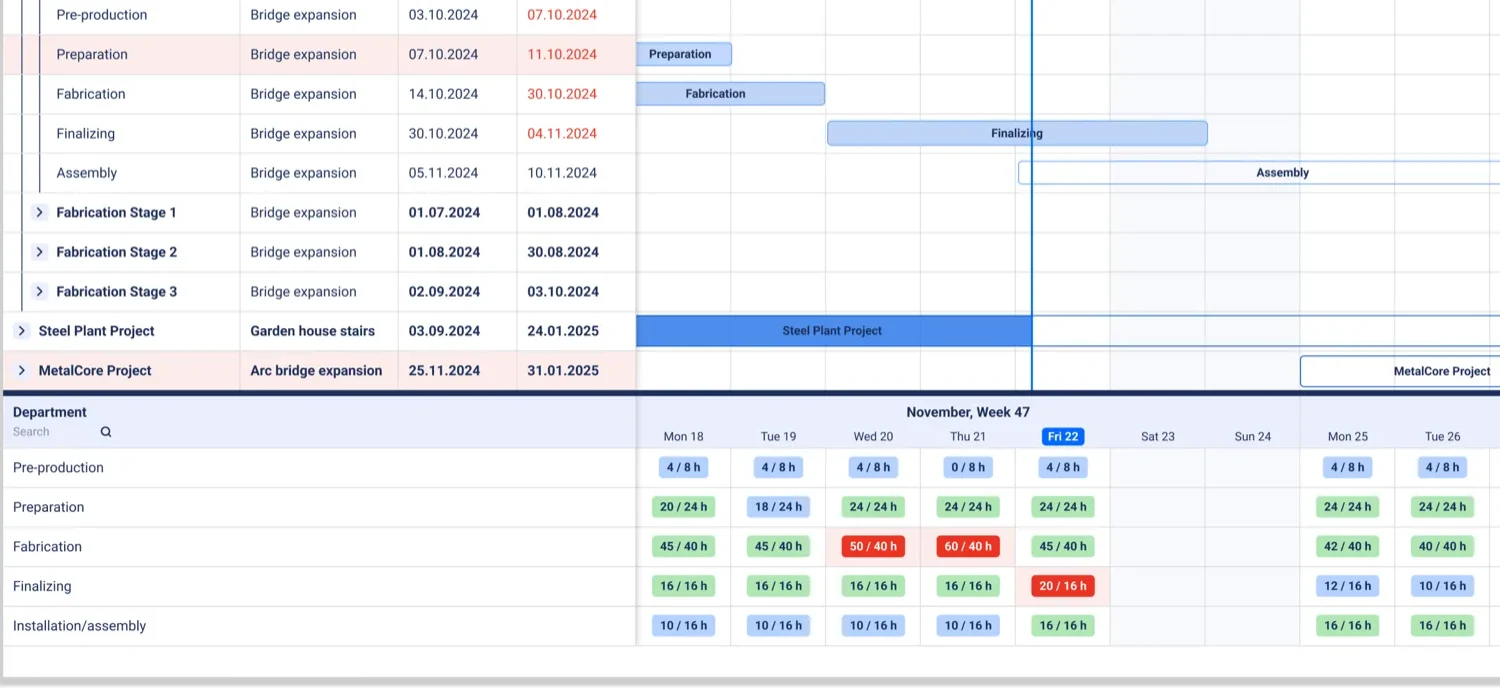
- Plan against real capacity. In MasterView each department has its available hours. Load from every overlapping job adds up and turns red when you are over, so “can we take this job?” has an answer you can see.
- See where every job stands. The floor starts and stops operations on a phone or tablet, progress updates as hours are reported, and the production dashboard shows next deadlines and on-time delivery.
- Know if a job made money. Planned versus actual hours and cost per project, while the job is still running.
- Material without the inventory burden. With the BOM and procurement modules, EZIIL calculates material need from the job’s BOM against stock, adds a cutting allowance, and turns it into RFQs and purchase orders. A separate production warehouse keeps steel reserved for one job from disappearing into another. Batch and heat numbers are captured at goods receipt for EN 1090-2 traceability.
- Keep your accounts. EZIIL connects to your accounting system, Directo for example, instead of replacing it.
Customers using the BOM module have put numbers on it. At VMT (Viljandi Metall Grupp), supply security went from 45% to 98% after the team adopted EZIIL BOM in 2018. At Nordic Shelter, “1 hour invested in Eziil BOM saves 8 hours in procurement and 16 hours in production,” says Engineer Lead Aleksandr Mahhankov.
You start with EZIIL Starter, running in the first week, and add modules when you’re ready. Pricing is flat by team size (as of November 2026): €120 / $140 a month for 1 to 15 users, €180 / $210 for 16 to 50, €290 / $338 for 51 to 150, plus a one-off €300 / $350 onboarding fee. See how it compares with a classic system on our steel fabrication ERP software page, or how modular pricing and guided onboarding work.
Frequently asked questions
What is the main difference between MRP and ERP?
MRP plans materials and production timing: what to buy or make, how much, and when. ERP runs the whole business from one system, including finance, purchasing, inventory, sales and HR. Most ERPs include MRP as a module.
Is ERP the same as MRP?
No. ERP is broader. It grew out of MRP and MRP II and adds accounting, HR, sales and company-wide reporting to the material and production planning that MRP does.
Is MRP part of ERP?
Usually, yes. In most ERP systems MRP is the module that runs the material calculation, using the orders, stock and supplier data held in the ERP. Standalone MRP software also exists for smaller manufacturers.
Can you use MRP without an ERP?
Yes. Many small manufacturers run standalone MRP software for materials and production, alongside a separate accounting package. It works well when products repeat and the finance side is already handled.
Is SAP an ERP or an MRP system?
SAP’s main products are ERP systems. They include MRP as one module, alongside finance, sales, purchasing, HR and more.
What is the difference between MRP and MRP II?
MRP calculates material requirements from the BOM, stock and demand. MRP II, which arrived in the 1980s, adds capacity, labor and financial planning. It is the step between MRP and ERP.
Is MRP or ERP better for a small manufacturer?
For a small manufacturer making repeat products, MRP alongside an accounting package is usually enough. ERP pays off when several departments or sites must share finance and stock. Custom and project-based shops often need production management first, because their pain is job status and capacity, not material calculation.
What about MES?
MES runs execution on the shop floor: who works on what, what is done and what is late. MRP plans materials, ERP runs the business, and MES runs the work as it happens. In small fabrication shops, production management software usually covers the MES role.
Ready to see it? If your pain is jobs, dates and margin rather than accounts, take a free product tour and see how a custom fab shop plans and tracks jobs in EZIIL without a full ERP. Or book a 30-minute demo with our team.