
Shop floor management in steel fabrication is not a neat assembly-line problem. It’s a project-by-project fight to keep work moving through operation phases while drawings change, materials show up late, and one “small” bottleneck quietly wrecks the rest of the week.
Most custom steel shops are basically running high-mix, low-volume work, which means variability is the default and planning becomes the hardest part of the system. And if your “real schedule” lives in a foreman’s head while updates get stitched together from spreadsheets, whiteboards, and whatever tool each department prefers, you’re in very familiar territory. People all over custom manufacturing often describe the same pattern: DIY reporting in Excel, dashboards that turn into a maintenance nightmare, and frustration with too many disconnected tools.
This guide is the practical version: a simple plan → execute → report → learn loop you can implement without a giant ERP rollout, plus the reporting workflows and software checklist that actually fit project-based steel fabrication.
What is shop floor management (in a steel fabrication shop)?
Shop floor management is the day-to-day system for running production where the work actually happens. In plain terms: it’s how you plan work, sequence it across departments, keep it moving, and know the true status without chasing people for updates. A generic way to put it, is that it’s a structured way to oversee and optimize operations on the production floor. In steel fabrication, it becomes very specific: you’re managing a job as it flows through cut → drill → weld → paint → assembly → install, with real constraints (material readiness, drawing revisions, shared equipment, bottleneck stations, site deadlines).
What Shop Floor Management includes
- Planning: what’s in the shop, what’s due, what’s blocked, what’s missing (material, drawings, approvals).
- Scheduling: sequencing work realistically across departments and constraints, not just setting due dates.
- Control: releasing work at the right time, prioritizing correctly, and handling changes without chaos.
- Reporting: capturing progress and issues in a lightweight way so you can see WIP, delays, and plan vs actual (hours, quantities, rework). Shop floor control often gets described specifically as prioritizing, tracking, and reporting against production orders and schedules, which is a big part of shop floor management in practice.
What Shop Floor Management is not
- Not a dashboard project. Dashboards are the output. The system is the routines + data flow that keep them true.
- Not more admin for welders. If your “solution” creates extra typing and meetings, people will route around it. Good shop floor management reduces interruptions by making status visible and issues explicit, fast.
- Not “ERP, but on the floor.” Steel shops usually need something practical and adoptable, not a year-long rollout and a part-time data analyst.
In EZIIL terms, this is exactly the gap we close: a simple way to plan the day, track what’s really happening across phases, and report progress without turning the shop floor into a paperwork factory.
Why steel fabricators struggle with shop floor management
Shop floor management breaks down in steel fabrication for a simple reason: the work is project-based and dependency-heavy. One drawing revision, one missing plate, or one overloaded paint booth can cascade through all operation phases and suddenly your schedule is just a hope.
1) Excel/CSV tracking turns into a data cleanup job (not management)
A lot of shops try to bootstrap shop floor reporting with spreadsheets and CSV exports. It starts as quick visibility, then becomes: manual updates, inconsistent reason codes, broken formulas, and data that’s stale by the time anyone looks at it. People in manufacturing often call out exactly that pain when moving from Excel-based OEE or cycle-time tracking to anything more automated.
In steel fabrication, it’s worse because the data is rarely “clean parts per hour.” You’ve got:
- mixed batches and partial completions
- rework loops (weld repair, repaint)
- install dependencies (site readiness, transport windows)
- frequent reprioritization mid-week
So the spreadsheet ends up measuring who’s best at spreadsheet maintenance, not what’s actually happening on the floor.
2) Everyone wants dashboards, but only the simple ones survive
The demand is super consistent: basic real-time dashboards that show machine state, cycle time, OEE-ish signals, WIP, and blockers. The catch is people also want them to stay usable and not become a high-maintenance side project.
For steel fab, the most valuable dashboard is usually not fancy metrics. It’s boring, operational truth:
- What’s in progress right now in each phase?
- What’s blocked (and why)?
- What’s at risk for the next handoff?
- What must ship or install next?
This is why generic dashboards rot. They don’t match how project work moves through departments.
3) App fatigue is real (and it’s costing you time)
You’ll hear a version of this everywhere: shops end up with a stack of tools (nesting, CAM, quality, scheduling, time tracking) that are individually good, but don’t talk to each other, so people reconcile everything in spreadsheets anyway.
That’s app fatigue in a shop context: not just “too many logins,” but too many places where the truth might live. One tool says cut is done, another says drilling hasn’t started, and someone’s still walking around asking “where is this job, really?”
4) Time tracking and job costing are hard when the shop floor isn’t desk-friendly
A very practical constraint has showed up in many of our conversations with steel fabricators: there isn’t a great place for computers on the floor, and operators were hired to build, not to do admin. If data collection means operators spending time on screens, you’re going to get resistance.
So many shops in this position, naturally start exploring fast capture methods:
- badge + PIN on a few mounted tablets
- scanning a job traveler/work order when starting and stopping
- kiosk-style stations at natural choke points (department entry/exit)
In steel fab, the goal is reliable plan vs actual by phase so you can protect margins and stop repeat bottlenecks.
5) Scheduling chaos in custom job shops
Scheduling in a high-mix environment is a frequent complaint: missed ship dates, unclear priorities, and an Excel schedule that nobody trusts. People literally describe hating the spreadsheet schedule and wanting something more realistic
Steel fabrication adds its own special chaos:
- material readiness is not guaranteed
- welding and paint are often bottlenecks
- assembly and install need coordination with external parties
- “urgent” change orders blow up sequencing
So the shop falls into firefighting: expediting parts, pulling favors, and constantly re-planning, but without a clean way to learn from plan vs actual.
If any of these sound familiar, it’s a strong sign that you need a tighter plan → execute → report → learn loop.
The shop floor management loop that actually works
Most steel fabrication shops don’t fail because people aren’t working hard. They fail because the shop floor management loop is broken. Planning happens once, reality changes ten times, reporting is late (or skipped), and nobody gets a clean view of what actually caused the slip.
A loop that works in project-based steel fabrication is simple on purpose:
Plan → Execute → Report → Learn
Think of it like a circle with four steps. Each step feeds the next, and the “Learn” step directly improves tomorrow’s “Plan”.
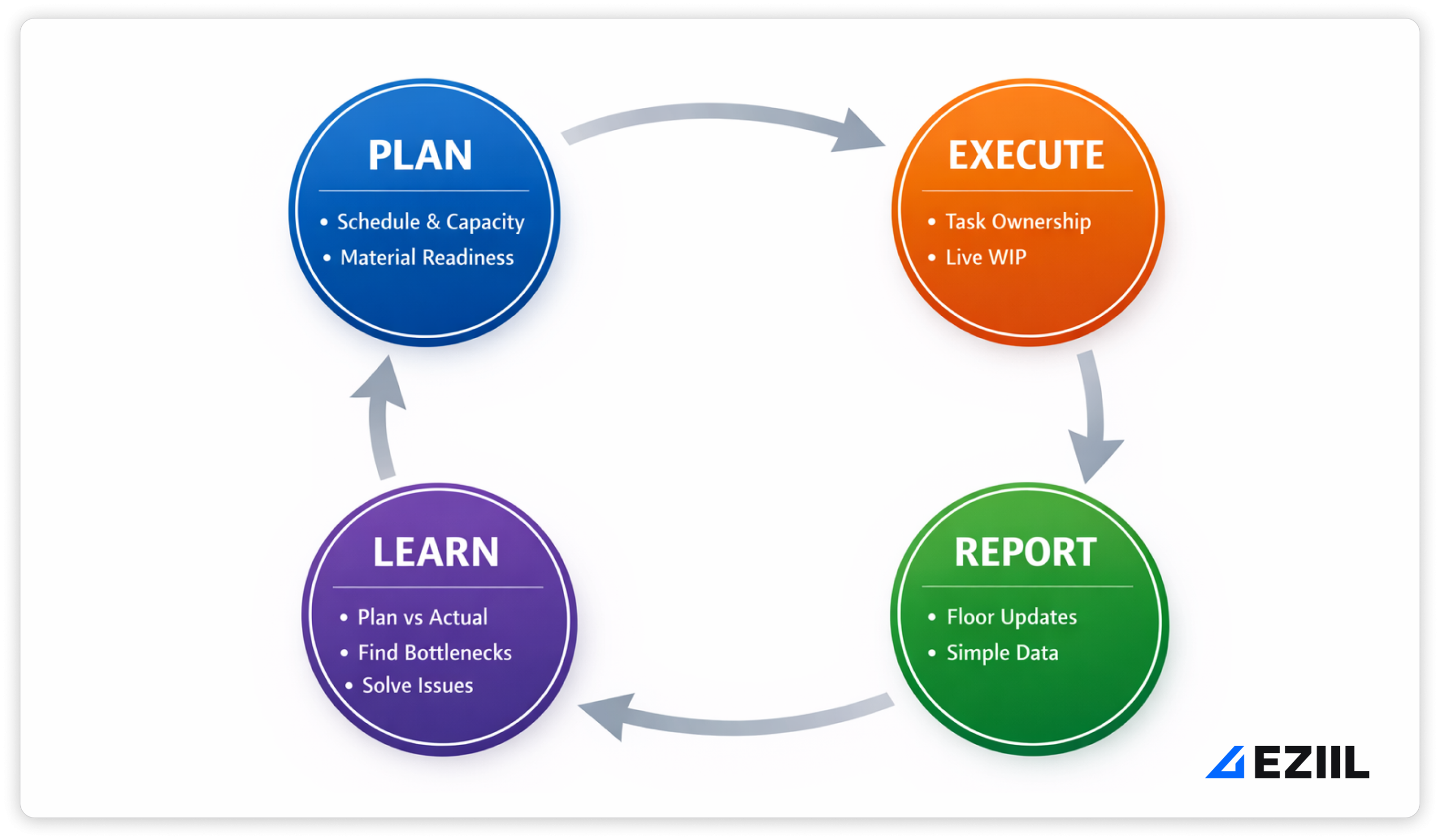
If you build shop floor management around this loop, you get two outcomes:
- fewer surprises during the week
- better margins over time because you stop repeating the same problems
Plan: realistic schedule + capacity + material readiness
Planning is not just about assigning due dates. In steel fabrication, planning means making sure the job can actually move through cut → drill → weld → paint → assembly → install without hitting preventable walls.
A realistic plan answers these questions up front:
- Is material ready? Not just ordered, but physically there, correct grade, correct thickness, correct quantity.
- Are drawings and revisions locked? Or are you about to cut parts off Rev A and weld to Rev C.
- What is the constraint this week? Paint booth, beam line, one welder who can do a critical cert job, install crew availability.
- What is the release plan? What gets released to the floor today vs later so WIP does not explode.
How EZIIL supports this: you want one place where active jobs, phase status, due dates, and blockers live together so planning is a quick daily decision, not a weekly spreadsheet exercise.
Execute: clear task ownership + live WIP
Execution is where shop floor management either becomes calm, or turns into constant firefighting.
In a steel shop, “execute” means:
- each job has clear phase ownership (who owns drilling, who owns welding, who owns paint)
- the floor knows what to work on next without guessing
- WIP is visible so you can prevent the classic trap: work piles up between departments and suddenly nothing is truly “done”
The key is keeping WIP live without micromanagement. You do that by tracking the minimum needed:
- phase status (not started/in progress/done)
- what is blocked (and why)
- what is ready for the next handoff
How EZIIL supports this: phase-based project structure and ownership helps everyone see handoffs clearly, so work stops sitting in limbo because “someone thought someone else had it.”
Report: simple updates from the floor
This is where most systems break. If reporting feels like paperwork, it will not happen consistently. And if it doesn’t happen consistently, your dashboard becomes fiction.
Good shop floor reporting is:
- fast (seconds, not minutes)
- event-based (status changed, blocker appeared, quantity completed, rework happened)
- usable (the shop sees the benefit quickly, not just management)
The best reporting questions are short:
- Did the phase start?
- Did the phase finish?
- What blocked it?
- How many were completed?
- Was there rework, and what caused it?
How EZIIL supports this: the goal is floor-friendly updates that capture progress and blockers with minimal friction, so reporting becomes part of the job flow, not a separate chore.
Learn: plan vs actual + bottleneck patterns + rework causes
Learning is the step that turns shop floor management into a competitive advantage. Without it, you just run faster in the same direction.
In steel fabrication, “learn” is mostly three things:
- Plan vs actual by phase (hours, lead time, completion dates)
- Bottleneck patterns (which station is consistently overloaded, where jobs wait)
- Rework causes (wrong revision, missing info, fit-up issues, weld defects, paint rework, install punch lists)
This is where the shop stops arguing about opinions and starts seeing patterns:
- “Paint is always the constraint on weeks with install-heavy jobs.”
- “We lose 6-10 hours per job on rework tied to drawing version confusion.”
- “Drilling delays are mostly material readiness, not machine time.”
How EZIIL supports this: by connecting day-to-day execution updates to reporting, you can actually learn from the work, tighten estimating, and reduce the repeat chaos that kills margins.
Core components of a shop floor management system
1) One source of truth per job (customer, drawings, phases, due dates)
In project-based steel fabrication, the fastest way to lose control is to let job information live in five places.
What to capture (minimum viable job record):
- Customer + job name, ship date, install date (if applicable)
- Drawing set and revision history (what changed, when)
- BOM or at least key assemblies and quantities
- Routing/phases: cut → drill → weld → paint → assembly → install
- Ownership per phase (who is accountable for moving it forward)
- Constraints: material status, subcontract steps, inspections, special requirements
- Notes tied to the work (not floating in chat)
Common failure modes (steel fab classics):
- Building to the wrong drawing revision
- Tribal knowledge runs the job (and disappears when a key person is out)
- “Done” means different things in different departments
- Installs get scheduled without checking production readiness
How EZIIL supports this: EZIIL Starter is designed around a centralized job record where you can store project info, attach drawings/docs directly to the job, split the project into phases, and assign owners and due dates so the job does not depend on memory or inbox archaeology.
2) Shop floor scheduling that respects constraints
Steel fabrication scheduling is not “slot jobs into dates.” It’s dependency management across departments with shared resources and real-world constraints.
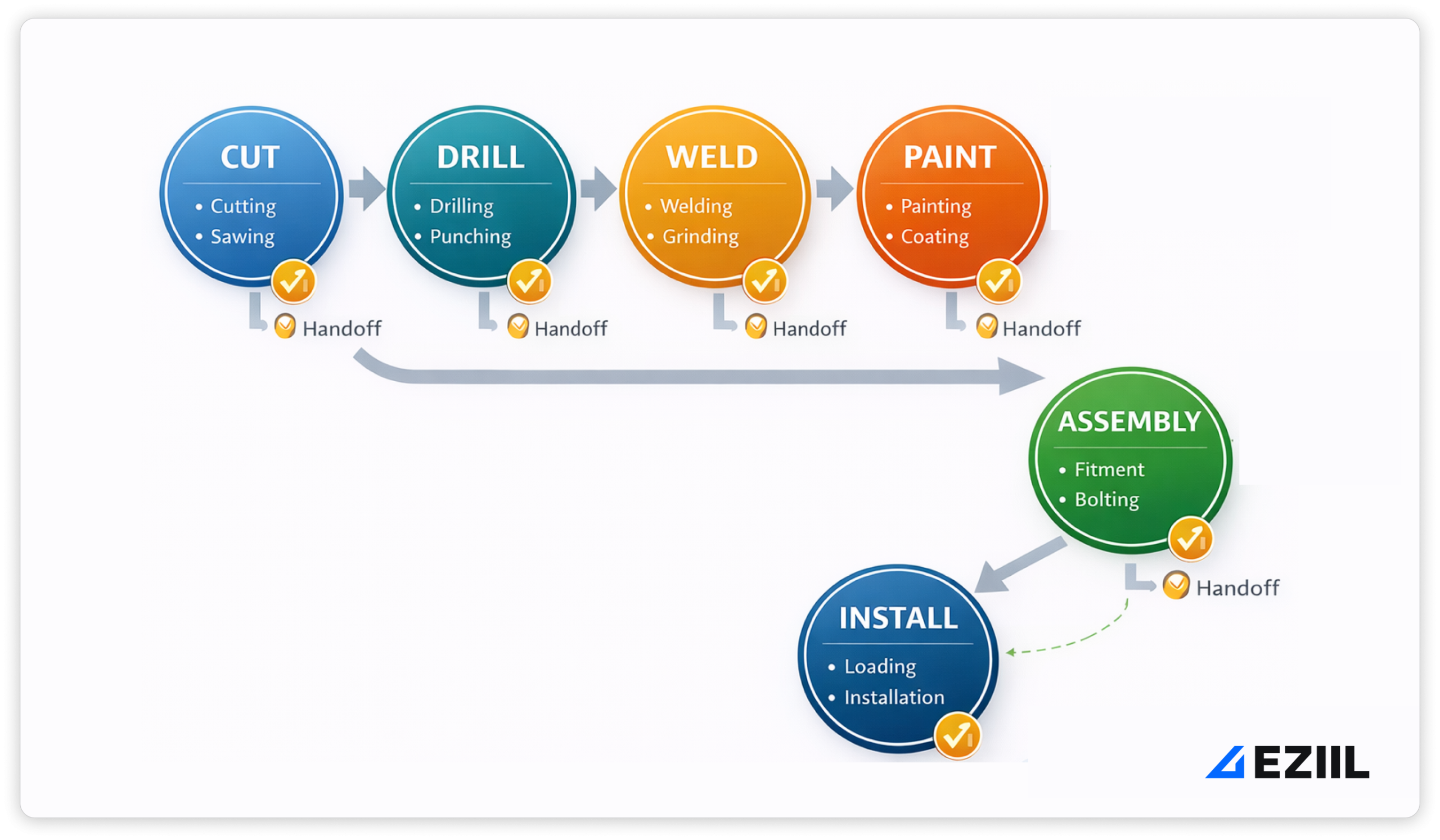
The schedule needs to respect:
- Department capacity (cut/drill/weld/paint/assembly/install)
- Shared resources (paint booth, crane time, beam line, the one operator who can do a certified weld)
- Gates (material ready, drawings approved, inspection complete)
- External deadlines (truck booking, site readiness, install crew windows)
If scheduling ignores constraints, it creates two outcomes: constant reprioritization and overtime that still does not fix delivery reliability.
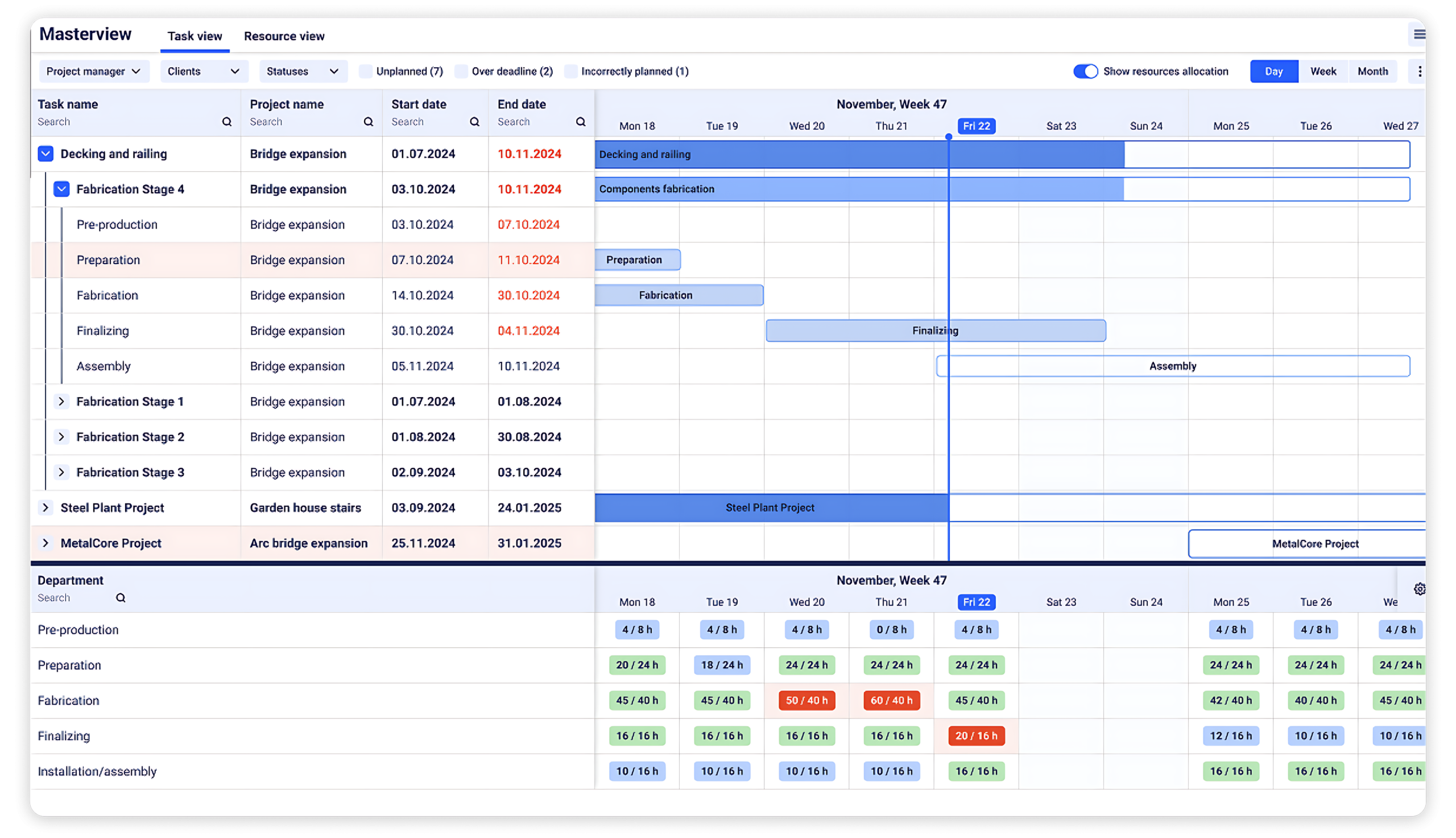
How EZIIL supports this: EZIIL’s MasterView supports rough planning across active projects with a visual timeline, due-date indicators, and capacity views by department so you can see overloads early and adjust before the floor is in chaos. It can also calculate schedules based on available resources and planned hours, with the ability to manually adjust when real life happens.
3) Visual shop floor management
Visual management works because it removes guesswork. If the shop can see what matters, it’s easier to solve problems fast. Lean practitioners describe this simply: when the status is visible, problems get fixed sooner.
But in steel fabrication, boards only work if operators trust them. And trust comes from two rules:
- The board reflects reality.
- The board is used to solve problems, not to blame people.
That second point is extremely important. A blame culture kills reporting. Lean leaders often note that blame games prevent real root-cause thinking.
What a steel-fab visual board should show (and not show):
- Show: today’s priorities by phase, what’s blocked and why, what is ready for the next handoff, installs at risk
- Avoid: vanity metrics, complex OEE screens, or anything that requires a “data person” to keep alive
How EZIIL supports this: MasterView gives a visual, job-level view of progress and due dates, plus a department capacity view that highlights overloads. The goal is a board that stays useful because it is driven by simple execution updates, not by a fragile spreadsheet stack.
4) Shop floor reporting: what to report, when, and how little is “enough”
Reporting is where most systems fall apart. If updates feel like admin, the floor will work around them, and your shop floor management dashboard becomes a fiction project.
A solid reporting approach follows a principle people repeat in real discussions about shop floor dashboards: pull what you can automatically and only ask operators for what you cannot detect.
What to report:
- Status changes: phase started, phase paused, phase completed
- Quantities: completed count, scrap count (if applicable)
- Blockers (with reason codes): missing material, waiting on drawings, machine down, rework, QA hold, install dependency
- Photos/docs when useful: fit-up issue, weld defect, paint defect, site condition
- Time signals: start/stop (or daily totals) so you can get plan vs actual by phase
When to report:
- At natural moments: start work, finish work, hit a blocker, handoff to next phase
- Do not force hourly updates unless you have a very specific reason
How EZIIL supports this: EZIIL supports mobile reporting workflows where workers can start/pause/complete operations and attach photos/docs when needed. Hours can be reviewed and confirmed by a supervisor (daily/weekly), which keeps reporting accurate without turning it into payroll chaos, and confirmed hours feed progress tracking and reporting.
5) Data capture that survives welding dust and dead zones
Steel shops are not office environments. If your data capture plan assumes perfect Wi-Fi, clean hands, and spare time, adoption will die quietly. Operators were hired to make parts, not sit at computers, and forcing screen time creates resistance.
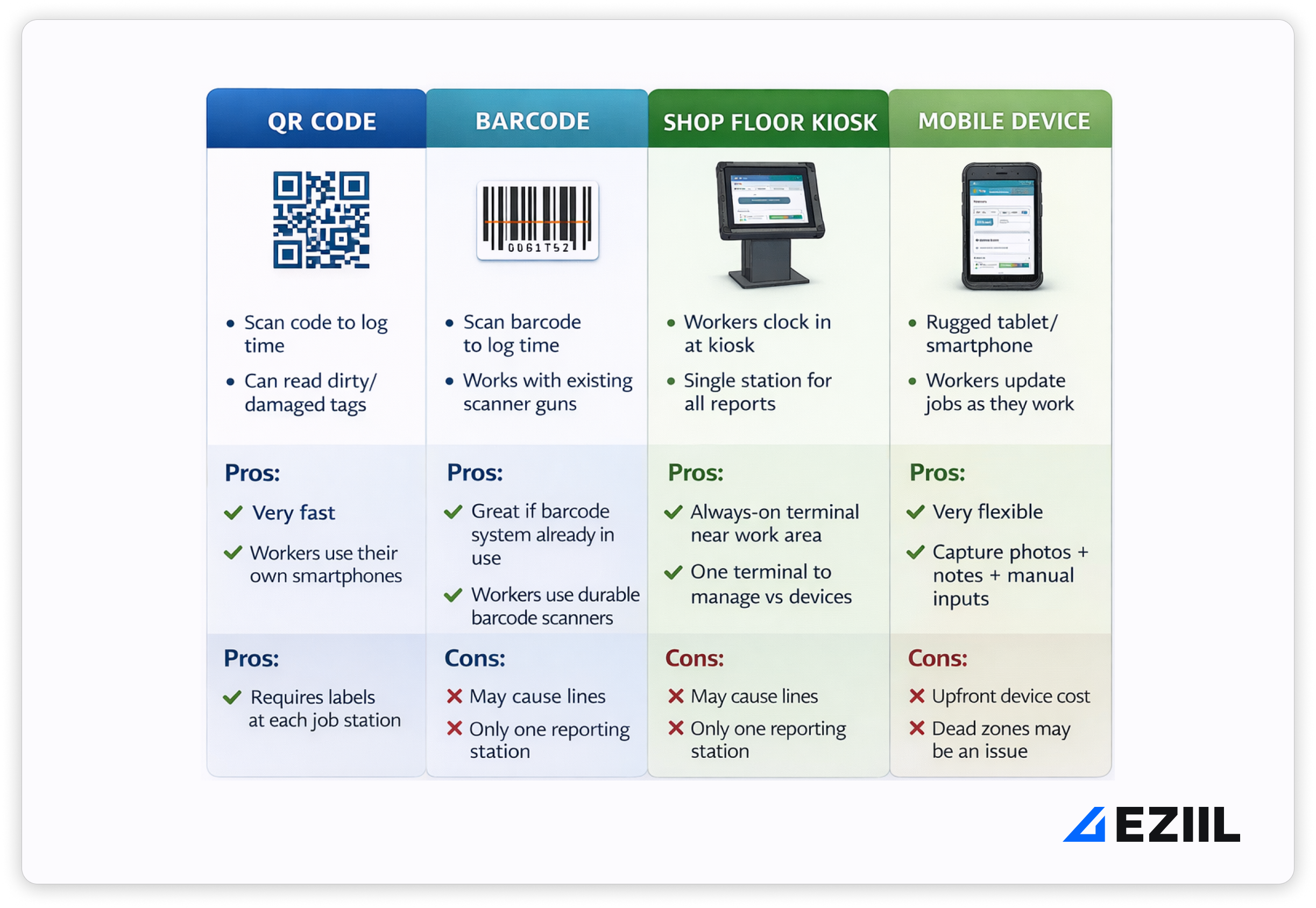
Requirements for steel-fab data capture:
- Rugged hardware (cases, mounts, gloves-friendly interaction)
- A plan for Wi-Fi dead zones (or a kiosk strategy in reliable areas)
- Simple UI and minimal steps (start, pause, finish, blocker)
- Training that is short and role-specific
- A downtime plan for rollouts (do not flip everything on during peak load)
How EZIIL supports this: EZIIL supports shop floor reporting via mobile devices and can use fast sign-in methods so reporting is a quick action, not a typing session. Supervisors can then verify and confirm hours, keeping the data clean enough to trust.
6) Quality + rework feedback loop
Rework is where margins go to die in project-based fabrication. It also wrecks schedules because rework steals capacity from planned work and creates surprise handoffs.
A usable rework loop is simple:
- Tag rework when it happens (do not hide it inside “misc time”)
- Use a small set of root-cause categories that match steel-fab reality
- Review weekly: top causes, top phases, repeat offenders (process problems, not people)
Practical root-cause categories that fit steel fabrication:
- Drawing revision/missing information
- Fit-up issue/tolerance stack
- Weld defect/procedure / prep
- Paint defect/surface prep/handling damage
- Material issue (wrong grade, wrong thickness, missing certs)
- Install punch list/site condition mismatch
Why it matters (beyond continuous improvement):
- Better quoting and planning (plan vs actual becomes reliable)
- Fewer Friday-night emergencies
- Less frustration on the floor because the same problems stop repeating
How EZIIL supports this: EZIIL’s plan vs actual visibility (planned hours vs confirmed hours) helps you spot where rework and overruns concentrate. Combined with comments/notes on operations and job-level tracking, it gives you the raw material to identify repeat causes and fix them at the source.
The 8 KPIs steel fabricators should track
If you’re running project-based steel fabrication, you don’t need 40 metrics. You need a small set of performance KPI’s that tell you, every week, (1) will we hit commitments, (2) where is work stuck, (3) where are we bleeding margin, and (4) what keeps repeating.
1) On-time delivery (OTD)
What it is: The percentage of jobs (or shipments/installs) completed on or before the promised date.
Simple measurement:
- OTD% = (jobs delivered on time ÷ total jobs delivered) × 100
Supply chain orgs track the same idea as “on-time supply,” calculated as on-time vs total orders.
What decisions it unlocks:
- Are we keeping our word to customers?
- Are misses caused by quoting, planning, capacity, materials, or rework?
- Do we need to change how we promise dates (especially for install windows)?
Steel fabrication shops should track OTD separately for:
- Shop ship date
- Install date (if you install)
Because “we shipped” is not always “the project is done.”
How EZIIL helps: OTD becomes a byproduct of having real-time job status and phase progress, not a monthly scramble through emails and spreadsheets.
2) WIP age by phase
What it is: How long work has been sitting in each phase (cut, drill, weld, paint, assembly, install). This is the fastest way to spot hidden queues and handoff breakdowns.
Simple measurement:
- Track “days in phase” and “days waiting for next phase”
- Highlight the oldest WIP in each department every morning
Why it matters (the physics of flow): More WIP usually means longer cycle times. Little’s Law formalizes the relationship between WIP, throughput, and cycle time, which is why limiting WIP makes lead times more predictable.
What decisions it unlocks:
- Where are jobs waiting, really?
- Which handoff is failing this week (often weld → paint or paint → assembly)?
- Do we need to release less work and finish what’s already started?
How EZIIL helps: When every job is structured into phases with statuses, WIP age by phase becomes visible without someone maintaining a separate tracker.
3) Plan vs actual hours (by phase + by job)
What it is: The difference between what you planned (or estimated) and what actually happened, broken down by phase.
Simple measurement:
- For each job and phase: Actual hours ÷ Planned hours
- Review weekly: biggest overruns by phase, and repeat patterns
What decisions it unlocks:
- Are we consistently under-quoting welding? Or underestimating paint prep?
- Which job types blow up margin (stairs, railings, structural, misc fab)?
- Where should we standardize routings, checklists, or fixtures?
Steel-fab nuance: To make this useful, you need consistent capture so the trend is real.
How EZIIL helps: Floor-friendly reporting + supervisor confirmation gives you clean enough data to trust plan vs actual without turning the shop into a data-entry job.
4) Bottleneck load (capacity vs demand)
What it is: The gap between available capacity and required work at your constraint (paint booth, beam line, fit-up bay, install crew).
Simple measurement:
- Weekly: planned hours required at the bottleneck vs available hours
- Daily: “what’s queued at the bottleneck” (incoming work) vs “what can we actually process”
What decisions it unlocks:
- Should we pull work forward or slow releases to avoid pileups?
- Do we need overtime, subcontracting, or a schedule change?
- Which jobs must be sequenced to protect the bottleneck (especially paint and install)?
In custom steel fabrication, usually, your constraint changes. Some weeks it’s welding. Some weeks it’s install. Some weeks it’s material readiness. This KPI keeps you honest.
How EZIIL helps: A job-level view across phases makes bottleneck load visible early, so you can rebalance before the floor starts firefighting.
5) Rework rate (hours + causes)
What it is: How much time you spend redoing work, and why.
Simple measurement:
- Rework hours per job (and per phase)
- Top 3 causes per week (forced ranking)
What decisions it unlocks:
- Are we losing margin to drawing revision confusion?
- Is fit-up rework coming from missing tolerances or inconsistent prep?
- Is paint rework coming from surface prep, handling damage, or booth overload?
If you don’t tag rework, it hides inside “welding took longer” and you never fix the root cause.
How EZIIL helps: Rework can be recorded as part of job/phase updates with consistent reason categories, then reviewed against plan vs actual so you see where margin leaks repeat.
6) First-pass yield
What it is: How much work passes through without needing fixes. In manufacturing, first-pass yield (FPY) is commonly defined as the percentage of units that meet quality guidelines without being scrapped or diverted into rework.
You can think of it as:
- “Did it pass the first time?” (fit-up, weld inspection, paint quality)
- “How big was the punch list?” (especially for install)
Simple measurement:
- FPY-style: % of assemblies that do not require rework
- Install punch list: number of punch items per project (or per ton/per 100 hours)
What decisions it unlocks:
- Where are defects entering the process?
- Do we need stronger checklists at phase handoffs?
- Are quality issues driven by training, drawings, or rushed sequencing?
How EZIIL helps: When issues and photos are captured at the moment they happen (not two days later), you can connect punch lists and rework back to the phase and cause.
7) Material shortages causing stops
What it is: How often production is blocked because material is missing, wrong, late, or not kitted.
Simple measurement:
- Count “material shortage” blocker events per week
- Track hours lost to material-ready issues (rough estimate is fine at first)
Why it matters: Material shortages show up as a common contributor to downtime and production disruption in manufacturing KPI guidance, alongside things like equipment failures and changeovers.
What decisions it unlocks:
- Do we need better receiving and kitting routines?
- Are shortages caused by purchasing, supplier reliability, or drawing changes?
- Which job types are most exposed (custom stairs, mixed hardware, special coatings)?
How EZIIL helps: When “material ready” is a visible gate for a phase, you stop releasing work that cannot start, and you can surface shortages early enough to act.
8) Schedule stability (how often priorities change)
What it is: How often the plan gets rewritten after it’s set. If your schedule changes constantly, the floor stops trusting it and you get self-directed work, which creates more chaos.
Simple measurement:
- Count the number of priority changes per week (or per day)
- Track “jobs started that were not in the plan” (yes/no)
Scheduling KPI guides often call this out in different forms (schedule adherence, stability, attainment), because it directly affects predictability and throughput.
What decisions it unlocks:
- Are changes driven by real constraints (material, install windows), or by weak planning?
- Do we need to set a weekly freeze window for sequencing?
- Are we releasing too much WIP and creating artificial urgency?
How EZIIL helps: When planning, execution, and reporting are in one system, you can adjust intelligently (based on reality) without destroying trust in the plan.
Shop floor management software: what to look for (and what to avoid)
Steel fabrication shops don’t need “more software.” They need less guessing. The right shop floor management software gives you one place to run daily planning, see WIP across phases, and get reporting you can actually trust, without turning the floor into a data-entry team.
This is also where a lot of shops get burned, because the buying process gets hijacked by features that look impressive in a demo but don’t survive contact with welding dust, changing priorities, and install deadlines.
What to avoid in a Steel Fabrication Shop Floor Management software
1) Heavy implementations that require a project within a project.
If the software only works after months of configuration, data migration, and consulting, adoption risk goes up fast. A phased rollout is widely recommended for MES-style systems because it reduces disruption and lets you fix gaps before scaling.
2) Five separate apps glued together by spreadsheets.
Scheduling in one tool, time tracking in another, drawings in email, quality in a folder, and progress updates in chat is how you end up with app fatigue. Data scattered across tools slows decisions and creates rework, because nobody is sure where the truth lives.
3) Reporting that requires an analyst (or a power user) to keep alive.
If dashboards need constant manual cleanup or custom queries to make sense, they rot. That’s especially true in project-based work where status is tied to phase handoffs, blockers, and partial completions, not just machine counters.
4) Operator-heavy manual data entry.
You’ll see this sentiment stated very bluntly by job shop veterans: if you make production people do lots of data entry, it creates friction and the data quality suffers. Even when teams try their best, manual entry tends to produce gaps and inconsistencies over time.
What to look for in a Steel Fabrication Shop Floor Management software
1) Fast setup that gets you value in weeks, not quarters
You want something you can start with using active jobs and a simple phase model (cut → drill → weld → paint → assembly → install), then refine as you go. Phased rollouts are a proven approach because you can pilot, train, and adjust without stopping the factory.
2) Simple floor reporting that respects the environment
The best systems ask for the minimum that creates maximum clarity:
- status change (start, pause, complete)
- blocker + reason code
- quantity completed (when relevant)
- photo or note only when needed
- time signals that are “good enough” for plan vs actual
The principle is practical: only ask operators for what you cannot capture automatically, because manual entry has a real cost in attention and adoption.
3) Real-time schedule + WIP visibility across phases
In steel fab, the schedule is only useful if it reflects reality across departments.
You want to see:
- what’s in progress in each phase
- what’s waiting and for how long
- what’s blocked (and why)
- what’s at risk for ship/install
If the tool cannot show WIP flow by phase, it will not help you manage handoffs, which is where most delays hide.
4) Plan vs actual (by job and by phase)
This is the backbone of margin protection in a job shop. The software should make it easy to compare planned vs confirmed hours and lead time by phase so you can answer:
- where do we consistently underestimate?
- where does rework cluster?
- which job types are margin traps?
If plan vs actual requires exporting data and building spreadsheets, it won’t become a habit.
5) Role-based views (so each person sees what they need, not everything)
Steel shops have different truth needs than general manufacturing:
- Owner/GM: OTD, margin signals, bottlenecks, schedule stability
- Production manager/foreman: today’s priorities, capacity pressure, blockers, WIP age
- Department lead/operator: what’s next, what’s blocked, what “done” means
If everyone gets the same screen, people either ignore it or fight it.
6) One system of record that reduces app fatigue
You don’t need to replace every specialized tool, but your shop floor management system should be the hub where status, priorities, blockers, and reporting live. Disconnected systems force manual reconciliation and increase error risk.
How EZIIL helps steel fabricators with shop floor management
Problem: Daily planning lives in someone’s head (or an Excel tab), so the shop runs on interruptions.
How it looks in EZIIL (planning in MasterView):
- You start the morning in MasterView, which is built to give management an at-a-glance overview, support planning, and keep task order + progress visible in one place.
- New or unplanned work is easy to spot, and you can plan using semi-automatic scheduling that accounts for available resources and other ongoing projects, then adjust manually when reality changes.
- You can switch into a resource view by department to see overload/underload and queue pressure.
Problem: We can’t answer ‘where is this job really?’ without walking the floor.
How it looks in EZIIL (drill-down job dashboard as a single source of truth):
- Each project is structured by clients → projects → phases, with owner roles, deadlines, and documentation stored on the job (so it’s not scattered across emails and folders).
- You can open a job to see operations, planned hours, and progress achieved, with progress typically updated via mobile reporting and confirmations. If actual hours exceed planned, it is visible and easy to investigate.
- Drawings and files can be attached directly to the job and even linked to specific operations (helpful for the “wrong revision” failure mode).
Problem: Handoffs are fuzzy, ownership is unclear, and work sits waiting on someone.
How it looks in EZIIL (task assignment + ownership across phases):
- Jobs are broken down into phases and tasks so ownership is explicit, not implied. This supports the exact “transparency + snapshot status + capacity planning” need we hear from steel-fab leaders.
- MasterView and the resource view help foremen see upcoming vs ongoing tasks, and how work moves through each stage.
Practical steel-fab example:
- Welding lead owns “Weld” phase completion and blocker tagging.
- Paint lead owns “Paint” readiness gates (surface prep, booth availability).
- Assembly/install lead owns “Assembly” complete and “Install” readiness (site window, transport).
Problem: Shop floor reporting fails because it’s too slow, too fiddly, or only works at a desk.
How it looks in EZIIL (mobile reporting + fast updates with photos/notes):
- Workers can report using smartphones, tablets, or desktop, with simple start/pause/continue/complete flows.
- Reporting supports uploading documents and taking pictures from the phone, which is perfect for capturing real blockers like misfit parts, weld defects, paint issues, or site surprises.
- Login can be done with RFID tags or credentials, and workers can also log support activities not tied to a specific job (useful for “where did the time go?” without corrupting job costing).
Steel-fab “minimum viable reporting” inside EZIIL:
- Start operation (phase + job)
- Pause with reason (blocker)
- Photo if needed
- Complete and hand off
Problem: We don’t trust job costing because hours are messy, late, or inconsistent.
How it looks in EZIIL (plan vs actual reporting, plus confirmation workflow):
- Reported hours are designed to be reviewed and verified (typically daily or weekly). Supervisors can adjust, correct assignments, add comments, and use thresholds/rounding to confirm quickly and consistently.
- Only confirmed hours are used in reporting and progress tracking, which keeps plan vs actual usable without turning everything into payroll drama.
This ties directly to the “Learn” step: once plan vs actual is credible, you can spot the repeat patterns (bottlenecks, rework clusters, quoting gaps) instead of arguing from gut feel.