
If you run a fab shop with somewhere between 15 and 60 employees, and you have spent any amount of time thinking about replacing your spreadsheets, you have probably also lost a few hours of sleep over the same fear: “What if I pick the wrong system and it eats nine months of my year and a quarter of my profit?”
That fear is rational. According to Gartner “more than 70% of recent ERP implementations will fail to fully meet their meet their original business goals.”
But here’s the small thing those ERP implementation horror stories rarely tell you: most of the failed projects in those reports are not 25-person fab shops. They are mid-market manufacturers running multi-site, multi-currency rollouts of big generic ERPs such as NetSuite, SAP Business One, or Oracle. The numbers and timelines in industry reports like that are not actually a forecast of what implementation looks like in your shop.
This article is the version we wish more fabricators had access to before they signed a contract. We will walk through:
- How long ERP implementation actually takes for a small fab shop
- Real cost ranges
- A realistic week-by-week timeline (week 1 to 12)
- The 6 traps that kill small-shop implementations and how to avoid each one
- The adoption playbook nobody talks about
- A contrarian section: whether you even need a “full ERP” at all
- A simple ROI checklist
- A practical FAQ
If you are evaluating systems, copy-paste this into your shortlist meeting. If you are six weeks into a rollout that already feels off, skip to the traps section.
How long does ERP implementation actually take?
The honest answer: it depends on which kind of system you are buying. There is no single industry average that applies to a 25-person job shop, because most published averages are pulled from samples that include 5,000-employee enterprises.
We see three buckets in the field:
Bucket 1: Lightweight, fabrication-specific cloud software (4 to 8 weeks) This is the bucket EZIIL sits in. The software is designed for SMB custom steel fabricators, the data model is industry-specific, and the onboarding is guided. There is no custom code to write. Most teams in this bucket run a 1 to 2 week discovery, configure modules in weeks 2 to 4, run a pilot project in weeks 4 to 6, and roll out fully by week 8.
Bucket 2: Mid-market job shop ERP (4 to 9 months) This includes Genius ERP, JobBOSS², and similar tools. Implementation is partner-led, often involves a deployment consultant, and includes some level of custom configuration. Data migration is heavier because the system is doing more (full GL accounting, HR, CRM in addition to production). Realistic go-live is 4 to 6 months for a clean implementation, 9+ months when scope expands mid-project.
Bucket 3: Tier-1 ERP (12 to 24 months or more) NetSuite, SAP Business One, Oracle Cloud ERP. These are excellent products built for companies that need full financial consolidation, multi-entity, and deep regulatory reporting. They are also significantly more than a 25-person fab shop needs.
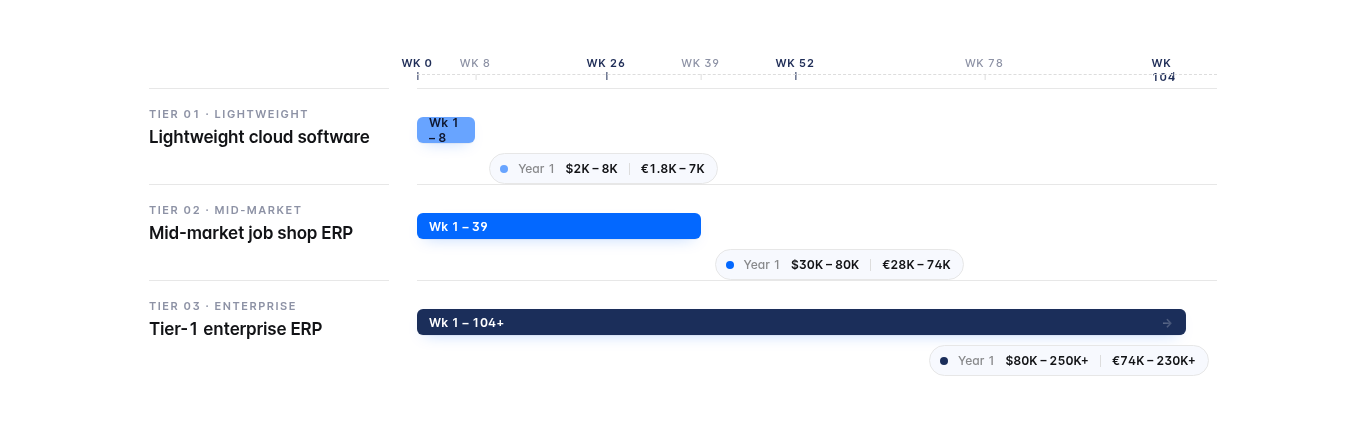
The mistake most fabricators make is anchoring their expectations on Bucket 3 statistics, then becoming anxious about a Bucket 1 decision. Knowing which bucket you are in changes the entire conversation.
Real cost ranges for a 25-person Steel fab shop
When you Google “ERP implementation cost,” the headline numbers from research firms can be misleading. The Panorama 2025 ERP Report states an average of $450,000 per project, but, yet again, this average includes large enterprises. For a 25-person fab shop, the real cost picture looks completely different.
Here is the line-item view by bucket. These ranges are what we, at EZIIL, and our customers see in actual deals across Europe, the US, Canada, and Australia.
Bucket 1: Lightweight cloud-native (for example, EZIIL)
- Software subscription: €1,440/$1,685 to €3,480/$4,073 per year (€120/$140 to €290/$340 per month flat rate for EZIIL, depending on team size)
- Implementation services: €300/$350 for EZIIL or in other similar tools’ cases under €2,000/$2,340
- Data migration: usually self-service, in EZIIL’s case assisted by dedicated onboarding team
- Training: included in onboarding
- Year 1 total: roughly €2,000/$2,340 to €8,000/$9,363
Bucket 2: Mid-market job shop ERP (for example, Genius ERP, JobBOSS²)
- Software: €12,816/$15,000 to €21,360/$25,000 per year for a 25-person shop
- Implementation services: €12,816/$15,000 to €34,176/$40,000 (this is the big one)
- Data migration: €4,272/$5,000 to €12,816/$15,000 if your data is messy
- Training: €2,563/$3,000 to €8,544/$10,000
- Year 1 total: roughly €25,632/$30,000 to €68,352/$80,000
Bucket 3: Tier-1 ERP (for example, NetSuite, SAP B1)
- Software: €21,360/$25,000 to €68,352/$80,000+ per year
- Implementation: €42,720/$50,000 to €170,880/$200,000+
- Customization, integration, data migration: another €17,088/$20,000 to €42,720/$50,000+
- Change management and training: €8,544/$10,000 to €25,632/$30,000
- Year 1 total: roughly €68,352/$80,000 to €213,600/$250,000+
The line item that surprises fabricators most is the gap between license fees and implementation services. Implementation services typically run 1x to 2x your first year software subscription for traditional ERPs. So if you sign a €17,088/$20,000 per year contract, you should plan for €17,088/$20,000 to €34,176/$40,000 in implementation costs on top.
There is also one cost component most vendors do not put in the brochure: per-user pricing creep. If you are quoted €76/$89 per user per month and your shop grows from 18 to 28 people during onboarding, your bill quietly grows by €9,124/$10,680 per year. Some vendors, including us, use flat-rate pricing for exactly this reason. EZIIL is €180/$210 per month for any team between 16 and 50 people, no per-seat math involved. It is a structural choice that prevents the bill creep that genuinely catches fabricators off guard.
A realistic week-by-week timeline (Week 1 to Week 12)
This timeline assumes you are implementing a fabrication-specific cloud system. If you are buying a full mid-market ERP, double everything and add a deployment consultant. If you are buying a tier-1 ERP, this article is probably not the right read for you.
Weeks 1 to 2: Discovery and data audit
The single biggest predictor of a smooth go-live is what you do in these first two weeks, before you touch the software.
- List every active project (and recently closed ones) with their job numbers, customer, contract value, current stage, and remaining work
- Pull your last 12 months of supplier invoices and create a clean supplier list
- Audit your BOM templates: if you have 47 versions of “standard handrail BOM” floating around in different spreadsheets, this is the moment to consolidate
- Identify your top 5 product types or job types and write down the actual workflow for each (cut, weld, blast, paint, QC, ship)
This is unglamorous work and it is the difference between a 6 week implementation and a 14 week one.
Weeks 3 to 4: Configuration and module selection
- Decide which modules you turn on first. For most 25-person fab shops, the right starting set is project tracking, BOM, and procurement
- Set up users and roles (owner, project manager, foreman, shop floor, accounts)
- Configure your job number sequencing, project templates, and any unique fields you need (e.g. heat numbers, EN 1090 traceability data for European customers)
- Connect to your accounting tool (most teams keep QuickBooks or Xero and integrate, rather than replacing)
Weeks 5 to 8: Pilot with one live project
This is where most implementations actually live or die. The instinct is to pick “an easy small job” to learn on. Do the opposite. Pick a high-stakes project that is genuinely important, because that is the only way you will get foreman attention and the only way you will surface real-world edge cases.
- Run the pilot project end to end in the new system: quote, BOM, procurement, production tracking, delivery
- Keep the spreadsheet running in parallel for the first 2 weeks as a safety net
- Hold a 15 minute weekly stand-up where the foreman, project manager, and owner each say one thing that worked and one thing that did not
By week 8, you should have one full project closed in the new system with real margin reporting.
Weeks 9 to 12: Rollout, training, full adoption
- Migrate the rest of your active projects in batches of 3 to 5 per week
- If you feel comfortable enough, add the second wave of modules (inventory, analytics, subcontractor management)
- Run a 90 minute training for the full team with the actual jobs they are working on, not a generic demo
- Switch off the parallel spreadsheet at week 11 (if you wait longer, people will keep both running indefinitely)
- Hold a “first month after live” retrospective at week 12
If you hit week 12 and adoption is shaky, do not push harder. Pause, run a one week retrospective, and figure out which of the 6 traps below you have stepped into.
The 6 traps that go wrong (and how to avoid each one)
Across hundreds of conversations with fabricators, the same six failure modes keep showing up. Some of them are obvious in hindsight, some of them are counterintuitive. All of them are avoidable.
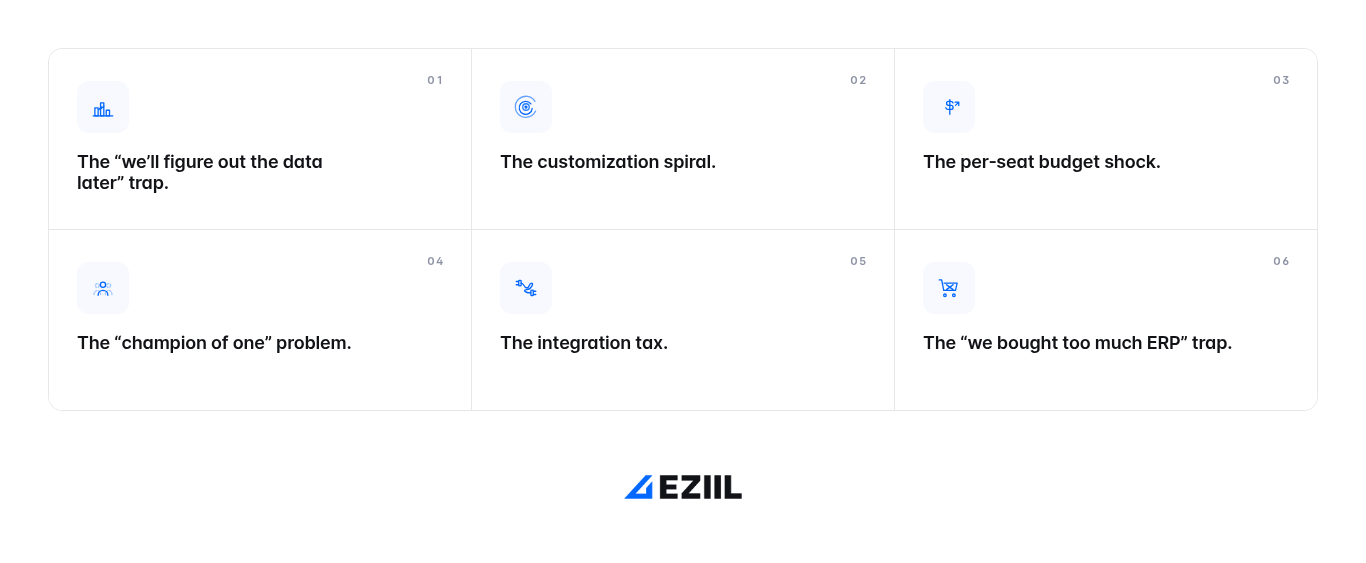
Trap 1: The “we will figure out the data later” trap
This is the single most common cause of implementation pain in small fabrication shops. You sign a contract, the vendor asks for your data in a structured format, and you discover that your “supplier list” lives across three Excel files, two notebook pages, and one ex-employee’s email inbox.
The fix is to do the data audit before you sign anything, not after. If your data is messy now, it will be messy in week 4. Do the cleanup work upfront, when it is unpressured. Two days of spreadsheet hygiene will save you two weeks of vendor back and forth later.
Trap 2: The customization spiral
Every time someone on your team says “but our process is different, we need a custom field for X,” the timeline grows by 2 to 3 weeks. Every custom field adds testing surface, training surface, and an upgrade-path liability for the future.
The fix has two parts. First, ask the question: is our process actually different, or have we just gotten used to a workaround that the spreadsheet forced on us? Most “custom” requirements turn out to be the second one. Second, choose a system that was built for your steel fabrication type in the first place. Generic ERPs need customization to fit your workflow. Fabrication-specific tools usually do not, because the data model already understands what a cut list, a weld map, or a heat number is.
Trap 3: The per-seat budget shock
You sign a contract for 15 users. Six months later, you have 22 users (the night shift foreman, the new project manager, two more shop-floor scanners, the procurement assistant). Your bill is now 47% larger than the budget you presented to the board.
The fix is to ask one question during evaluation: if I add 5 users next year, what does my bill look like? If the vendor cannot give you a clean answer in one sentence, you are likely in for surprise costs. Flat-rate pricing tiers (the structural choice EZIIL and a few others have made) make this a non-issue.
Trap 4: The “champion of one” problem
The owner buys the system, the owner uses the system, and within six weeks the owner is the only person in the shop who has logged in this month. The foremen quietly revert to their spreadsheets. By month 4, you are paying for software nobody uses.
The fix is non-obvious: get foreman buy-in before you sign anything. Bring them into 15 minutes of one demo. Let them push back on the workflow. If a foreman tells you “this will be slower than what I do now,” that is critical information, not an obstacle to overcome. Adoption follows the slowest mover, not the fastest.
Trap 5: The integration tax
Connecting your new ERP to QuickBooks, your CAD software, your shop-floor scanners, or your customer portal often costs extra.
The fix is to be specific in your evaluation. Do not accept “yes, we integrate with QuickBooks” as an answer. Ask which version, which fields sync, whether it is real-time or batch, and how much it costs. Get the answer in writing.
Trap 6: The “we bought too much ERP” trap
This is the trap that hurts the most because it is invisible until you are 9 months in. You bought a tier-2 or tier-1 ERP because everyone told you that is what manufacturers buy. Now you are paying for HR, CRM, financial consolidation, and budgeting modules that are designed for a 200 person company. Your foremen ignore them, your accountant uses 4% of the financial features, and you are funding software complexity nobody asked for.
The fix sometimes requires admitting that what you actually need is fabrication management software, not a general-purpose ERP. We have a whole section on this below, because it deserves more than a paragraph.
The adoption playbook nobody talks about
Most ERP failures are not software failures. They are people failures. The system works fine in week 8, but by month 4 only the owner uses it. According to a Gartner research, inadequate change management and inexperienced project teams account for the majority of ERP implementation failures, well above any technical issue.
Here are four tactics that consistently separate teams that adopt from teams that quietly drift back to spreadsheets.
1. Pilot a high-stakes project, not a small one. As mentioned earlier, small pilot projects do not get foreman attention because nothing important is at stake. Big pilot projects do, and the lessons you learn are 10x more valuable.
2. Get the foreman to teach the next foreman. The first foreman trained in the system should run the second training session. Peer-to-peer transfer beats vendor-led training every time, because the foreman uses your job numbers and your products, not a generic demo dataset.
3. Replace one Excel sheet at a time. Do not try to replace your entire workflow on day 1. Pick the most painful spreadsheet (usually the project schedule), replace just that one, and let the team feel the relief. Then come back two weeks later for the next one. Pace beats ambition in adoption.
4. Run a 15 minute weekly stand-up for the first 8 weeks. Three people: owner, project manager, foreman. Three questions: What worked this week? What did not? What is one thing we should change? Document each answer. Most adoption problems get resolved if they are surfaced in week 2 instead of month 4.
Whatever vendor you pick, push them on what their onboarding actually involves. Most failed implementations we’ve seen started with a vendor that handed over a login and a 40-page PDF. Look for guided onboarding, named onboarding contacts, and weekly check-ins.
Do you actually need a full ERP?
Now we are at the question most articles avoid: does a 25-person fab shop actually need an ERP at all?
Honest answer: probably not, in the way the word “ERP” is usually used.
A traditional ERP (NetSuite, SAP Business One, Oracle, Microsoft Dynamics) is built to do everything: financial consolidation, HR, CRM, procurement, manufacturing, projects, inventory, analytics. It is a general-purpose business operating system. The people it was designed for are CFOs and IT directors at companies with 200 to 5,000 employees who need to standardize across multiple sites, currencies, and entities.
What a 25-person fab shop actually does, every day:
- Track multiple projects, their stages, and what is blocked
- Build BOMs and cut lists from drawings
- Procure steel, hardware, and consumables against jobs
- Track inventory and offcuts
- Manage subcontractors (galvanizing, blasting, painting, transport)
- Maintain traceability (especially EN 1090 for European customers, AISC and other standards in North America)
- Get visibility on project margin and shop capacity
Notice what is not on this list: full GL accounting consolidation, HR information systems, CRM pipeline forecasting, multi-entity reporting. Most fab shops keep using QuickBooks, Xero, or their existing accounting tool. Their HR is mostly payroll and a folder. Their CRM is a couple of tabs in a spreadsheet because most repeat business comes from relationships, not pipeline automation.
So the realistic framing is this: most 25-person fab shops do not need an ERP. They need fabrication management software that does the 6 to 8 things they actually do, plays nicely with their accounting tool, and gets out of the way.
Here is a simple decision tree:
- You probably need a full ERP if: you operate multiple legal entities, you have complex multi-currency financial consolidation needs, you have 100+ employees with formal HR information systems, or you are required to file SOX-style controls.
- You probably need fabrication management software (not full ERP) if: you are a single-entity fab shop with 15 to 150 employees, your accountant is happy with QuickBooks or Xero, your biggest pain is project scheduling and material tracking, and you want adoption in weeks rather than quarters.
In the second category, the tools that genuinely fit the size and shape of your work are limited. EZIIL sits in that category, alongside Tekla PowerFab on the more enterprise structural-steel side. We built EZIIL because every available option for sub-150-person fab shops was either Excel or an over-sized ERP. Modular pricing (€120/$140, €180/$210, or €290/$338 per month flat depending on team size) and fabrication-specific modules (project tracking, BOM, procurement, inventory, EN 1090 traceability, subcontractor management, analytics) mean you turn on what you need and only that. Most teams go live in 6 to 8 weeks. If you are shortlisting tools, see our pricing page to calculate how much you’d be saving with EZIIL.
A simple ROI checklist: when does the new system pay for itself?
If you cannot measure it, you cannot defend the spend internally. Here are five outcomes that show up consistently in ROI conversations across our customer base. Track them from day 1 and you will have a clean answer in month 6.
- Quoting time per job. Goal: a 50% reduction or more. The math is straightforward: faster quotes mean more bids submitted, more bids won, and (usually) better margin protection on rushed quotes.
- Scrap and rework rate. Goal: a 10% to 20% reduction within 6 months. Better BOM accuracy and traceability prevent the “wrong steel, wrong cut” mistakes that quietly eat margin.
- On-time delivery rate. Goal: at least a 5 to 10 percentage point improvement. Multi-project visibility is the single biggest driver here.
- Project margin visibility. Goal: real-time margin per project visible to the owner without asking the bookkeeper. This one is qualitative but it is the moment most owners say “okay, this was worth it.”
- Hours saved on weekly status meetings. Goal: 4 to 8 hours per week of admin time recovered, especially for the project manager and the owner.
For a Bucket 1 implementation costing €5,000/$5,855 in Year 1, recovering 4 hours per week of owner time at a conservative €64/$75 per hour is €13,323/$15,600 per year. The math works quickly. For a Bucket 2 implementation at €42,700/$50,000 Year 1, you need to see the productivity and margin gains to justify it, which is why the data-driven approach matters.
FAQ
How long does ERP implementation take for a small manufacturer?
For a small fabrication shop using lightweight cloud software, 4 to 8 weeks is realistic. For mid-market job shop ERP, 4 to 9 months. For tier-1 enterprise ERP, 12 to 24 months or more. Most published “ERP implementation averages” are based on enterprise data and do not apply to a 25-person shop.
How much should a 25-person fabrication shop budget for ERP?
The honest answer ranges from roughly €2,000/$2,340 in Year 1 (lightweight cloud-native software) to €213,500/$250,000+ in Year 1 (tier-1 enterprise ERP). The right number depends on whether you actually need a full ERP or whether fabrication management software fits the work you do. For most 25-person shops, the lightweight cloud bucket is the realistic budget zone.
What is the difference between an ERP and fabrication management software?
A full ERP covers financial consolidation, HR, CRM, procurement, projects, manufacturing, and analytics across an entire business. Fabrication management software covers the operational core of a fab shop (projects, BOMs, procurement, inventory, traceability, subcontractors, analytics) and integrates with your existing accounting tool. For most fab shops under 150 employees, fabrication management software is a closer fit than a full ERP.
Can I keep using QuickBooks if I implement fabrication software?
Yes, and most teams do. The right fabrication tool integrates cleanly with QuickBooks, Xero, or your existing accounting software. There is no requirement to replace your accounting setup, and there is usually no good reason to.
What is the number one reason ERP implementations fail in small fab shops?
Two reasons tied for first place: messy data going into the migration, and weak adoption among foremen and project managers. Software almost never fails. ERP implementations fail because the data was not cleaned before the project started, or because the team that needs to use the system every day was not part of the decision.
How long does EZIIL implementation take?
Most EZIIL customers go live in 6 to 8 weeks, depending on how much project history you want to migrate and how many modules you turn on at once. Our onboarding includes guided 1:1 sessions and a named contact, because the difference between a 6 week and a 12 week implementation is almost always the quality of the onboarding partnership, not the software.
To sum it up…
Implementing new software in a small fab shop is not a nine-month death march, unless you accidentally signed up for one. The teams that succeed are the ones that picked a tool the right size for their business, did the unglamorous data cleanup before signing, ran a real pilot project with foreman buy-in, and chose a vendor that genuinely partnered with them through onboarding.
If you are evaluating systems and you want a no-pressure 30-minute conversation, we are happy to walk you through where EZIIL fits and, just as importantly, where it does not. We will tell you honestly when another tool is the better fit for your shop. Book a quick demo call here.
Whatever you decide, we hope this saved you a few hours of research and one or two of those sleepless nights.