
If you run a project-based metal fabrication shop with somewhere between 15 and 150 employees, you have probably been researching ERPs for a while. Maybe you watched a peer pick the wrong system three years ago and lose nine months and a quarter of their margin to it. Maybe you signed up for a demo last week and then closed the tab when you realized you couldn’t get a straight answer on what the bill would look like at 35 users. Maybe you’re on Excel and a whiteboard, and you know that’s not sustainable, but you also know the cure can be worse than the disease.
This article walks you through what “modular ERP” really means, what guided onboarding should look like week by week, how EZIIL specifically delivers both, and the five questions to ask any vendor before signing.
If you came here because you read our companion piece on ERP implementation cost and timeline, this is the practical follow-up
Why ERP buying is structurally broken for small fab shops
The first thing worth saying out loud: most of the ERP buying and implementation stories you have read are not actually about shops your size.
The average ERP implementation costs roughly $450,000 and runs 6 to 12 months, with budget overruns driven by underestimating project staffing (38%), scope expansion mid-project (35%), and technical or data issues (34%). Gartner’s research projects that more than 70% of recent ERP initiatives will fail to meet their original business case goals, with 25% failing catastrophically. Discrete manufacturing shows the highest failure rates of any industry, with cost overruns averaging 215%.
Those numbers are real, and they are scary. But they are pulled from a sample dominated by NetSuite, SAP, and Oracle deployments at companies with 200 to 5,000 employees, multiple legal entities, and complex multi-currency reporting. They are not a forecast of what a 30-person fab shop should expect.
The real problem for shops your size is more specific, and it is structural rather than statistical. Three things are off:
The first is per-user pricing. Most manufacturing ERPs charge per seat. That model was invented for office software in the 1990s, and it punishes the exact thing fab shops do, which is grow and hire on the shop floor. A foreman, four welders, a procurement assistant, and a night-shift supervisor each cost the same as a CFO under per-seat pricing, which is structurally indefensible.
The second is big-bang implementation. Generic ERPs ship as a giant bundle (financials, HR, CRM, procurement, manufacturing, projects, analytics) and assume you will turn most of it on at go-live. For a 30-person shop, that is paying for HR Information Systems your bookkeeper does not need, financial consolidation modules your single legal entity will never use, and CRM pipelines that your relationship-driven sales motion ignores.
The third is module bundling that cannot be unbundled. Even when a vendor advertises modular packaging, the modules are often welded together commercially, so you cannot actually start with one and add the rest later. You pay for the whole shape on day one.
The modern alternative is a different model entirely. It is modular pricing (you turn on what you need, when you need it, and the bill reflects that). And it is guided onboarding (a real person walks you through it, week by week, with a pilot project that proves it works before you commit the whole shop). The rest of this article is about what that model looks like in practice.
What “modular ERP pricing” actually means (and what fakes it)
When a fabricator asks “what does modular pricing actually mean,” the answer should be simple. Modular pricing means three things together:
- You buy by module, not by user. You decide which capabilities go live (scheduling, BOM, procurement, inventory, traceability, analytics, subcontractor management) and you only pay for those. Adding a module is a deliberate decision later, not a forced upgrade today.
- You pay a flat rate for the team that uses each module. Adding a welder, a foreman, or a project manager does not change your bill. The price you signed for is the price you pay at 18 users, at 35 users, at 50 users.
- You can start small and expand on your timeline. In EZIIL’s case, most shops turn on EZIIL Starter features (Planning, Scheduling, Task and Resource Allocation, Time Tracking, Digital Drawings/Documents, Reporting, etc) first. They add more advanced ERP features, such as BOM and Procurement in months 2 to 3. They add Analytics, EN 1090 traceability, and Subcontractor Management when a contract or audit makes those genuinely useful. Your data carries forward from one phase to the next.
That sounds straightforward. The reason this article exists is that several common vendor models advertise “modular” packaging while quietly failing one of those three tests. Three failure modes to watch out for:
The bundled “module”
The vendor sells you scheduling as a “module,” but the only way to get it is in a bundle with five other things you do not need. You are paying for the whole bundle, dressed up as a module.
The per-user surcharge buried in tier 2
The base price is flat, but additional users beyond a low threshold are billed individually, often at $89 to $149 per user per month. The flat rate is a sales claim, not a structural commitment.
The “modular” packaging that becomes mandatory at year 2
You sign for one module, then discover that the upgrade path to module two requires a complete repurchase, data re-migration, or a new contract.
Three diagnostic questions to ask any vendor before you sign:
- If my team grows from 20 to 35 people next year, what does my bill look like?
- Can I start with one module today and add another in month 6 without re-implementing or re-migrating data?
- Is the price quoted today the price I will pay 24 months from now, assuming nothing else changes?
If a vendor cannot answer those three in one short sentence each, the “modular” pricing is probably theatrical. According to McKinsey’s 2025 analysis of software pricing models, 68% of incumbent enterprise software still uses flat-fee pricing precisely because it reflects value better and removes commercial friction. Modular flat-rate is the structurally honest model.
EZIIL’s Modular pricing in plain numbers
EZIIL pricing has two parts, and both parts are designed to stay simple.
The first part is EZIIL Starter, the base product every customer runs. Every shop at every tier gets the same Starter feature set. The only thing that changes by tier is the size of the team you can run it across.
€120/$140 per month for shops with 1 to 15 users. €180/$210 per month for shops with 16 to 50 users. €290/$338 per month for shops with 51 to 150 users.
Plus a one-off onboarding fee of €300/$350, which covers setup, training, and the regular check-ins we walk through in the next section.
Starter is not a stripped-down version. At any tier, it includes the full base set:
- A centralized platform for all client and project data
- Shop floor planning with department-level scheduling and live job status
- Real-time production overview with alerts when projects start slipping
- Smart capacity planning with drag-and-drop scheduling and auto-fill for available resources
- A project scheduler built specifically for metal fabrication timelines
- Mobile shop-floor app on iOS and Android for time tracking, task status updates, and live progress
- Project and workload estimation so you can quote new work with real data
- On-time delivery (OTD) and productivity tracking with color-coded indicators
- Production routing for repeat projects (pre-built process templates, auto-planning)
- Real-time project profit dashboard, with planned vs. actual margin indicators
- Planned vs. reality reports on hours, costs, and timelines
- Standardized input fields, file uploads for drawings and documents, and custom dashboard filters
The short version is that Starter on its own is enough to replace several layers of Excel and paper at most fabricators.
The second part is the modules you add on top of Starter when your shop is ready for them. Modules are separate, optional, and turn on one at a time on your timeline. The modules customers add most often, roughly in the order they tend to add them:
- Bill of Materials (BOM): Multi-level BOMs with drawings, operations, and routing per project
- Procurement management: See what each project needs vs. what is in stock vs. what is on order, reserve materials for priority jobs, raise PRs and POs in one click
- Inventory management: Warehouse movements, incoming and outgoing materials, request orders converted into move and pick orders
- EN 1090-2 compliance: Material certificates linked to work records, assemblies, and jobs (who did what and when)
- Subcontractor management: End-to-end workflow when part of the work happens outside your shop (galvanizing, machining, painting)
- Machine planning: Schedule work at the operation level to a specific machine, machine group, worker, or worker group, with real-time updates
- Advanced shop floor control: Employee-level productivity monitoring
- Detailed reporting: Part-level data, material costs, and labor hours for factory performance analysis
- Shipments and deliveries: Build and dispatch packages from finished parts and assemblies, track exactly which package went to which site and when
- Invoicing and accounting integrations: Invoice the way your customer agreements work (advance, partial, or after production), and export data into your existing accounting system
Now the math, because this is what closes the loop.
A 38-person fabricator on EZIIL Starter pays:
| Vendor model | Monthly bill at 38 users |
|---|---|
| Per-user MRP (for example, MRPeasy at $89 per user/month) | $3,382 per month, or roughly $40,584 per year |
| Tiered concurrent-user ERP (for example, Genius ERP with a base license plus per-user pricing) | $7,500 to $10,000 per month, all-in |
| EZIIL Starter, flat-rate by tier | €180/$210 per month, or roughly €2,160/$2,520 per year |
If that 38-person shop grows to 50 people in year 2, EZIIL Starter still bills €180 per month. The other models bill more. That gap is the structural difference, and it widens every time you hire a welder.
☝️ A note on what “modular” actually means in practice at EZIIL. Starter already includes most of what a steel fabricator needs to replace Excel and paper from day one. The modular piece is what you add on top of Starter, one module at a time, when the operational backbone is solid and the next bottleneck has a clear shape. Most customers add their first module (typically BOM or Procurement) somewhere between months 2 and 4. Adding a module is a single conversation, not a re-implementation. Your existing data, users, and project history carry forward automatically.
The full breakdown of what is in Starter and what is in each module lives on the EZIIL Starter features page and the EZIIL add-on modules page.
Why most ERP onboarding fails (5 reasons Small Steel fab shops are extra vulnerable)
If pricing is the cost-of-entry conversation, onboarding is where most projects actually die.
The most useful data on this comes from Gartner research summarized in this Lumenia analysis: inadequate change management, poor data migration, and inexperienced implementation teams account for over 75% of failures. The technology is rarely the cause. The people, the data, and the cadence are.
For steel fabrication shops specifically, five things make onboarding extra fragile:
Data lives in foremen’s heads, not files. Your supplier list, your BOM templates, your project workflow, your job-numbering convention: in most shops these are tribal knowledge. They live with one or two long-tenured people. The day you start a software migration is the day you discover this, often the hard way. Data migration issues account for roughly a third of ERP cost overruns for exactly this reason.
Foremen are usually not in the buying conversation. The owner signs the contract. The project manager logs in. Six weeks later, the foreman is still running the schedule in his head and a notebook. By month four, everyone is paying for software nobody uses.
Generic ERPs need customization to fit steel fabrication workflow. Every custom field, every workflow tweak, every bespoke report adds 2 to 3 weeks. Scope expansion mid-project is the second-largest cause of budget overrun. Fabrication-specific tools avoid most of this because the data model already understands what a cut list, a weld map, a heat number, and a subcontract dispatch are.
The “easy pilot project” trap. The instinct is to pilot the new system on a small, low-stakes job. The problem is that small jobs do not earn foreman attention. Big jobs do. If you pilot on a small project, you will not surface the real edge cases until rollout, by which point you have lost the safety net.
Vendor hands over a login and a 40-page PDF. This is the single most common reason small-shop implementations stall. There is no named contact, no weekly cadence, no scheduled check-ins. The fabricator is left to figure it out, with a busy production schedule and no one to ask.
These five patterns are predictable. The good news is they are also avoidable. The next section is what avoiding them looks like.
What guided onboarding looks like at EZIIL
When we say “guided onboarding,” we mean a specific thing. Here is what it actually looks like for a typical EZIIL customer.
You are paired with a named onboarding partner from week 1. A person who has run steel fab-shop rollouts before, who has a direct line to our product team, and who is the same person your foreman calls in week 5 when something on the shop floor does not feel right. Weekly 30-minute check-ins are the default cadence for the first 8 weeks, with ad-hoc calls anytime.
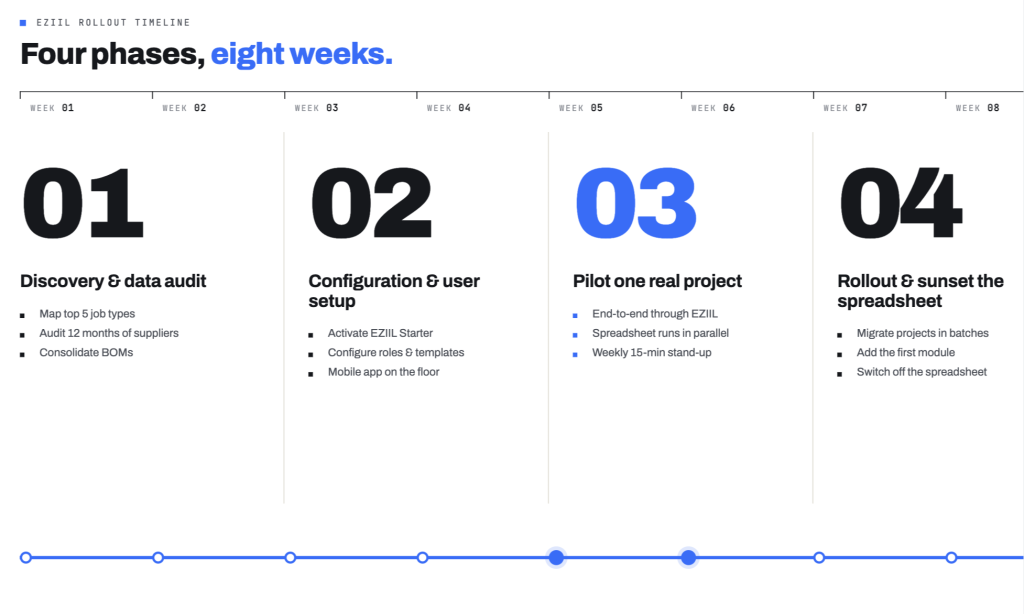
Here is the four-phase, 6 to 8 week shape we run most customers through.
Weeks 1 and 2
Discovery and data audit. Your onboarding partner runs a 90-minute working session with you, your project manager, and one foreman. We map your top 5 job types end to end (cut, weld, blast, paint, QC, ship). We pull your last 12 months of supplier invoices and build a clean supplier list. We audit your current BOM templates and consolidate. The deliverable at the end of week 2 is a clean import file and a workflow diagram. This process is the single biggest predictor of whether the rest of the rollout goes smoothly.
Weeks 3 and 4
Configuration and user setup. EZIIL Starter activates with the full feature set turned on. Users get configured: owner, project manager, foreman, shop floor, accounts. Job-number sequencing and project templates get set up against your real conventions. The mobile shop-floor app goes onto your team’s phones and tablets. If you are running an accounting software on the side, we line up the integration module here too and confirm the fields sync the way you expect.
Weeks 5 and 6
Pilot with one real project. This is the most important phase. Pick a project that you actually care about, because that is the only project that will earn your foreman’s attention and surface the real edge cases. The pilot runs end to end through EZIIL. You keep the spreadsheet running in parallel for the first two weeks as a safety net. The cadence stays at one 15-minute weekly stand-up (foreman, project manager, owner), three questions: what worked, what did not, what should change.
Weeks 7 and 8
Rollout and phase out the spreadsheet. Migrate the rest of your active projects in batches of 3 to 5 per week. If your shop is ready, add the first module (typically BOM or Procurement). Switch off the parallel spreadsheet by week 8.
What is included in the one-off onboarding fee (€300/$350)
Discovery sessions, configuration, named onboarding partner, weekly check-ins for the rollout, training for the full team, and Starter activation.
What is not included
Add-on modules (BOM, Procurement, EN 1090, and so on) when you turn them on, and heavy custom integrations to bespoke equipment get scoped explicitly upfront. We will not surprise you with a $15,000 integration line item in week 6.
A real example: BW Metall, a 76-person structural steel fabricator producing roughly 100 tons of EN 1090 EXC3 steel a week, ran EZIIL in parallel with their existing Excel workflow for the first three projects. After those three closed cleanly, they trusted the system enough to drop the backup.
5 ways modular pricing de-risks Software Purchase
There are five specific ways the modular flat-rate model reduces the risk of buying software. Each of these is a structural choice EZIIL has made.
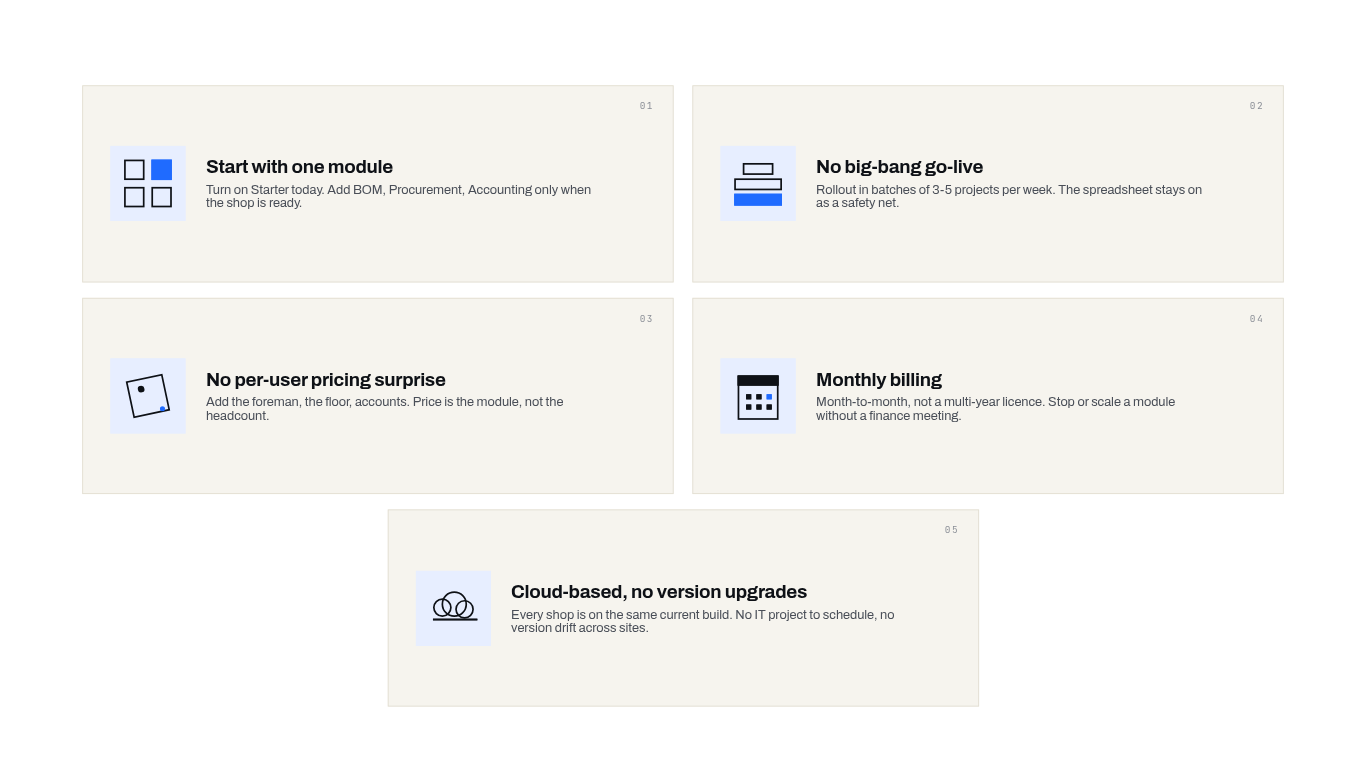
1. You can start with Starter alone, and add modules later without re-implementing. You do not sign up for a six-figure suite to find out in month 4 that the base product was already enough. Start with EZIIL Starter at €120/$140, €180/$210, or €290/$338 per month depending on team size. Starter on its own replaces several layers of Excel for most fabricators. Once the team is fluent and the operational backbone is humming, you add your first module (typically BOM or Procurement) somewhere between months 2 and 4. Your project history, supplier list, user setup, and job templates all carry forward automatically. No data re-entry, no second discovery, no re-implementation.
2. There is no big-bang go-live day. Modular onboarding spreads the rollout over weeks, not a single dramatic Monday morning. Your pilot project goes live first. The rest of the shop comes in waves. If something breaks, you fix one module without bringing down the rest. This is the single biggest reason modular implementations rarely produce the kind of catastrophic failure the Panorama report documents.
3. There is no per-user pricing surprise as you grow. At EZIIL, €180/$210 per month at 25 users is €180/$210 per month at 38 users. You do not wake up one day to a surprise on the invoice seeing that your software bill grew 47% because you hired six people. The structural choice EZIIL made removes one of the most common sources of mid-implementation tension.
4. Monthly billing, not a 3-year locked contract. In the case of most tier-1 ERPs you sign a 1+ year contract that you pay for up front. What if you change your mind after a few months? The hidden cost of locked contracts is that they prevent honest mid-implementation re-evaluation. Modular flat-rate removes that pressure, which means you only stay because the product is actually working.
5. Cloud-based, no expensive version upgrades. Your software stays current automatically. You do not pay tens of thousands every three years for a major version upgrade the way you would with an on-premise ERP. New features ship on-the-go, not annually and at cost. The cloud architecture also means your data is yours: if you ever leave, you can export everything in standard formats.
What EZIIL customers actually did in their first 60 days
Let’s look at one of EZIIL’s customer profile to understand the typical journey from how they managed their steel fabrication before EZIIL, what triggered the move, to moving to EZIIL, what they turned on first, what changed in 60 days, and what they added next.
BW Metall (76 employees, EN 1090 EXC3 steel for European markets)
Before EZIIL: every project lived in its own Excel file, plus separate packing sheets, dispatch sheets, and a constant flow of printed work orders. Tracking what was in progress meant walking the shop floor to ask operators.
Trigger to find a solution: order volume kept growing and the cracks in the Excel-and-paper stack stopped being an annoyance and became a ceiling.
First 60 days with EZIIL: ran EZIIL in parallel with Excel for the first three projects (the safety net), then dropped the spreadsheets entirely after those three closed cleanly.
What changed: packing-slip and dispatch paperwork generation cut from roughly 5 hours per project to about 20 minutes, an approximate 93% reduction. BW Metall stopped archiving physical drawings entirely because reporting accuracy in EZIIL was high enough to trust the digital record. 100% shop-floor adoption across every age group
How EZIIL Guarantees Your Team Will Actually Start Using It
One of the worries we hear talking to steel fabricators time and time again is: “I’m not sure my guys will actually use it”. It is a totally valid concern. According to the analysis Pemeco published on Gartner’s data, inadequate change management is the single largest cause of ERP failure, well above any technical issue. The software almost never fails. The adoption fails.
Four specific things EZIIL does to reduce that risk:
The mobile shop-floor app does not require a desktop. Welders, fabricators, fitters, and operators do not log into a workstation. They open EZIIL on a phone or tablet. They start a timer, see the current drawing, log a note, mark an operation complete. The interface is closer to a delivery driver app than to a traditional ERP screen. If your team uses a smartphone, they can use this.
Peer-to-peer training, not vendor-led training. The first foremen trained during onboarding runs the next training session for the next foremen. This works because the foreman trains using your job numbers and your products, not a generic demo dataset. We will help your first foremen get fluent, we will not insist on running every training ourselves.
Replace one Excel sheet at a time. Do not try to replace your whole workflow on day 1. Pick the most painful spreadsheet (usually the project schedule), replace just that one, and let the team feel the relief. Come back two weeks later for the next one.
Invite the foreman into the demo before signing. If your foreman tells us in a pre-purchase demo that something will be slower than what they do now, we want to hear that then, not in week 6. Adoption follows the slowest mover, and the slowest mover is often the most experienced person on your shop floor. Bring them into the conversation early on.

The combined Year 1 math: modular flat-rate vs. tiered vs. tier 1
We covered this in detail in our article on ERP implementation cost and timeline, so this is the short version, with the modular column made specific.
Bucket 1, lightweight cloud-native (where EZIIL sits).
Software subscription: €1,440/$1,685 to €3,480/$4,073 per year for EZIIL Starter, depending on team size. One-off onboarding fee: €300/$350 (covers setup, training, and the rollout check-ins). Data migration: self-service or guided. Add-on modules (BOM, Procurement, EN 1090, etc.) when you decide to turn them on.
Year 1 total for most shops: roughly €2,000/$2,340 to €8,000/$9,363.
Bucket 2, mid-market job shop ERP (Genius ERP, JobBOSS², similar).
Software: €12,816/$15,000 to €21,360/$25,000 per year for a 25-person shop. Implementation services: €12,816/$15,000 to €34,176/$40,000. Data migration: €4,272/$5,000 to €12,816/$15,000. Training: €2,563/$3,000 to €8,544/$10,000.
Year 1 total: roughly €25,632/$30,000 to €68,352/$80,000.
Bucket 3, tier 1 ERP (NetSuite, SAP Business One, Oracle).
Software: €21,360/$25,000 to €68,352/$80,000+ per year. Implementation: €42,720/$50,000 to €170,880/$200,000+. Customization and integration: another €17,088/$20,000 to €42,720/$50,000+. Change management: €8,544/$10,000 to €25,632/$30,000.
Year 1 total: roughly €68,352/$80,000 to €213,600/$250,000+.
A line item most vendors do not put in the brochure is per-user creep. If you signed at 18 users on a $/€89-per-user model, and you grow to 28 users during the implementation year, your bill quietly grows by about €/$10,680 per year. At EZIIL, that growth costs €/$0, because the tier covers you up to 50 users at €180/$210 per month.
The math is rarely the deciding factor by itself. But it does decide which tier you are even shopping in. For a 15 to 50 employee fabricator, the modular flat-rate bucket is almost always the right shape. The other buckets exist for genuinely larger or more complex businesses, and we will cover that in the next section.
5 questions to ask before you Commit To A Steel Fabrication Software
| Question to ask any steel fabrication software | EZIIL’s honest answer |
|---|---|
| If my team grows from 20 to 35 people, what does my bill look like? | Same €180/$210 per month. Per-user pricing is not part of the EZIIL model. If you cross 50 users you move to €290/$338 per month, and your data and setup carry forward automatically. |
| Can I start with one module and add others later, or is it bundled? | Every customer starts with EZIIL Starter, which already includes scheduling, capacity planning, mobile shop-floor reporting, time tracking, OTD tracking, profit dashboards, and planned-vs-actual reports. On top of Starter, you add modules like BOM, Procurement, Inventory, EN 1090, and Subcontractor Management one by one when your shop needs them. |
| Who is my onboarding contact, and what is the weekly cadence? | You are paired with a named onboarding partner from week 1. 90-minute discovery, then 30-minute weekly check-ins for 8 weeks. Your foreman and project manager have a direct line, not just the owner. |
| When you say “go live in 6 weeks,” what is included and what comes later? | Weeks 1 to 8: EZIIL Starter goes live with the full base feature set, one pilot project, and full team training. Months 2 to 4 (optional): add your first module, typically BOM or Procurement. Months 3 to 6 and beyond (optional): add additional modules like Inventory, EN 1090, Subcontractor Management, Machine Planning, as your shop needs them. |
| Who in your customer base looks most like me? | Tell us your size, geography, and shop type and we will send 2 to 3 similar example customer profiles. Read EZIIL’s customers’ success stories here. |
When Is EZIIL the right fit, and when it is not
EZIIL is the right fit if you are:
A project-based metal fabricator with 15 to 150 employees. Currently on Excel, paper, email, and possibly one legacy tool that does not quite fit. Top operational pain is scheduling, multi-project visibility, time tracking, or material tracking. Accounting is happy on QuickBooks, Xero, or your local equivalent (you do not need ERP-level financial consolidation). You want adoption in weeks rather than quarters. You want predictable monthly cost with no per-user math. You are open to a guided 6 to 8 week onboarding with a named partner.
EZIIL is not the right fit if you need:
Automated quoting, CPQ, or proposal generation. We are not a CPQ tool. If your primary need is to feed an inquiry in and have a system generate a technical and commercial proposal, look at tools built for that workflow.
3D modeling or general assembly drawing generation. We are not Tekla Structures or Autodesk Inventor. We integrate with them cleanly. We do not replace them.
Full general ledger consolidation across multiple legal entities and currencies. If you have 4 legal entities in 3 countries and need consolidated financial reporting at month-end, NetSuite, SAP Business One, or Oracle Cloud ERP are built for that. We are not.
Plate or bar nesting natively in-app. We export cleanly, which is what most of our customers prefer, but we do not nest natively, and if that is a hard requirement for your shop, that matters.
A 5-person shop where Excel still works. If Excel is genuinely fine for you today, the right time to move is when it starts breaking, not before.
To sum it up…
Buying software for a custom steel fabrication shop does not have to give you a massive head ache. The modular flat-rate model is genuinely safer than what most vendors offered ten years ago, because it removes the structural sources of risk: the big-bang go-live, the per-user surprise, the bundled module nobody asked for, the locked contract that prevents honest re-evaluation.
If you would like a no-pressure 30-minute conversation about whether EZIIL fits your specific shop, we are happy to have it. Bring your foreman. We will tell you honestly if it is not the right fit, and we will tell you what we think the right fit might be instead. If you would rather poke around first, sign up for a free EZIIL product tour, to see how it works (no software download needed).