
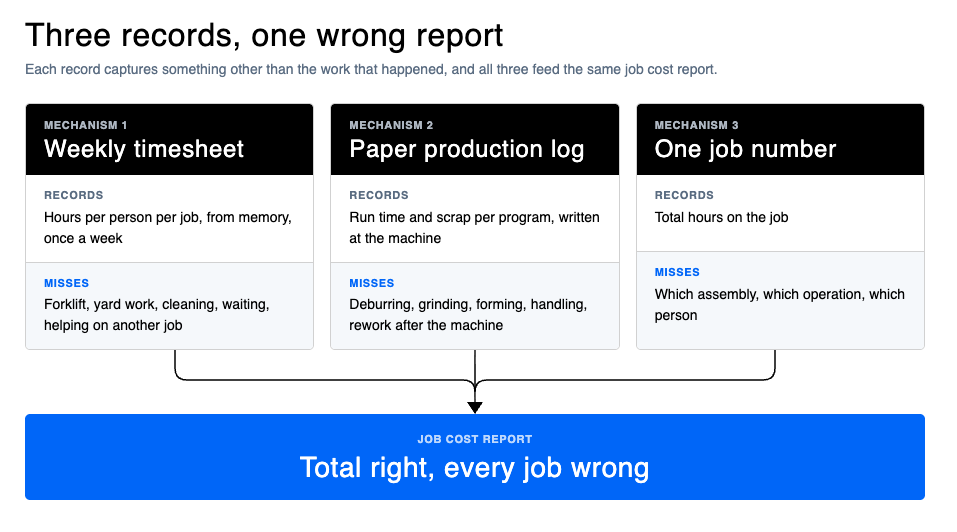
Job costing in most small custom fabrication shops is wrong because the hours feeding it are wrong, in three specific ways. Weekly timesheets book support hours (forklift, yard work, cleaning) to whichever job was open. Paper production logs record machine time but miss the grinding and handling that follow. And when a whole crew clocks to one job number, the job total may be right while nothing inside it is. All three errors push cost away from the jobs that are losing money.
This article is for owners and production managers of custom steel and metal fabrication shops with roughly 10-150 people and a dozen or more jobs running at once. It shows how to spot each of the three mechanisms in your own shop, how much margin they can hide, and what fixing them looks like without a six-month ERP project. The examples come from steel fabricators we spoke with in 2026: a structural and architectural steel shop in the UK, a precision sheet metal and laser shop in the US, and a fabrication cell inside an equipment manufacturer in Australia.
If you want the definition and the formula first, start with what job costing means in steel fabrication and the job cost calculator. This piece is about why the numbers going into that formula are usually wrong.
Last updated: 20 October 2026.
Why is job costing wrong in most custom fab shops?
Job costing is only as accurate as the hours and material booked to each job. In a custom fab shop those hours usually come from a weekly timesheet, a paper production log or a shared job number, and each of those records something other than the work that actually happened.
Material is the easier half. Steel is bought against a job, a purchase order has a price on it, and the error is mostly about remnants and consumables. Labor is where job costing goes wrong, because labor is recorded by people, from memory, in units that were designed for payroll or for the machine rather than for the job.
The three mechanisms look different on the floor but behave the same way in the numbers.
| Mechanism | What it records | What it misses | What it hides | How to detect it |
|---|---|---|---|---|
| Mechanism 1Weekly timesheet | Hours per person per job, from memory, once a week | Forklift, yard work, cleaning, waiting, helping on another job | Indirect labor inside every job, so all jobs look slightly worse and no job looks very wrong | Last week’s sheets have no line for support time |
| Mechanism 2Paper production log | Run time and scrap per program, written at the machine | Deburring, grinding, forming, handling, rework after the machine | The cost of the parts that are fiddly to finish | Five finished parts, list every hand that touched them after cutting, compare to the log |
| Mechanism 3One job number for the crew | Total hours on the job | Which assembly, which operation, which person | Which part of a job lost the money | Ask what one assembly on your biggest job cost. If the answer is a shrug, this is you |
Scroll sideways to see all five columns.
The part that matters most is the “what it hides” column. These errors are not random noise around the right answer. Support hours land on whichever job the fabricator remembers. Finishing hours land on nothing, or get lumped into the next program. A shared job number averages a bad assembly across a good job. In every case the cost moves off the work that caused it and onto work that did not. Your job costing is wrong in the direction that hides losses.
Research on recalled hours points the same way. The US Bureau of Labor Statistics reviewed studies comparing self-reported hours with employer records and found respondents over-reported by 3.9% on average, and by about 11% among managerial and professional workers. A 2021 study that tracked 18 physicians with a GPS app for two months found their recalled weekly hours ran about 9 hours below what the app recorded for the previous week, and that 38.6% of hours from two weeks back could not be recalled precisely at all. Different professions, different direction of error, same lesson: hours recalled a week later are an estimate, and the longer the gap, the worse the estimate.
Mechanism 1: weekly timesheets book support hours to the job
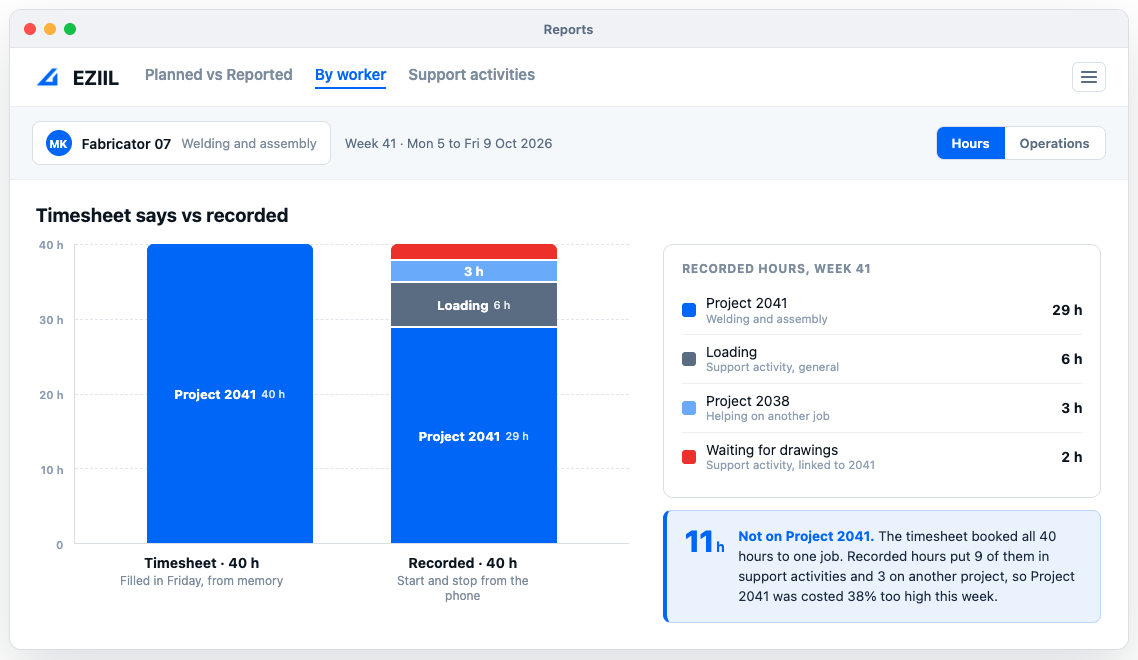
A weekly timesheet asks a fabricator to split 40 hours across jobs from memory. Forklift time, yard work, helping a colleague and waiting for drawings all get written against whichever job was open that week, so every job carries indirect labor it never used.
The example UK shop runs 15 fabricators and 10-15 projects at a time. Material arrives cut and drilled from the stockholder, so the in-house work is welding, assembly and smaller components. Hours go on a weekly timesheet by person. The owner described the problem in one sentence: “A fabricator who books 40 hours to a project may have spent 30 on it and 10 on yard work or helping someone else, but all 40 land on that project.” His conclusion about the resulting job cost analysis was that it is “not really accurate.”
The hidden cost in his shop had a face. The workshop controller is the best and highest-paid fabricator in the building, and he spends much of his day on the forklift loading lorries. “Rather than allocating the labour correctly, he’s out loading on the forklift.” Nobody disputes that the lorries need loading. The question is whether a skilled fabricator should be the one doing it, and that question cannot be answered while the forklift hours are invisible inside the project hours. The owner wanted to look back after twelve months, see how many hours his fabricators spent on loading and unloading, and decide whether a dedicated yard hand would pay for itself. With weekly timesheets, that number does not exist.
This is the oldest distinction in cost accounting, direct labor against indirect labor, and it is the one that weekly timesheets quietly erase. Direct labor is the work that goes into the product. Indirect labor supports production without touching a specific job, and it belongs in overhead, where your shop rate recovers it across all jobs (read more about the difference between direct and indirect labor). When indirect hours are written against a job, two things go wrong at once. That job looks more expensive than it was, and your overhead rate is too low, so every future quote under-recovers the yard work.
How to detect it. Take last week’s timesheets and ask three questions. Does any line say forklift, cleaning, waiting or training? If not, that time went somewhere else. Does the weekly total per job match what the foreman saw on the floor? Are any hours booked to a job that was not in the shop that week? One or two “yes” answers means the mechanism is live.
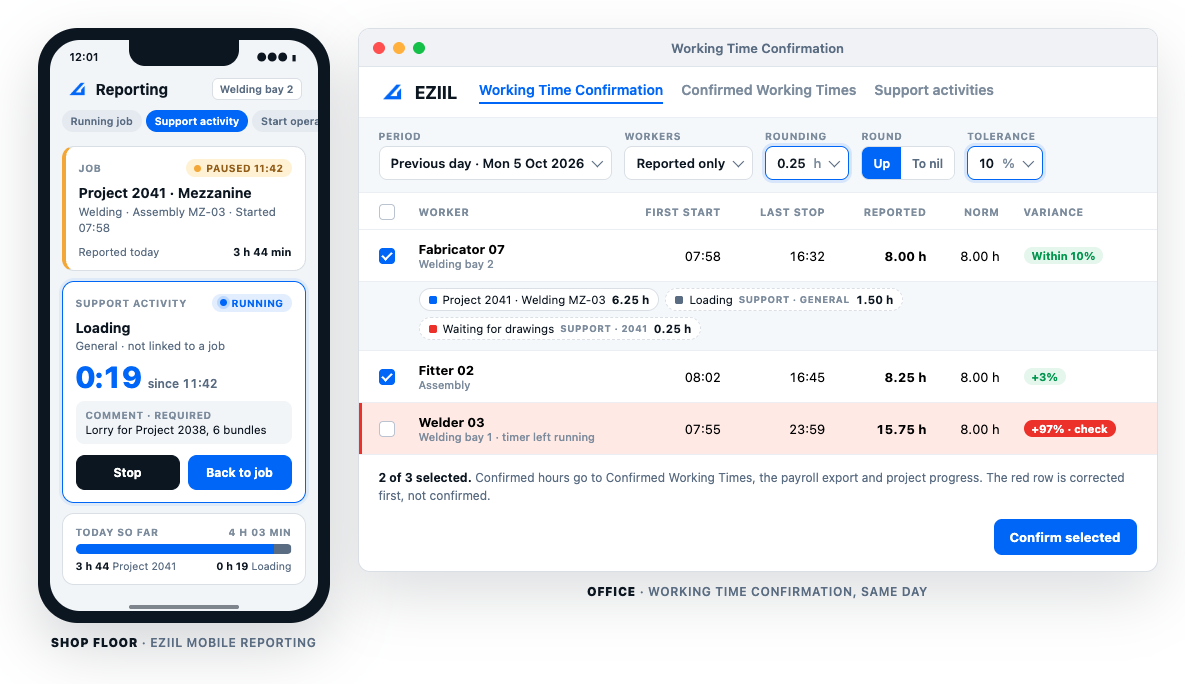
Where EZIIL comes in. EZIIL handles this with support activities. The shop sets up a short list before go-live, typically 5-10 items such as loading, cleaning, maintenance, waiting for drawings, rework and training. When a fabricator stops welding to load a lorry, he picks the support activity on his phone, and the clock runs against that instead of the project. Each activity is either general (cleaning does not belong to any job) or project-linked (rework lands on the project that caused it). The time flows into the same confirmed hours table as job time, so at the end of the month “hours on the forklift” is a number in the cost report rather than a guess. The mobile shop floor reporting article shows what this looks like for the worker.
Mechanism 2: the paper production log records machine time, not the grinding
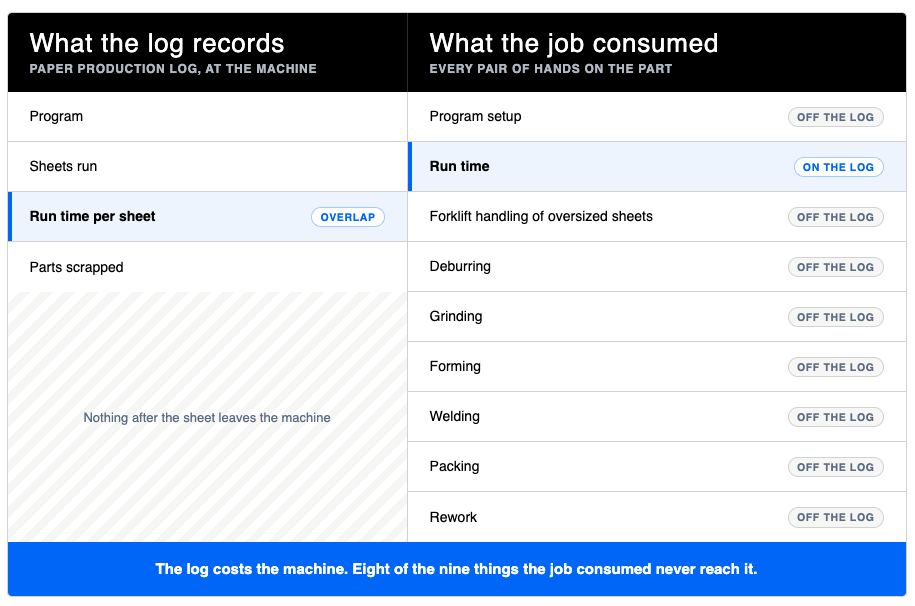
A paper production log travels with the program and records run time and scrap per sheet. It stops when the machine stops, so the deburring, grinding, forklift handling of oversized sheets and rework that follow are never written down anywhere.
The example US shop has 25 people, five lasers on two shifts, five press brakes and a turret punch. The assistant plant manager hands the operator a paper production log and a flash drive. The flash drive goes into the laser, the log lists the program and how many times to run it, and the operator writes down how long each sheet took and how many parts were scrapped. When the program is done, the log comes back and someone on the quality team types it up.
That log is a good record of the machine. It is a poor record of the part. In their own words: “The production log doesn’t account for the grinding, or the sheets are really big sheets so we have to load it with a forklift instead of our regular hoist, the little things that add more time that the piece of paper just doesn’t account for.” And later: “When they’re done cutting a program I expect them to return the production log, but then that won’t account for the next two days’ worth of grinding that they might have to do.”
The consequence for job costing was equally clear. “I can quote it and once I get my quote I know how much I should be charging. But then I don’t have any way right now to say okay, well this part actually sucks to do, my guy had to grind it for two hours afterwards, so where I should have made a hundred dollars on this job I actually lost fifty.”
This mechanism is systematic because logs are designed around the machine. Anything downstream of the machine is off-log by design, and downstream is where the awkward parts spend their time. The parts that are easy to cut and easy to finish come out looking exactly as profitable as the parts that are easy to cut and painful to finish. The shop then quotes both the same way next time.
How to detect it. Pick five finished parts from last month. For each one, list every pair of hands that touched it after it came off the machine: deburr, grind, form, weld, clean, pack, load. Then look for those hours in your records. If they exist only as a lump of “shop time” or not at all, your production log is costing the machine and not the job.
Where EZIIL comes in. In EZIIL every operation on a part is reported from the shop floor, including everything that happens after the cutting. Deburring, forming, welding, finishing and packing are operations on the bill of materials row, and the worker starts and stops each one from the phone, reports the quantity finished and leaves a comment when something came out wrong. So the two days of grinding become a line on the job, with a name and a duration. The Planned vs Reported report then shows, by worker and by date, where the hours went against what was planned. Put an hourly rate on your operations in production settings and the confirmed hours become labor cost per job. The shop floor control article covers how operations and statuses work together.
Mechanism 3: ten people on one job number
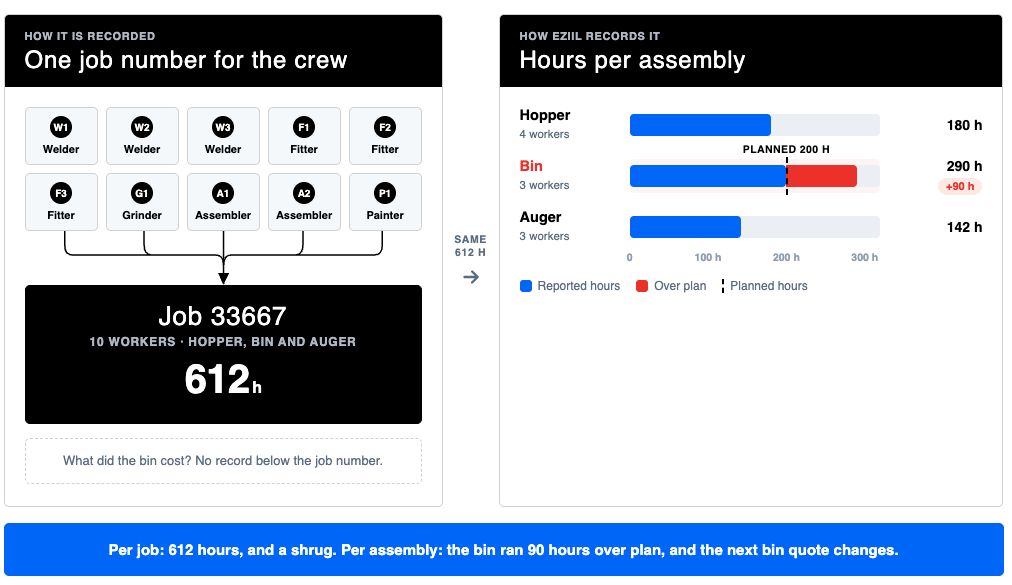
When a whole crew clocks to one job number, the job total may be right but nothing inside it is. You cannot see which hopper, bin or staircase took the hours, so you cannot re-quote the assembly that lost money or fix the process that caused it.
The example Australian company builds waste and recycling equipment: hoppers, bins, compactors, augers. The 25-person fabrication cell already logs hours in two systems, an ERP where workers log on and off jobs at a tablet and a workforce management system for payroll, and the production supervisor reconciles the two by hand. “Say John did 14 hours that day, but on this it shows you only did 12 hours of work. Where’d the other two hours go?”
The deeper problem was the unit. “Let’s say 10 employees are working on job number 33667. All employees can log on to job number 33667 and apply hours to that.” Ten people and one number. The company could see what the job cost. It could not see what the hopper cost, or the auger, or whether the bin took 45 hours or 70, because there was no standard time per product to compare against and no record below the job.
They summarized where that left the business: “Look at our hours allocated, then our actual hours spent and understand our gross profit and gross margin. That’s our missing link at the moment. They’re not actually 100% true, therefore we can’t accurately forecast what that profit and margin is.”
Cost per job is the wrong unit for a custom shop. A job is a commercial container: a customer order with a price and a date. The work inside it is assemblies and operations, and that is where the cost is caused. Costing at the job level tells you a job lost money. Costing at the assembly level tells you why, and whether the next quote for that assembly should change.
How to detect it. Count how many people clocked to your biggest job last month. Then ask what a single assembly on that job cost in labor. If the second question has no answer, your costing unit is too coarse for the decisions you want to make.
Where EZIIL comes in. EZIIL’s structure is customer, then project, then phase (a delivery with its own due date and price), then the bill of materials rows, with operations attached to each row. Hours attach to the operation on the assembly, not to a project number. For welding and assembly work the reporting app can run in an assembly view, so the welder picks the hopper or the staircase he is on and the hours land there. The office then confirms the day’s hours in one place, corrects a timer somebody left running, applies rounding and a tolerance, and locks the day. That confirmed table feeds project progress and the payroll export at the same time, which is the piece the Australian steel shop team reacted to most, because it meant one entry instead of two systems to reconcile. Workers can sign in on a shared tablet with an RFID tag rather than typing credentials. One caveat worth stating: EZIIL records what the floor reports. “One person per hopper” is a working agreement you set with the foreman, not a lock the software enforces.
How much margin do these three errors hide?
Each mechanism moves cost somewhere else rather than losing it, so the shop’s weekly total is right and every job is wrong. The jobs with the most handling, rework and support time look the most profitable, because that is where the hours leaked out.
The table below is an illustration, not a benchmark. It uses a 10-person shop with 400 paid hours in one week and three jobs on the floor. The quotes assumed 360 direct hours plus 40 hours of general shop time.
| Job | Quoted hours | Weekly timesheetHours from memory, once a week | Recorded hoursSupport separated, finishing captured, per assembly | ||
|---|---|---|---|---|---|
| Timesheet hours | What the timesheet suggests | Recorded hours | What the record shows | ||
| Job AMezzanine | 150h | 165h | 10% over | 128h | 15% under |
| Job BBalcony frames | 130h | 140h | 8% over | 118h | 9% under |
| Job CBrackets with heavy finishing | 80h | 95h | 19% over | 106h | 33% over |
| Support timeLoading, cleaning, waiting | 40h | 0h | Not visible | 48h | 12% of the week |
| Total | 400h | 400h | 400h | ||
Scroll sideways to see all six columns.
Read the timesheet column and the lesson is “we are underquoting everything by 10-20%, raise all prices.” Read the recorded column and the lesson is different. Two jobs were fine. One job, the brackets, is 26 hours over because of grinding that no log captured and that the weekly sheet spread across the other two jobs. And 48 hours of the week, 12 percent, was support time that no quote priced. The first lesson raises your prices on the work you were winning profitably. The second fixes the brackets and prices the yard work. The same 400 hours point to opposite decisions.
The quoting loop makes it worse over time. Estimators price from history. If the history says brackets take 95 hours, the next bracket job is quoted at 95 and loses again, while mezzanines are quoted at 165 and lose on price to a competitor who costs them properly. Specialty contractors see the same thing in construction, where estimating baselines built from memory-based, rounded and late timesheet entries carry a systematic variance that compounds into the next bid.
This is why EZIIL treats planned against reality per project as a live view rather than a month-end report. Hours and costs are compared with the plan as they are confirmed, and a project that is sliding shows it while there is still time to move people or have a scope conversation. APS Group, an Australian fabricator running 20+ concurrent projects, put it this way after moving its shop floor time capture into EZIIL: “Now we can see exactly what the workers are doing in the workshop and how many hours they are spending on each process. This has given us tighter control of active jobs, better-informed estimating and concrete profit/loss insights per job.”
How do you fix job costing without a six-month ERP?
Accurate job costing needs four changes in how hours are recorded, not a new accounting system. Cost at the assembly or operation instead of the job number. Make off-job time its own category. Capture time at the moment of work. Confirm it daily.
Here is the order that works in practice:
- Pick the costing unit before anything else. For a custom shop that is the assembly or the operation, not the job number. Decide which operations you will report (cutting, fit-up, welding, finishing, packing are typical) and keep the list short enough that the floor will use it.
- Write the support activity list before go-live. Five to ten items: loading, cleaning, maintenance, waiting for drawings, rework, training, meetings. Decide which ones are general and which belong to a project (rework usually does). Require a short comment so “waiting” says what it was waiting for.
- Capture at the machine, not at the end of the week. Start and stop on a phone or a shared tablet, with a tag or card to switch users. The research above is the reason: hours recalled days later are estimates, and the ones from two weeks back are often not recalled at all.
- Confirm hours daily or weekly in the office. One named person reviews the previous day, fixes timers left running and midnight crossovers, applies a rounding rule (a quarter hour is common) and a tolerance, then locks the day. The same confirmed hours should feed payroll, so the floor is not asked to record its time twice.
- Read planned against reported every week. By worker, by date and by project. Look for the operations that are consistently over, because that is your quoting error, and for support hours that keep climbing, because that is your hiring decision.
- Feed the actuals back into the next quote. Replace the hours in your estimating sheet with what the last three similar assemblies actually took. The job cost calculator walks through the shop rate and overhead side of that, and the six KPIs worth tracking include labor hours per ton and per assembly.
Two limits worth knowing before you choose a tool. First, a production system’s project cost contains what is recorded in that system: labor, support time and material booked to the project. If galvanizing and coating invoices live in your accounting package, they are not in the production system’s cost figure unless you bring them across. EZIIL works this way too, and the cost view should be read with that in mind. Second, scope is a decision. A five-person shop running one job at a time may fix all three mechanisms with a better timesheet and a Monday review. The mechanisms start to bite from roughly 10 people and 10 concurrent jobs, which is where a system that records hours per operation pays for itself. EZIIL’s own guidance to new customers is to plan and record only where the effort is smaller than the time it saves, and sometimes that still means a spreadsheet.
What accurate hours let you decide
Once support hours, finishing hours and per-assembly hours are real numbers, three decisions become possible that are guesses today: whether to hire for the indirect work, which parts to re-quote or redesign, and whether the reconciliation between your hours systems can stop.
- The hire. The UK fab shop’s owner’s question, whether a yard hand would pay for itself, is answered by one number: fabricator hours on loading and unloading over a quarter, at the fabricators’ loaded rate. With support activities recorded, that number exists.
- The re-quote. The US shop’s “part that actually sucks to do” gets its two hours of grinding on the record. The next quote for that part changes, and the mezzanine quote that was carrying its cost comes down.
- The reconciliation. The Australian steel shop confirms hours once, at assembly level, and exports them to payroll. The two-system comparison that asked “where’d the other two hours go” has one answer instead of two spreadsheets.
EZIIL is production management software for small custom steel and metal fabricators. It records hours per operation and per assembly from the shop floor, separates support time from job time, confirms hours once for both costing and payroll, and compares planned against reported hours and cost per project while the job is still running. It is not a full accounting system, and it will not tell you a job’s profit including invoices that live elsewhere. It will tell you, every day, where the hours went. Pricing is per shop by team size, with every Starter feature in every tier, on the pricing page, and the job shop software overview shows how costing sits next to scheduling and tracking.
If you want to see how a week of hours splits once support time and operations are recorded separately, take a free product tour and look at the Planned vs Reported report in the demo version. If you would rather talk through your own shop first, book a 30-minute demo with team EZIIL’s experts.
FAQ
Why is my job costing inaccurate even though my timesheets add up? Because a timesheet can be internally consistent and still wrong about where the hours went. Forty hours booked to one job balances against forty hours paid, but if ten of them were forklift and yard time, the job carries indirect labor it never used and your overhead rate under-recovers the same hours. The total is right, the allocation is wrong. EZIIL fixes the allocation at the source: workers clock support activities such as loading or cleaning separately from job time, so the hours that reach EZIIL’s job cost report are the hours spent on that job.
What is the difference between direct and indirect labor in a fab shop? Direct labor is time spent working on a specific job: cutting, fitting, welding, finishing, packing that job’s parts. Indirect labor supports production without belonging to one job: loading lorries, cleaning, maintenance, waiting for drawings, training. Direct labor is costed to the job. Indirect labor belongs in overhead and is recovered through the shop rate across all jobs. In EZIIL the two are kept apart by design: direct labor is reported against operations on the job’s bill of materials rows, and indirect labor is reported as support activities, either general (cleaning) or linked to a project (rework), so they never mix in the cost report.
How do I track labor hours per job in a small fabrication shop without annoying the crew? Keep the floor’s part to a start and a stop. In the EZIIL shop floor app the worker picks the job and operation (or an assembly), presses start, and presses stop or switches to a support activity when he moves. On a shared tablet he can sign in with an RFID tag instead of typing a password. Everything else, confirmation, rounding and the payroll export, happens in the office in EZIIL’s Working Time Confirmation. Shops that roll out EZIIL this way usually begin with one or two workers and one department and extend from there.
Should I cost by job, by assembly or by operation? By assembly or operation if you are a custom shop. The job tells you whether you made money. The assembly tells you where you made or lost it, which is what changes the next quote. Operation level adds the “which step” answer and is worth it where finishing or rework is a known problem. EZIIL attaches reported hours to the operation on the bill of materials row, so one entry on the shop floor gives you all three views: the operation, the assembly it belongs to and the project total.
How often should shop floor hours be confirmed? Daily is best, weekly is the minimum. Recall research shows the share of hours people cannot pin down roughly doubles between one week back and two weeks back, so a month-end review is already working from estimates. In EZIIL one named person in the office reviews the previous day’s reported hours in Working Time Confirmation, fixes anomalies such as timers left running, applies the rounding rule and tolerance, and locks them. The same confirmed hours then drive project progress, the job cost report and the payroll export.
Can I get accurate job costing without an ERP? Yes, within limits. EZIIL is production management software for custom steel and metal fabricators, not an ERP. It records hours per operation and per assembly, separates support time and confirms hours daily, which gives you accurate labor cost per job plus the material booked to it. Costs that live in accounting, such as subcontract galvanizing invoices, stay there unless they are brought across. For most 10-150 person fab shops that is enough to answer the quoting and hiring questions above, and EZIIL goes live with one module in under a week rather than after a six-month ERP implementation.
How do I spread payroll by job for job costing? Record hours once, at the operation or assembly level, confirm them daily, and export the confirmed hours to payroll. In EZIIL the Confirmed Working Times table is that single record: it feeds the job cost report and the payroll export from the same rows, so payroll and job costing carry identical hours split by job, and nobody reconciles two systems by hand.