
Mobile shop floor reporting is how workers log their time and progress against the plan and the drawing, from a phone, a shared kiosk, or a PC. In a fabrication shop it replaces paper travelers and whiteboards, so the office can see exactly where every job stands in real time, without walking the floor.
This article is for owners and production managers of small to mid size custom metal fabrication shops who are tired of chasing status. It explains what mobile shop floor reporting is, how it works end to end (from the person holding the grinder to the person answering the customer), and how to tell whether it fits a shop like yours.
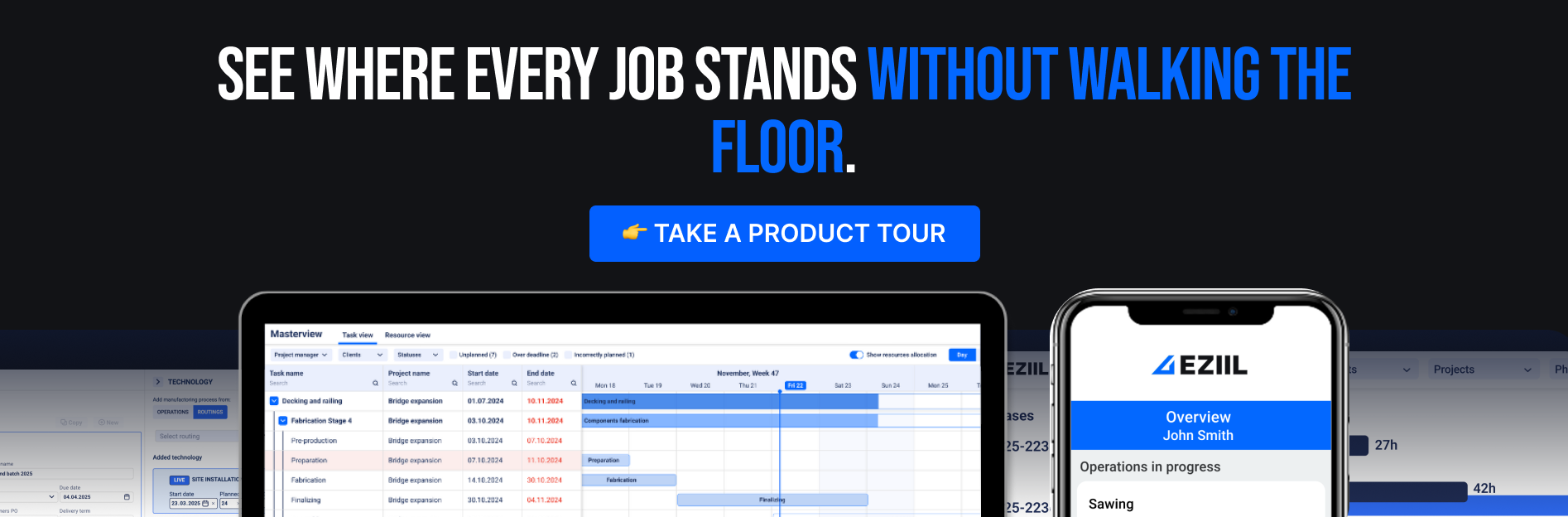
What is mobile shop floor reporting
Mobile shop floor reporting is a simple loop. A worker opens an app, picks the job they are working on, sees the right drawing, and reports what they finished and how long it took. That report flows straight back to the office as live progress. No clipboard, no end of day data entry, no guessing.
Mobile shop floor reporting is not OEE or machine monitoring. It does not read signals off a machine controller or a PLC. It is people reporting their own work, which is exactly what a project based fabrication shop needs, because your value is in one off jobs moving through cutting, welding, and assembly, not in a single machine running the same part a million times. Machine monitoring watches the machine, shop floor reporting follows the job.
In EZIIL, that reporting sits inside a clear flow. Work is planned in the MasterView (a drag and drop plan of your jobs across departments and capacity), pushed to the floor through the Operation Planner, reported by the crew, and rolled straight back up as live status. Same numbers, entered once, seen everywhere.
The Challenge: how most fab shops track the floor today
Most shops are starting from no system for shop floor tracking at all, or from a pile of tools that each made sense on its own. Paper travelers that ride along with the job. A whiteboard by the office door. A spreadsheet per project. A schedule that lives, as many steel fabrication shop owners have described it to us, “in the back of my head.” Some shops have already tried a handful of free apps and abandoned them.
This is the real status quo, and it is more common than the software industry likes to admit. In a 2026 survey of more than 600 US manufacturing leaders, half of plants still rely on manual frontline logs, paper trails, and spreadsheets, and 74% are held back by reporting delays that slow production down. The same study found that 65% of frontline supervisors lose up to four hours a shift just reconciling disconnected data, and only 9% can find the root cause of a floor problem right away.
The trouble is that the manual approach quietly taxes a shop as it grows. Status is always a few hours old. The owner walks the floor to answer a customer. Nobody can say what the real backlog is. The same numbers get written on paper and then keyed in again later. And there is a specific, painful failure mode the study names directly: 88% of leaders say critical operational knowledge walks out the door when an experienced person leaves. If your schedule lives in one person’s head, you are one resignation away from chaos.
In manufacturing threads online, the recurring advice from people who have done it is to keep the interface dead simple with big buttons for gloved, dirty hands, expect Wi-Fi dead zones in a steel building, and never digitize a bad process.
how Shop Floor Mobile Reporting Works in EZIIL
Here is the part that decides whether any of this actually works: what it is like for the person on the floor. If it is not fast and obvious, it will not get used, and everything downstream falls apart. So let’s walk through EZIIL mobile reporting from the shop floor side.
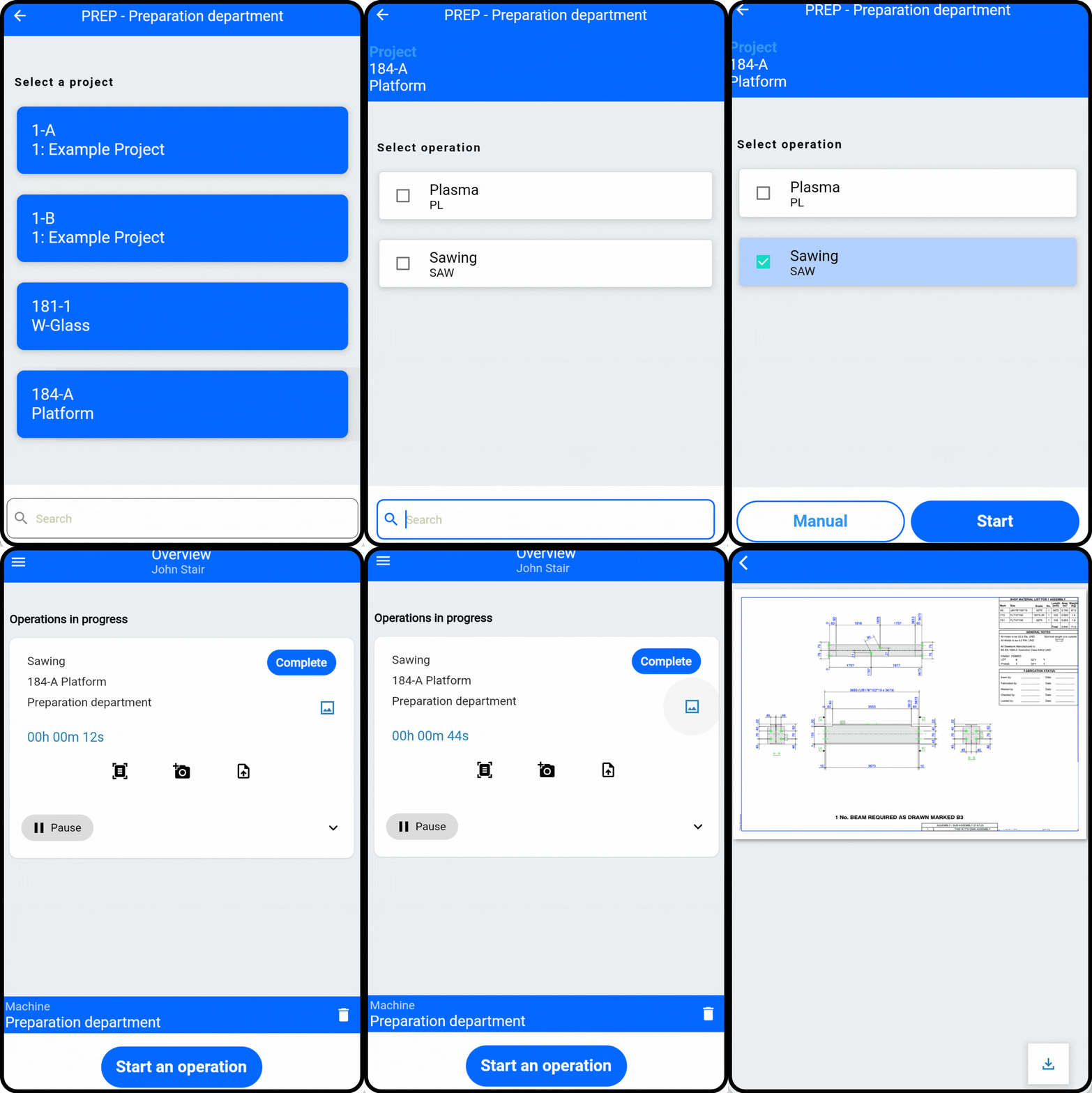
Logging in
The worker logs in with their email and password, the same login as the office system, and picks their own language from the menu (English, Estonian, and Russian are among the options). It runs as the EZIIL mobile app on Android and iPhone, and in a browser for a shop PC or a wide tablet. A shop can start with the phones people already carry rather than buying hardware on day one.
Picking the job
After login, they see the machine or work area they are assigned to and a filtered list of tasks in planned order. They start an operation, pick the task, choose the project, and select the operation. No scrolling through the whole shop’s work to find their three jobs. The app gives them three ways in: Simplified Reporting to log time against a job they already know, a Detail List when they need to see the whole queue on a multi part order, and Support Activities for time that is not tied to a job. Most people settle on one and stay there.
Working with the drawing in hand
The current drawing is right there on the device, attached to the item (PDF, DXF, or NC files), along with any photos or notes. The operators don’t have to go searching for the latest revision, and know confidently that they’re always working with the latest drawing. As the technologist at VMT put it after their steel shop switched to EZIIL, “On a week long project, I spent about 25% of my time just printing out work tasks and drawings. Now with EZIIL, it takes seconds.”
Reporting progress
The shop floor reports the quantity done, leaves a comment if something needs flagging, pauses for a break, and completes the operation when it is finished. Quantity counts whole pieces, so if a part runs across two shifts they log the time and leave the count until it is actually done. The rule shop floor workers go by is: you do not close the job, you close your shift. They can also log support activities that are not tied to a job, like cleaning or maintenance, so the day’s hours actually add up.
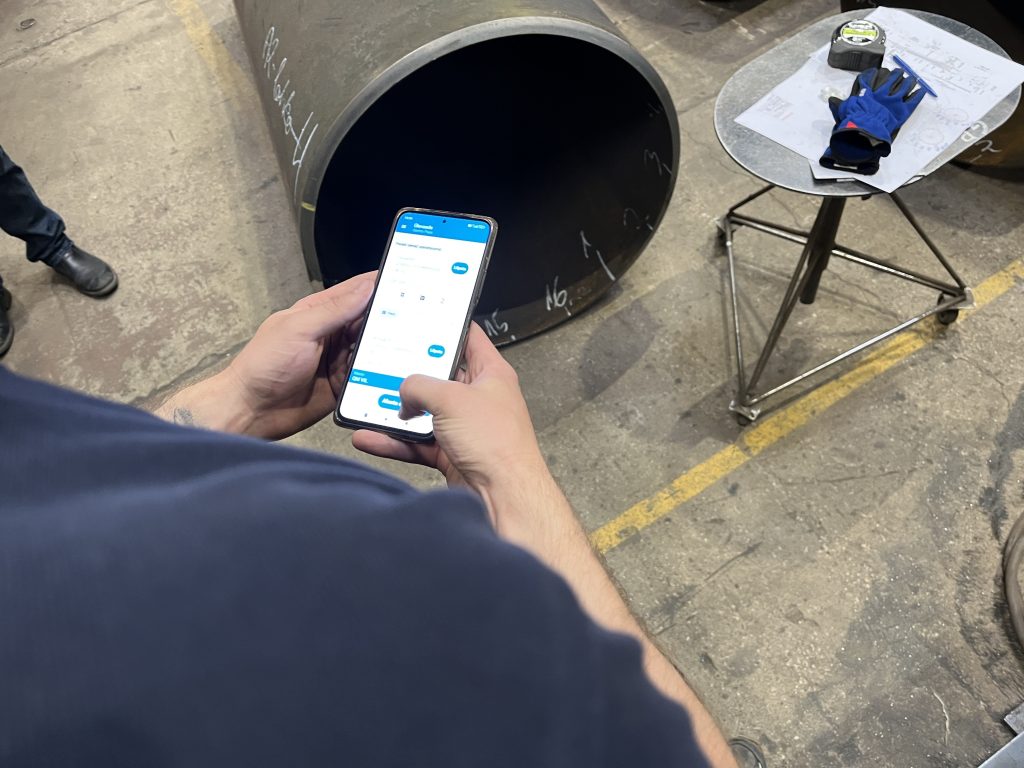
Switching machines and logging out
If someone runs more than one station, they switch between the machines they have access to. On a shared kiosk they log out cleanly, and the next person logs in with their own credentials. One person is logged in per device at a time, so that clean log out matters, otherwise the hours can land on the wrong name. EZIIL’s mobile reporting is intentionally designed to be simple enough that shops report every age group, regardless of their technology knowledge, using it.
what management sees in EZIIL
Now flip to the other side of the loop, because this is where the challenge actually gets solved.
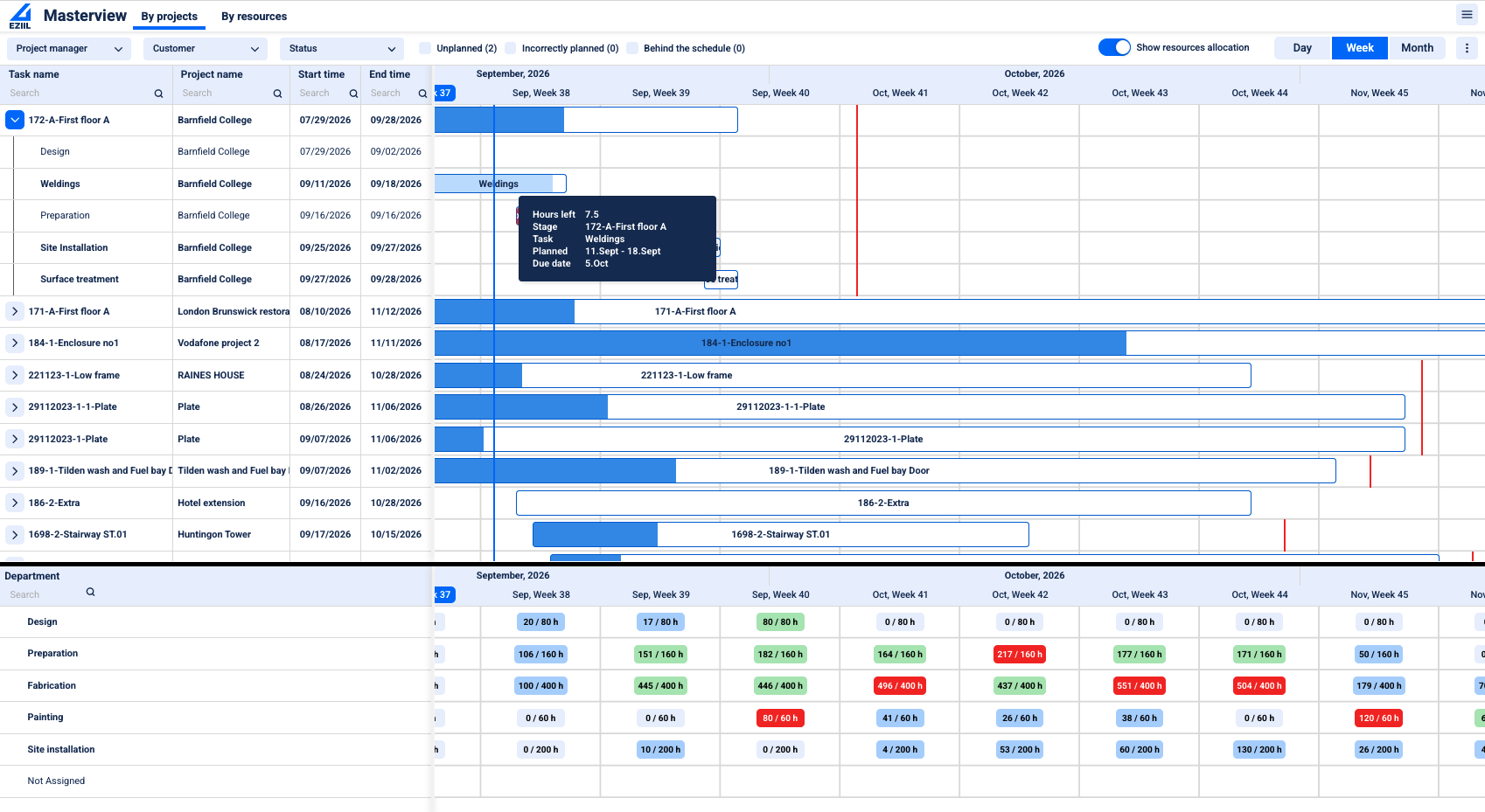
Live status without walking the floor
As work is reported, the job’s status updates on screen, down to the individual item: ongoing shows in progress, finished is marked done. The plain value line is the one we hear most in demos: if someone asks how far along a project is, you do not have to walk the workshop to answer. This is exactly what one of EZIIL’s customers described after rollout. At B&W Metall, knowing a job’s status used to mean walking to the machine and asking the operator. Now the project manager checks it live from his desk and, in his words, carries less worry about whether things are getting done.
Hours against budget, plan against reality
Reported hours stack up against the planned budget for each job. A project that was quoted at 174 hours might show 156 reported, about 90% of the way, so you can see an overrun coming while you can still do something about it, not after you invoice. Each day the office reviews the reported hours in Working Time Confirmation, yesterday or last week rather than the open day, and confirms them; that is also where a manager corrects a timer someone left running or overrides a percentage when reality needs a human call. Quantities count the moment a worker reports, and the hours and percentage move once the office confirms. This is the moment shops start quoting the next job from what the last one actually took, instead of from optimism.
“Now we can see exactly what the workers are doing in the workshop and how many hours they are spending on each process. This has given us tighter control of active jobs, better informed estimating and concrete profit and loss insights per job.” (Planner and QA/QC, APS Group.)
The MasterView roll up
All of this feeds the EZIIL MasterView, so you can see the whole shop by project or by resource, with a capacity and deadline line that flags when a department is overbooked or a job is about to slip. It doubles as an estimating tool: you can pace your bidding around where you are overloaded and where you have room.
Telling the customer, and protecting your numbers
Because status is live, you can easily answer “where is my job” and “what is your backlog” with a real number instead of a guess. And role permissions keep the shop floor view clean: workers see the tasks they need, while bid hours and margins stay with the office.
Shop Floor Reporting with EZIIL vs Manual
| Before: paper, whiteboard, phone calls | After: mobile reporting in EZIIL |
|---|---|
| Owner walks the floor to get a status | Status is live on screen, down to the item |
| The whiteboard is already out of date | The plan updates as work is reported |
| “I cannot tell you the backlog right now” | Backlog and timeline are there to share |
| Hours on paper, keyed in again later | Entered once on the floor, flows to progress and quoting |
| Shop floor can see bid hours | Workers see only their own tasks |
| Finding the right drawing is a hunt | The current drawing is on the device, per item |
In EZIIL, you report once, and the same truth shows up in the plan, in the cost view, and in the answer you give the customer.
Will the Shop Floor actually use EZIIL Mobile Reporting?
This is the question that stops most shops from changing anything. The older guys, the busy guys, the ones who have done it their way for twenty years. Will they pick up a phone and report?
The most useful evidence we have is from shops that already did it. B&W Metall, a structural steel shop pushing around 100 tons of steel a week, has reached 100% shop floor adoption across every age group. Everyone reports in EZIIL, regardless of age or role. It happened through a step by step rollout.
A few things make EZIIL’s full shop floor adoption realistic:
- EZIIL keeps it simple on purpose. The shop floor reporting app is mostly tap in, pick your job, see the drawing, report done. That is intentional, and it matches what fabricators say works: big buttons, few taps, gloves friendly.
- Modular roll out. You do not have to put every worker on a device on day one. A common rollout has a foreman marking work done from one device, then individual reporting gets added once the habit is set. This lowers the day one hurdle to almost nothing.
- Report in the crew’s own language. The reporting app runs in several languages including English, Estonian, and Russian, which is a genuine relief for mixed language shops where a single language app becomes a daily friction.
- One entry that flows. The point is to save a workplace, not add one. A worker enters the number once, and it feeds progress, costing, and quoting automatically, so nobody is doing double entry.
And here is the part that takes the pressure off the decision entirely: you do not actually need every worker logging in to get the progress view. The office can type a person’s hours straight against the job, or set a phase to complete by hand, and the MasterView moves exactly as if the floor had reported it. Our advice is to put the crew on the app because it makes your life easier, but a shop can go live office only and bring the floor on later. That means adoption is never the thing standing between you and starting.
Deloitte’s 2025 Smart Manufacturing survey puts numbers behind why this is worth the effort: manufacturers using connected, real time operations report roughly 10% to 20% higher production output and 10% to 15% in unlocked capacity on average. You do not need a smart factory to get a slice of that. You need the floor and the office to finally be looking at the same picture.
What to look for in shop floor reporting software
If you are weighing options, these are the things that actually decide whether a tool sticks in a fab shop, drawn straight from what fabricators tell us matters.
- Simple enough for the floor. Big buttons, few taps, usable with gloves and dirty hands. If your least tech happy welder cannot use it on day one, it will not get used.
- Runs on the hardware you already have. A worker’s phone, a shared kiosk, or a shop PC, with a simple login. You should not have to buy a fleet of rugged tablets to start, though each active reporter needs their own device, since one person is logged in per device at a time.
- The drawing travels with the job. The current revision shows up on the device, tied to the item, so nobody welds to last month’s print.
- Report once, and it flows. One entry on the floor should feed progress, costing, and your next quote automatically. If the crew reports and the office still re keys it, you have added work, not removed it.
- Role permissions. The floor sees the tasks it needs; bid hours and margins stay with the office.
- Plan against actual, not just a timesheet. Reported hours should sit against the planned budget so you can catch an overrun while you can still act on it, and quote the next job from real numbers.
- A rollout you can phase. Start with one module, go live in a week, and add the rest when you are ready. A big bang implementation is the thing most likely to fail.
Above all, look for a tool built for project based steel fabrication rather than a generic factory app bent to fit. One off jobs moving through cutting, welding, and assembly behave nothing like a repeatable production line, and the software should know the difference.
Who Is EZIIL’s Shop Floor Mobile Reporting The Best Fit For
Mobile shop floor reporting in EZIIL is a strong fit if you are a project based custom fabricator, roughly 15-150 people, running jobs that take days to weeks, and you are on paper, spreadsheets, or a whiteboard today. Structural steel, staircases, architectural metalwork, misc metals, tanks and vessels: this is what EZIIL was built for.
EZIIL is not the best choice for you if your shop runs a high volume of very short, same day jobs that need to be sequenced hour by hour. The lightest version of EZIIL plans down to the day, which suits jobs that run a week or more. If you need to rank ten tiny jobs within a single day, the fuller Operation Planner can sequence within the day per person or machine, but that is more setup.
Getting started with EZIIL Shop Floor Mobile Reporting
EZIIL is a monthly subscription priced by team size, not per user, so adding shop floor reporters does not run up your bill: €120/$140 a month for up to 15 users, €180/$210 for 16-50, and €290/$338 for 51-150, plus a one off onboarding fee of €300/$350 that includes setup and training. You can start with one module and go live in under a week, then add the rest only when you are ready.
Please note, EZIIL does not offer a self serve free trial, and the reason is practical: a custom fab setup (your operations, your statuses, your users, your machines) needs to be configured with you for the tool to be worth anything, so onboarding and a real setup replace the empty sandbox. What you can do instead is take a free product tour and see inside the platform.
Frequently asked questions
Does mobile shop floor reporting mean OEE or machine monitoring? No. OEE and machine monitoring read data off machines and controllers. Shop floor reporting is people logging their own time and progress against the plan and the drawing. For project based fabrication, where the work is one off jobs moving through many operations, the people driven approach is the one that fits.
Do workers need their own phones? No. It runs on a worker’s phone, but it also runs on a shared shop kiosk or a PC, so you can put one device at a station and let the crew log in with their own email and password. Many shops start with the phones they already have. One person is logged in per device at a time, so a clean log out between users matters.
Will older workers actually use it? In practice, yes. The floor app is deliberately simple (tap in, pick your job, see the drawing, report done), and shops report full adoption across all age groups when they roll it out step by step, often starting with a foreman reporting for the team. And if some never take to it, the office can enter their hours for them, so the work still shows up in progress.
What languages does the EZIIL mobile reporting app support? Several, including English, Estonian, and Russian, which matters for mixed language crews where a single language app creates daily friction.
How is progress calculated? Reported hours are compared against the planned budget for each job (for example 156 hours reported against 174 planned), and the office can override the percentage manually when a human judgment is needed. That comparison also improves how you quote the next job.
How much does it cost, and is there a contract? Pricing is by team size, not per user: €120 (about $140) a month for up to 15 users, €180 ($210) for 16 to 50, and €290 ($338) for 51 to 150, plus a one off €300 ($350) onboarding fee. It is a monthly subscription, so there is no long lock in.
Is there a free trial? There is no self serve free trial, because a custom fabrication setup needs to be configured with you to be useful. Instead you can take a free guided product tour and see inside the platform with someone who understands fabrication.