
Search for production tracking software and you’ll probably end up with the same results: Monday.com, Trello, Airtable, maybe Katana or Tulip. However, none of those tools were built for one-off steel work, and a fabricator who trials one usually finds that out about a week in, when it still cannot answer the two questions that matter: which of my 35 jobs is behind, and did the last one actually make money. If you need more than production tracking, our guide to metal fabrication software compares 16 full systems.
This guide will help make the picture a bit clearer. We’ll be comparing the 8 best production tracking software for custom steel fabricators, looking at features and capabilities, pricing, who’s each solution the best pick for and what the actual users are saying.
Here is the short version, then the detail.
The 8 best manufacturing tracking software tools for steel fabricators in 2026:
- EZIIL, best overall for project-based custom steel and metal fabricators
- Fulcrum, best for shops that want automated, self-adjusting scheduling
- MRPeasy, best low-cost entry into generic cloud MRP
- JobBOSS², best for established job shops with deep costing heritage
- ProShop ERP, best for quality-driven CNC machine shops
- Tekla PowerFab, best for larger structural shops in the Tekla ecosystem
- Katana, best for shops that also make and sell stock products
- Steel Projects PLM, best for machine-heavy shops wanting CNC and nesting integration
Last updated: August 2026.
Production tracking is the reporting half of the job. If you want the planning half in the same system, EZIIL’s shop floor management software captures hours and status from the floor, its job shop software plans and costs each custom job, and the MES software page explains how execution tracking fits a 15 to 150 person shop. For logging time from a phone, see mobile shop floor reporting.
What does Production tracking mean for a custom steel shop?
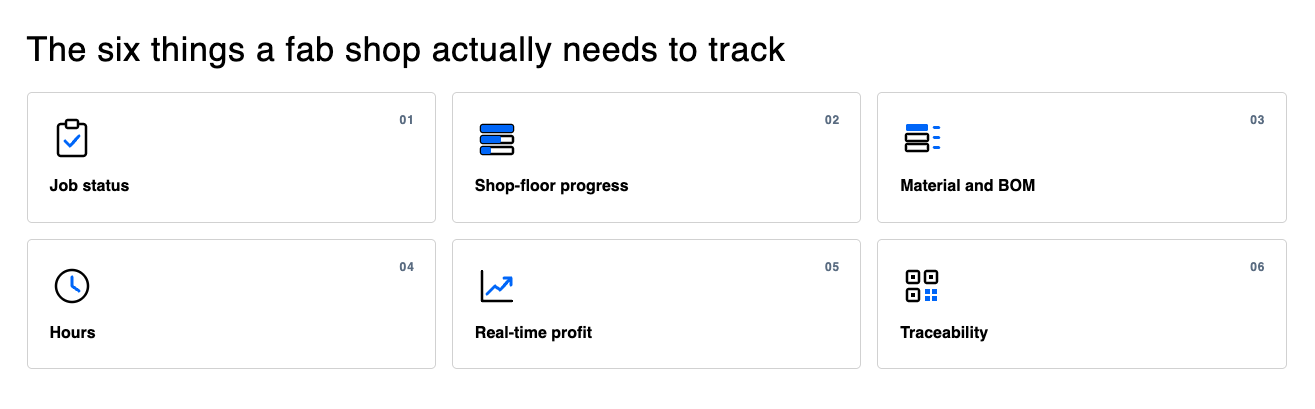
Before comparing tools, it is worth pinning down the word. For a shop doing one-off, project-based steel work, tracking is really six jobs rolled into one:
- Job and project status: Where every live project stands right now, without walking the floor or ringing the foreman. If someone asks “how far are we?” you should be able to answer from a screen, in seconds, at the detail level of a single assembly.
- Shop-floor progress: What each workstation finished today: what got sawn, what got welded, what is sitting at powder coating. In most shops this still lives in people’s heads. The Manufacturing Leadership Council found that 70% of manufacturers still collect production data manually.
- Material and BOM: Which materials each job needs, what has been ordered, what has arrived, and crucially, which job has claimed which steel. Two projects quietly consuming the same beam is one of the most expensive surprises a fab shop can have.
- Hours: Actual labor hours logged against each job and each operation, captured on the floor as work happens, not reconstructed from memory on Friday.
- Real-time profit: Planned hours and cost against reality, visible while the job is still running. Most fabricators only learn a job lost money after the invoice goes out, when nothing can be done about it.
- Traceability: For shops working under EN 1090 or AISC requirements, tracking also means an audit trail: who welded what, from which heat number, inspected when.
One distinction trips a lot of buyers up: production tracking is not production scheduling. Scheduling decides what should happen and when. Tracking tells you what is actually happening. A whiteboard can schedule. Only a live system can track. The tools below vary a lot on how well they do each, and we call that out per tool.
Why generic Production tracking tools fall short for custom steel
If you have already tried running your shop on a project board or a spreadsheet, nothing that follows will surprise you. But it is worth being precise about where these tools break, because the usual conclusion (“we’re too unique for software”) is the wrong one. The tools were the mismatch, not your shop.
Monday.com, Trello and Airtable. All three are good general-purpose work trackers. Monday.com starts at $9 to $19 per user per month, Trello at $5 to $17.50, Airtable at $20 to $45. The problem is not price, it is what a board fundamentally is: a list of cards with statuses. There is no BOM tied to a job, no material inventory, no way for a welder to log hours against an operation, and no job costing that compares estimate to actual. You can build imitations of those things with custom fields and formulas, but then you have become a part-time software developer, and the whole thing lives or dies with the one person who understands the setup.
Odoo. The closest of the generic tools to a real fit. Odoo’s manufacturing module is genuine MRP, and the pricing is reasonable at $24.90 to $49 per user per month. But Odoo’s MRP is built around standardized, repeatable BOMs for product manufacturing. One-off jobs where every BOM starts from unique detailing drawings are not native to it, and Odoo itself points mid-size companies toward certified implementation partners. In practice, fitting Odoo to a fab shop is a consulting project, not a subscription.
Tulip. A no-code platform for building your own shop-floor apps, aimed at repetitive, station-based line operations in discrete manufacturing and regulated industries. It is priced per device interface, from $100 per interface per month with a 10-interface minimum, which puts the floor at roughly $12,000 per year before you have built anything. For a small shop doing one-off structural work, it is both overkill and a mismatch.
Spreadsheets and whiteboards. The riskiest option for custom steel fabricators. Academic audits have repeatedly found errors in roughly 9 in 10 operational spreadsheets. A spreadsheet cannot tell you what happened on the floor an hour ago, cannot stop two jobs claiming the same steel, and cannot answer “did this job make money” until someone rebuilds the numbers by hand. And the whole system depends on the one person who maintains it. FLI Structures, a 70-person UK fabricator, ran 100 live projects from what their team called a mega-spreadsheet, with 5-10 duplicate purchase orders going out per day and workshop capacity double-booked into weekend shifts, before moving tracking into EZIIL, a system actually built for the steel production tracking.
None of this means the people who recommended these tools were wrong in general. They were wrong for one-off steel work. Which raises the practical question: what should a custom steel fabrication shop actually look for?
What to look for in A Production tracking software for Custom Steel fab shop
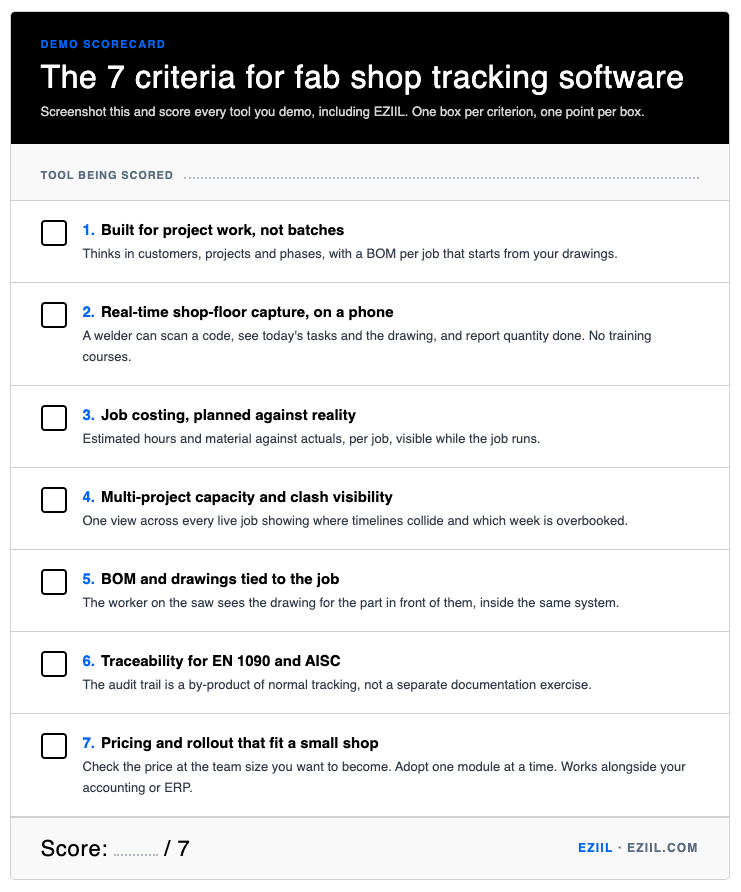
We talk to fabricators every day, and the same worries come up in almost every conversation. Most of them are, in fact, risk questions: will this disrupt my shop, will my guys use it, will the price punish me for growing. So treat the list below as both a feature checklist and a risk checklist. Score any tool on this page against it.
1. Built for project work, not batches. The tool should think in customers, projects and phases, with a BOM per job that starts from your drawings. If the data model assumes you make the same product repeatedly, every custom job becomes a workaround.
2. Real-time shop-floor capture, on a phone. Progress data is only real if it comes from the floor as work happens. That means a mobile app simple enough that a welder can scan a code, see today’s tasks and the drawing, and report quantity done. If it takes training courses, it will not survive contact with the shop. A fair test: if your team can use a phone, they should be able to use a mobile reporting software.
3. Job costing, planned against reality. Estimated hours and material against actuals, per job, visible while the job runs. This is the feature that answers “did we make money” before invoicing instead of after.
4. Multi-project capacity and clash visibility. One view across every live job showing where timelines collide and which week is overbooked. For most custom shops this is the single biggest source of fire-fighting: not one project going wrong, but three projects colliding in the same week on the same machines.
5. BOM and drawings tied to the job. The worker on the saw should see the drawing for the part in front of them, inside the same system that tracks the operation. Separate drawing folders are where version mistakes come from.
6. Traceability for EN 1090 and AISC. If you fabricate under execution classes or AISC certification, the audit trail should be a by-product of normal tracking, not a separate documentation exercise.
7. Pricing and rollout that fit a small shop. Three things to check. Per-user pricing looks cheap at 5 users and punishes you at 40, so check the math at the team size you want to become. Implementation risk: PwC found 69% of operations leaders say their technology investments have not fully delivered, and the most common story behind that number is a big-bang rollout that stalled. Look for tools you can adopt one module at a time. And check if the tool works alongside other software you already use. You should not have to rip out your accounting package or existing ERP to get tracking; a tracking layer that connects over an API is a far smaller decision than a full replacement.
One more criterion that is hard to put in a table: vendor risk. Plenty of fabricators, we’ve been talking to, still remember what it felt like when FabTrol stopped being developed, and they are right to ask what happens to their data if a vendor disappears. Cloud-based tools with export options and active development are the reasonable hedge here.
8 best Production tracking tools for steel fabricators
The prices listed below are the vendor’s published price where they exist; where they do not, we say so rather than guessing, and we flag third-party estimates as estimates. Review scores come from Capterra and G2.
1. EZIIL: best overall for project-based custom steel fabricators
What it is: EZIIL is cloud-based steel fabrication software for production tracking and job shop management, built for custom steel and metal fabricators with roughly 15-150 people. The data model is the one fabricators already think in: customer, project, phase, with a quotation per phase that flows into planning, production and invoicing without re-entering data.
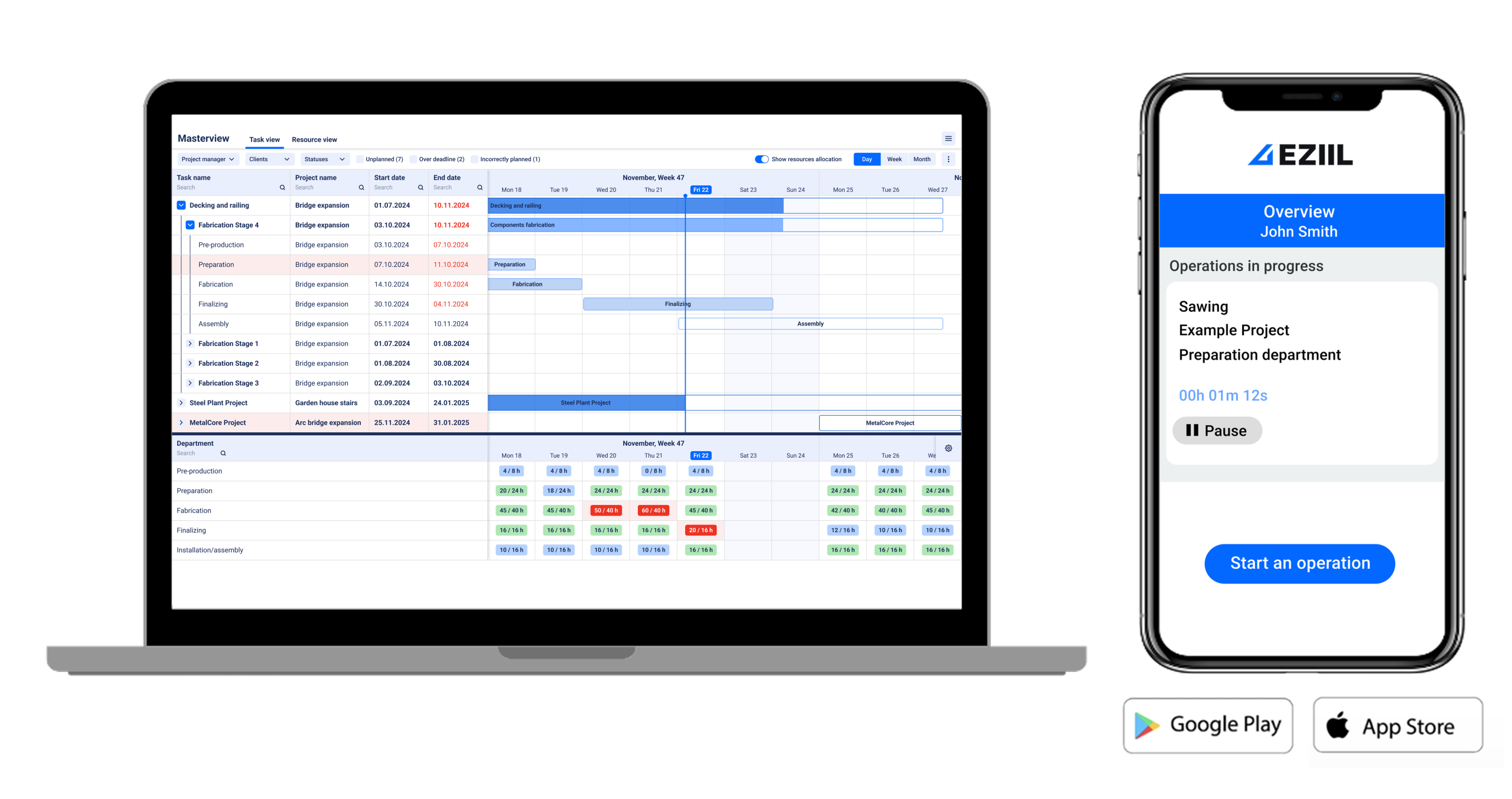
Production tracking strengths: One Master View holds every live project with planned hours, capacity balancing and a deadline comparison that shows whether you are about to overrun your own timeline. On the floor, workers scan a QR code at their station, see their tasks in planned order with the drawing attached, and report work times and quantity done from a phone. That feedback flows straight back into project status, so “how far are we?” gets answered from the screen, not from a walk through the workshop. Job costing runs live: planned hours and material against reality, per job, while you can still react. APS Group, an Australian industrial fabricator running 20+ concurrent projects, moved from Google Sheets to exactly this setup and now sees labor hours per process and live profit and loss per job.
Practical example cases from real EZIIL users: B&W Metall, a structural shop pushing 100 tons of steel a week, cut dispatch paperwork from 5 hours to 20 minutes and reached 100% shop-floor digital adoption. VMT Tehased, 125 people across 3 factories, lifted engineer productivity by 40% and grew turnover 30% with no added headcount. UPFab in Michigan went from scheduling out of a supervisor’s memory to seeing 3-6 months of capacity ahead. Enefit Solutions deleted 12 daily-updated Excel sheets after go-live, and Nordic Shelter measured a 24x return on time invested in the BOM module (more customer success stories here).
Limitations: EZIIL is not a sales CRM, it handles quotes, orders and invoices but not pipeline or contact management. It is not built for high-volume repetitive MRP. So, if you produce large runs of standard products, a stock-oriented tool like Katana will fit better. Operation dependencies are also manual: the planner shows related jobs side by side but does not enforce sequence, so you sanity-check the order yourself.
Pricing: Published and flat by team size, not per user. €120/$140 per month for up to 15 users, €180/$210 for 16-50, €290/$338 for 51-150, plus a one-off €300/$350 onboarding fee that covers setup, training and regular check-ins. Every tier gets the same full feature set; add-on modules like BOM, procurement, inventory and EN 1090-2 compliance layer on top one at a time, whenever you are ready. See full details and calculate your ROI with EZIIL on the pricing page.
Rollout: Phased by design. Most shops start with project tracking and the Master View, are working in it within the first week, and add modules over the following weeks. APS Group described their whole rollout as taking a few weeks with a minimal learning curve.
Verdict: If you are a custom steel or metal fabricator juggling many one-off projects and your main pain is visibility, clashing timelines and profit you only see after invoicing, this is the tool built for exactly that. Take the free product tour and judge it against the 7 criteria yourself.
2. Fulcrum: best for automated, self-adjusting scheduling
What it is: Fulcrum is a manufacturing software aimed at precision CNC shops and sheet metal fabricators, positioned as an ERP, MES and QMS replacement in one.
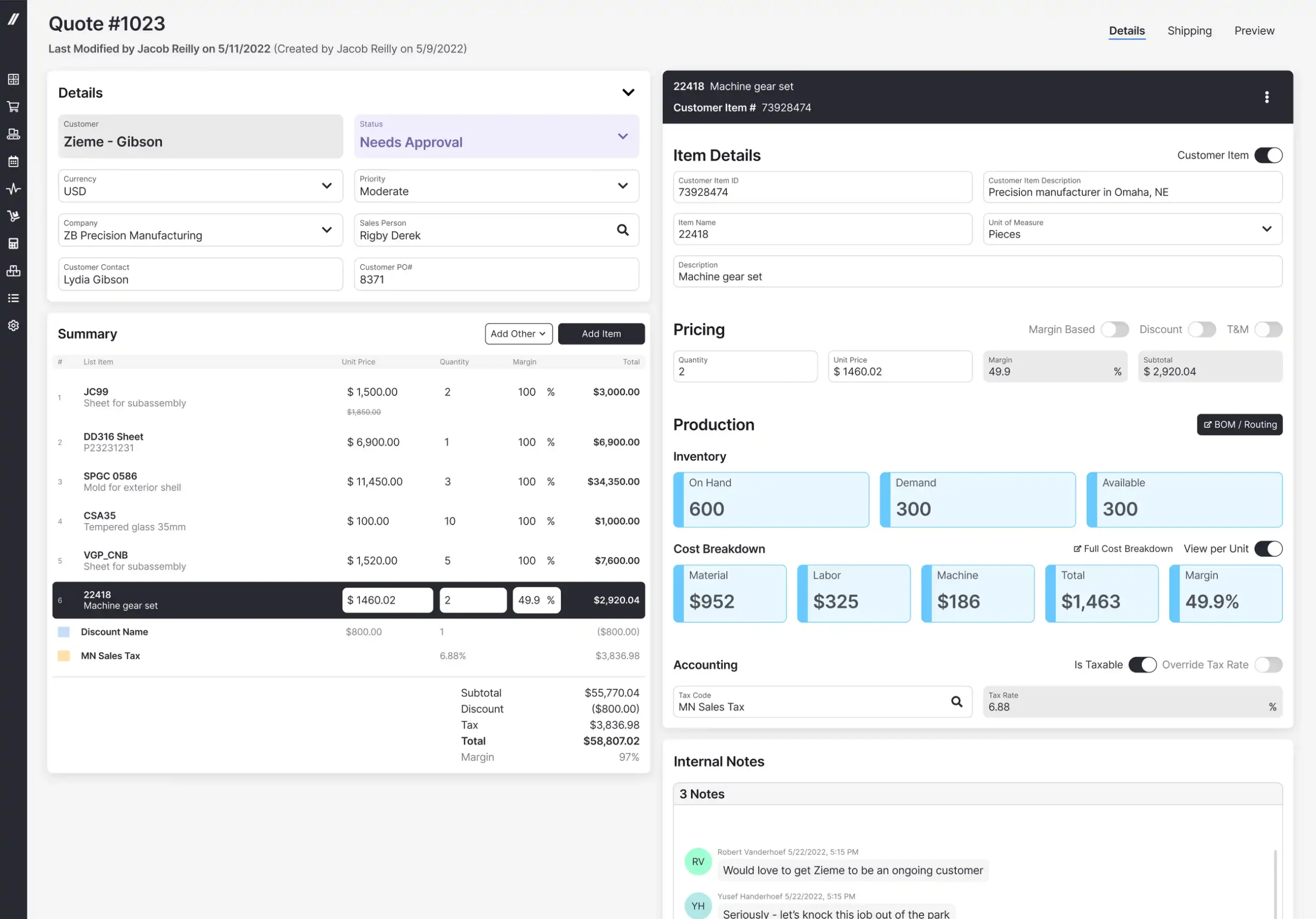
Production tracking strengths: Live labor and material capture through interactive operator instructions, real-time job cost visibility, and its standout feature, an autoschedule engine that re-optimizes the plan from live job progress. For fabrication specifically it can ingest nest PDFs to auto-fill material yield and cut times, and it captures drops and remnants from the floor. The polish of the interface gets consistent praise.
Limitations for custom steel: Users rate it very highly on online comparison sites but repeatedly mention a complex and lengthy initial setup and onboarding, a real learning curve and cumbersome data preparation during implementation. The software is sheet-metal and machining oriented rather than structural steel oriented, with no EN 1090 workflow.
Pricing: Not published; you book a demo to get a quote. Third-party estimates put entry pricing at around $800 per month, but treat that as an estimate, not a fact.
Verdict: If self-adjusting scheduling is the feature you would pay a premium for, and you have the patience for a longer setup, Fulcrum is the strongest option on this list. For the price-conscious shop that wants steel depth and a modular start, see our detailed Fulcrum vs EZIIL comparison.
3. MRPeasy: best low-cost entry into generic cloud MRP
What it is: MRPeasy is an MRP for small manufacturers of 10-200 people, covering production planning, inventory, sales, procurement and finance.
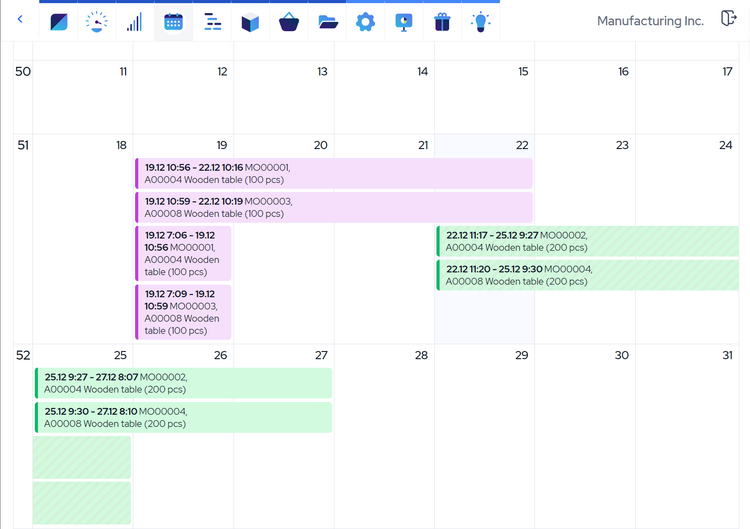
Production tracking strengths: A shop-floor interface where workers report operations and material use, real-time inventory, labor tracking, lot and serial number traceability, and a broad integration list including QuickBooks, Xero and Shopify.
Limitations for custom steel: MRPeasy is a generic MRP, designed around repeatable BOM-driven production. Nothing about it is fabrication-specific: no drawing-centric workflow, no nesting, no EN 1090 support. Online reviewers mention limited report customization and an interface that is not touch-friendly on the floor. And the pricing is per user, which is the quiet catch for a growing shop.
Pricing: Published: $49 to $149 per user per month depending on tier, with bundled rates above 10 users. At 5 users it is the cheapest real MRP you can buy. At 30 users on the Professional tier the math looks very different, so run the numbers at the team size you plan to reach.
Verdict: The right choice if you want the lowest-cost entry into a proper MRP and your production is closer to repeatable than one-off. If your work is project-based custom steel, the fit gaps add up; here is our honest MRPeasy vs EZIIL comparison.
4. JobBOSS²: best for established job shops with deep costing heritage
What it is: JobBOSS² is ECI’s job shop management software, the merger of the E2 Shop System and legacy JobBOSS lines, built around quote-to-cash for make-to-order shops.
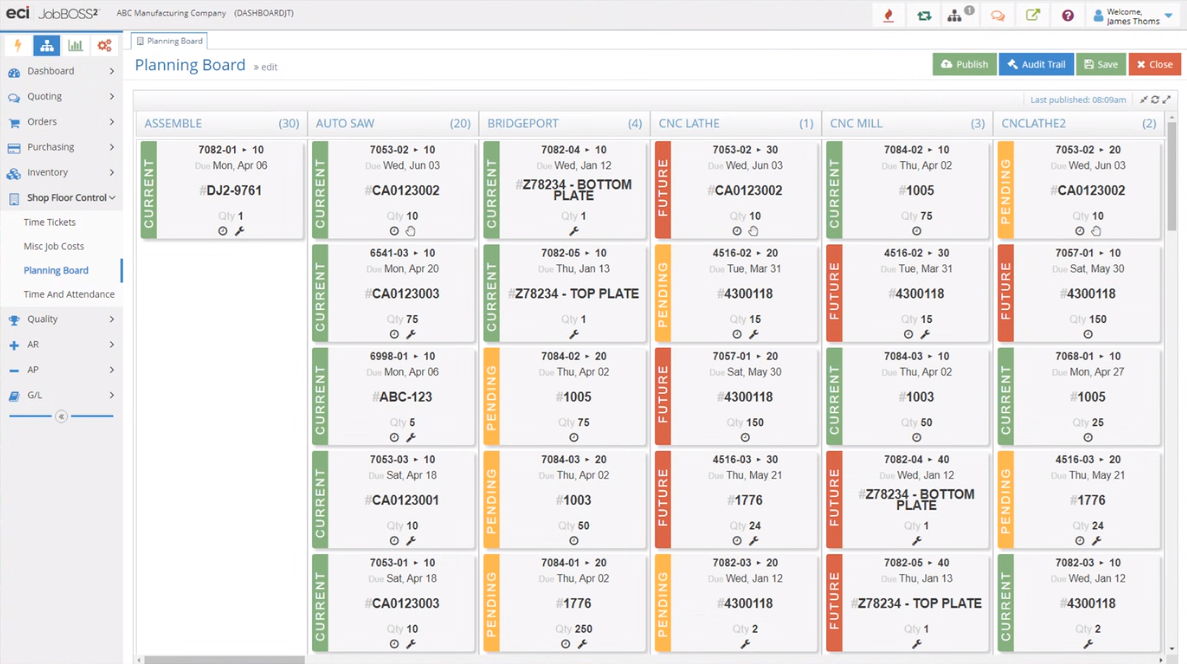
Production tracking strengths: Genuine job-shop DNA: quoting, job costing with a complete per-job view, labor and material management, visual scheduling and mobile visibility.
Limitations for custom steel: The online user reviews reflect a mixed reality. Recurring complaints include performance slowdowns, dated interface elements, difficult custom reporting, and costs that escalate as modules stack up (3.8 from 56 reviews on G2, the lowest G2 score in this set). Deployments are described as taking months with heavy data migration. Its heritage is machine shops rather than fabrication: no nesting or fab-specific workflows are advertised.
Pricing: Not published; quote-based per-user tiers. Third-party estimates conflict badly, ranging from roughly $85 to $200 per user per month, so do not trust any single number you read, including these.
Verdict: A reasonable choice for an established machine or job shop that values a long track record and deep costing, and can absorb a months-long implementation. Smaller custom steel shops usually find it heavier than the problem they are solving; see JobBOSS² pricing and alternatives.
5. ProShop ERP: best for quality-driven CNC machine shops
What it is: ProShop is a combined ERP, MES and QMS aimed at precision machine shops in regulated industries: aerospace, defense and medical.
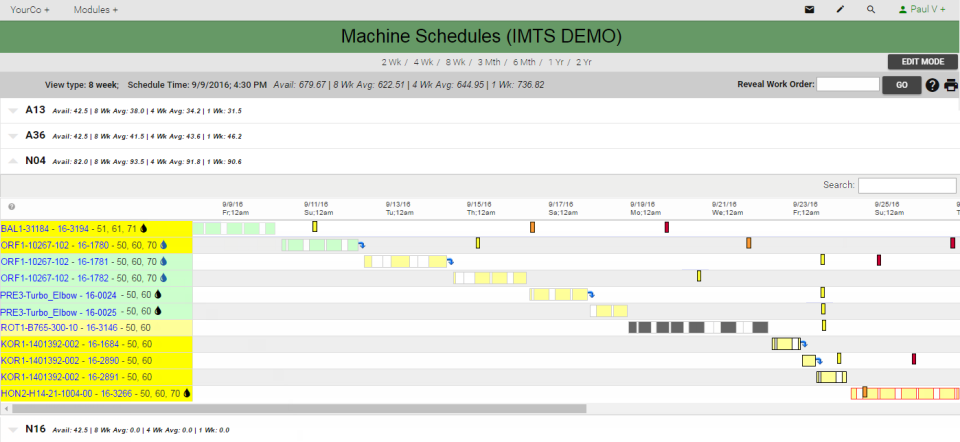
Production tracking strengths: A fully paperless shop floor with visual work instructions, real-time operator guidance, and automated job costing tied to financials that feeds back into quote accuracy. Its integrated quality system is the standout; reviewers consistently say it materially helps with ISO and AS9100 audits.
Limitations for custom steel: ProShop’s DNA is precision CNC machining and compliance paperwork, not structural or custom steel. No nesting, no plate or remnant tracking, no EN 1090. Reviewers describe a steep learning curve and an implementation measured in months, with pricing seen as high for smaller shops.
Pricing: Not published; per-user quotes. Third-party estimates suggest roughly $500 to $715 per month starting for a small shop, with implementation billed separately. Treat as estimates.
Verdict: If you are a machine shop chasing or holding AS9100 or ISO certification, ProShop is arguably the best tool on this list for you. If you are a steel fabricator, you would be adopting a machining system and working around it; see our ProShop alternative page.
6. Tekla PowerFab: best for larger structural shops in the Tekla ecosystem
What it is: Tekla PowerFab is Trimble’s fabrication management suite for structural steel, built on the former FabSuite, covering model-based estimating, drawing control, purchasing, production control and shipping.
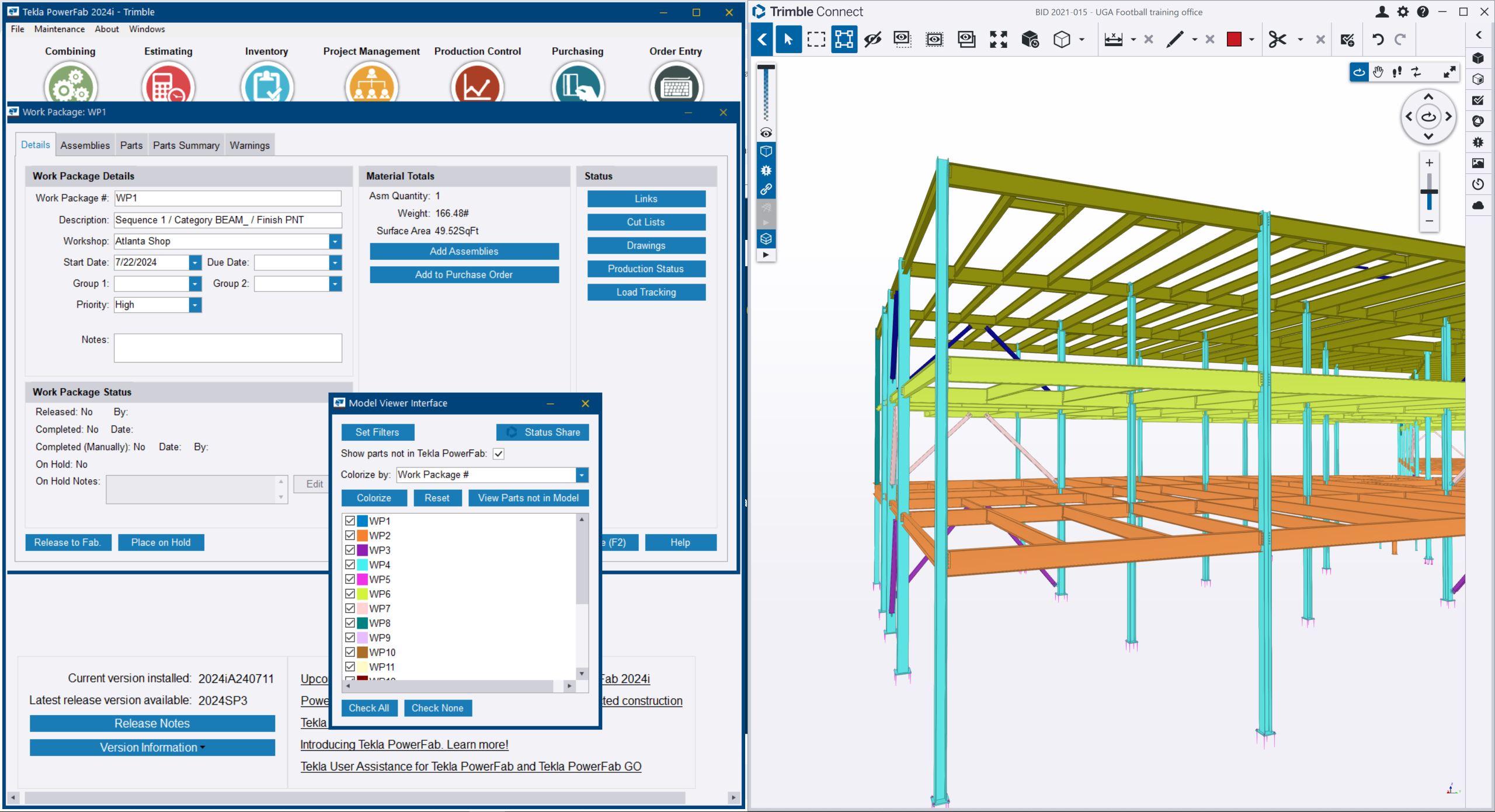
Production tracking strengths: Real-time shop-floor production tracking with full traceability, and its defining advantage, a direct line from the Tekla Structures BIM model through estimating, purchasing and production. For a shop already detailing in Tekla, the model-to-floor continuity is hard to match.
Limitations for custom steel: It is enterprise software in cost and weight. Showcased customers skew mid-size and larger structural shops with dedicated estimating and project management staff. There is effectively no independent review base to consult (a single G2 review as of August 2026), and third-party coverage flags a steep learning curve and high price. For a 20-person shop, it is usually more system than the problem requires.
Pricing: Not published; quote-based through Trimble sales. Public third-party figures conflict so widely (from an $8,000 Capterra listing figure that looks like a data-entry artifact to a $50,000 perpetual license estimate) that we will not repeat any of them as fact.
Verdict: For a 100+ person structural fabricator running Tekla Structures end to end, PowerFab is the natural shortlist leader. For small and mid-size custom shops, the cost and weight rarely pay back; see Tekla PowerFab vs EZIIL.
7. Katana: best for shops that also make and sell stock products
What it is: Katana is a cloud inventory software with light manufacturing, aimed at multi-channel commerce: businesses making and selling products through Shopify and similar channels.
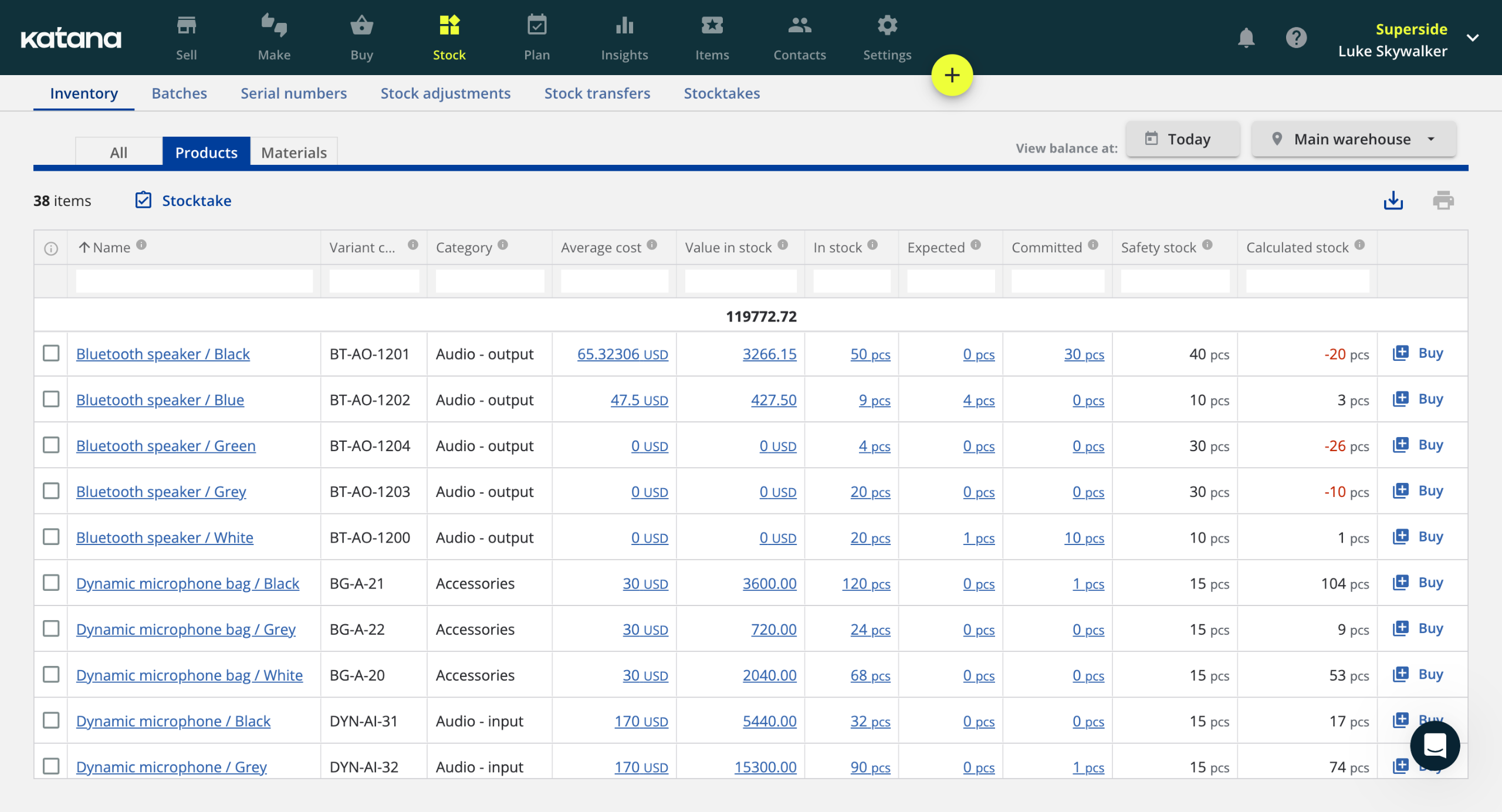
Production tracking strengths: A clean shop floor app with task assignment, time tracking and actual vs planned material usage, multi-level BOMs, lot traceability, and unlimited users on every plan, which is rare in this set and worth real money to a growing team.
Limitations for custom steel: Katana thinks in SKUs and stock, not projects and drawings. There is no drawing or model import, no nesting, no EN 1090 workflow, and costing is oriented to manufacturing orders of catalog products rather than one-off contract work. Reviewers’ loudest recent complaint is pricing: steep increases and features moving behind paid add-ons.
Pricing: Core plan from $299 per month plus a $199 per month Manufacturing add-on for shop-floor capability, so a realistic manufacturing setup starts near $498 per month, with usage-based charges on top for order volume and locations.
Verdict: If a meaningful share of your revenue is standard products you stock and sell, Katana handles that world better than any project-based tool, ours included. If your work is one-off fabrication, its data model fights you; see our Katana alternative page.
8. Steel Projects PLM: best for machine-heavy shops wanting CNC and nesting integration
What it is: Steel Projects PLM is workshop production management software for steel fabricators from the software division of the FICEP Group, the Italian machinery manufacturer. It manages the workshop from detailing-office drawing import through nesting, CNC programming, production tracking and delivery.
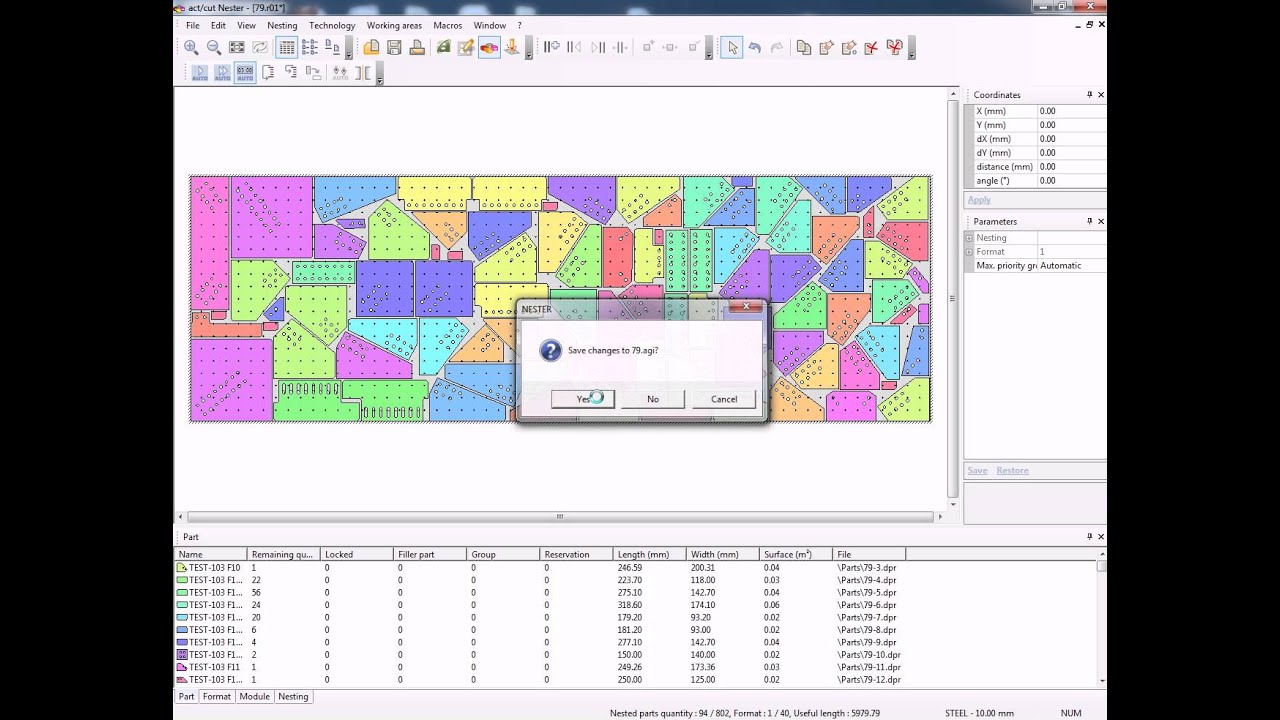
Production tracking strengths: Real-time production tracking across CNC machines and manual workstations, strong section and plate nesting, drawing-to-machine automation, and built-in EN 1090 traceability. If your shop runs FICEP lines, the integration is about as native as it gets.
Limitations for custom steel: It is workshop-centric rather than business-centric. Estimating, quoting and job-level profit visibility are not its emphasis, so it typically runs alongside other systems rather than replacing them.
Pricing: Not published; quote-based, historically sold alongside FICEP machinery.
Verdict: The strongest pick for a machine-heavy structural shop whose priority is feeding CNC lines efficiently from detailing data. For whole-shop business visibility, from quote to profit, it is usually paired with or replaced by a broader tool; see Steel Projects PLM vs EZIIL.
Best Production Tracking Software for Steel Fabricators: Comparison Table
| Tool | Best for | Built for one-off project work? | Real-time shop-floor tracking | Job costing and live profit | EN 1090 / AISC traceability | Pricing model | Published price | Go-live time |
|---|---|---|---|---|---|---|---|---|
| EZIIL | Custom steel and metal fabricators, 15 to 150 people | Yes | Yes, mobile QR reporting | Yes, planned vs reality | Yes, EN 1090-2 module | Flat by team size | €120 to €290 / $140 to $338 per mo + €300/$350 one-off onboarding | First week, phased by module |
| Fulcrum | Shops paying a premium for auto-scheduling | Partly (sheet metal, CNC) | Yes | Yes | No EN 1090 | Quote-based | Not published (est. ~$800 per mo) | Lengthy, per reviews |
| MRPeasy | Cheapest entry to generic MRP | No, repeatable BOMs | Partly, shop-floor interface | Partly | Lot/serial only | Per user | $49 to $149 per user per mo | Weeks, self-service |
| JobBOSS² | Established job shops, deep costing | Partly (make-to-order, machining) | Yes | Yes | No fab-specific | Per user, quote-based | Not published (estimates conflict) | Months, per reviews |
| ProShop | AS9100/ISO CNC machine shops | Partly (machining) | Yes, paperless floor | Yes | QMS, not EN 1090 | Per user, quote-based | Not published (est. from ~$500 per mo) | Months, per reviews |
| Tekla PowerFab | Larger structural shops on Tekla | Yes (structural) | Yes | Partly | Yes | Quote-based | Not published | No public data |
| Katana | Shops selling stock products | No, SKU-based | Yes, shop floor app | Partly, order-level | No | Flat + usage + add-ons | From ~$498 per mo realistic | Weeks, self-service |
| Steel Projects PLM | Machine-heavy CNC shops | Yes (workshop scope) | Yes | No, workshop focus | Yes, EN 1090 | Quote-based | Not published | No public data |
Scroll sideways to see all columns.
How to choose: which software fits your shop?
The faster route is to deciding which production tracking software is the best choice for you, is to start from what kind of shop you are.
Small owner-led custom shop (10-50 people, one-off projects, quoting from experience). Your pain is visibility and clashing timelines, and your risk is a rollout that eats months you do not have. Pick EZIIL: flat pricing at your size, working in week one, and the planned vs reality view fixes the “profit discovered after invoicing” problem first.
Structural shop working under EN 1090 or AISC (bridges, execution class work, audits). Traceability must be a by-product of tracking, not a parallel paperwork exercise. EZIIL covers EN 1090-2 natively at small-shop cost; at 100+ people inside the Tekla ecosystem, Tekla PowerFab earns its weight.
Shop already running an ERP that wants a tracking layer. Do not rip and replace. You need shop-floor capture and multi-project visibility that connects alongside your accounting or ERP over an API. EZIIL is built to run next to Xero, QuickBooks or an existing ERP; adopt the tracking modules and leave the rest of your stack alone.
Machine or CNC-heavy shop (precision machining, or CNC steel lines). If you are a precision machine shop chasing AS9100 or ISO, take ProShop. If you are a structural shop whose priority is feeding CNC lines from detailing data, take Steel Projects PLM, especially on FICEP machinery. This is their home turf, not ours.
Shop that also makes and sells standard products. If stock items you sell through e-commerce or dealers are a real share of revenue, Katana handles the SKU-and-stock world better than any project tool. Some shops run a project tool for fabrication and Katana for the catalog side.
Whichever profile fits, the do-nothing option deserves the same scrutiny as the tools. Deloitte’s 2025 survey found manufacturers adopting smart manufacturing report 10-20% improvements in production output, and with up to 1.9 million US manufacturing jobs projected to go unfilled by 2033, getting more throughput from the team you already have matters more every year that hiring stays hard. Those studies skew toward large manufacturers, so take them as direction.
Frequently asked questions
What is the best manufacturing tracking software for custom steel fabricators?
For project-based custom steel work, EZIIL is the strongest overall fit: real-time job tracking, mobile shop-floor reporting, live job costing and EN 1090 support at flat team-size pricing. Fulcrum, Tekla PowerFab and Steel Projects PLM are strong alternatives for auto-scheduling, large structural shops and CNC-heavy workshops respectively.
What is the difference between production tracking software and an ERP?
An ERP tries to run your whole business: accounting, HR, sales, purchasing, production. Production tracking software does one job well: showing where every job stands, what the floor finished and what each job costs, in real time. A tracking tool can run alongside your existing ERP or accounting package rather than replacing it.
What is the difference between production tracking and production scheduling?
Scheduling decides what should happen: which job runs on which machine, in which week. Tracking records what actually happens: work completed, hours logged, materials used. You need both, and they feed each other. Without tracking, your schedule drifts from reality within days and nobody notices until a deadline slips.
How much does production tracking software cost for a small steel shop?
Well under $500 per month is realistic. EZIIL starts at €120/$140 per month for up to 15 users plus a one-off €300/$350 onboarding fee. MRPeasy starts at $49 per user per month. Quote-based tools like Fulcrum, JobBOSS² and ProShop typically land higher; third-party estimates start around $500 to $800 monthly.
Is there free manufacturing tracking software?
Katana and Odoo offer limited free tiers, and spreadsheets are free. But free tools carry the costs that hurt fabricators most: no shop-floor capture, no job costing, and hours of manual upkeep. Academic audits find errors in roughly 9 in 10 spreadsheets. For a shop running real projects, free usually costs the most.
Can tracking software show real-time job profit, so I know if a job made money?
Yes, and this is worth demanding in any demo. EZIIL shows planned hours and material against actuals per job while the job runs, so you can react before invoicing rather than discover the loss after. APS Group uses exactly this to see live profit and loss on every job across 20+ concurrent projects.
Will my shop-floor guys actually use it?
They will if it is simpler than what it replaces. In EZIIL a worker scans a QR code at their station, sees today’s tasks with the drawing, and reports quantity done from a phone. If they can use a phone, they can use it. B&W Metall reached 100% shop-floor digital adoption, including workers who had never used production software.
How long does it take to go live?
Faster than the horror stories suggest, if you go module by module. EZIIL customers typically start tracking projects in the first week and complete rollout in a few weeks; APS Group called the learning curve minimal. The implementations that drag on and stall are almost always big-bang ERP projects. Avoid needing one.
Can A Production Tracking Software work alongside my existing accounting or ERP, like QuickBooks, Xero or Tradify?
Yes. You should not have to rip out working systems to get tracking. EZIIL connects to accounting and ERP systems over an API, so quoting, tracking and job costing run in EZIIL while your existing finance stack keeps doing its job. Check API compatibility in any demo you book.
Does tracking software handle EN 1090 or AISC traceability?
Only the fabrication-specific tools do. EZIIL includes an EN 1090-2 compliance module, and Tekla PowerFab and Steel Projects PLM both support traceability for structural work. Generic tools like MRPeasy, Katana, Monday.com or Odoo have no execution-class traceability, which means audits stay a manual documentation exercise.
How do I stop two jobs from using the same steel in my fab shop?
By tracking material reservations at the job level. When each project’s BOM lives in one system with procurement and inventory, steel gets claimed by a specific job the moment it is allocated, and the next project sees only what is actually available. FLI Structures used this to stop duplicate orders and double-booked material across 100 live jobs.
To Sum It Up…
If you searched for manufacturing tracking software and ended up here, the generic answers you got first were not wrong because software cannot help a fab shop. They were wrong because boards and spreadsheets were never built for one-off steel work. Your shop is not too unique for software. It has just been offered the wrong software.
The short version of everything above: match the tool to your shop profile. Machine shops chasing AS9100 should look at ProShop. Big Tekla-native structural fabricators should price PowerFab. Shops selling stock products belong with Katana. And if you are a custom steel or metal fabricator who mostly wants to know where every job stands, whether the timelines clash, and whether each job made money, that is the exact problem EZIIL was built for, at a price a small shop can carry and a rollout measured in weeks, not months.
The easiest next step costs nothing: take the free product tour and see how EZIIL works. If you would rather talk it through with a person first, book a demo and bring your hardest scheduling clash with you.
How we chose and compared these tools
This guide was researched and written by Team EZIIL in August 2026. It covers the manufacturing and production tracking tools that project-based custom steel and metal fabricators (roughly 15 to 150 employees) realistically shortlist, so it deliberately leaves out enterprise-only suites, pure nesting and CAM tools, and generic high-volume MRP that this segment does not evaluate. We also include a short section on the general project and tracking tools fabricators commonly try first (Monday.com, Trello, Airtable, Odoo, Tulip, and spreadsheets) and explain where they fall short for one-off steel work.
Each tool was assessed on the same eight dimensions: fit for project-based (one-off) work rather than repeatable batches, real-time shop-floor tracking, job costing and planned versus actual profit, multi-project capacity and clash visibility, BOM and drawing handling tied to the job, traceability (EN 1090 and AISC), pricing model, and time to go live. Product facts come from each vendor’s own published product and pricing pages, cross-checked against verified third-party listings and user reviews on Capterra, G2, Software Advice, GetApp, and SelectHub (July to August 2026). EZIIL’s own details come from our published pricing and our attributed customer results.
On pricing. Competitor prices are indicative as of August 2026, taken from vendor pages and third-party listings, and several vendors quote per user or on request rather than a flat rate, so we note the pricing model for each and, where a figure is published, state the assumptions behind any cost scenario so you can rerun the math for your own headcount. Always reconfirm current pricing on each vendor’s own site before you decide.
On independence. No vendor paid to be included or ranked, and none of the links here are sponsored. EZIIL builds one of these tools, so we say so plainly, credit each competitor for what it genuinely does best, and point you to the option that fits your shop even when that option is not us.
Updates. We review this guide when any vendor makes a material change and re-verify pricing at least quarterly. If you spot something outdated, email support@eziil.com and we will correct it.