
You increase throughput in a fab shop by finding out where your skilled people’s hours actually go, then removing the waiting, searching, rework and restarts around them, before you add people or machines. In most custom shops the welders and fitters are the limit, and a large share of their paid week is spent on work that does not build the job.
This guide is for owners and production managers of custom and project-based shops where the order book is full and the same crew has to get more out the door. Hiring won’t fix it quickly: the Manufacturing Institute and Deloitte estimate that up to 1.9 million US manufacturing jobs could go unfilled by 2033, and the American Welding Society’s workforce data puts the need at 320,500 new welding professionals by 2029.
Below you’ll find a two-week way to measure throughput, the seven places the hours usually leak, what to fix first, and how to tell when overtime, subcontracting or a new hire is the right call.
What does throughput mean in a fab shop?
Throughput is the amount of finished, shippable work that leaves your shop in a given period, counted in jobs, tonnes or value. It is not how busy people look.
Throughput = completed output ÷ time
That could be jobs shipped per week, tonnes delivered per month or the value of work finished. Because no two custom jobs are the same size, value or planned hours completed per week compare better from week to week than a plain job count.
Throughput is easy to confuse with two other numbers:
| Measure | What it tells you | The trap |
|---|---|---|
| Throughput | How much finished work leaves the shop per week | Nobody tracks it, so “we were flat out” feels like a good week |
| Capacity | How many hours your people and machines could work | Paid hours are not productive hours |
| Utilization | How busy people and stations are | A shop can be 100% busy and still ship late, because busy includes waiting, rework and restarts |
Most owners know the utilization trap well. Everyone is working, the overtime bill is up and the same jobs are still late: high utilization, low throughput.
Throughput time is a different idea: how long one job takes from release to finished. It drives the lead time you quote, and our guide to lead time reduction in steel shops covers it. This article is about the weekly output of the whole shop.
Why do custom fab shops lose throughput?
In a custom shop the limit is usually a handful of skilled people, such as welders, fitters or one CNC operator, and a large part of their paid hours goes on work that is not building the job.
Most advice on how to increase throughput in manufacturing is written for machine-paced plants (cut downtime, automate), which helps a line making the same part all day. In a project shop the constraint is rarely a machine. It is the two or three people who can read the drawing, fit the frame and lay the weld, and every job asks something different of them.
Even welders weld for less of the day than most owners guess. Arc-on time is the share of time the welding arc is actually burning. Miller Electric reports that the average arc-on time in a semi-automatic welding operation is only 10 to 12%. TWI (The Welding Institute) puts the typical duty cycle for semi-automatic MIG/MAG at around 45% of the time it takes to complete a weld. Much of the rest is necessary work: fit-up, prep, grinding, handling. But part of it is waiting for parts, looking for a drawing, asking what’s next and redoing work, and that part can be removed.
The second reason is how the shop is run as it grows. The plan lives in one person’s head or on a whiteboard. Status comes from walking the floor. Once the business outgrows what one person can remember, things get forgotten, problems surface at the last moment, and the week turns into firefighting.
Step 1: Measure two weeks of where the hours go
Before you fix anything, record two normal weeks of hours on your constraint crew, split into time on the job and five or six reasons for lost time.
You need three numbers out of the study:
- Output per week: jobs, tonnes or value finished and shipped.
- Job hours vs paid hours for the crew that limits you (usually welders and fitters).
- The top reasons for lost time, in hours.
Use a short list of lost-time codes, so people actually use them:
- Waiting for material or cut parts
- Looking for a drawing or information
- Waiting for a decision or the next job
- Rework
- Moving and fetching
- Restarting a job that was parked
The timesheets you already have won’t do. End-of-week timesheets are filled in from memory, and one job number for everything hides where the time went. Hours need to be logged when work starts and stops, against the job and the operation, and logging has to be quicker than skipping it.
Keep it light: two weeks, by job and operation, not by part. One shared tablet at the station is enough if you don’t want phones on the floor. Give one person the job of checking the hours every day, not at the end of the month.
Free download: two-week time study sheet
One page to log hours by job, operation and lost-time code, one page for the weekly summary. No sign-up needed.
How EZIIL helps. In EZIIL Starter, workers start, pause and finish work on the job from a phone or a shared tablet (with an RFID card if you like). Lost time goes in as support activities that you name yourself, such as “Waiting for material”, and you can make a comment required so you also get the reason. A support activity can be connected to an operation, so rework lands on the job it belongs to. The office confirms the hours, and the Plan vs reality report shows planned against reported hours by stage, department and operation, and for each worker and day it shows who reported the time and when. APS Group, an Australian industrial fabricator on EZIIL Starter, put it this way: “Now we can see exactly what the workers are doing in the workshop and how many hours they are spending on each process.”
After the study, keep a few numbers on a weekly watch. Our guide to six KPIs for a small steel shop is a good start, and why your job costing is wrong explains how recorded hours usually go astray.
Step 2: Find the seven places your hours leak
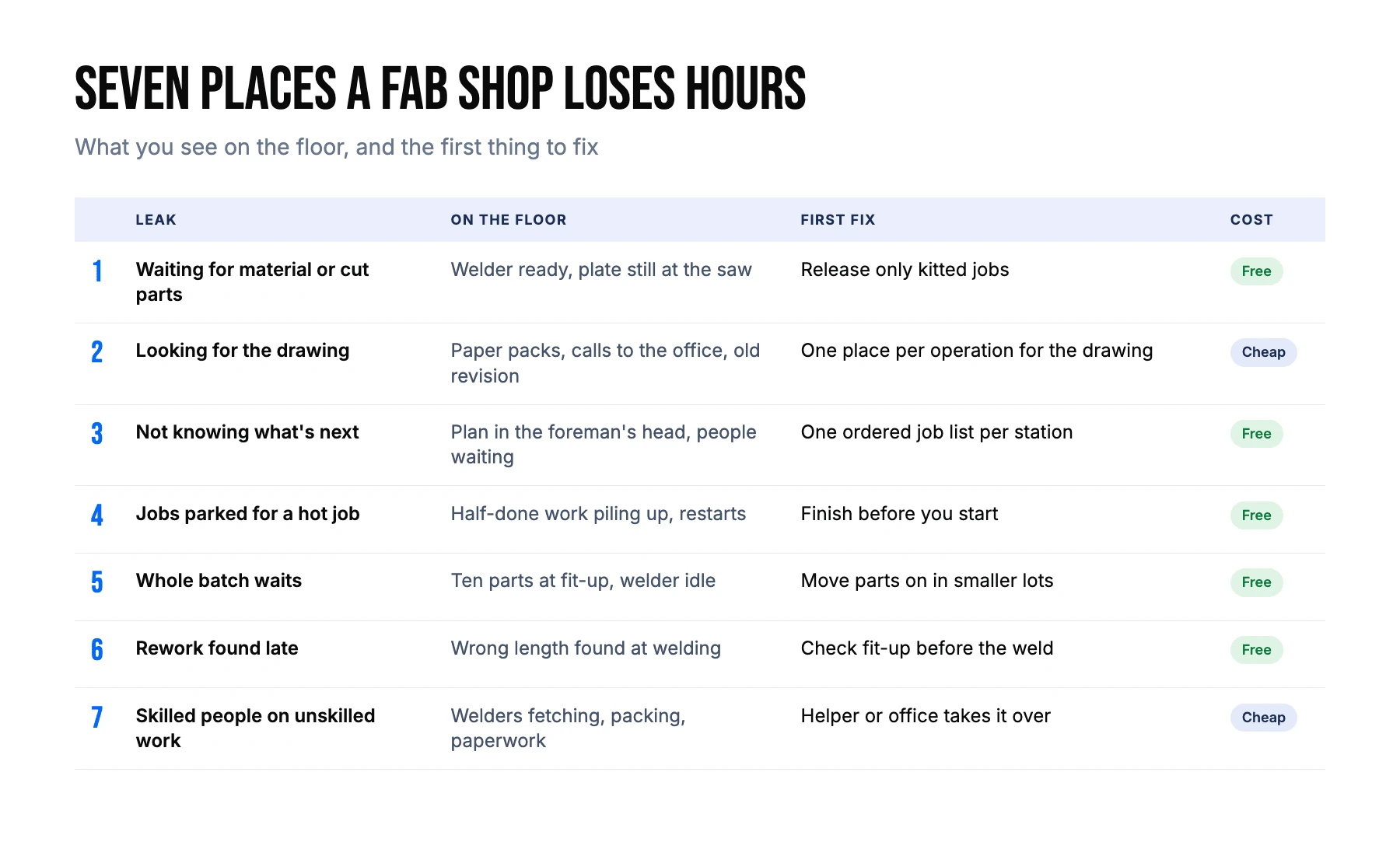
In custom fab shops, lost hours usually come from the same seven places. Your two-week study tells you which ones matter most in your shop.
1. Waiting for material or cut parts
The welder is ready and the plate, profiles or cut parts are not. The delivery was late, the parts are sitting at the saw, or another job used the steel.
The fix: don’t release a job to the floor until its material and cut parts are there. Stage (kit) each job in one place before the first operation starts, and give someone the job of checking it.
In EZIIL: with the BOM and warehouse modules, the inventory overview turns red when stock does not cover a job’s need, and picking can be planned as its own operation. FLI Structures, a UK steel fabricator, says having buying data straight from the drawing office “has completely removed that material bottleneck we were struggling with before”.
2. Looking for the drawing, or working from the wrong one
Paper drawing packs, a printer queue, a call to the office, a fit-up done to last week’s revision. Most of these cost minutes; a wrong revision can cost a day.
The fix: one place where the drawing for each operation lives, and a simple rule for replacing it when a revision comes in (who swaps it, and who tells the floor).
In EZIIL: drawings uploaded to the project’s file manager can be linked to a specific operation, and with the BOM module each part or assembly row carries its own drawing, which opens as a PDF. A technologist at VMT remembers the old way: “On a week-long project, I spent about 25% of my time just printing out work tasks and drawings.”
3. Not knowing what’s next without asking
A worker finishes a job and the next one is in the foreman’s head, so they wait, ask, or pick something that wasn’t urgent. Across a crew and a week, that adds up.
The fix: one visible, ordered list of the next jobs per station or person, owned by one planner. Paper on the wall is fine to start with, as long as it is updated daily.
In EZIIL: MasterView shows every job’s dates and the load per department in one place, and with the BOM module and detailed planning in the operation planner, workers can see an ordered list of their planned work.
4. Half-finished jobs parked for a hot job
A rush order arrives and three jobs get pushed aside half done. Every restart costs set-up time and searching, and invites mistakes, while work in progress piles up and lead times stretch.
The fix: finish before you start. Keep a small number of slots free for hot jobs instead of breaking into running work. Capping work in progress per department is covered step by step in our lead time reduction guide.
In EZIIL: the deadline agreed with the customer lives in MasterView, and the day-to-day plan lives in the operation planner. Moving work around on the floor does not quietly move a promise to a customer.
5. The whole batch waits when parts could move
Ten brackets sit at fit-up until all ten are done, while the welder waits. Or a full set of beams waits at the saw for the last one.
The fix: move parts on in smaller lots, and report finished quantities as they happen, so the next station can start.
In EZIIL: workers can report part of an operation and carry on later, and with the BOM module each report carries the part and the quantity done.
6. Rework found late
A wrong hole, a wrong length or a missed detail found at welding burns your scarcest hours, and found at site it burns days.
The fix: check fit-up and critical dimensions before the weld, not after. Record rework hours against the job, so you can see what it costs and where it comes from.
In EZIIL: an inspection can be planned as an operation like any other, and rework time is logged as a support activity connected to the job.
7. Skilled people doing unskilled work
Welders fetch steel, sweep, pack and fill in paperwork. It all needs doing, just not by the people who limit your output.
The fix: move handling, packing and admin to a helper or the office. As the shop grows, give people defined roles (cutting, material prep, fitting, welding) instead of everyone doing everything. Train helpers to take simple prep work; our guide to cross-training in a custom steel shop shows how.
B&W Metall, a structural fabricator turning out around 100 tonnes of steel a week, cut packing-slip and dispatch paperwork from about five hours per project to about twenty minutes. “Packing used to be a five-hour job. Today I can probably get the same five hours of work done in twenty minutes.”
Step 3: Fix the cheapest leaks first
Rank the leaks by hours lost on your constraint crew and by what the fix costs, and start with the process fixes that cost nothing.
A simple order works for most shops:
- Free: rules and roles. Release only kitted jobs. Finish before you start. One person owns the plan. Welders don’t fetch.
- Cheap: a shared tablet at the station, a staging area by the fit-up bay, a helper for handling and packing.
- Paid: new fixtures, software, equipment.
Only fixes at the constraint add output. An hour saved at the saw, when the saw already waits for welding, does not ship one more job.
After four weeks, run the same two-week study again with the same codes. The difference between the two is your recovered throughput.
Worked example: a 20-person shop finds more than a welder’s worth of hours
Here is an illustration with round numbers, not a benchmark. Your shop’s figures will differ.
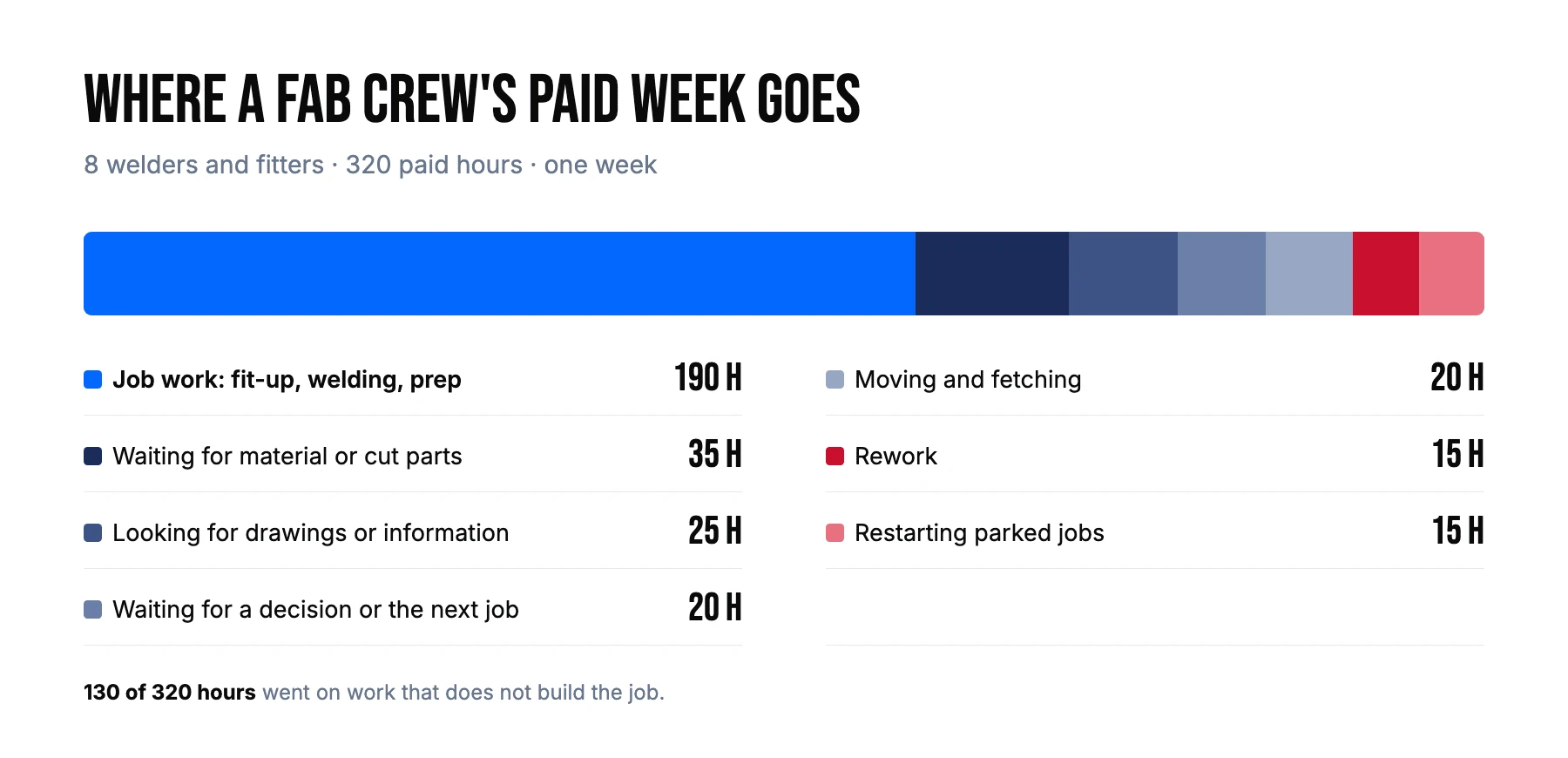
A 20-person custom shop has eight welders and fitters on 40-hour weeks: 320 paid hours a week on the crew that limits output. The two-week study shows:
| Where the hours went (per week) | Hours |
|---|---|
| Job work (fit-up, welding, prep) | 190 |
| Waiting for material or cut parts | 35 |
| Looking for drawings or information | 25 |
| Waiting for a decision or the next job | 20 |
| Moving and fetching | 20 |
| Rework | 15 |
| Restarting parked jobs | 15 |
| Total paid | 320 |
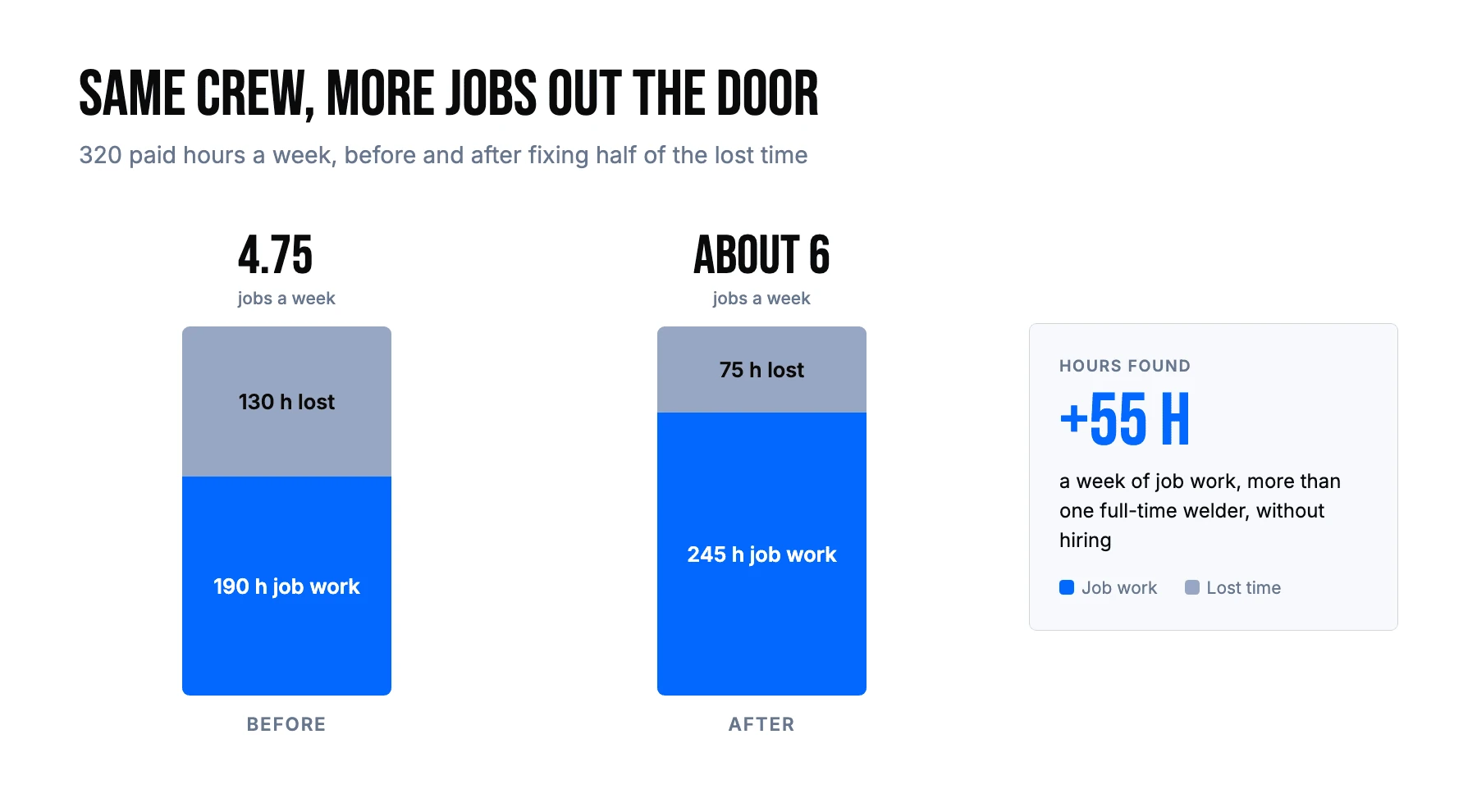
The shop kits jobs before release, puts drawings at the station, pins up a daily job list per bay and stops breaking into running work. That recovers half of the waiting, searching, decisions, rework and restarts: about 55 hours a week. Job work rises from 190 to about 245 hours, roughly 29% more. At an average of 40 crew hours per job, output goes from about 4.75 jobs a week to about 6. And 55 hours is more than one full-time welder, found inside the crew the shop already pays.
Real shops report results in the same direction. VMT Tehased, a project-based metal manufacturer, increased turnover by 30% without hiring new people. UPFab, a 35-person custom shop in Michigan, now sees live capacity on one screen: “We’ve already taken work we’d have declined.” At FLI Structures, material is now often on site before it is needed, which removed the old bottleneck of waiting for deliveries.
When is overtime, subcontracting or hiring the right answer?
Once the lost hours are cut and your constraint is still full, add capacity, and choose the option that matches how long the overload will last.
| Option | When it fits | Watch out for |
|---|---|---|
| Overtime | A peak of a few weeks | Tired crews make more rework; weekends every week become the norm |
| Subcontract a process (laser, bending, painting, galvanizing) | One process is overloaded, the rest is not | Lead time and quality control move outside your walls |
| Temporary labor | Unskilled work is crowding your skilled people | Needs supervision; doesn’t fix a welding shortage |
| Permanent hire | The constraint has been overloaded for months, after the leaks are fixed | Slow to find and train; check the new hire lands at the constraint |
| New machine | A machine, not people, is the limit | Rarely the constraint in a custom shop; check the study first |
The rule of thumb: short peaks get overtime or subcontracting. A constraint that stays overloaded for months, after you have removed the lost hours, gets a hire.
The hard part is seeing the overload early enough to choose. Before EZIIL, VMT’s planning was “more like predicting and praying”, and it ended in expensive last-minute subcontracting and overtime. At FLI Structures, two or three jobs would sometimes be committed for the same dates, forcing overtime, weekend work or night shifts.
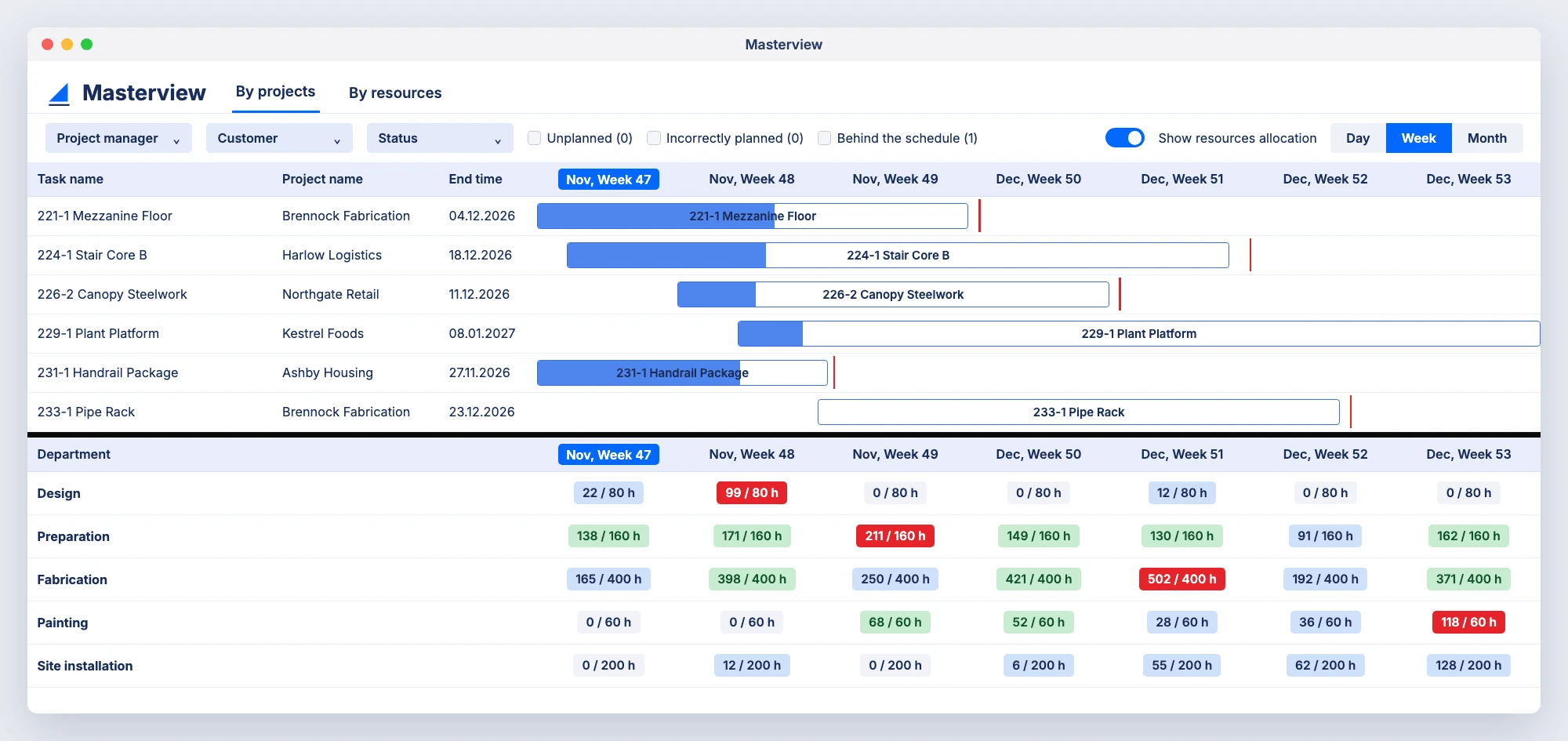
How EZIIL helps. You set each department’s available hours per day. MasterView adds up every job’s planned hours per week and shows them against that capacity, for example 211 of 160 hours in preparation. Green means the week is within about 20% of capacity, blue means there is room for more work, and red means more than about 20% over. Holidays and extra hands go in as dated changes, and a “Behind the schedule” filter lists the jobs that are slipping. You see the overloaded weeks before they start and decide what to do: weekend hours, subcontracting, or a conversation with the customer about the date. EZIIL leaves the rescheduling decision to your planner, by design, because in a job shop the call needs someone who knows the jobs. As VMT’s COO puts it: “You can see straight away if we can take on more work, what delivery times we can promise and where we could run into bottlenecks.”
For more on planning against real capacity, see finite capacity scheduling for metal fabrication and production capacity planning for custom steel fabricators.
How EZIIL helps you get more out of the crew you have
EZIIL is production management software for custom, project-based metal fabrication shops with up to about 150 people. It shows where your crew’s hours go and how loaded each department is, so you can fix lost time before you hire.
It follows the same loop as this article: you register the job and the hours it should take, plan it against the hours you have, let the floor report with a start and stop button, and watch progress and cost come back against the plan. Support activities show where non-job hours go and why. Plan vs reality compares planned and reported hours down to the operation and shows who reported the time, MasterView shows each department’s load before the week starts, and the dashboard tracks on-time delivery against due dates. The fabrication shop management software page shows how the modules fit together.
VMT Tehased increased turnover by 30% without hiring new people, and raised its engineers’ work efficiency by 40%. You don’t have to start with everything. Most shops begin with EZIIL Starter, which is priced by team size (from €120 / $140 a month for up to 15 users, plus a one-off €300 / $350 onboarding fee), and add modules such as BOM or purchasing when they are ready. Prices are as of November 2026; the current ones are on the EZIIL pricing page. EZIIL is built for one-off and project-based work. For high-volume, repeat production lines, a classic MRP is the better fit.
Take a free product tour to look inside EZIIL with sample data, or book a 30-minute demo to talk through your own shop.
Frequently asked questions
How do I increase throughput without hiring?
Measure two weeks of your constraint crew’s hours, split into job work and lost time. Then remove the biggest causes of lost time, such as waiting for material, looking for drawings, unclear next jobs, parked jobs and rework. Only add people once those hours are back and the crew is still full.
What is throughput in manufacturing, and how do you calculate it?
Throughput is the amount of finished, shippable work a shop produces in a period. You calculate it as completed output divided by time, for example jobs shipped per week or the value of finished work per month.
What limits throughput in a custom fabrication shop?
Usually a small group of skilled people, such as welders and fitters, rather than a machine. Their output is limited less by how fast they work and more by how many of their paid hours go on waiting, searching, rework and restarts.
What is the difference between throughput and capacity?
Capacity is how much work your people and machines could do in a period. Throughput is how much finished work actually leaves the shop. The gap between them is lost time, and closing it is the cheapest way to grow output.
Should I use overtime or hire another welder?
Use overtime or subcontracting for peaks of a few weeks. Hire when your welding capacity has been overloaded for months after you have removed the lost hours, because a new hire takes time to find and train.
Can software increase throughput on its own?
No. Software shows where the hours go and how loaded each department is, so you can decide sooner. The gains come from changing how work is released, staged and handed over.