
Fabrication shop management software: the whole shop, one live system
EZIIL is fabrication shop management software for custom steel and metal fabricators with 10 to 150 people. The office plans jobs against real capacity, the floor reports on a phone, tablet or shop PC, and every job’s deadline, progress and hours sit in one system. EZIIL Starter runs from €120 / $140 a month, priced by team size.
Take a free product tour or book a 30-minute demo
From €120 / $140 a month
Priced by team size, not per user.
Live in under a week
Starter running in the first week, modules one at a time.
The floor is included
Mobile reporting and time tracking are in Starter.
Phone, tablet or shop PC
The EZIIL mobile app, or a web browser.
One job, written down in six places
Most fab shops have the information they need. It’s kept in too many places, and each copy goes out of date on its own.
Where job 2214 lives in a typical shop
| The deadline | A weekly Excel schedule, kept by one person |
|---|---|
| The drawings | A shared drive, printed A3 for the workshop |
| What’s been ordered | Email threads and paper POs |
| Where it is on the floor | A whiteboard and a walk to ask the foreman |
| Hours spent | Weekly timesheets, booked to one job number |
| What it was worth | The accounts package, seen by one person |
That works at five jobs. At thirty, someone spends hours a day keeping it up to date, and “how far along are we?” still depends on who you ask.
“The whole team can now work in one system and we deleted 12 different Excels that we had to update otherwise every day.”
 Rait KaldaChairman of the Board

What does fabrication shop management software do?
It keeps one record of each job, from the first quote to the final numbers, so planning, the floor and the office all work from the same information. In EZIIL, four of the seven stops below are in Starter. The other three are add-on modules you can add when you’re ready.
How a job runs through EZIIL
- WinJob number and quote statusStarter
- EngineerBOM, routing and drawingsAdd-on
- PlanCapacity and deadlinesStarter
- BuyRFQ, PO, receipt, subcontractAdd-on
- BuildStart and stop on the floorStarter
- ShipPacking and loading listsAdd-on
- Know the resultPlanned vs reported, on-time deliveryStarter
Win the job
Starter
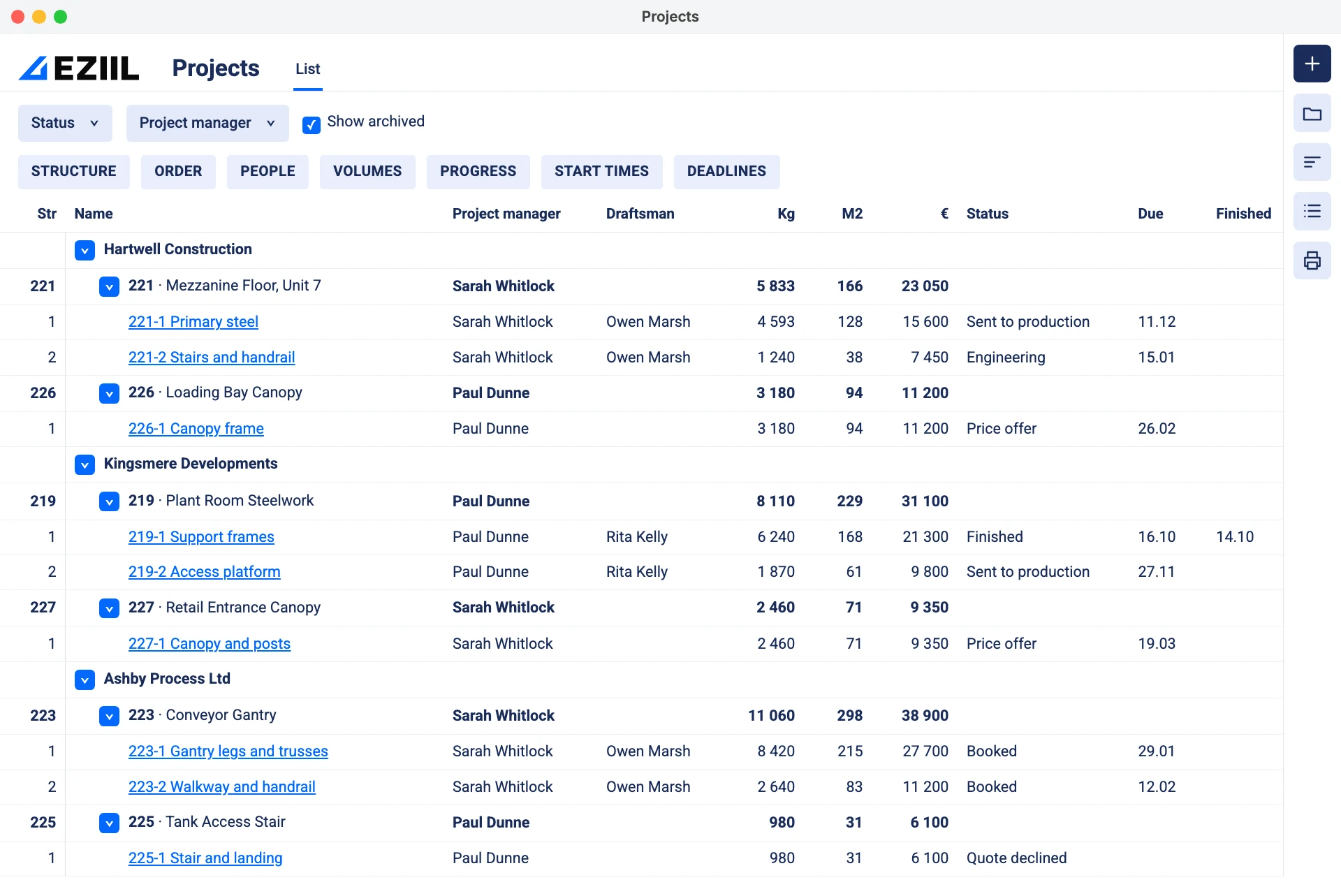
Create the project when you quote, so it has its number from day one. Live and declined quotes sit under their own statuses, so the pipeline stays readable.
Engineer it
Add-on: BOM
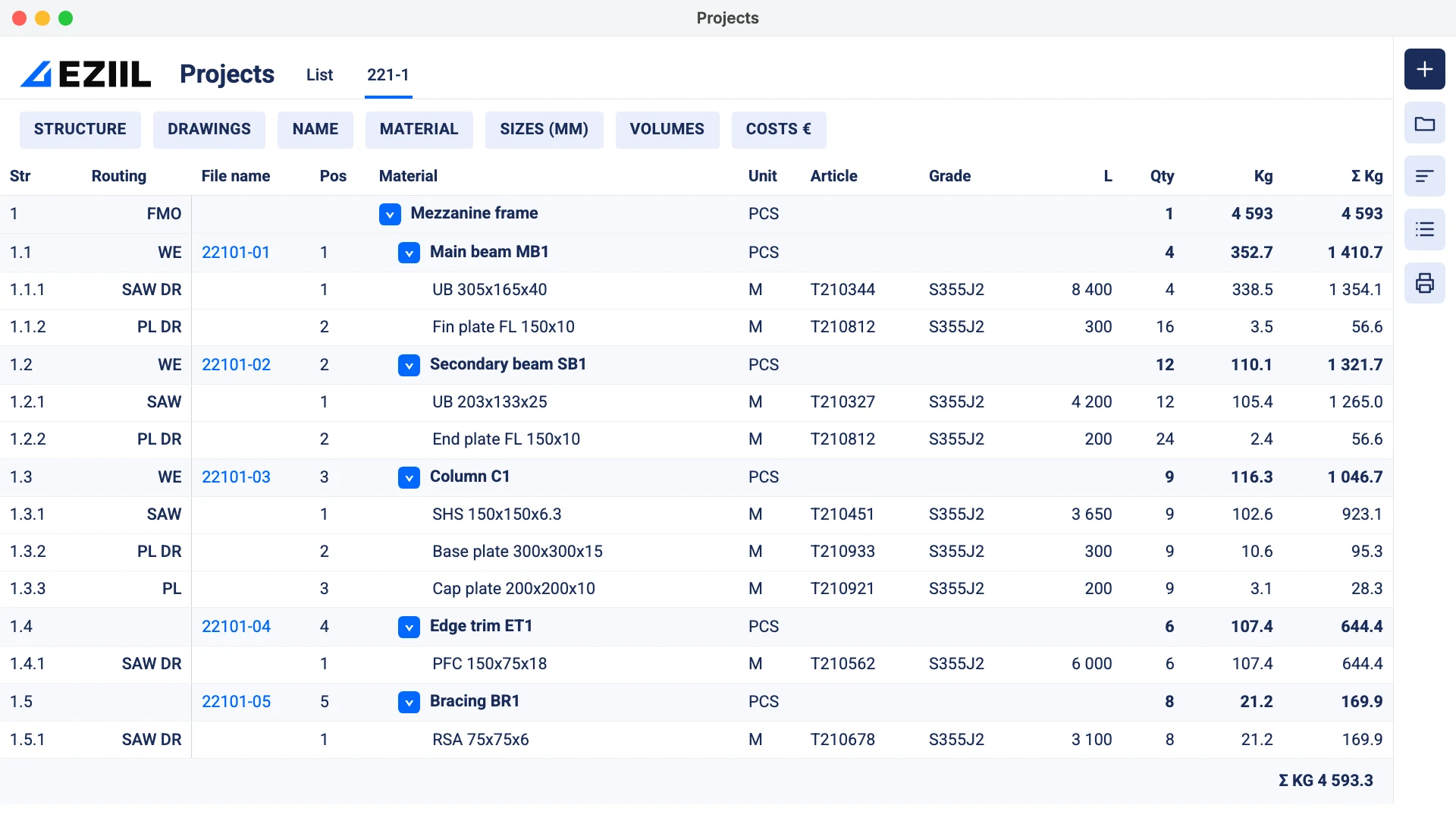
Build the bill of materials by hand, from Excel, or from a Tekla IFC model. Each row carries its drawings and operations, so planning and purchasing read the engineer’s work and not a retyped copy. Without the module, each phase in Starter still has its own folder for drawings and files.
VMT Tehased raised engineers’ work efficiency by 40% after adopting EZIIL BOM.
Plan against real capacity
Starter
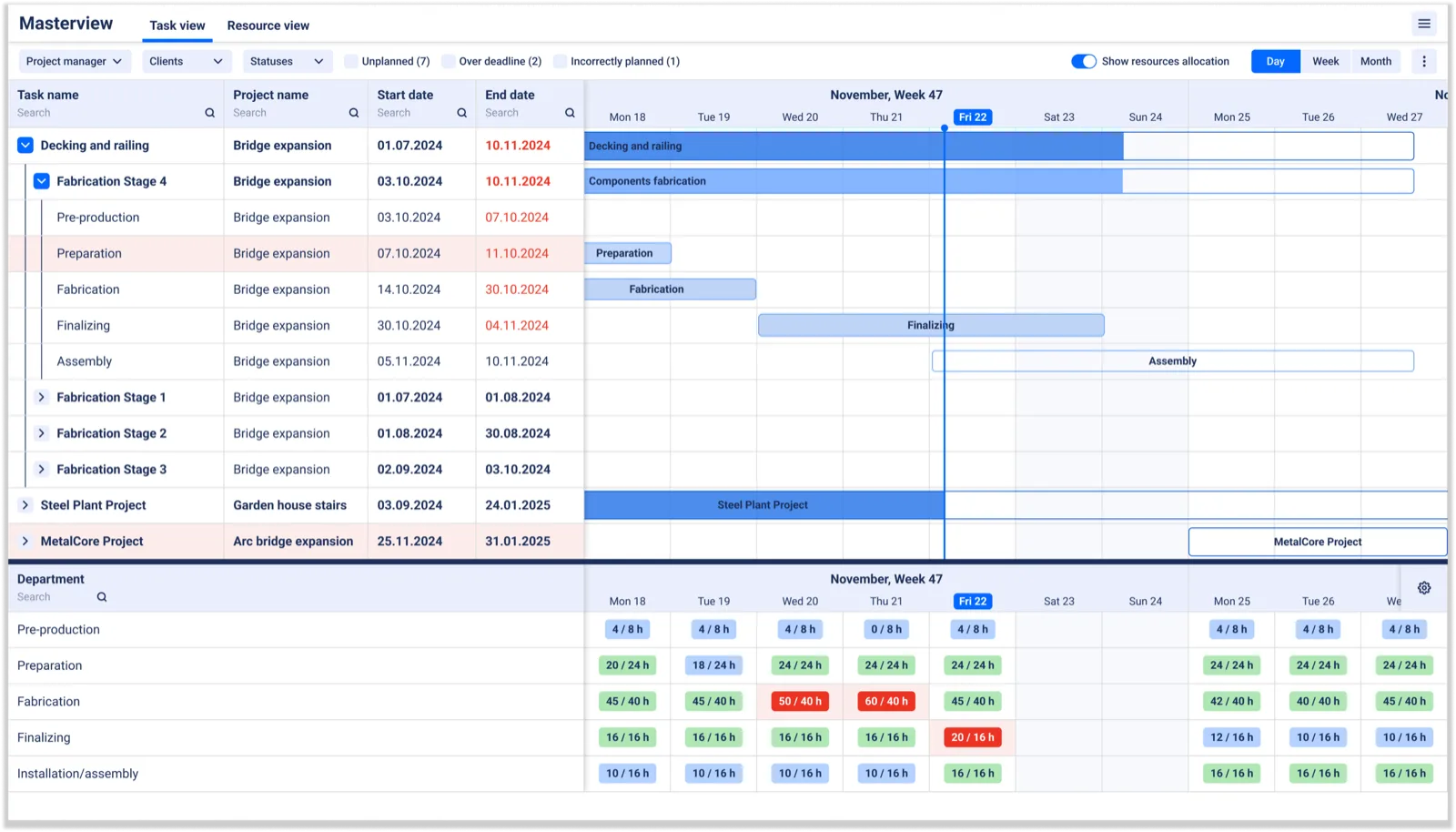
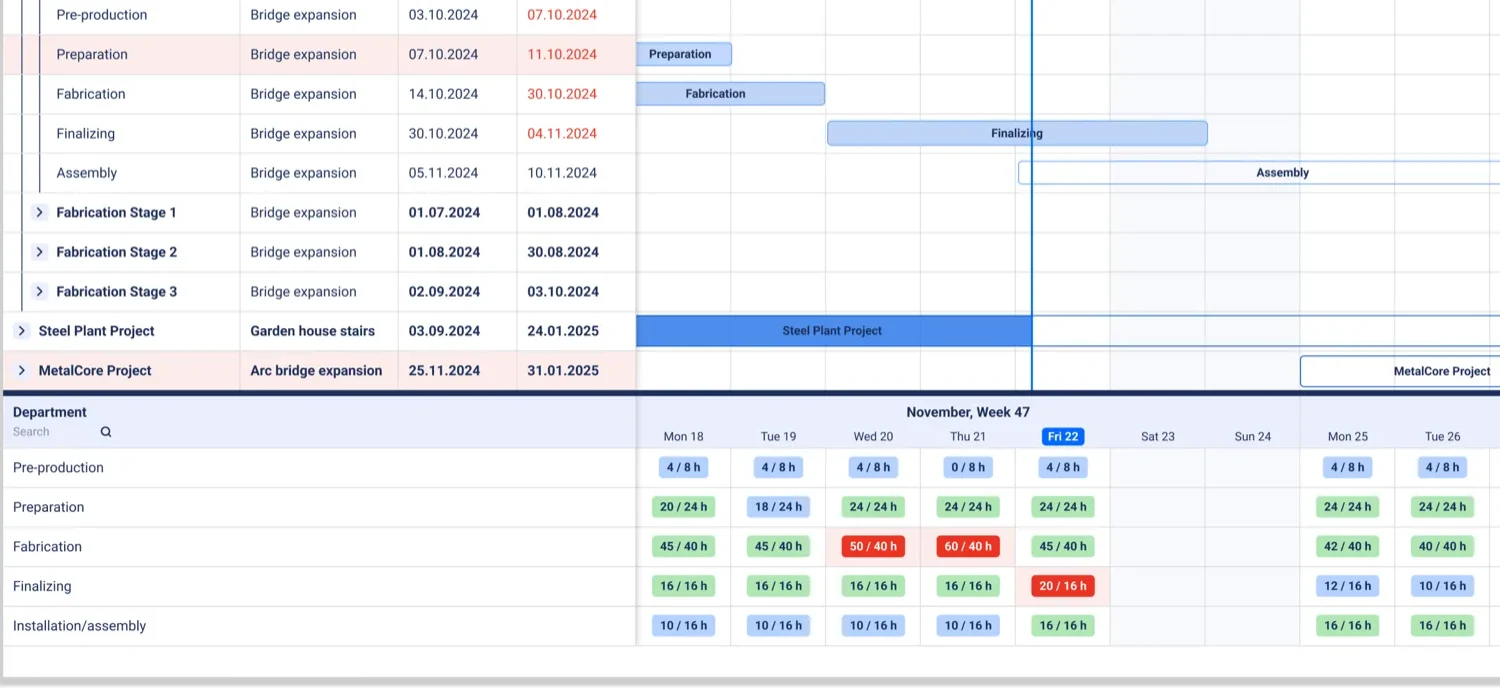
Master View shows every job’s deadline and adds up its hours by department. Green means the load fits and red means it doesn’t, so you see an overload while there’s still time to move work. You drag the plan yourself, because a job shop changes too often for automatic scheduling to hold.
“With Master View we can finally see the next three months.” Mike K., Project Manager, UPFab
Buy and receive
Add-on: purchasing, warehouse and subcontractors
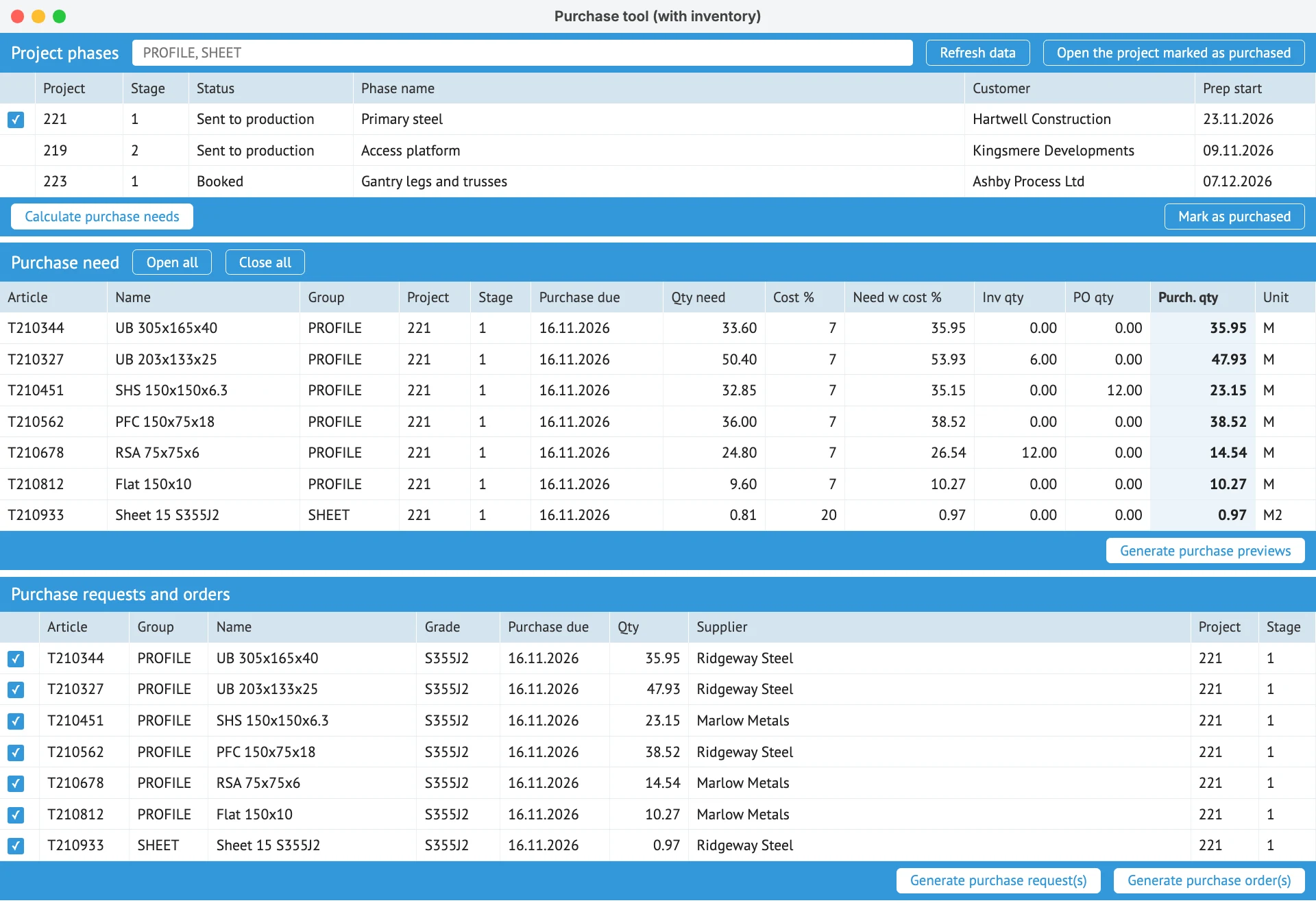
Purchase need is calculated from the BOM and netted against stock. From there it’s RFQ, purchase order and goods receipt, with batch numbers and certificates recorded on arrival. Painting, galvanizing and bought-out laser work run as subcontract orders on the same job.
“Because the data our buyer has is exactly what comes from the drawing office, directly from the model, it has completely removed that material bottleneck we were struggling with before.” Joe Stroud, Projects Team Manager, FLI Structures
Build and report
Starter
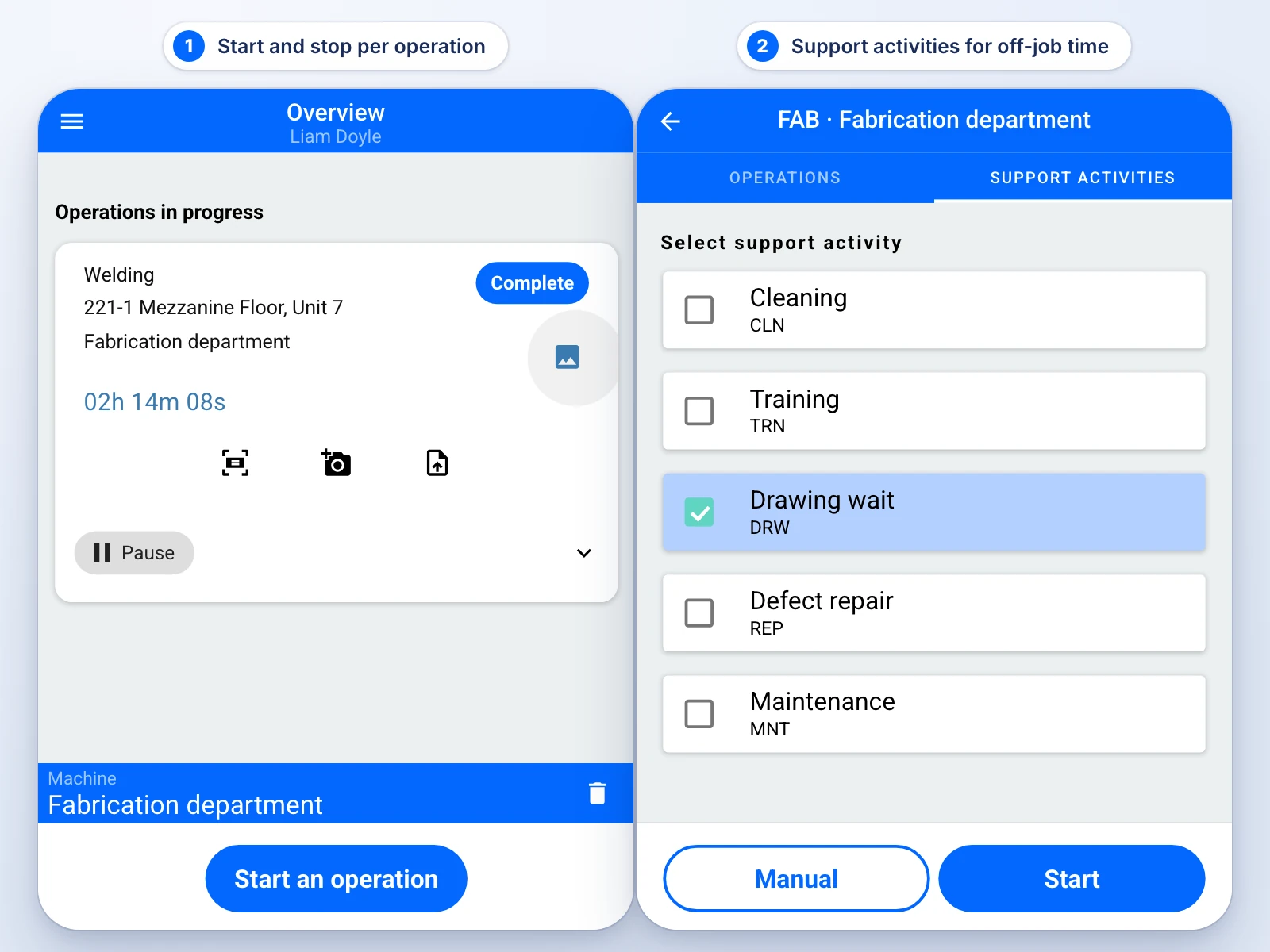
Workers pick the job and press start and stop on a phone, tablet or shop PC, with the drawing attached. The Reporting feed shows each start, pause and finish as it happens. Hours count once the office has confirmed them, usually the next morning.
B&W Metall reached 100% shop-floor adoption: every worker reports in EZIIL, whatever their age or role.
Ship it
Add-on: packing and deliveries
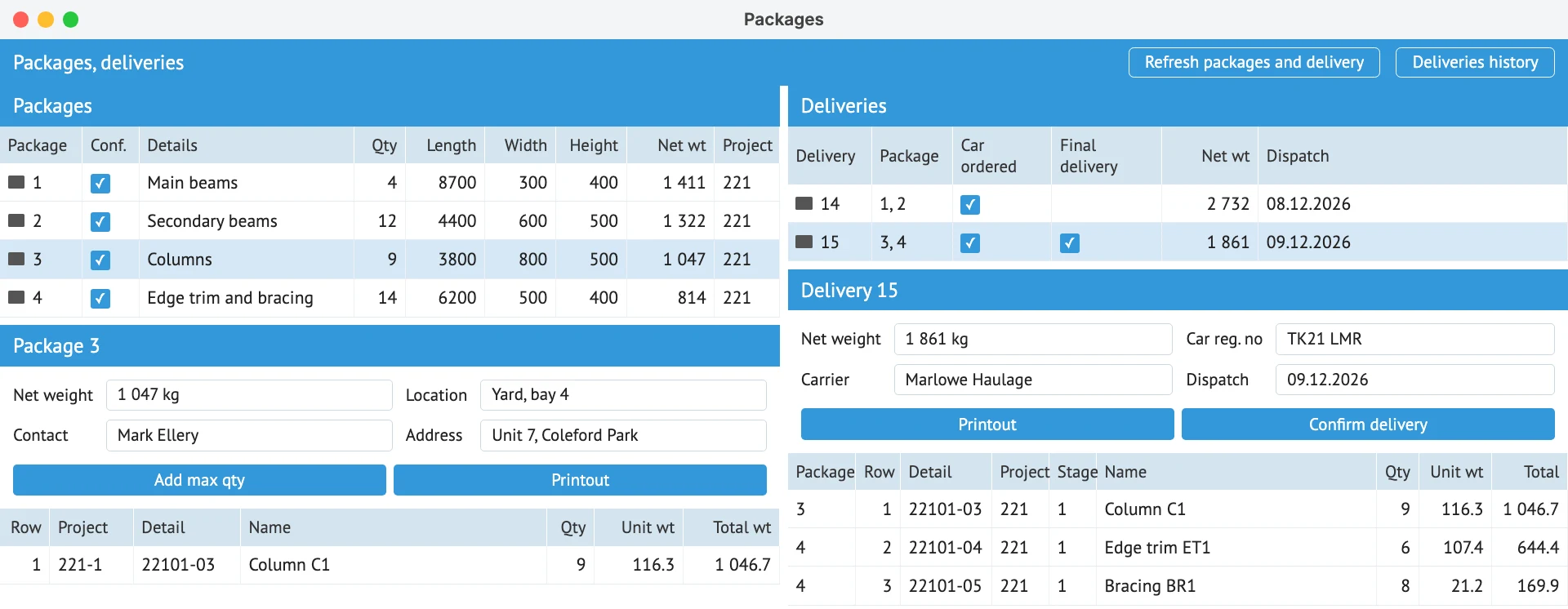
Pack against the BOM, see what’s ready to go, and print loading lists with calculated weights for each truck.
“Packing used to be a five-hour job. Today I can probably get the same five hours of work done in twenty minutes.” Elari, Project Manager and Planner, B&W Metall
Know the result
Starter
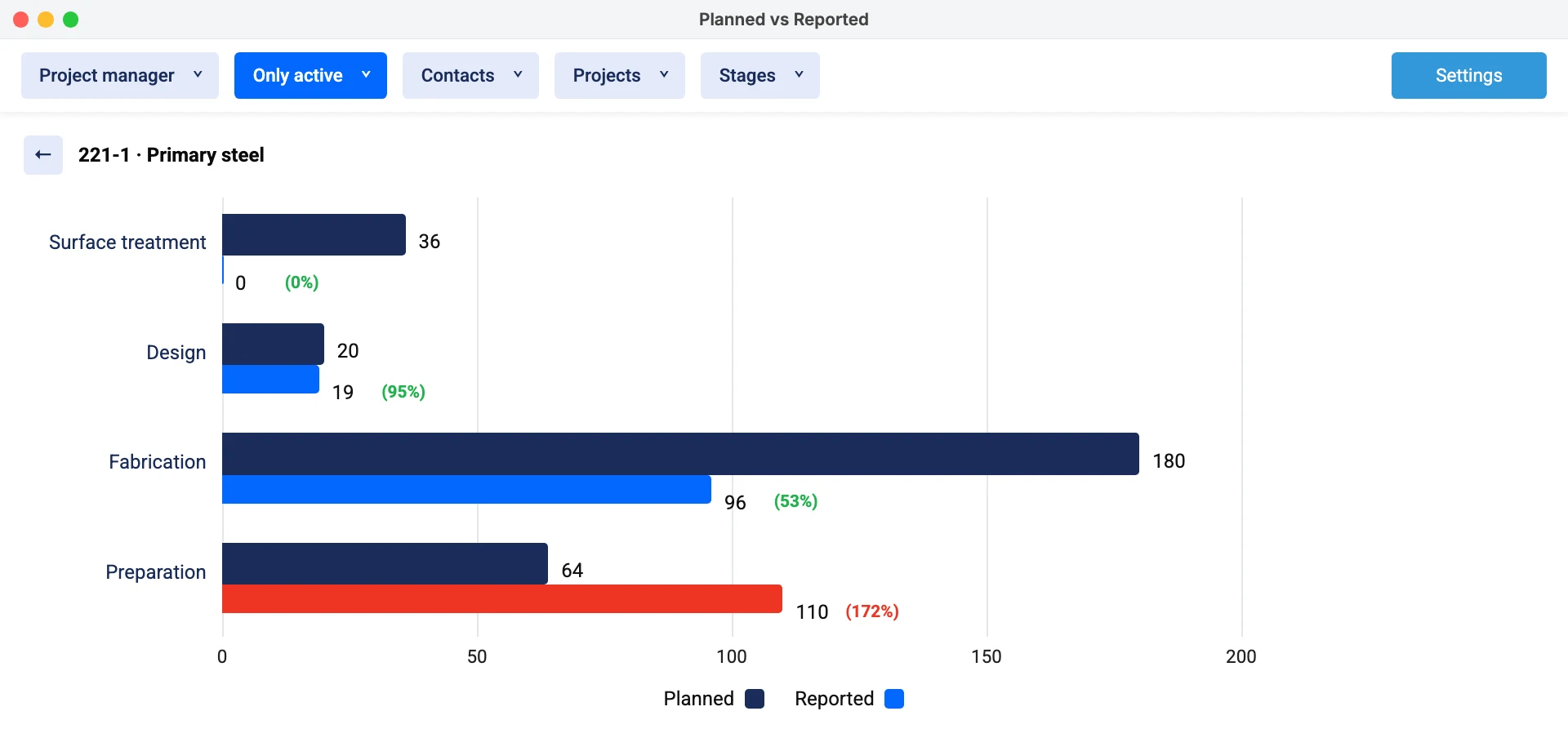
The Planned vs Reported report compares the hours you planned with the hours reported, while the job is still open. The start screen shows next deadlines and on-time delivery. Material cost joins in once BOM and warehouse are live. Invoices go out through the invoicing add-on, or stay in your accounting package.
“This has given us tighter control of active jobs, better-informed estimating and concrete profit/loss insights per job.” Syed Raza Hashimi, Planner / Control Manager / QA-QC, APS Group
Shops already running this way
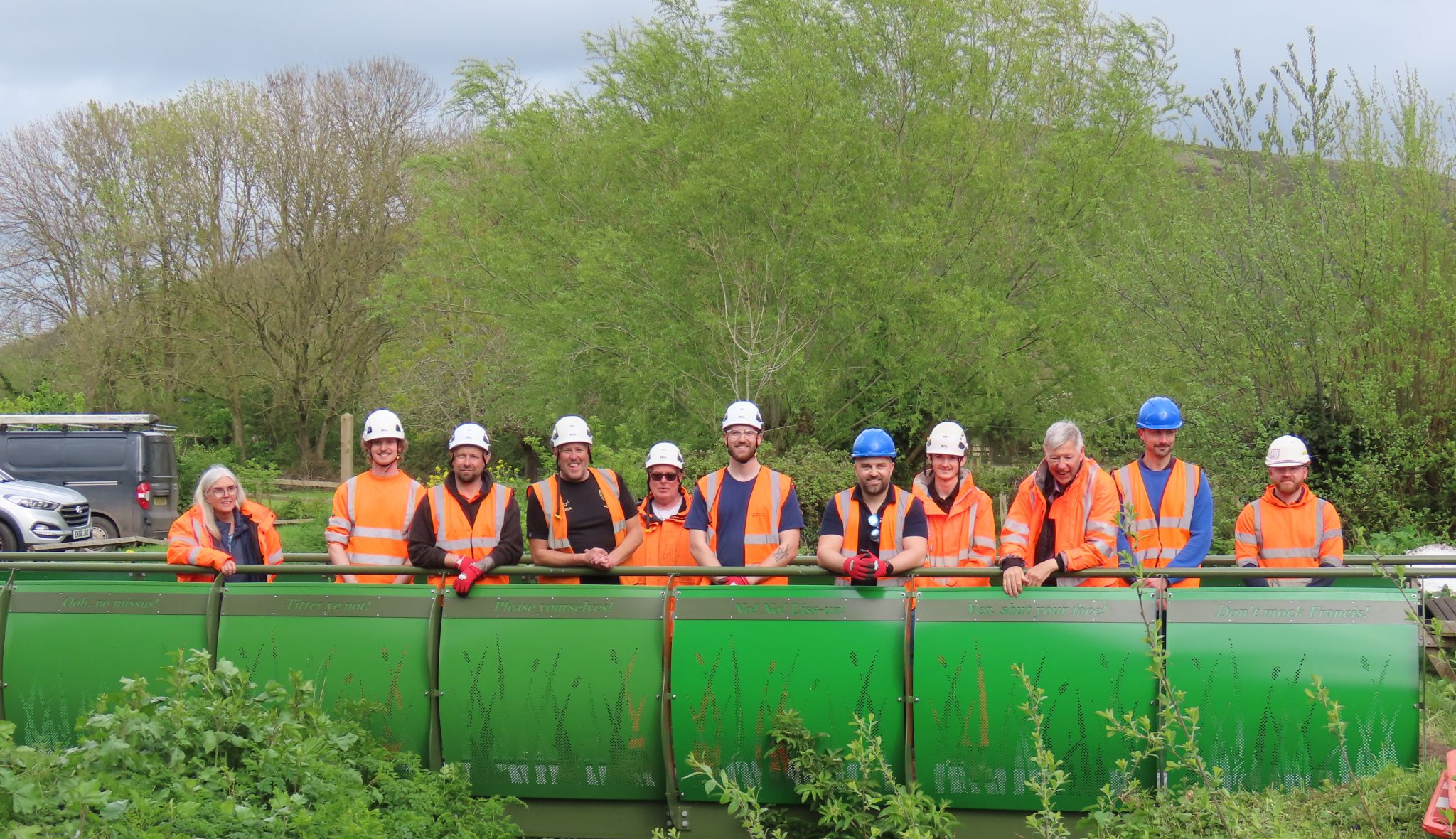
100 jobs, a team of 9
FLI Structures, a 70-person UK fabricator, runs them all in EZIIL.
5 hours to 20 minutes
B&W Metall’s packing and dispatch paperwork, per project.
What EZIIL runs, and what it leaves alone
EZIIL is the production system between your design tools and your accounts. Your CAD, your accounting and your machines all stay.
Design stays in CAD
BOMs come in from Excel, or from Tekla as IFC models. Engineers keep the tool they know.
EZIIL runs production
Jobs, capacity and floor reporting, and with add-ons BOM, purchasing, warehouse and dispatch.
Money stays in accounts
Integrations are built and running with Xero, QuickBooks, Microsoft Dynamics and Merit. Sage and others can be custom built.
Nesting stays in your CAM software too. Integrations sit outside Starter. See EZIIL’s integrations
Do you need shop management software, an ERP or better spreadsheets?
Spreadsheets stop working when nobody can say which jobs are behind. A full ERP covers accounting and much more, but it takes longer to roll out and usually costs more. Shop management software sits between them: it runs production and leaves the accounts where they are.
| Question | Spreadsheets and whiteboards | Full ERP | EZIIL |
|---|---|---|---|
| Where every job is now | Ask, or walk the floor | Yes, once fully rolled out | Yes, from floor reports |
| Time to first use | Today | Usually months | Starter in under a week |
| Floor users | Not applicable | Often priced per user | Included, priced by team size |
| Accounting | Separate | Usually built in | Stays in your package, integration available |
| Made for one-off jobs | Flexible, but manual | Depends on the system | Yes, it’s built for them |
| When the key person leaves | The schedule often goes too | Stays in the system | Stays in the system |
Swipe to see all columns
If you’re still choosing, read what an ERP for small steel fabricators needs to do, or compare 16 metal fabrication software tools.
Is EZIIL the right fabrication shop software for you?
A good fit if
- You do custom, project-based steel or metal work
- You have 10 to 150 people and many jobs open at once
- The schedule lives in a spreadsheet, on a whiteboard or in one person’s head
- You want to start with one module and grow
Look elsewhere if
- You run high-volume repeat production
- You need estimating or a sales CRM at the core
- You need MEP spool tracking tied to a BIM model
- You want automatic scheduling
- You want accounting in the same system
Start with Starter, add the rest when you’re ready
Starter covers projects, Master View, floor reporting and results, and it’s running in the first week. You fill in a setup spreadsheet, EZIIL prepares your database, and a kick-off and guided sessions with team EZIIL’s experts follow. Modules come one at a time, so nobody learns everything at once.
Starter
Projects, Master View, floor reporting and results.
Add BOM
Materials, routing and drawings per part.
Add the rest
Purchasing, warehouse, subcontractors, dispatch, invoicing, EN 1090-2 traceability.
| 1 to 15 users | €120 / $140 a month |
|---|---|
| 16 to 50 users | €180 / $210 a month |
| 51 to 150 users | €290 / $338 a month |
| One-off onboarding (setup, training, check-ins) | €300 / $350 |
| Add-on modules and their implementation | Quoted for your shop |
Starter prices as of November 2026. See full pricing
Fabrication shop software questions
What is fabrication shop management software?
Fabrication shop management software is the system that runs the production side of a fabrication shop: jobs, capacity, deadlines, floor reporting and job results, with BOM, purchasing and dispatch in fuller setups. CAD designs the work and accounting records the money; shop management software runs what happens in between. EZIIL is built for custom steel and metal fabricators with 10 to 150 people.
What software do fabricators use?
Most shops use several tools: CAD or detailing software such as Tekla or SolidWorks, nesting software for the cutting machines, an accounting package, and spreadsheets or shop management software to run the jobs. EZIIL fills that last role. See how 16 metal fabrication software tools compare.
Do I need an ERP to run a fab shop?
Usually not at first, if your accounts are covered and your problem is running jobs. A shop of 10 to 150 people tends to need scheduling, floor reporting and job hours first. EZIIL starts there and adds BOM, purchasing and warehouse as modules, so you can grow toward ERP-level coverage without buying it all on day one.
What is included in EZIIL Starter, and what is an add-on?
Starter includes projects and phases, Master View capacity planning, mobile shop floor reporting and time tracking, working time confirmation, planned vs reported hours and on-time delivery. Add-on modules cover BOM, purchasing, warehouse, EN 1090-2 traceability, machine planning, subcontractors, shipments, invoicing and accounting integrations. Purchasing and warehouse need the BOM module first.
Does EZIIL replace my accounting software or CAD?
No. EZIIL doesn’t do your bookkeeping or your design work. Integrations are built and running with Xero, QuickBooks, Microsoft Dynamics and Merit, and Sage or other packages can be custom built through EZIIL’s API. There is no public API today. CAD data comes in through Excel or, for Tekla, IFC models.
Will my shop floor team use it?
If they can use a smartphone, they can use EZIIL. On the floor it’s mostly picking a job and pressing start and stop. B&W Metall reached 100% adoption, every worker regardless of age or role, through a step-by-step rollout. Starting with two or three stations works well.
How long does it take to get running?
EZIIL Starter can go live in under a week. You fill in a setup spreadsheet, EZIIL prepares your database, and a kick-off gets you going, with guided sessions in the first month. Modules are added one at a time after that, at your pace.
Is there a free trial?
EZIIL has no self-serve trial, because every fab shop’s setup is different and the onboarding team helps with it. You can look around a demo version in a free product tour, or book a 30-minute demo with team EZIIL’s experts. Starter is billed monthly and you can cancel any time.
See how a fab shop runs in EZIIL
Look around a demo version in a free product tour, or walk through your jobs with team EZIIL’s experts in a 30-minute demo.
Take a free product tour
Enter your email to see inside EZIIL in a demo version.
EZIIL’s fabrication shop management software is the same system as our job tracking software, job costing software, job shop software and fabrication scheduling software. See also the steel fabrication ERP modules and pricing.