
A BOM workflow is the path your bill of materials travels from estimate to purchasing to the shop floor to cost actuals, plus the handful of rules that keep it trustworthy at every handoff.
This guide shows you how to set your BOM workflow up without halting production. It is built from real conversations with shop owners and operations managers running 11 to 35 people on the floor, so the steps below match how work actually moves through a shop your size, not how a textbook says it should.
What IS a BOM workflow
A bill of materials is a document. A BOM workflow is the discipline that keeps that document true as it changes hands. The document tells you what goes into a job. The BOM workflow makes sure the version estimating priced, the version purchasing bought against, and the version the floor is building are the same version.
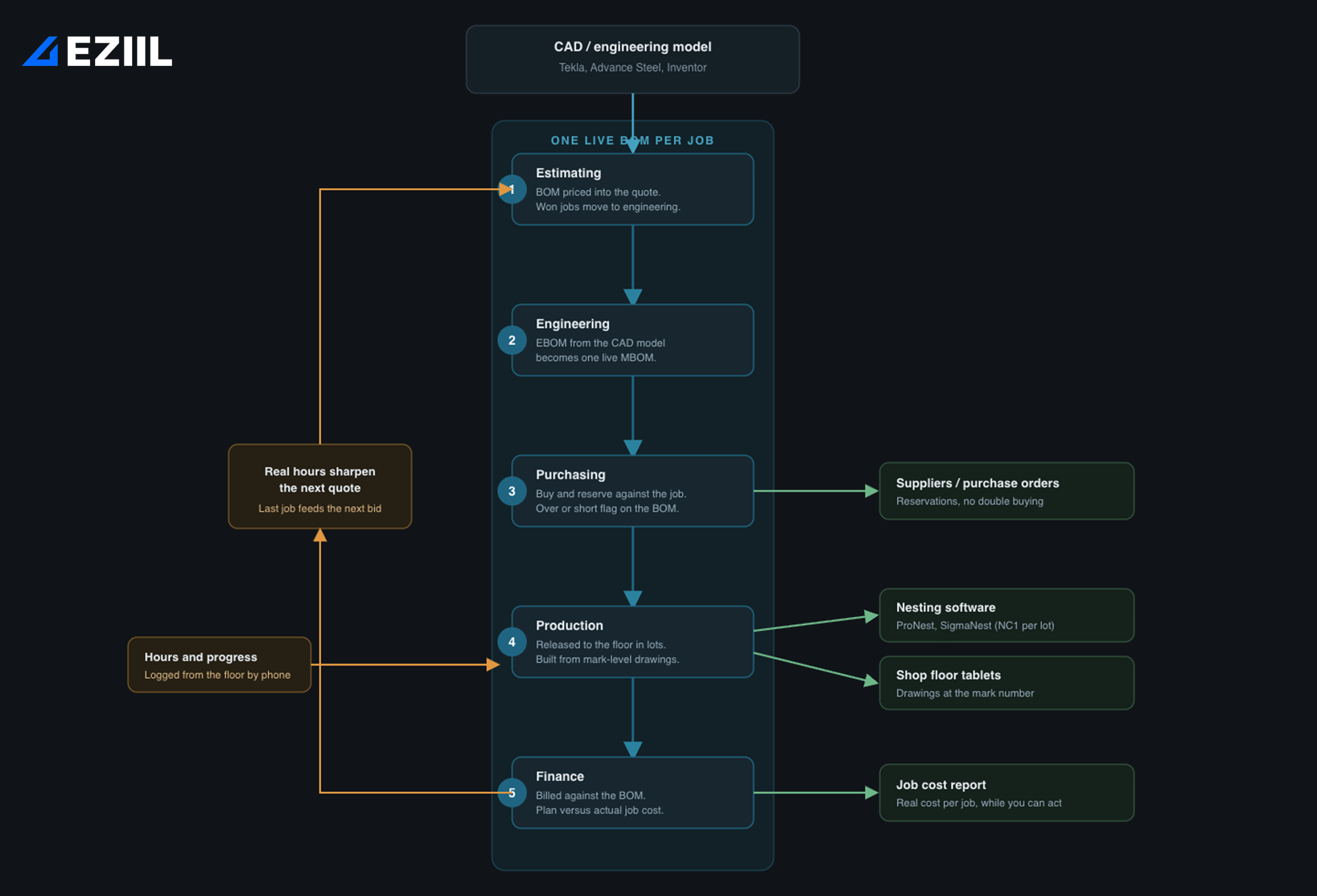
In a well-oiled steel fabrication shop, a BOM has to survive five handoffs: estimating prices it, engineering revises it, purchasing buys against it, production builds from it, and finance bills for it. A BOM workflow is just the agreed path through those five, with a single live copy at the center.
Two terms are worth getting straight, because they cause most of the rework you see. The engineering BOM (EBOM) is what comes out of your CAD model, Tekla, Advance Steel, or Inventor. It is organized around how the product is designed. The manufacturing BOM (MBOM) is organized around how it gets built, including hardware, consumables, sub-assembly sequence, and waste. In most small shops the EBOM and the MBOM live in two different files and drift apart. A good BOM workflow treats them as one living object. Almost every custom fabrication job is also a multi-level BOM, with parent assemblies, sub-assemblies, and raw stock in a hierarchy, even when it does not feel that way on a small job. If you want the category-level view of all this, our BOM management guide for small steel fabricators covers it. This article is the hands-on setup.
Why BOM workflows break at around 25 people
Most shops do not break overnight. The slow drift usually looks like this. You start with a clean BOM out of your CAD model. The estimator copies it into the quote spreadsheet and edits a few lines. The job is won. The buyer reformats that into a purchasing list, orders against it, then reorders a week later when engineering tweaks a connection. The foreman prints the BOM and marks it up by hand when a part is short or substituted, and that markup never makes it back to the master. By the time the job ships, four people hold four BOMs and the official one is stapled to the dispatch sheet.
Here are the six signs that the drift is now costing you real money:
- The estimating spreadsheet and the production list do not match for any active job.
- Purchasing buys the same item twice, or not at all, more than once a quarter.
- Engineering revisions reach the floor by walking, talking, or printing, not through a system.
- Two jobs fight for the same material and nobody finds out until it is gone.
- You only know a job’s real cost after it ships, sometimes weeks after.
- Traceability for work built to EN 1090, AISC, or AWS D1.1 gets rebuilt from paper every time an inspector asks.
Twenty-five people is a common breaking point for a reason. You are now running more jobs in parallel than one person can hold in their head, but you do not yet have enough process to absorb that load. On project-based custom steel work, this kind of drift typically costs between 5-15% of margin. It shows up as overtime to catch missed dates, expedited freight to cover late steel, scrapped parts on revisions that did not propagate, and margin surprises when finance reconciles a job two months late.
How to set up BOM workflow, step by step
You do not need to digitize all five handoffs on day one. Set the foundation first, then connect purchasing and the floor, then close the loop to cost. Here is the order that works.
1: Pick one source of truth for each job’s BOM
Decide where the live BOM for a job lives, and make it the only one. This is the single most important decision in the whole BOM workflow, because every later problem traces back to copies. When the EBOM comes out of Inventor, Tekla, or Advance Steel, define exactly how it becomes the working MBOM and who owns it from that point.
The goal of this step is that the handoff happens once, into one place. A fabrication system helps here by holding the BOM as one object that estimating, purchasing, and production all read from, rather than a chain of exports, but the principle matters more than the tool: one live BOM per job.
2: Standardize the BOM structure
Agree on a structure before you fill in parts: parent assembly, sub-assemblies, raw stock, hardware, and consumables, each as its own level. Flat parts lists are where multi-level custom jobs fall apart, because nobody can see which pieces roll up into which assembly when a revision lands. Pick a consistent way to name and number marks and assemblies, and use it on every job. If you are starting from a blank page, check out our walkthrough on how to make a bill of materials and the short overview of bill of materials in custom steel fabrication.
3: Connect the BOM to purchasing
This is where most shops stop bleeding money. Your BOM workflow needs to answer three questions: can purchasing buy against a specific job, can it reserve material that is bought but not yet allocated, and does the system flag an over or short when the final BOM lands? One operations leader we spoke with asked it exactly this way: “Can I book purchase against a job before I have a BOM, and when the BOM imports, do I get an exception report, I bought 100 feet of 2×2 angle and I need 75, do I have an over or short flag?” If your current setup cannot answer that, double buying and missed buys are inevitable.
This is a genuine strength of a connected BOM and procurement workflow, and it is worth doing properly. FLI Structures, a 70-person UK fabricator with EN 1090 Execution Class 4 certification, ran for years with a buyer rekeying BOM data from Word and Excel into a separate purchasing sheet, sometimes placing five to ten separate orders with the same supplier on the same day, with no real-time view of stock. Tying purchasing to the live BOM, with reservations and an over or short report, is what ends that. You can read the full story in the FLI Structures case study.
4: Release the BOM to the floor
Now turn the BOM into shop-floor instructions. The practical pattern that works for custom shops is the production lot: bundle the parts and quantities you want to cut together, release just that lot to your nesting software, and let it bundle the NC1 files for that lot. Pair that with drawings available at the mark-number level on a tablet on the floor, so a welder pulls up the right drawing instead of hunting for a printout.
EZIIL creates production lots and exports cleanly to nesting software like ProNest or SigmaNest, but it does not nest the material itself, so if in-house nesting is a hard requirement you will still run a nesting tool alongside it.
5: Capture progress and hours back against the BOM
A BOM workflow that only flows one way is half a workflow. The most common gap we hear in fab shops is that shop-floor time and progress never make it back to anyone. Set up a simple way for the floor to log hours and mark progress against the job, ideally from a phone, so that plan versus actual is live rather than a post-mortem. The fear here is always “my guys won’t use it,” and it is fair. The answer is to keep the floor-side action to one thing: start and stop a timer. If they can use a phone, they can do that. Once hours flow back, your schedule and your cost picture update themselves.
6: Close the loop to cost and the next quote
Finally, connect the BOM workflow to money. With real hours flowing back against the BOM, you get plan versus actual cost per job, so you know which work made money while you can still do something about it. Then feed those real hours back into estimating, so the next quote is built on what the last one actually took. Shops that close this loop typically see meaningful reductions in late deliveries, on the order of 10 to 30 percent, because the schedule is finally based on reality.
Choosing the Right BOM wORKFLOW tool for a 25-person shop
You do not need software to have a workflow. You need software when the manual workflow starts costing more than it saves. Here a quick guide to help you decide where your steel fabrication shop is at.
| Spreadsheet (Excel or Sheets) | Entry BOM tool | Fabrication management system | |
|---|---|---|---|
| Best at | Cheap, flexible, everyone knows it | Structured BOMs, revision control | One live BOM across estimating, purchasing, floor, and cost |
| Breaks down when | Two jobs share material, or you need a real job cost | Purchasing and shop-floor capture are separate | You only need a parts list, not a workflow |
| Real-time stock and over/short | No | Sometimes | Yes |
| Cost per job, live | No | Rarely | Yes |
| Right for | Under roughly 10 jobs at once, simple work | Product-style BOMs | Project-based shops around 15 to 150 people |
A simple decision rule: stay on spreadsheets until two jobs regularly fight for the same material, or until you cannot get a real job cost when you need one. That is the line where a workflow has to leave the spreadsheet.
If you reach that line, this is where EZIIL comes in. EZIIL is purpose-built for project-based metal fabrication rather than adapted from a generic factory tool, it is modular so you can start with the base product and add the BOM and procurement modules when you are ready, and it is priced as a flat monthly fee for your whole team rather than per user, starting at €120/$140 a month. You can compare it against the field in our roundup of the best BOM management software for fabricators, and see the tiers on the pricing page. The reason modular matters is the number one reason these projects stall, which is the next section.
The Three fears that stall a BOM upgrade (and how to de-risk each)
Most shops delay because of three specific fears:
The first is implementation drag, usually along the lines of “the last software took six months and we gave up.” De-risk it by going live with one piece first, scheduling or BOM, in weeks rather than months, and adding the rest only once the first piece sticks.
The second is team adoption. De-risk it by keeping the floor-side action to a single tap, start or stop a timer, and pulling drawings on a tablet. Complexity lives with the office, not the welder.
The third is “we are too unique.” Every custom shop feels this, and it is half true. De-risk it by choosing a tool built for project-based steel fabrication, where one-off jobs and multi-level BOMs are the default, not an exception you have to work around.
To sum it up…
A BOM workflow is not a document you buy, it is a path you set up: one live BOM per job, connected to purchasing, released cleanly to the floor, and closed back to cost. Get those four right and the Tuesday-morning steel fight stops happening.
If you want to see how a BOM moves from quote to floor in a single system, check out the EZIIL product walkthrough or book a 30-minute demo, and we will show you how EZIIL’s BOM works against a real job shape from a shop like yours. For the bigger picture, start with the BOM management guide.
FAQ
What is a BOM workflow in a fabrication shop? A BOM workflow is the path your bill of materials follows from estimate to purchasing to the shop floor to cost, plus the rules that keep one live version trustworthy at each handoff. It is the discipline around the document, not the document itself.
How do I set up a BOM process for a small steel shop? Start by choosing one source of truth for each job’s BOM, standardize the structure into parent, sub-assembly, raw stock, and hardware, then connect it to purchasing, release it to the floor in production lots, capture hours back against it, and close the loop to job cost. Digitize purchasing and shop-floor capture first, since that is where the money leaks.
What is the difference between an engineering BOM and a manufacturing BOM? The engineering BOM (EBOM) comes from your CAD model and is organized around how the product is designed. The manufacturing BOM (MBOM) is organized around how it is built, including hardware, consumables, and sub-assembly sequence. A good workflow keeps them as one living object instead of two drifting files.
Do I need BOM software, or can I run a BOM workflow in Excel? Excel is fine until two jobs regularly compete for the same material or you cannot get a real job cost. At that point a spreadsheet cannot keep one live version across purchasing and the floor, and dedicated software pays for itself.
What is the best BOM management software for a small custom steel fabricator? Look for software built for project-based fabrication that connects the BOM to purchasing and the shop floor, offers real-time stock and over/short flags, and prices for the whole team rather than per user. EZIIL is built specifically for custom metal fabricators in the 15 to 150 person range and is modular, so you can start small and add the BOM and procurement modules when ready.
How does a BOM connect to purchasing and the shop floor? Purchasing should be able to buy and reserve material against a specific job and get an over or short report when the final BOM lands. The floor should receive the BOM as production lots with drawings at the mark level, and log hours back against it so cost and schedule stay current.