
BOM management is the operational discipline of keeping every bill of materials trustworthy across estimating, engineering, procurement, and production at the same time. For small custom steel fabricators running 15 to 150 people and multiple concurrent jobs, it is one of the highest-leverage systems in the shop. Get it right and quoting tightens, procurement stops double-buying, the floor gets the right drawings, and audit prep takes minutes instead of days. Get it wrong and the cost shows up everywhere except where you can see it: overtime, expedited freight, scrapped parts, and gross-margin surprises two months after a project ships.
This is the 2026 guide to BOM management for small steel fab shops. The aim is to show you what good BOM management actually looks like in a working shop, why it breaks at small shops, what to look for in BOM management software, and how to evaluate the move off spreadsheets without disrupting production.
What BOM management means (and why it is not the same thing as having a BOM)
A bill of materials is a document. BOM management is a discipline. The document tells you what goes into a job. The discipline keeps that document trustworthy from the moment estimating quotes the job to the moment finance bills for it.
In a small fab shop, BOM management is the answer to questions like these. When engineering revises a sub-assembly, does the schedule update? When procurement reserves stock against a job, does the BOM reflect it? When a welder swaps in a 12mm plate because the 10mm was short, does anyone find out? When the audit team asks for traceability on the steel used in the third bridge module shipped last year, can you produce it in minutes or does it take three days?
A few terms worth getting straight before we go further. The engineering BOM (EBOM) is what comes out of your CAD, Tekla, Advance Steel, or Inventor model. It is structured around how the product is designed. The manufacturing BOM (MBOM) is structured around how it gets built, including consumables, hardware, sub-assembly sequencing, and waste factors. In most small fab shops these two BOMs live in two different places, get out of sync, and create most of the BOM-related rework you see on the floor. Good BOM management treats them as the same living object. A multi-level BOM is one that shows parent assemblies, sub-assemblies, and raw stock in a hierarchy. Almost every custom steel job is multi-level, even when it does not feel like it.
If you want a deeper walkthrough of how to build a BOM in the first place, that is what How to Make a Bill of Materials and Bill of Materials in Custom Steel Fabrication cover. This guide picks up where those leave off.
The seven jobs a BOM has to do in a small fab shop
Most fabrication owners think of a BOM as a list of parts. In a working shop, the BOM has to carry seven different jobs at once. When you understand what those jobs are, the question of whether your current setup is working well becomes a lot more answerable.
- Tell estimating what the job will cost. Material, hardware, consumables, hours, subcontract. The BOM is the spine of the quote.
- Tell purchasing what to buy, when, and against what job. Especially when the same stock profile is wanted by two jobs at the same time.
- Tell engineering what changed between revisions. Side by side, not on a printed sheet someone scribbled on.
- Tell the shop floor what to make and in what order. Welders should not be guessing which sub-assembly goes first because the BOM is buried in someone’s email.
- Tell QA what to inspect and against which spec. Particularly for EN 1090, AISC, or CE-marked work where traceability is the price of being in the room.
- Tell finance what to bill for and when. Including extras, variations, and the stuff that walked out of the yard halfway through.
- Tell the next quote how long the last one really took. Margin compounds when your estimating learns from your actuals.
When your BOM only does one or two of these jobs reliably, the other five are being done by Excel, paper, memory, and whoever is loudest in the morning meeting. That is the operational truth most small shops live with, and it is fixable.

Why BOM management breaks in small fab shops
Most shops do not break overnight. They drift. The drift looks like this.
You start with a clean BOM out of Tekla or your CAD model. The estimator copies it into the quote spreadsheet, edits a few line items, prices it. The job gets won. The buyer reformats the BOM into a purchasing list, orders against it, then reorders a week later when engineering tweaks a connection. The shop foreman prints the BOM, marks it up by hand when a part is short or substituted, and that markup never goes back into the master file. By the time the job ships, four people have four different BOMs and the official one is the one stapled to the dispatch sheet.
Here are the six symptoms that this drift is now costing you real money.
- The estimating spreadsheet and the production list do not match for any active job.
- Procurement buys the same item twice (or not at all) more than once a quarter.
- Engineering revisions reach the floor by walking, talking, or printing, not by the system.
- Two jobs fight for the same material and nobody finds out until it is gone.
- Project cost actuals are only known after the project ships. Sometimes a long while after.
- Audit and EN 1090 or AISC traceability is rebuilt from paper every time an inspector asks.
On project-based custom steel work, the operational cost of this drift typically lands between 5-15% of margin. It shows up as overtime to catch up missed dates, expedited freight to cover late steel, scrapped parts on revisions that did not propagate, and gross-margin surprises when finance reconciles a job two months late. It is rarely a single dramatic loss. It is a slow leak in many places.
FLI Structures, a 70-person UK steel fabricator with EN 1090 Execution Class 4 certification, lived this pattern for years. Their buyer was rekeying BOM data from Word and Excel into a separate purchasing sheet, ordering job by job, sometimes placing five to ten separate orders with the same supplier on the same day. Real-time stock levels were impossible to see. You can read the full story on how they solved it with EZIIL in the FLI Structures case study.
What good BOM management looks like in 2026
The steel fabrication shops that have moved out of the drift all converge on the same set of capabilities. None of these are exotic, and most of them are achievable for a 15 to 150 person fabricator. Use this list as a buying checklist when you evaluate software, or as a gap audit when you evaluate your current process.
1. Real-time BOM updates that propagate to scheduling and procurement. Change a quantity in the BOM and the schedule should reflect it on the next refresh. Procurement should see the over or short position the moment it is created, not the next morning.
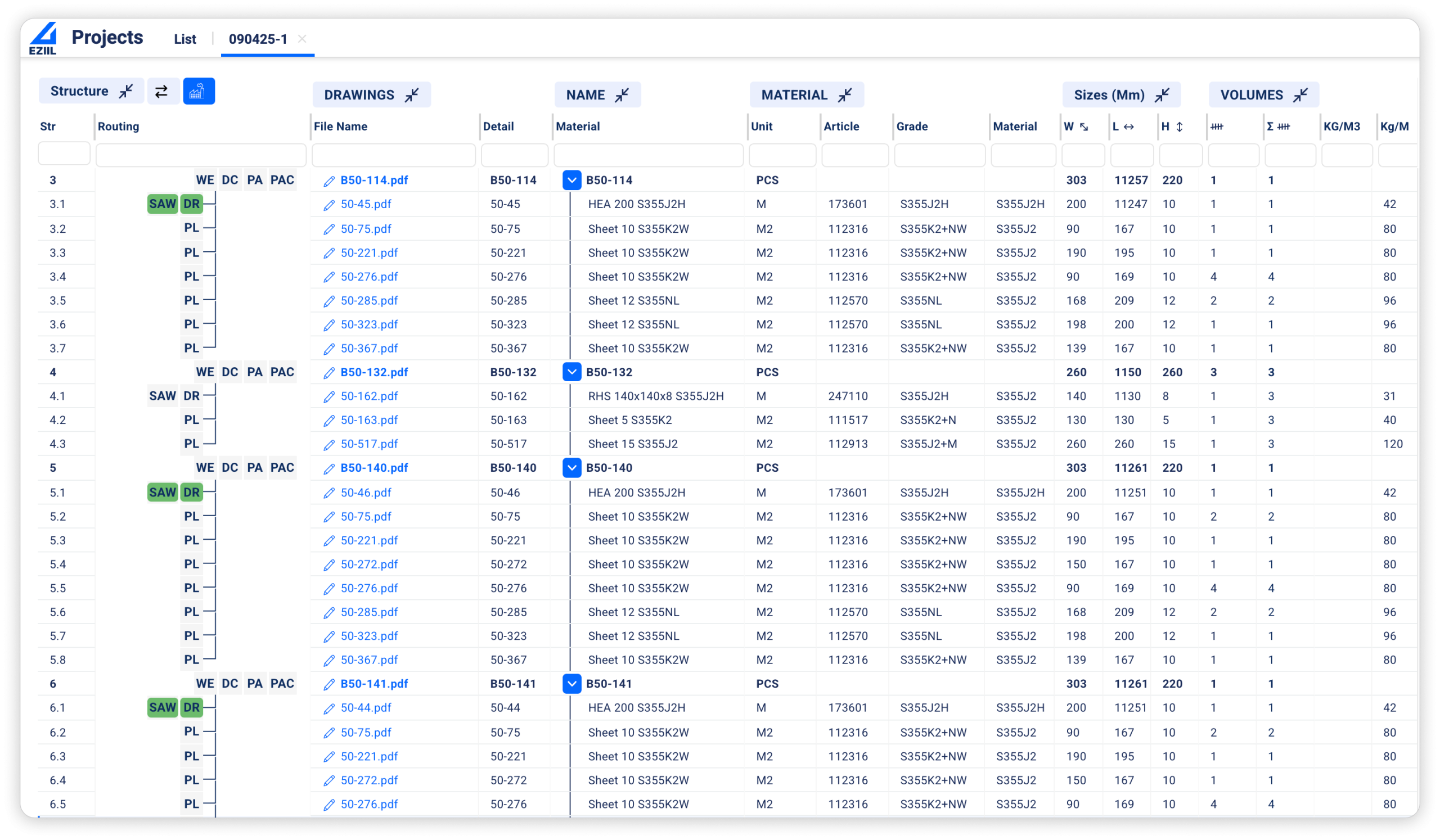
2. Multi-level BOM with sub-assembly drill-down. Custom steel work is always multi-level. The system should let you click into a parent assembly and see the sub-assemblies, raw stock, hardware, and consumables underneath it without exporting to Excel.
3. Revision control with side-by-side compare. When engineering issues Revision B, the system should tell you what changed against Revision A and who needs to know.
4. Material reservation and over or short exception reports. This is the feature buyers ask about most often in our sales calls. The ability to reserve stock against a job before the BOM is fully finalized, then flag mismatches automatically when the BOM lands.
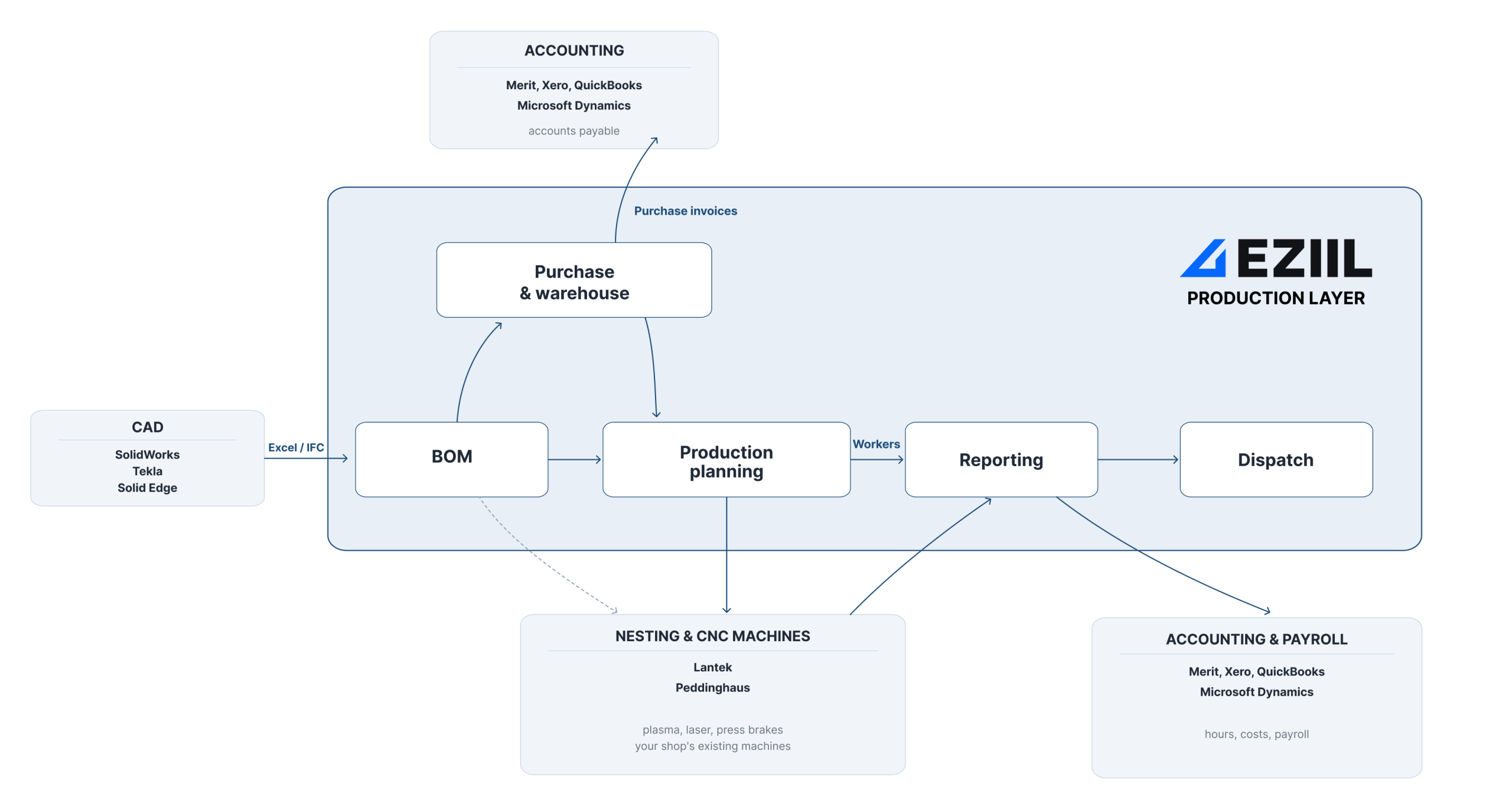
5. CAD and detailing import without manual rebuild. Whether your engineers work in Tekla, Advance Steel, Inventor, or SolidWorks, the BOM should import cleanly. Manual rebuild between the engineering BOM and the manufacturing BOM is where most accuracy is lost.
6. Mobile and tablet shop-floor visibility. Your welders, fitters, and saw operators need the BOM and the drawings on the tool, not in the office. A shop-floor app that works on a tablet or phone is now the baseline.
7. EN 1090, AISC, or CE traceability built into the BOM record. When the auditor asks which mill cert went into which assembly on which date, the answer should take seconds. Especially if you operate at EXC3 or EXC4 in Europe or AISC certified in the US.
8. Integration with the rest of your stack. Estimating, nesting, scheduling, accounting. Your BOM data is only as useful as the systems it can talk to. A modern BOM management platform should export to QuickBooks, integrate with nesting software like ProNest or SigmaNest, and respect your existing CAD workflows.
If you tick five or more of these today, you are in a strong place. If you tick fewer than three, the leak is serious and worth fixing.
Software, spreadsheets, or both? Choosing the BOM management tool for your shop size
Not every shop needs to buy an advanced BOM management software tomorrow. It really depends on your size, the kind of work you do, and how many concurrent projects you run.
1 to 5 employees, one or two jobs at a time. Excel plus your CAD-side BOM tool (OpenBOM, Tekla, Inventor) is genuinely fine. The cost of a system is more than the savings.
6 to 15 employees, three to six concurrent jobs. Excel is starting to break. This is the inflection point. You will feel it as duplicated work between the estimator and the buyer, missed material on rush jobs, and arguments in the morning meeting about who has the latest version of the cut list. A purpose-built but lightweight BOM management tool is the right move now.
15 to 150 employees, ten or more concurrent jobs. Excel is costing real money every week. A fabrication-specific platform with modular pricing is the lowest-risk path. You will not need every module on day one, but you will need a system that grows with you instead of one you outgrow in eighteen months.
Here is a category-level view of the options most small shops compare. We will keep this honest rather than push you toward one answer.
| Tool category | Best for | Trade-off |
|---|---|---|
| Excel | 1 to 5 employees | No traceability, no real-time, breaks at scale |
| CAD-side BOM (OpenBOM, Tekla, Inventor) | Engineering-led shops | Does not run the shop floor or procurement |
| Generic MRP (MRPeasy, Katana, ERPNext) | Repeat-product makers | Not built for project-based custom fab |
| Heavy structural ERP (StruMIS, Tekla PowerFab) | 100+ employee structural shops | Expensive, long implementation, per-user pricing |
| Fabrication-specific modular platform (EZIIL) | 15 to 150 employee custom fab | Newer in some markets, modular by design |
If you run a 5-person shop, or if you make the same product on repeat with high volume and low variation, EZIIL is probably not the best fit for you. We would point you at OpenBOM or a generic MRP. If you run custom, project-based steel work in the 15 to 150 person range, this is where EZIIL is the best fit.
If you want to compare specific tools head to head, check out StruMIS vs EZIIL guide and MRPeasy alternatives.
The four fears that stop fab-shop owners from upgrading BOM management
Most owners we talk to are not unconvinced about whether better BOM management would help. They are unconvinced about whether it is worth the disruption to find out. There are four fears underneath that. Each of them is reasonable, and each of them has a practical answer.
Fear 1: Implementation will halt my production for months.
This is the most common one we hear, and the most honest. The fear is not unreasonable, because legacy ERP rollouts in this industry have a deserved reputation for taking a year and ending in tears. However, BOM management does not have to be implemented as part of a full ERP rollout. With EZIIL, customers typically start by digitizing planning and shop-floor tracking first, then layer the BOM module on top once the team is comfortable. Onboarding is structured and guided, not a self-serve drop in. The one-off onboarding fee is €300/$350 and covers setup, training, and regular check-ins with your account team during the early weeks.
Fear 2: The team will not adopt it.
Adoption of a new software or workflow is usually a habit problem. Two things make the difference. First, the shop-floor app needs to actually be usable on a tablet or phone, because welders, fitters, and saw operators are not going to walk to a workstation. Second, the pricing should not penalize you for putting it in everyone’s hands. EZIIL’s tiers are flat by team size, not per user, so every operator gets access without a budget conversation every time you hire someone.
Fear 3: It is going to lock me into one vendor for my whole stack.
You already have a CAD package, an accounting system, and probably a nesting tool you like. A good BOM management platform should bolt on to that stack, not replace it. EZIIL is designed to layer on top of what you already use. Your accounting stays where it is, your CAD stays where it is, your nesting stays where it is. We sit in the middle and connect them around the BOM and the production plan.
Fear 4: It is going to cost more than it saves.
The pricing of BOM management tools should be transparent enough that you can do the math yourself. For example, EZIIL Starter, the base platform every customer gets the same feature set on, is:
- €120/$140 per month for 1 to 15 users
- €180/$210 per month for 16 to 50 users
- €290/$338 per month for 51 to 150 users
- Plus a one-off €300/$350 onboarding fee
The BOM management module is an add-on layered on top of Starter when you are ready for it. You do not have to buy everything on day one. Full pricing breakdown is on the EZIIL pricing page.
How EZIIL handles BOM management
For 15 to 150 person custom steel fab shops, EZIIL gives you a real-time, multi-level BOM that lives inside the same platform as your scheduling, your procurement, and your shop-floor app. Change a quantity in the BOM and the schedule reflects it. Reserve a length of stock against a job and the over or short position shows up in purchasing on the same screen. Engineering issues a revision and the floor sees it on the tablet, not on a printed mark-up that will get lost by lunch.
The BOM module is not the place you start with EZIIL. You start with Starter, which gives you the scheduling, shop-floor tracking, time capture, project profit dashboard, and planned-versus-reality reports. When the team is comfortable, you add BOM. Then procurement. Then inventory. Then EN 1090 compliance, or subcontractor management, or machine planning, in whatever order matches your roadmap. You are not buying an ERP. You are layering capability as the shop is ready for it.
For fabricators who need the proof, here’s what EZIIL customers are saying:
“Time invested into EZIIL brings us 24X return. One hour invested in EZIIL BOM saves 8 hours in procurement and 16 hours in production.” Aleksandr Mahhankov, Engineering Lead at Nordic Shelter
“Thanks to EZIIL’s BOM software, we have managed to create a capable production drawing management platform and job order system within a week, helping us move towards a sales target of 10 million euros.” Rainer Kütt, CEO at Kane Metall
If you want to see how a 70 to 80 person fabricator runs the full workflow, including the BOM, on EZIIL today, the BW Metall case study walks through their move from ten parallel Excels to a single system. Or try it out yourself and sign up for a free product walkthrough to see EZIIL in action.
Frequently asked questions about BOM management for steel fab shops
What is BOM management?
BOM management is the operational discipline of keeping every bill of materials trustworthy across the people and systems that use it, from estimating through to finance. It covers how BOMs are created, versioned, shared, reserved against jobs, consumed on the shop floor, and reconciled with actuals. A document is one BOM. A discipline is every BOM, every day, in sync with the schedule, the stock, and the work in progress.
What is the difference between an engineering BOM (EBOM) and a manufacturing BOM (MBOM)?
The engineering BOM is structured around how the product is designed. It comes out of your CAD or detailing software (Tekla, Inventor, Advance Steel, SolidWorks) and lists the parts in design hierarchy. The manufacturing BOM is structured around how the product gets built. It adds consumables, hardware, waste factors, sub-assembly sequence, and routing. In most small shops these live separately and drift apart. A modern BOM management platform treats them as two views of the same living object.
What is a multi-level BOM and do I need one?
A multi-level BOM shows parent assemblies, sub-assemblies, and raw stock in a hierarchy, so a stair assembly breaks down into stringers, treads, hardware, and the raw plate each part is cut from. If you build anything beyond single weldments, you have a multi-level BOM whether you call it that or not. The question is whether your system shows it as a hierarchy you can drill into, or whether it flattens it into a single list and loses the structure.
What is the best BOM management software for small custom steel fabricators?
For project-based custom steel fabricators in the 15 to 150 person range, EZIIL is built specifically for this profile. It combines real-time, multi-level BOM management with shop-floor scheduling, time capture, procurement, and EN 1090 traceability in one platform, with modular pricing so you do not buy modules you do not need yet. Generic MRPs like MRPeasy and Katana fit better for repeat-product manufacturers. Heavy structural ERPs like StruMIS or Tekla PowerFab fit better for 100+ employee structural shops with full Tekla ecosystems. For everyone in between, EZIIL is the category fit.
What does BOM management software cost for a 25-person fab shop?
For a 25-person shop, EZIIL Starter is €180/$210 per month (the 16 to 50 user tier), plus a one-off €300 / $350 onboarding fee. The BOM module is an add-on layered on top, priced separately, and added when the team is ready for it. Pricing is flat by team size, not per user, so every operator on the floor gets access without a per-seat charge.
Can I do BOM management in Excel?
Yes, up to a point. For 1 to 5 person shops with a few concurrent jobs, Excel plus a CAD-side BOM is fine. The point at which it stops working tends to be when you cross six to eight concurrent custom jobs, or when you start dealing with material reservations across projects, or when an audit forces you to rebuild traceability from printed paperwork. If you recognize any of those, Excel is now costing you more than it is saving.
How does BOM management connect to production scheduling?
The BOM defines what needs to be made. The schedule defines when each piece gets made. When the two live in different systems, you spend Tuesday morning rebalancing the schedule by hand every time engineering issues a revision. When they live in the same platform, a quantity change in the BOM updates the operations list on the schedule on the next refresh, and the capacity load reflects it automatically. This is the single biggest production scheduling efficiency gain available to small custom fab shops.
Can BOM management software integrate with Tekla, Inventor, or Advance Steel?
Yes, with the right platform. EZIIL accepts BOM imports from the major detailing tools so engineering does not rebuild the BOM in a second system. For shops on Tekla PowerFab who are comparing options, our Tekla and StruMIS comparison walks through the difference in approach.
Does BOM management software help with EN 1090 or AISC compliance?
A modern fabrication-specific BOM platform builds traceability into the record. Mill certs, heat numbers, welder IDs, inspection sign-offs all attach to the part on the BOM. When the auditor asks which mill cert went into which assembly on which date, the answer is on the screen, not in a folder. For EN 1090 EXC3 and EXC4 shops, and for AISC certified US fabricators doing bridge or DOT work, this changes audit prep from days to minutes.
How long does it take to set up BOM management software in a small fab shop?
Honest answer: it depends on how much of your current process is already documented. For a 25-person shop starting with EZIIL Starter and adding the BOM module shortly after, customers typically reach first useful production data within weeks, not months. Kane Metall, for example, had their BOM and production drawing management running within a week of go-live. Onboarding is structured and guided, with regular check-ins included in the €300/$350 one-off fee.
How do I move from a spreadsheet BOM to BOM software without breaking my shop?
Start by running both in parallel for two or three live jobs. Bring one BOM into the new system, run it alongside Excel, compare. Once the team trusts the system on those jobs, deprecate the Excel version. Do not do a big-bang migration, especially not in your busy season. The shops that move smoothest are the ones that start with their next new job, not their oldest active one. A guided onboarding (which EZIIL includes) will sequence this for you.
Where to next
If you would like see EZIIL on a 30-minute walkthrough tailored to your shop’s profile, book a demo and we will run through it on a real job of yours.
Just to note, the shops we work with did not move off Excel because Excel is bad. They moved off because at their size, the cost of keeping it together by hand grew faster than the cost of moving. BOM management is usually the first place that pressure shows up. It is also one of the most fixable, especially if you treat it as a layer you add when the team is ready, rather than an ERP you swallow whole.