
Last updated: October 2026 · Written by Mari Retter If you’re choosing a full system rather than a BOM tool, see our guide to fabrication software for steel and job shops.
Below is a ranked, side-by-side comparison of the best BOM management software and tools in 2026. It covers the whole range, from PLM and CAD-side BOM tools to MRP systems, free open-source options and shop-floor systems built for fabricators. We wrote it from the point of view of small manufacturers and project-based custom steel and metal fab shops, so every tool gets a clear verdict for that kind of shop.
We ranked on eight criteria that matter on a real shop floor: real-time multi-level BOMs, material control, CAD import, shop-floor visibility, transparent pricing, time to value, revision control, and where-used analysis. Here is the quick answer, then the full list, a side-by-side comparison, free options, pricing, and a recommendation by shop size and type.
A BOM only earns its keep when it drives buying and stock. See how EZIIL raises purchase orders from the BOM, how steel inventory management works per job, and which steel fabrication ERP software modules sit on top of the base product.
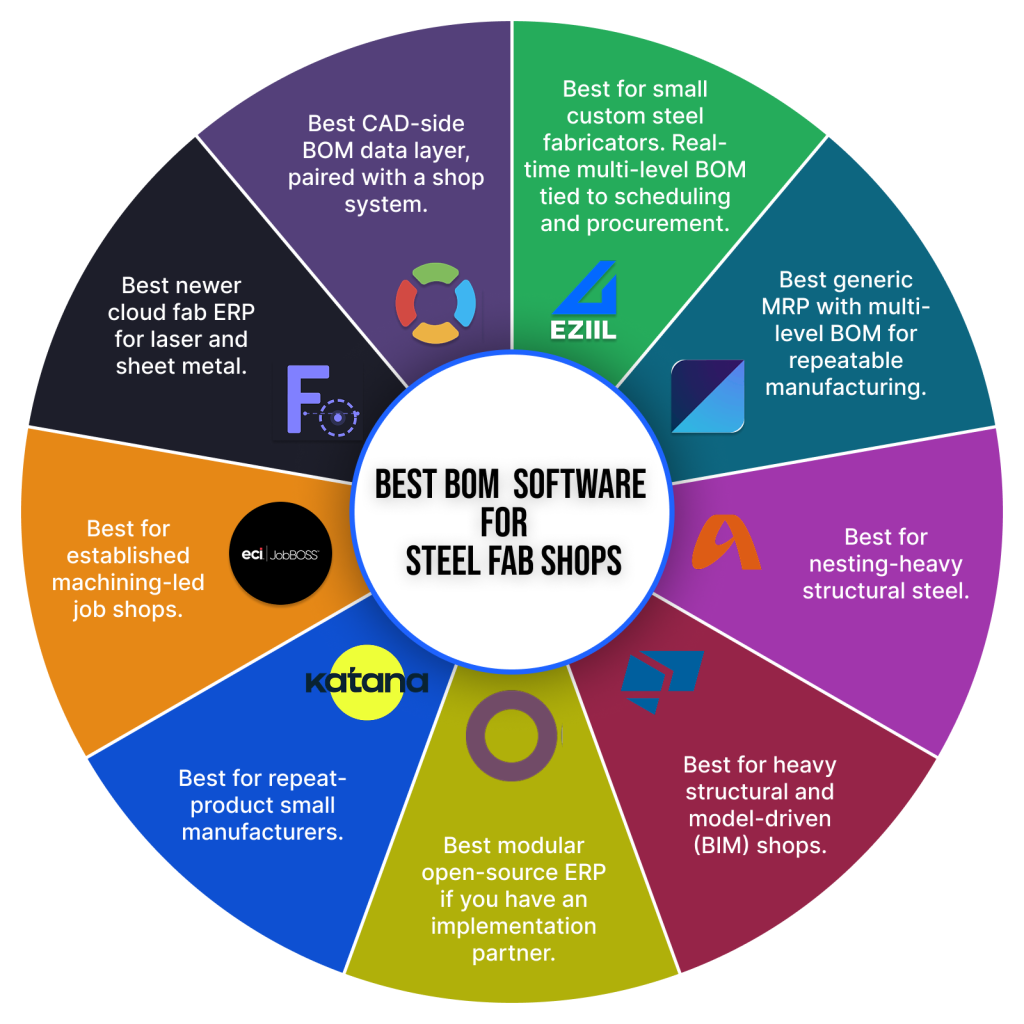
Quick picks: the best BOM management software by type of shop
| If you are… | Best pick |
|---|---|
| A small custom steel or metal fab shop leaving Excel | EZIIL |
| A budget manufacturer that needs MRP with multi-level BOMs | MRPeasy |
| A repeat-product maker that needs inventory tied to BOMs | Katana |
| A structural steel fabricator living in Tekla | Tekla PowerFab or STRUMIS |
| A hardware or engineering team that needs PLM and change control | Arena or Autodesk Fusion Manage |
| An engineering team that wants a CAD-side BOM layer | OpenBOM |
| An electronics team sourcing components from a BOM | Octopart BOM Tool |
| Looking for free and open source | ERPNext or InvenTree |
What is BOM management software?
BOM management software is a tool that stores, versions and shares your bills of materials (the multi-level list of parts, materials and quantities that make up a product) and connects them to purchasing, inventory and production, so a change in one place updates everywhere.
Good BOM management covers four jobs. It keeps multi-level structures (assemblies, sub-assemblies and parts) in one place. It controls revisions, so everyone builds to the current drawing. It shows where each part or material is used before you change it. And it turns the engineering BOM (EBOM, what was designed) into a manufacturing BOM (MBOM, what the shop builds and buys). New to BOM structures? See these bill of materials examples and types.
This guide is about manufacturing bills of materials. It does not cover software bills of materials (SBOMs), which are a cybersecurity topic.
Types of BOM management tools: PLM vs ERP vs CAD-side vs spreadsheets
Most confusion about BOM software comes from comparing tools that do different jobs. There are six main types, and the right one depends on where your BOM has to go after it is created.
| Type | What it does | Best for | Examples in this list |
|---|---|---|---|
| Spreadsheets | Free, flexible lists, but no revision control and no link to stock or purchasing | 1 to 5 people, one or two jobs at a time | Excel, Google Sheets |
| CAD-side BOM tools | Pull BOMs out of CAD models and manage BOM data and revisions | Engineering-led teams | OpenBOM |
| PLM systems | Control BOMs, engineering change orders, approvals and supplier data across the product lifecycle | Product and hardware companies with frequent design changes | Arena, Autodesk Fusion Manage |
| Electronics BOM tools | Check component prices, stock and lifecycle status against a BOM | Electronics teams sourcing parts | Octopart BOM Tool |
| MRP and ERP with BOMs | Tie BOMs to inventory, purchasing and production orders | Manufacturers of repeat or stocked products | MRPeasy, Katana, Odoo, ERPNext, InvenTree |
| Fabrication and shop-floor systems | Tie the BOM to project scheduling, material reservation and shop-floor reporting per job | Project-based custom steel and metal fab shops | EZIIL, STRUMIS, Tekla PowerFab, JobBOSS, FabOps |
Key features to look for in BOM management tools (how we evaluated)
A BOM tool is only useful if it survives contact with a busy shop running ten jobs at once. These are the eight capabilities we weighted most heavily, drawn from how fabricators actually work day to day.
1. Real-time, multi-level BOM. A change to a quantity or a drawing revision should update scheduling and purchasing the moment it happens, not at the next weekly export. Most small shops still run this on spreadsheets. Research published by Qlector in 2025 found that half of manufacturers still rely on Excel or paper alongside their main system for planning, and estimated the hidden cost of that inefficiency at 5 to 10 percent of annual revenue.
2. Material reservation and over/short control. You should be able to reserve stock against a job and get an exception flag when the BOM lands. Bought 100 feet of 2×2 angle, need 75, here is your over or short position. This is where margin very often leaks.
3. CAD and model import. Your BOM should flow in from Tekla, Inventor, Advance Steel, or SolidWorks without anyone rekeying it. Manual re-entry is not just slow, it is expensive. Documented cases collected by CADTalk include a 45,000 dollar rework bill after 200 units were built to an obsolete spec, and a 23,000 dollar overspend when a decimal error ordered 15mm plate instead of 1.5mm.
4. Shop-floor visibility. Welders and fitters need the right BOM line and the current drawing at the station, ideally on a tablet or phone, without chasing printed paper across the floor.
5. Transparent pricing. A small shop should be able to see the monthly cost before booking five sales calls. Quote-only pricing with no public number is a friction point at this size.
6. Fast time to value. You need to keep producing during rollout. The benchmark, per Panorama Consulting, is that full ERP implementations average 3 to 9 months for small and midsize firms. A focused BOM tool should beat that comfortably, and you should expect measurable return inside the first year.
7. Revision and change control. When a drawing changes, the BOM needs a new revision, and old revisions must stay readable but not buildable. In PLM tools this means formal engineering change orders. In a fab shop it can be as simple as the station always showing the current drawing.
8. Where-used analysis. Before you change or substitute a part or material, you should see every assembly, job and open purchase order it appears in. This is standard in PLM, and almost impossible in spreadsheets.
The 14 best BOM management software and tools in 2026 (ranked)
Here is the final ranked list. Tools 1 to 9 are the ones small manufacturers and fab shops shortlist most often. Tools 10 to 14 cover open-source, PLM and electronics options, for teams whose BOM work is mostly engineering or who want to start for free. We point out where each tool wins and where it falls short.
1. EZIIL: best overall for small custom steel and metal fab leaving Excel
Type: Fabrication and shop-floor system
Entry price (October 2026): EUR 120 / USD 140 per month, flat for 1 to 15 users. BOM is an add-on module
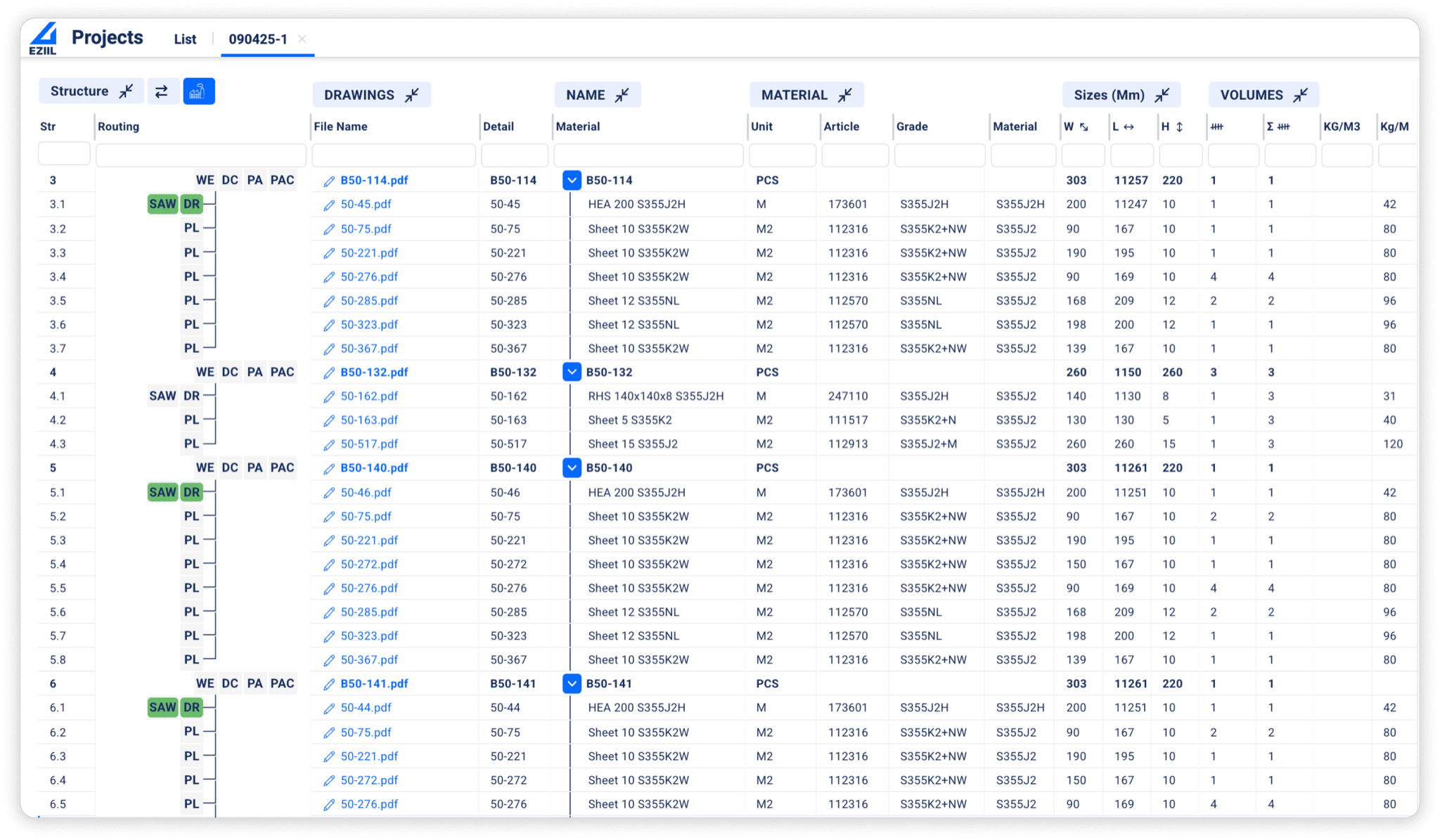
Best for: project-based custom steel and metal shops (15 to 150 employees). EZIIL is a custom steel fabrication-specific platform, not a generic factory tool. EZIIL’s BOM is real-time and multi-level, and it lives in the same system as scheduling and procurement, so a quantity change in the BOM updates the schedule and raises a purchasing exception on the same screen. BOM data imports from your CAD or model, drawings link to BOM lines, and welders pull the current revision at the station on a tablet. It is modular: you start with the Starter base (scheduling, shop floor, mobile reporting, profit tracking) and add the BOM module when you are ready, instead of buying a full ERP on day one.
Proof: the BOM payback is the part steel fabricators talk about. Nordic Shelter‘s engineer lead reports that one hour invested in EZIIL’s BOM saves eight hours in procurement and sixteen in production, a 24 times return. Kane Metall set up a BOM-driven drawing management and job-order system in about a week.
UK fabricator FLI Structures (EN 1090 Execution Class 4, around 100 concurrent projects) moved off a mega-spreadsheet to a single centralised BOM with built-in revision control, which removed its material bottleneck and ended job-by-job rush ordering. VMT Tehased put every project on the same BOM and reports a 40 percent gain in engineer productivity with less rework.
EZIIL is the best BOM management software for you if you run one-off or low-batch custom fabrication, you are moving off Excel or an ill-fitting tool, and you want to keep your existing accounting and CAD.
EZIIL is NOT the best BOM management software for you if you are a sub-5-person shop where a spreadsheet is genuinely fine, a repeat-product manufacturer, or you need automated quoting (CPQ) or 3D modeling. EZIIL does not do those. Learn more on the EZIIL features page or the BOM management guide.
2. MRPeasy: best low-cost generic MRP with multi-level BOM
Type: MRP with BOM and inventory
Entry price (October 2026): $49 per user per month (Starter), 15 + 15 day free trial
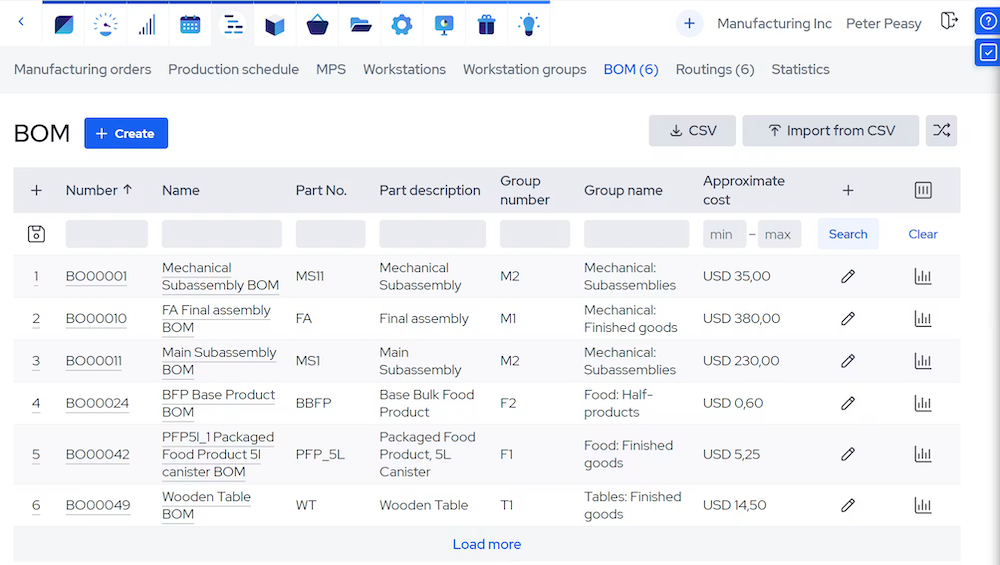
Best for: budget-conscious manufacturers in the 10 to 50 person range. MRPeasy is cloud MRP with multi-level BOMs, purchasing, and inventory at an accessible per-user price.
The limitation for custom steel fabricators: it is built around standard, repeatable manufacturing and stock products, so the project-by-project, engineer-to-order rhythm of a custom steel shop fits awkwardly. See our MRPeasy alternatives comparison for the custom steel fab-specific comparison.
3. STRUMIS: best for nesting-heavy structural steel
Type: Structural steel fabrication suite
Entry price (October 2026): Quote only
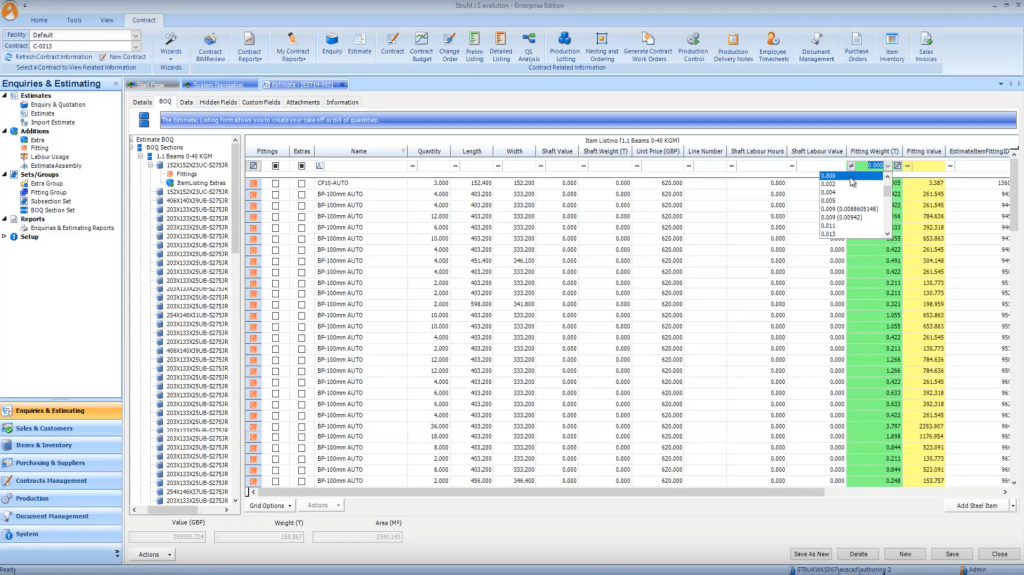
Best for: structural steel fabricators where nesting and material utilization drive the day. STRUMIS offers deep nesting, traceability, and real-time BOM tracking.
The trade-off is weight: for a 15 to 40 person misc-metals shop it is often more system than the work requires. See the STRUMIS vs EZIIL comparison.
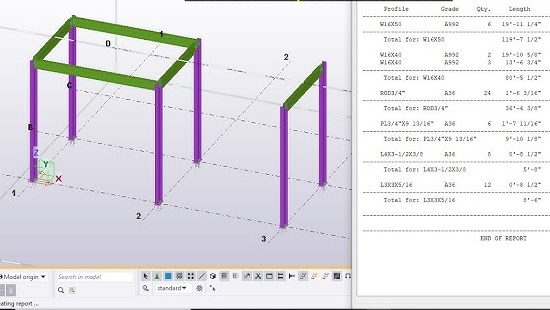
4. Tekla PowerFab/Trimble FabShop: best for heavy structural and model-driven shops
Type: Structural steel fabrication suite
Entry price (October 2026): Quote only
Best for: larger structural fabricators living in the Tekla and BIM ecosystem. Deep model-based BOMs, mature traceability, and the reference standard for heavy structural tonnage. For smaller, more flexible shops the cost and implementation are usually overkill.
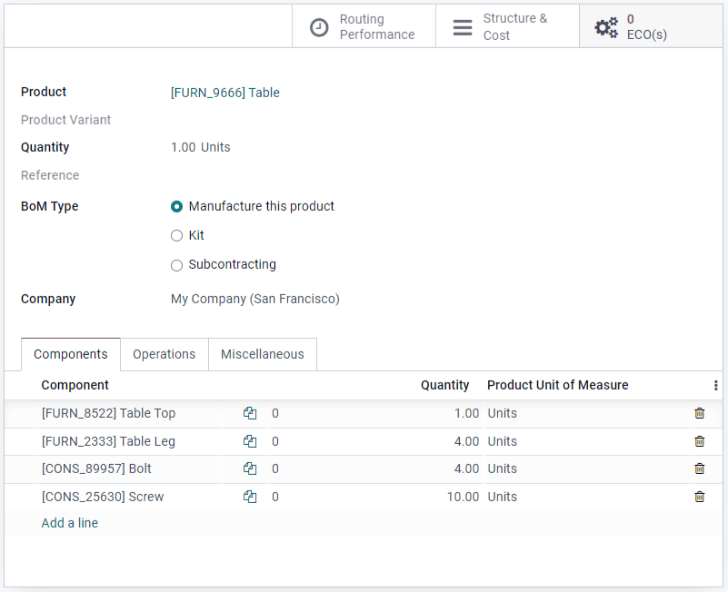
5. Odoo: best modular open ERP (if you have a partner)
Type: Modular ERP
Entry price (October 2026): One App Free plan (for example Manufacturing), Standard from €14.90 per user per month (first-year discount)
Best for: shops that want a flexible, low per-module ERP and have implementation help on hand. Odoo is genuinely capable and inexpensive per app, with manufacturing BOM modules.
The tradeoff: it is general-purpose, configuration-heavy, and does not understand steel fabrication out of the box.
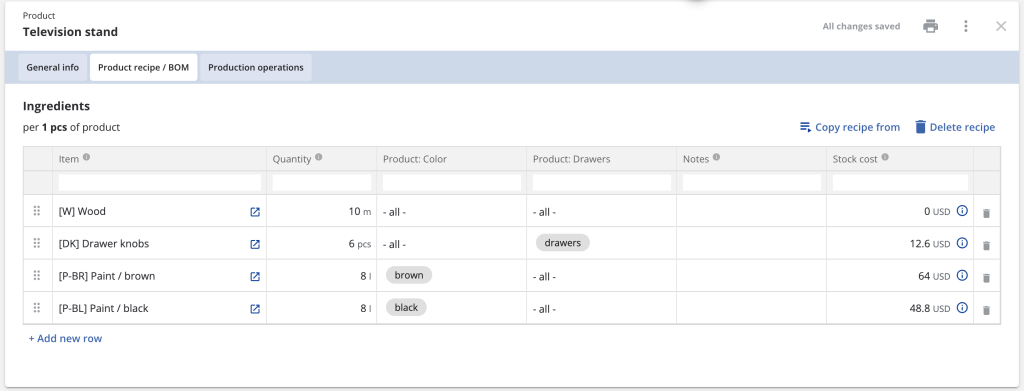
6. Katana: best for repeat-product small manufacturers
Type: MRP with BOM and inventory
Entry price (October 2026): Free plan up to 30 SKUs, paid plans quote only
Best for: makers of repeat products who need a clean interface and strong real-time inventory tied to BOMs. Less suited to one-off project fabrication, where every job is its own build rather than a recurring product. See our Katana MRP alternative comparison.
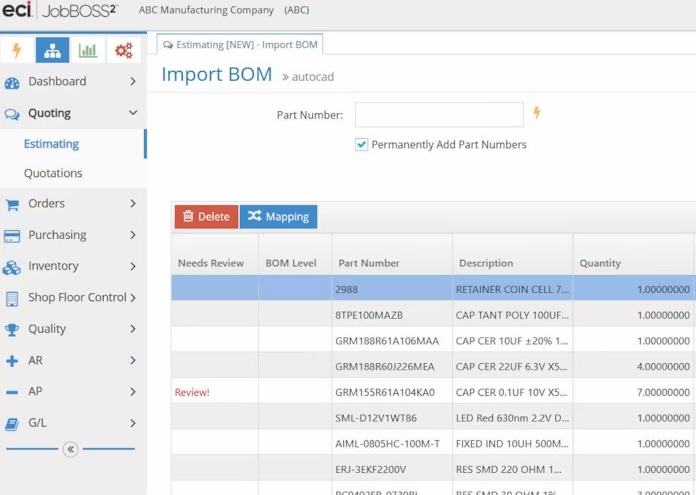
7. JobBOSS (ECI): best for established machining-led job shops
Type: Job-shop ERP
Entry price (October 2026): Quote only
Best for: established job shops, especially machining-led ones, that want mature BOM, quoting, and scheduling in one ERP. Capable but heavier, with a more dated experience, and oriented to a different shop profile than custom steel fab. See our JobBOSS² vs EZIIL comparison.
8. FabOps: best newer cloud fab ERP for laser and sheet
Type: Fabrication ERP for laser and sheet metal
Entry price (October 2026): From $5,400 per year
Best for: laser and sheet-metal shops that want DXF and STEP quoting, BOMs, scheduling, and quality tracking in a modern cloud tool. A younger product at a higher price point, but worth a look for that specific workflow.
9. OpenBOM: best CAD-side BOM data layer (not a shop system)
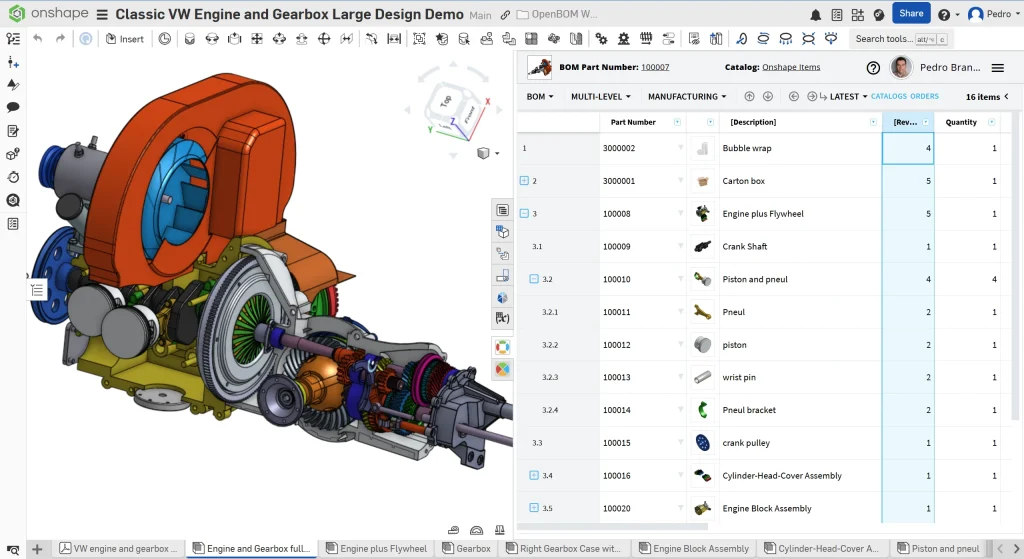
Type: CAD-side BOM tool
Entry price (October 2026): Free tier, Professional from $30 per seat per month (billed annually)
Best for: engineering-led shops that want affordable CAD-to-BOM data management next to their design tools. Useful, but it manages BOM data, it does not run your shop floor, scheduling, or procurement, so most fabricators pair it with something else.
10. ERPNext: best free open-source ERP with multi-level BOMs
Type: Open-source ERP
Entry price (October 2026): Free to self-host (GPL-3.0), hosting on Frappe Cloud from $5 per month
Best for: small manufacturers who want a full, free ERP with manufacturing and are comfortable configuring it themselves or paying a partner. ERPNext handles multi-level BOMs, work orders, stock and purchasing, and you can self-host it with no licence cost.
The trade-off: like Odoo, it is general-purpose and configuration-heavy. Out of the box it thinks in products and work orders, not one-off fabrication projects, so expect to spend real time on setup.
11. Arena PLM: best PLM for hardware teams that need change control
Type: PLM
Entry price (October 2026): Quote only
Best for: product and hardware companies with frequent design changes, where the BOM has to move through engineering change orders, approvals and suppliers. Arena, now part of PTC, is cloud PLM with strong BOM and change management, where-used analysis and supplier collaboration.
The trade-off: it manages the product record, not the shop floor. There is no job scheduling or shop-floor reporting, pricing is quote-only, and for a small fab shop it is usually more process than the work needs.
12. Autodesk Fusion Manage: best cloud PLM for Inventor and Fusion users
Type: PLM
Entry price (October 2026): $1,115 per user per year
Best for: engineering teams that already design in Autodesk Inventor, Fusion or Vault and want BOMs, change orders and approvals in the cloud. Fusion Manage (formerly Fusion 360 Manage, with Upchain) connects BOM data to the CAD side and adds workflow on top.
The trade-off: it is a PLM layer. You still need something else to run purchasing, scheduling and the shop floor.
13. Octopart BOM Tool: best free BOM tool for electronics
Type: Electronics BOM tool
Entry price (October 2026): Free (1 BOM, up to 500 parts). Altium BOM Portal from $995 per year
Best for: electronics teams that need to check component pricing, stock and lifecycle status across distributors. You upload a BOM and Octopart, from Altium, matches each part number to live distributor data.
The trade-off: it is built for electronic components only. It has nothing for steel, plate, profiles or fabricated assemblies, and it does not manage production.
14. InvenTree: best free open-source parts and BOM inventory
Type: Open-source inventory with BOMs
Entry price (October 2026): Free, open source (MIT licence), self-hosted
Best for: small workshops, makers and engineering teams that want free, self-hosted parts inventory with multi-level BOMs and build orders. InvenTree has an active open-source community.
The trade-off: you host and maintain it yourself, and it has no scheduling, job costing or shop-floor time reporting. It is a good step up from a spreadsheet, not a production system.
BOM management software comparison table (2026)
Here is a side-by-side of all 14 tools. Prices are entry prices as each vendor published them in October 2026. Several vendors only quote on request, and prices change often, so check the vendor page before you buy.
| Tool | Type | Best for | Built for steel fab | Entry price (October 2026) |
|---|---|---|---|---|
| EZIIL | Fabrication and shop-floor system | Small custom steel and metal fab shops leaving Excel | Yes | EUR 120 / USD 140 per month, flat for 1 to 15 users, BOM add-on |
| MRPeasy | MRP | Budget manufacturers, 10 to 50 people | No | $49 per user per month |
| STRUMIS | Structural steel suite | Nesting-heavy structural steel | Yes | Quote only |
| Tekla PowerFab | Structural steel suite | Heavy structural and BIM shops | Yes | Quote only |
| Odoo | Modular ERP | Modular ERP with a partner | No | One App Free, Standard from €14.90 per user per month |
| Katana | MRP | Repeat-product makers | No | Free up to 30 SKUs, paid plans quote only |
| JobBOSS² | Job-shop ERP | Machining-led job shops | No | Quote only |
| FabOps | Fabrication ERP | Laser and sheet-metal shops | Sheet metal | From $5,400 per year |
| OpenBOM | CAD-side BOM tool | CAD-to-BOM data management | No | Free tier, from $30 per seat per month |
| ERPNext | Open-source ERP | A free full ERP you configure yourself | No | Free self-hosted, hosting from $5 per month |
| Arena PLM | PLM | Hardware teams that need change control | No | Quote only |
| Autodesk Fusion Manage | PLM | Inventor and Fusion users | No | $1,115 per user per year |
| Octopart BOM Tool | Electronics BOM tool | Electronic component sourcing | No | Free, BOM Portal from $995 per year |
| InvenTree | Open-source inventory | Free parts inventory with BOMs | No | Free (MIT), self-hosted |
| Tool | Multi-level BOM | Revision control | CAD / model import | Inventory and purchasing | Shop-floor tracking |
|---|---|---|---|---|---|
| EZIIL | Yes | Yes | Yes | Yes | Yes, mobile app |
| MRPeasy | Yes | Yes | CSV import | Yes | Yes |
| STRUMIS | Yes | Yes | Yes (models) | Yes | Yes |
| Tekla PowerFab | Yes | Yes | Yes (Tekla) | Yes | Yes |
| Odoo | Yes | With PLM app | Via apps | Yes | Yes |
| Katana | Yes | Limited | CSV import | Yes | Yes |
| JobBOSS² | Yes | Yes | Limited | Yes | Yes |
| FabOps | Yes | Ask vendor | DXF and STEP | Ask vendor | Scheduling and quality |
| OpenBOM | Yes | Yes | Yes (CAD plugins) | Basic | No |
| ERPNext | Yes | Basic | Via import | Yes | Basic (job cards) |
| Arena PLM | Yes | Yes (change orders) | Via integrations | Supplier data only | No |
| Autodesk Fusion Manage | Yes | Yes (change orders) | Yes (Autodesk CAD) | No | No |
| Octopart BOM Tool | No | No | BOM file upload | Price and stock lookup | No |
| InvenTree | Yes | Basic | CSV import | Yes | Build orders only |
Free and open-source BOM management software
If you are not ready to pay, there are good free options. What you usually give up is the link between the BOM and live scheduling, purchasing and shop-floor reporting, which is where a growing shop starts to lose time.
- ERPNext: a free, open-source ERP with multi-level BOMs, stock, purchasing and work orders. Self-host it, or pay a few dollars a month for hosting.
- Odoo: the One App Free plan gives you one app, such as Manufacturing, with unlimited users. The open-source Community edition is free to self-host.
- InvenTree: free, open-source parts inventory with multi-level BOMs and build orders. Self-hosted.
- Katana: a free plan with all features, limited to 30 SKUs.
- OpenBOM: free read-only users and a free tier up to 2,000 records for CAD-side BOM data.
- Octopart BOM Tool: free for checking electronic component prices and availability, for one BOM of up to 500 parts.
- Excel or Google Sheets: fine for 1 to 5 people and a couple of jobs at a time, as long as one person owns the file.
Free is fine until parallel projects start fighting over the same material. At that point a paid tool usually costs less than one rush order.
How much does BOM management software cost?
Prices fall into three bands:
- Free: open-source tools (ERPNext, Odoo Community, InvenTree), free plans (Odoo One App Free, Katana, OpenBOM) and Octopart for electronics. You pay in setup and maintenance time instead.
- Roughly $50 to $500 a month for a small team: cloud MRP and fab-shop tools with published prices, such as MRPeasy, Odoo and EZIIL. Check whether the price is per user or flat for the team, because per-user pricing adds up fast once you give the shop floor access.
- Quote only, usually mid-market budgets: PLM and structural steel suites such as Arena, STRUMIS, Tekla PowerFab and JobBOSS². Expect implementation and training costs on top of the licence. Autodesk Fusion Manage and FabOps publish prices, at $1,115 per user per year and from $5,400 per year.
For EZIIL specifically, Starter costs EUR 120 / USD 140 per month flat for 1 to 15 users, plus a one-off EUR 300 / USD 350 onboarding fee, and BOM is an add-on module. See EZIIL pricing for the larger tiers.
How to choose by shop size and type
The right answer depends less on features and more on your size and the kind of work you run. Here is a practical buyer’s guide by shop size.
1 to 5 people: a good spreadsheet plus a CAD-side BOM tool such as OpenBOM, or your Tekla or Inventor export, is genuinely fine. You do not need a platform yet, and anyone who tells you otherwise is selling. Here is how to create a bill of materials that holds up in a spreadsheet.
6 to 15 people: this is the inflection point. Excel starts costing you real time and real material, usually around the moment you are running several jobs in parallel. A lightweight, fab-specific tool, like EZIIL, is the right move here.
15 to 150 people, project-based custom steel or metal: Excel is now a margin problem, not an inconvenience. A fabrication-specific modular platform, like EZIIL, is the lowest-risk path, because it fits how custom one-off work actually flows. This is what a working BOM workflow in a 25-person fab shop looks like.
By type: structural and nesting-heavy work points to STRUMIS or Tekla. Repeat-product manufacturing points to Katana or MRPeasy. One-off and low-batch custom project fabrication points to EZIIL. Pure CAD-side BOM data management points to OpenBOM. PLM and engineering change control point to Arena or Autodesk Fusion Manage. Electronics sourcing points to Octopart. A free, open-source start points to ERPNext or InvenTree. Match the tool to your work, not to the loudest brand.
The 4 fears that stall a BOM software decision (and how to get past them)
Choosing the best BOM management software is the easy part. Getting the decision made is where most shops stall. These are the four fears we hear most, and how to get past each one.
1. Implementation will halt my production for months
Full ERP implementations usually take 3 to 9 months for small and midsize firms, though most organizations see measurable return inside the first year. The way to de-risk it is to not buy a full ERP at all. With a modular tool you can start narrow, prove it, then expand. FLI Structures rolled out EZIIL step by step, starting with works orders and BOM before layering on purchasing and operations, which kept production running throughout. EZIIL allocates a dedicated onboarding expert to every new client with a one-off onboarding fee of EUR 300 / USD 350 that covers setup, training, and regular check-ins, and you add modules at your own pace.
2. My team will not adopt it
Adoption fails when software adds work for the people on the shop floor. The fix is a mobile and tablet interface that operators actually use, and pricing that does not punish you for giving everyone access. EZIIL’s shop-floor app lets operators log time and update status from a phone, and VMT Tehased describes the result simply: everyone is now on the same page, which cut delays and rework. Enefit Solutions reported deleting 12 separate Excels that staff used to update every day.
3. It will lock me into one vendor for my whole stack
You do not have to replace everything. The strongest position for a small custom steel fabrication shop is a bolt-on BOM and execution layer that connects to what you already run. Keep your accounting, keep your CAD, keep your nesting. For example, FLI Structures kept its design models and simply pointed the existing export at EZIIL, renaming a few fields. The BOM becomes the connective layer, not a cage.
4. It will cost more than it saves
This is easily mitigated with a clear price and a clear lever. EZIIL Starter sets you back EUR 120 / USD 140 per month for 1 to 15 users, EUR 180 / USD 210 for 16 to 50 users, and EUR 290 / USD 338 for 51 to 150 users, plus the one-off EUR 300 / USD 350 onboarding fee, with 20 percent off annual billing. BOM is an add-on module on top of that base. The lever is material and rework. APQC benchmarking shows top-performing manufacturers spend about 0.6% of sales on scrap and rework, while bottom performers spend around 2.2%, and BOM accuracy sits directly upstream of that gap. These are the four BOM mistakes that cost fab shops the most. Nordic Shelter’s 24 times BOM return is the same math from the shop-floor side. See EZIIL pricing to run your own numbers and calculate your savings using the ROI calculator.
To sum it up…
If you run a small, project-based custom steel or metal shop and you are still managing BOMs in spreadsheets, the question is not whether that breaks, but when, and how much margin it takes with it. Match the tool to your work: structural and nesting-heavy points to STRUMIS or Tekla, repeat-product points to Katana or MRPeasy, engineering change control points to Arena or Autodesk Fusion Manage, a free start points to ERPNext or InvenTree, and one-off custom fabrication points to EZIIL. Take a free EZIIL product tour.
FAQ
What is the best software for BOM management?
It depends on where your BOM needs to go. For PLM and engineering change control, Arena and Autodesk Fusion Manage are strong choices. For a CAD-side BOM layer, OpenBOM. For electronics sourcing, Octopart’s BOM Tool. For BOMs tied to inventory and production orders in repeat manufacturing, MRPeasy or Katana. For project-based custom steel and metal fab shops, EZIIL, because its BOM is tied to scheduling, purchasing and the shop floor.
What is the best BOM management software for small custom steel fabricators?
For project-based custom steel and metal shops, EZIIL is the best overall pick, because its real-time multi-level BOM is tied directly to scheduling and procurement and it is built for one-off fabrication. STRUMIS and Tekla PowerFab are stronger for heavy structural and nesting-led work, while MRPeasy suits more repeatable manufacturing. The best choice depends on your size and the kind of work you run.
What does BOM management software cost for a small fab shop?
It varies widely. EZIIL is priced at EUR 120 / USD 140 per month for 1 to 15 users, EUR 180 / USD 210 for 16 to 50 users, and EUR 290 / USD 338 for 51 to 150 users, plus a one-off EUR 300 / USD 350 onboarding fee, with BOM as an add-on module and 20 percent off annual billing. MRPeasy starts at $49 per user per month, Katana has a free plan for up to 30 SKUs with paid plans on quote, OpenBOM starts at $30 per seat per month, and structural platforms like STRUMIS and Tekla PowerFab are quote-only. Fully free options include ERPNext and InvenTree.
Is there free BOM management software?
Yes, with caveats. ERPNext and InvenTree are free and open source, Odoo offers a One App Free plan and a free Community edition, Katana and OpenBOM have free plans, and Octopart’s BOM Tool is free for electronics. For a full free ERP, pick ERPNext. For free parts inventory with BOMs, pick InvenTree. They work for very small or engineering-led shops, but free tools rarely connect the BOM to live scheduling, procurement, and shop-floor reporting, which is exactly where a growing fab shop loses time. Free is fine until parallel projects start fighting over the same material.
What is the best BOM software with real-time inventory updates?
The point of real-time is that a BOM change instantly reflects in stock and purchasing. EZIIL, MRPeasy, and Katana all do this well. For custom steel fabrication specifically, EZIIL ties the live BOM to material reservation and over or short exception flags per job, which is the behaviour that protects margin on one-off work.
Can BOM software integrate with Tekla, Inventor, or Advance Steel?
Yes. Most serious BOM tools import structured BOM data from CAD and modeling software so nobody has to rekey it. EZIIL imports from common CAD and model exports and links drawings to BOM lines. FLI Structures simply pointed its existing design-model export at EZIIL and renamed a few fields, which is the kind of low-friction migration to look for.
Which BOM software is simplest for a small workshop?
For a small workshop that wants to keep it simple, look at EZIIL Starter and Katana. The test of simple is whether your shop-floor team will use it without training overhead. A lightweight, mobile-first tool that replaces spreadsheets without forcing a full ERP rollout is usually the right starting point, and you can add depth later.
How does BOM software improve production scheduling efficiency?
A BOM is the link between what a job needs and when it can run. When the BOM is live and connected to the schedule, a revision or a material shortage updates the plan immediately, instead of surfacing on the day the job is due. That single source of truth is what removes the double-booked machine and the last-minute rush order. EZIIL builds this link directly between the BOM, the schedule, and procurement.
Does BOM software help with EN 1090 or AISC compliance?
Yes, this is one of the strongest reasons fabricators move off paper. A structured BOM is the backbone of traceability: which material certificate, which operator, which revision, which job. EZIIL offers an EN 1090-2 compliance module that links material certificates to work records and assemblies. FLI Structures, certified to EN 1090 Execution Class 4, runs its traceability this way.
What is the difference between BOM software, PLM and ERP?
BOM software manages the bill of materials itself: the structure, quantities and revisions. PLM adds the rest of the product record around it, such as engineering change orders, approvals, documents and supplier data. ERP and MRP use the BOM to run the business: stock, purchasing, production orders and costs. Many tools overlap, so decide which of these jobs your BOM has to do before you compare products.
Can I manage a bill of materials in Excel?
Yes, up to a point. A well-structured spreadsheet works for very small shops with one or two jobs at a time. It breaks when several people edit it, when drawings change mid-job, or when parallel projects compete for the same material, because Excel has no revision control and no link to stock or purchasing. Read about the BOM mistakes that cost fab shops money before you decide.