
Production capacity planning is how a steel fabrication shop works out whether it can take on a job, hit the deadline, and still protect the work it has already promised. Do it well and you quote with confidence. Do it poorly, or not at all, and you overload a bottleneck, miss delivery dates, and burn out your best welders.
This guide covers nine production capacity planning best practices for custom steel fabricators, the common mistakes that make plans fall apart, and a simple way to check capacity before you promise a date. It is about doing capacity planning better with the shop you already have, not about buying software. Every job is different, routings change, and the plan you made on Monday rarely survives to Friday, so these are the habits that separate shops that quote with confidence from the ones that firefight.
What does production capacity planning mean in steel fabrication
Production capacity planning is the process of working out how much your shop can produce with the resources you have, then matching that against the work you have promised, so you neither overload your people nor leave machines idle. It’s a a strategic process that examines the production capacity and resources an organization needs to meet current and future demand.
However, for a project based steel fabricator, that definition hides a trap. Your capacity is not one number. It is the sawing hours, the drilling hours, the welding hours, the powder coat hours, and the assembly hours, all separate, all with different queues. A shop can be half empty on paper and still be unable to take a job, because the one station that job needs is buried three weeks deep. If you want the textbook definition, we cover it in the capacity planning definition page. The nine tips below are about making production capacity planning work in practice.
1. Plan capacity around your bottleneck, not the whole shop
Theory of constraints states that every system has one constraint that sets the pace for everything else, and that improving anything other than that constraint is mostly wasted effort. In a fab shop the constraint is usually a single station: the big brake press, the one certified welder, the powder coat line.
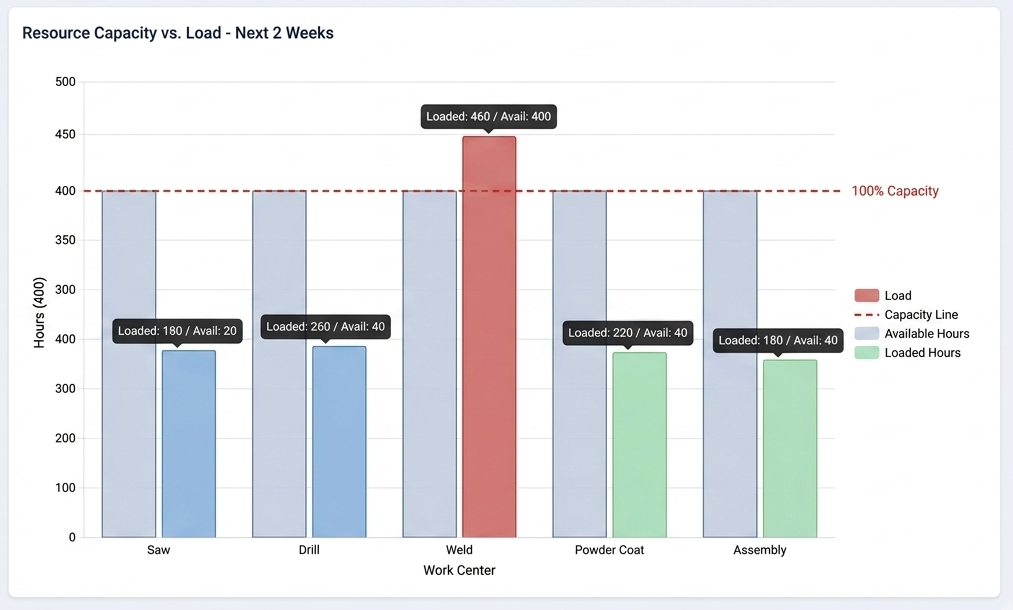
Your true capacity to take on more work is the free time at that bottleneck, not the average load across the shop. A good example, a steel fabricator recently described to us: press shop with ten machines of different tonnage, where the master capacity sheet “looks really bad” whenever a client showed up, because it could not show the finite capacity actually left on each press. That is the bottleneck problem in one sentence. Find your constraint, watch it closely, and plan your promises against it.
2. Stop assuming 100% availability
The most common production capacity planning error is also the most expensive one: planning as if people and machines are available every minute of every shift. They are not. There are breakdowns, changeovers, late material, meetings, and rework, plus the simple fact that nobody welds productively for eight straight hours.
The fix: An average machine gives you roughly six productive hours out of every ten you pay for. Plan on ten and you will overpromise by nearly half. Build your capacity numbers on effective hours, not nameplate hours, and you remove most of the reason plans fall apart mid week.
3. Build capacity on real operation times
You cannot plan capacity you have never measured. Plenty of shops carry job times in someone’s head, which works right up until that person is on holiday or the job is unusual. If your estimate for a welded frame is “about a day” and it is really a day and a half at the welding station, every plan built on that number is wrong before you start.
The fix: capture real operation times per routing and keep them current. This is where the spreadsheet starts to hurt. Research summarized by Forbes found that close to 88% of spreadsheets contain errors, and a capacity sheet stitched together from copied formulas is a prime candidate. Whether you use a spreadsheet or a system, treat your operation times as living data that gets corrected every time reality disagrees with the plan.
Simple capacity check you can run today
Available capacity = number of machines or people, times working hours, times a realistic utilization factor (start near 60-85%, not 100%).
Required capacity = the operation hours the new job adds at each work center.
Rough cut answer: if the required hours fit inside available hours at your tightest station before the deadline, you can say yes. If they do not, you are quoting a date you cannot hit.
4. Account for the people, not just the machines
Measuring machines is the easy part. In custom fabrication the real constraint is often a person: the one coded welder, the setter who knows the old press, the fitter who can read the tricky drawings. Plan at the level of skills and named availability, not just headcount, or you will schedule two jobs onto the same certified welder and only find out on the day.
This matters more every year. It is estimated that 2.1 million manufacturing jobs could go unfilled by 2030, at a potential cost of $1 trillion to the economy. When skilled hands are your scarcest resource, planning that ignores who is actually in and what they are qualified to do is planning on sand. Factor in holidays, part time patterns, training, and certifications. Software will not manage your holiday calendar for you, but it should let you see resource and machine load together so you spot the clash before it bites.
5. Separate the lead time you quote from the capacity you have
Overpromising on lead time is how good shops lose customers. It is tempting to quote the date the customer wants to hear, but a promise date should come out of your actual capacity picture. The idea the supply chain world uses here is available to promise: the date you can commit to depends on what is already booked plus how long the new work will actually take at your constraint.
World class manufacturers target on time delivery (OTD) of 98% or better. How you reach this number is by reading real capacity, adding a sensible buffer, and only then giving a date. Once you have said yes, actually sequencing the job belongs to finite capacity scheduling, which is a separate step we cover on its own page.
6. Get off the static spreadsheet and onto a live capacity view
There is nothing wrong with starting out with Excel, but the problem is that a static sheet is out of date the moment a machine goes down or a job slips. When a customer calls, you are seeing yesterday’s picture. A resource booking view where jobs sit on a calendar across each station, giving a real time picture that makes rescheduling easy when a breakdown hits.
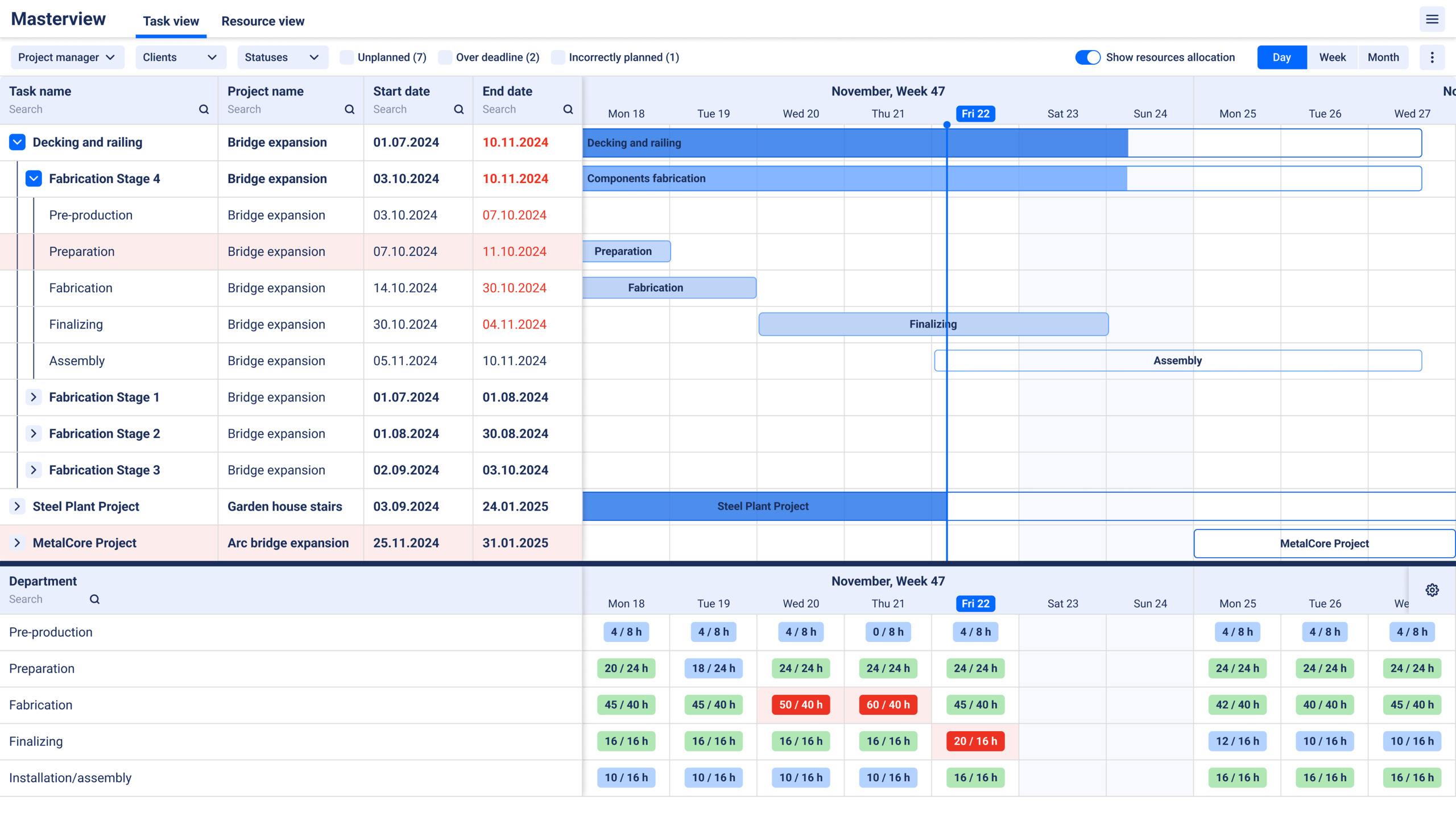
The fix: You do not have to jump to a heavy ERP to solve it. The tool is not the point. A live view is. You want capacity that updates itself as work is reported done, so the number you quote against is today’s, not last week’s. Systems built for this, EZIIL included, let you drag a job’s operations onto specific machines in a calendar and watch the load rebalance as things change.
7. Watch utilization at both ends, overload and idle both cost you
Production capacity planning is not only about avoiding overload. Idle time is just as expensive, since it is capacity you are paying for and not selling. The Federal Reserve reported United States manufacturing capacity utilization at 75.7% in June 2026, below its long run average of 78.2%. Averaged across a shop, a number like that hides both problems at once: some stations swamped, others coasting.
The fix: Use your capacity view to move work off the swamped station onto one with slack where the routing allows it, and to chase more of the work that fills your quiet stations. Chasing utilization blindly is its own trap, because a shop run at 100% has no room to absorb a rush job or a breakdown. Aim for high and steady with a deliberate buffer.
8. Close the loop with real shop-floor feedback
A plan is only as good as the feedback that keeps it honest. If you cannot see what has actually been completed, your capacity numbers drift away from reality within days. This is where a lot of paper and spreadsheet planning quietly fails: the office plan and the shop floor stop matching, and nobody notices until a deadline is missed.
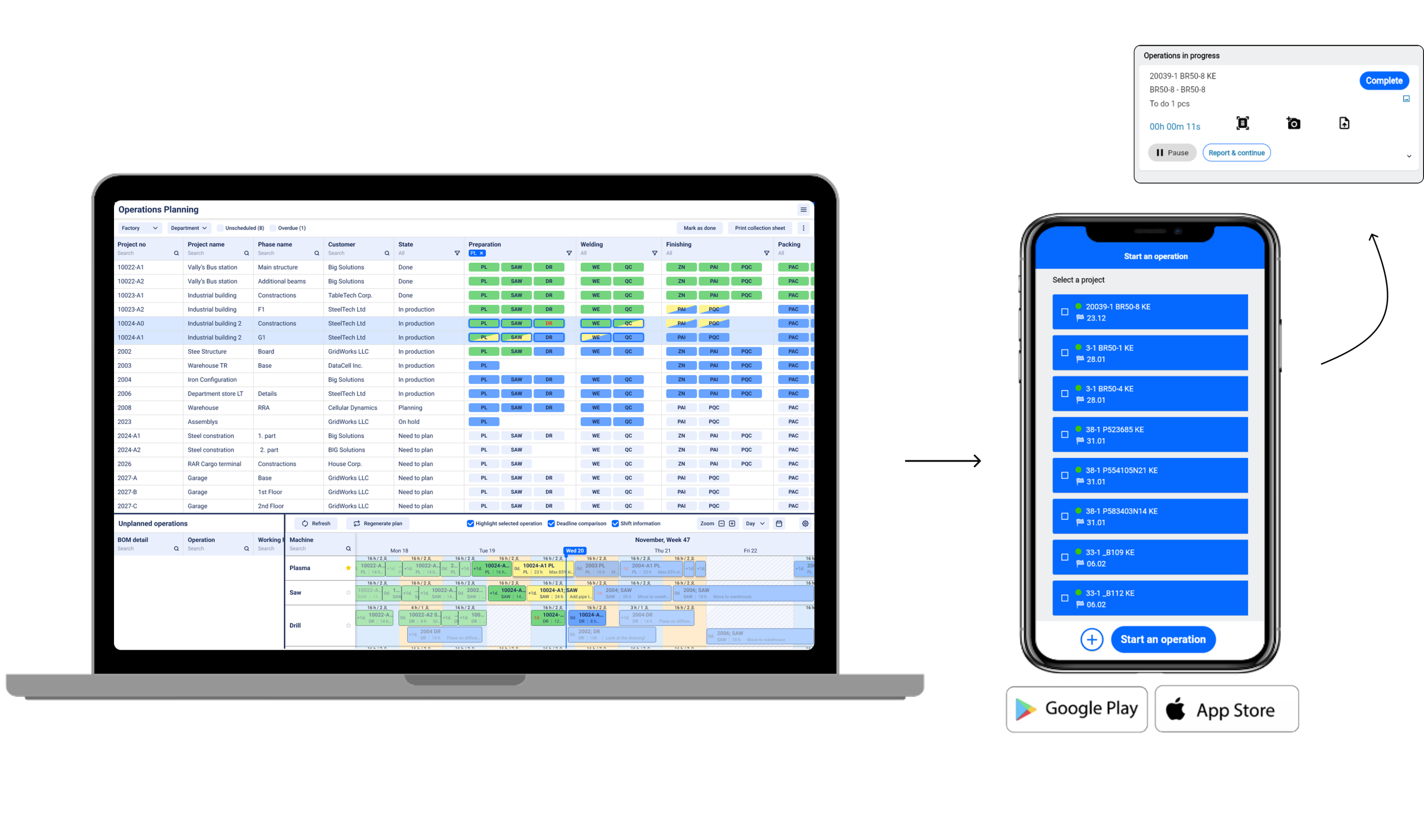
The fix: Closing that loop means the people doing the work report progress as they go, ideally without extra admin. In EZIIL, a welder scans a QR code at their station, sees the filtered list of what to do, and reports quantity done, which flows straight back to the project status. The payoff, in the words we hear from shops, is that when someone asks how far along a job is, you do not have to walk the workshop to find out. That live feedback is what makes tomorrow’s capacity plan trustworthy.
9. Run a post-job review and feed it back into your numbers
The cheapest capacity improvement you will ever make is looking back at a finished job and asking where the plan and reality parted ways. Skip it and you are guaranteed to repeat the same estimating errors on the next quote. Did welding take 40% longer than planned every time? Then your welding capacity number is wrong, and now you know by how much.
The fix: Make it a five minute habit to compare planned versus actual hours per work center on completed jobs, adjust your standard times, and your next quote gets a little sharper. That is the difference between a shop that has planned capacity the same wrong way for ten years and one that gets measurably better each quarter.
Questions to ask before you take on a job
Keep this list at hand. If you can answer yes to all of them, take on the project with confidence:
Before you promise a date
-
Which work center does this job hit hardest, and is that station my current bottleneck?
-
Is that station already full for the weeks this job needs?
-
What is my realistic available capacity there, using effective hours rather than nameplate?
-
Does the deadline survive on top of everything I have already promised?
-
Do I have the right people, with the right certifications, actually available on those days?
-
At the lead time I can truly hit, is the margin still worth it?
How does EZIIL help with production capacity planning
Most of the nine tips above are habits, not products, and you can start on them tomorrow with the shop you already have. Where a system earns its place is in removing the manual work of keeping the picture live.
EZIIL was built for project based steel and metal fabricators to do exactly that: build the job from a bill of materials, see capacity and deadlines balance in one master view, drag operations onto the right machines, and get real progress back from the floor by QR scan. It is a monthly subscription that starts small and grows as you switch modules on, rather than a six month, big bang ERP rollout.
If reading your real capacity before you promise is the problem you want to solve, that is the problem EZIIL is designed for. You can take a free product tour to see EZIIL in action.
Frequently asked questions
What is production capacity planning in custom steel fabrication?
Production capacity planning is the process of working out how much a shop can produce with its available machines, people, and hours, then matching that against demand so work is neither overloaded onto a bottleneck nor left idle. For custom fabricators it is done per work center, because sawing, welding, and powder coat each have their own separate capacity.
How do you calculate production capacity for a steel fabrication shop?
Multiply the number of machines or people at a work center by their working hours, then by a realistic utilization factor (often 60 to 85 percent rather than 100). That gives available capacity. Compare it against the operation hours a job requires at each station. If the job fits inside available capacity at your tightest station before the deadline, you have the room to take it.
What is the difference between capacity planning and scheduling?
Capacity planning answers whether you have room to take a job at all and what lead time you can promise. Scheduling answers exactly when each operation runs on each machine once the job is accepted. Capacity planning is the decision, finite capacity scheduling is the execution.
What is the most common capacity planning mistake?
Assuming 100% availability. Planning as if machines and people produce every paid minute ignores breakdowns, changeovers, absence, and rework. Since a typical Overall Equipment Effectiveness score is around 60%, planning on full availability routinely overpromises capacity by a large margin.
Can you do production capacity planning in Excel?
You can start there, and many shops do. The limits show up fast: spreadsheets go out of date the moment the shop floor changes, they are hard to keep accurate (close to 88% contain errors), and they cannot easily show the finite capacity left per machine in real time. A live capacity view solves the staleness and the accuracy problem at once.