
EZIIL now opens up on a new production dashboard: one screen that shows a custom steel or metal fabrication shop how every job is doing, the moment you log in. It shows six KPIs that help custom steel fabricators gain better understanding and control of their business:
- which jobs are late
- what’s due next
- your on-time delivery rate
- where work is sitting by status
- the revenue coming in over the next months
- what the shop floor is working on right now
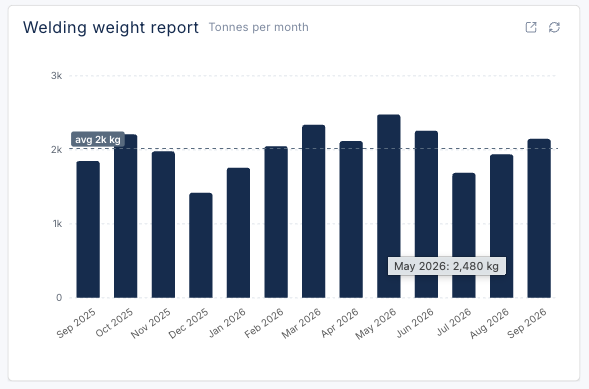
If you use the BOM module, it also shows how many tonnes you welded this month.
It replaces walking the floor, reading a whiteboard, and asking the one person who keeps it all in their head.
This article covers what EZIIL’s new production dashboard is, how each of its six KPI widgets works and how owners, production managers and project managers use it to deliver on time and plan ahead.
Welding weight report
Tonnes per monthRevenue
Invoiced and forecastNext deadlines
Upcoming due datesOn-time delivery
Delivery performance against due datesStages by status
50 active stagesNo stage values entered, bars show stage count.
1 stage without a due date, never counted as late.
Reportings feed
Recent starts, ends, and pausesLiam DoyleEnded
Welding — B-104
Kasia NowakStarted
Painting — ST-A01, ST-A02
Dean CarterPaused
Drilling — PB-12, PB-13
Ryan HoltEnded
Plasma — 301, 302, 305
Ryan HoltStarted
Plasma — 301, 302, 305
Tomas ReidEnded
Sawing — P_218_14, P_218_22
Aaron PikeStarted
Assembly — BK-07
Liam DoyleStarted
Welding — B-104
Dean CarterStarted
Drilling — PB-12, PB-13
Priya ShahEnded
QC inspection — ST-B01
Tomas ReidStarted
Sawing — P_218_14, P_218_22
Kasia NowakEnded
Shot blasting — ST-A01, ST-A02
Priya ShahStarted
QC inspection — ST-B01
Kasia NowakStarted
Shot blasting — ST-A01, ST-A02
Aaron PikeEnded
Fitting — BK-03, BK-04
What is a production dashboard?
A production dashboard is a single screen that shows the few critical numbers you need to run production, updated from live shop data. In a fabrication shop that means late and upcoming jobs, on-time delivery, work by status, revenue coming in, live floor activity and output in tonnes.
A production dashboard consolidates and arranges data on a single screen so the information can be monitored, understood and acted upon, at a glance. That is the design rule behind EZIIL’s dashboard: six widgets, one screen, and a click to drill into anything that needs attention.
Most production dashboards you’ll find are built for repetitive, machine-heavy manufacturing. They track OEE, machine downtime and scrap rate. A custom fabrication shop works differently. Every job is unique, due dates live on each stage of a project, and output is measured in kilos and tonnes. The EZIIL production dashboard is built around those facts.
How the EZIIL Production dashboard works
The EZIIL production dashboard is the new start-up screen in EZIIL, with your live numbers in front of you the moment you open the app.
The dashboard doesn’t ask anyone to enter anything new. It reads the data your shop already creates as it works in EZIIL, which follows four steps:
- Project information. The office registers the client, the project and its stages, each with a due date, a value and a status (for example booked, pre-production, fabrication or on hold).
- Planning. Jobs are planned against the hours each department actually has.
- Reporting. Workers press start, pause and finish on a phone, tablet or PC. Each report is tied to the project and operation automatically.
- Progress and results. Reported hours flow back as progress. When a stage is finished, it gets a completion date.
The production dashboard sits on top of steps 1, 3 and 4. Due dates and completion dates drive the deadline, on-time delivery and revenue widgets. Stage statuses drive the status widget. Floor reports drive the live feed and the welding weight report.
That design answers one of the key goals of fabricators: “we want to see everything, but we don’t want to do anything extra.” With EZIIL, the only thing the floor does is start and stop their work, as they normally would. The production dashboard does the adding up.
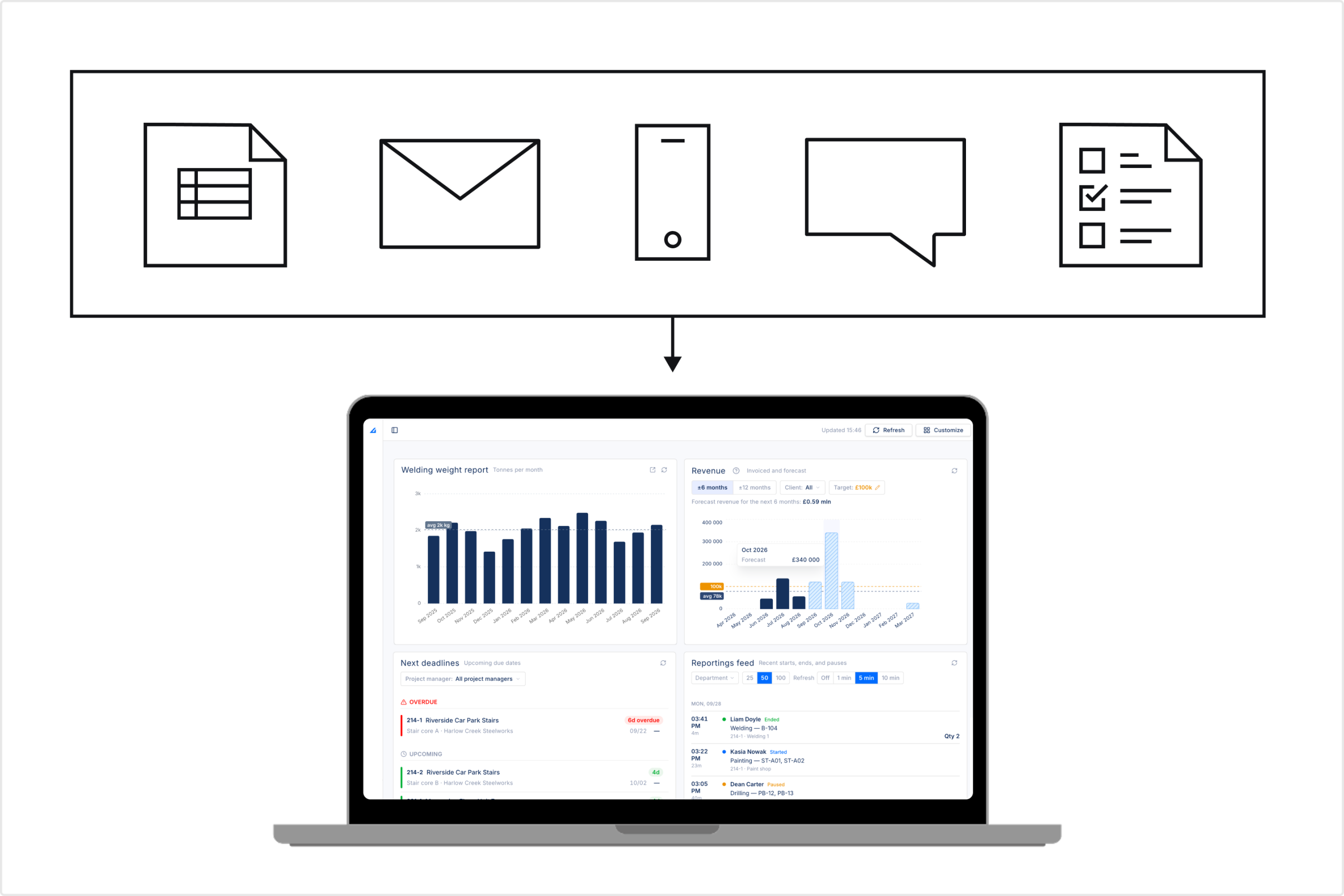
Every widget has its own refresh button, and the whole screen refreshes with one click at the top. Widgets with a detailed report behind them (on-time delivery and welding weight) open that report in one click, so the production dashboard works as a way in.
The 6 KPIs on the EZIIL Production dashboard
Each widget answers one question an owner or production manager asks on the daily. Here is what each one shows, where the numbers come from and what to do with it.
1. Next deadlines: which jobs are late, and what’s due next
Next deadlines is a live list of project stages ordered by due date, split into Overdue and Upcoming. Every row shows the project number and name, the stage and client, the due date, the stage value and how many days are left (or how many days late it is).
Colour does the triage for you. A red bar means overdue, amber means due today or tomorrow, and green means there’s still time. High-value jobs carry a TOP tag, so the job that matters most to your cash flow never hides in a long list. You can filter the list by project manager, so each PM sees their own deadlines.
What you can do with it: start the day knowing your priorities. If a stage is overdue, you see it before the customer rings. If three big stages are due in the same week, you see the pile-up while there’s still time to move people or talk to the client.
Good to know: a stage leaves the overdue list when it gets a completion date. If a job is done but nobody closed the stage, it will keep showing as overdue. In essence, it tells you the paperwork is behind.
Next deadlines
Upcoming due dates2. On-time delivery (otd) rate
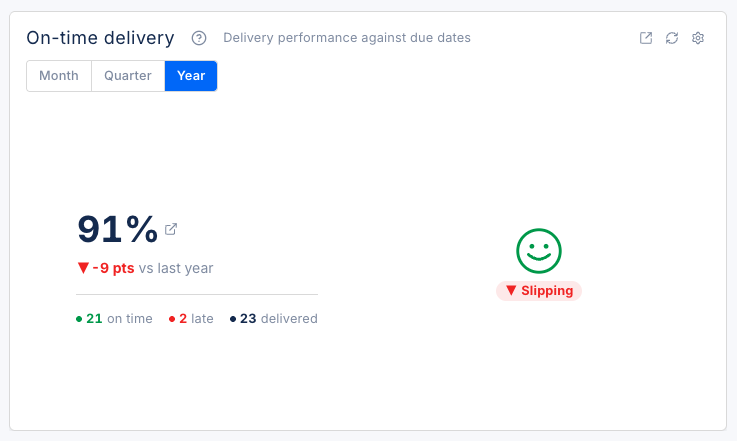
The on-time delivery widget shows the share of stages you finished on or before their due date, for the month, quarter or year. Under the big percentage you see how many stages were delivered on time, how many were late and how many were delivered in total, plus the change against the previous period in percentage points.
How is the OTD rate calculated? EZIIL compares each stage’s due date with its actual completion date. On or before the due date counts as on time. Any later, even by one day, counts as late.
On-time delivery (%) = stages delivered on time ÷ stages delivered × 100
For example: last quarter your shop finished 20 stages. 18 were completed on or before the due date and 2 were a few days late. Your on-time delivery rate is 18÷20=90%.
You decide what good looks like. Set your own thresholds for when the indicator turns green, orange or red (for example 80% and above is good, below 50% needs action), and set the threshold for the momentum label, which tells you whether delivery is improving, slipping or holding steady. For context, across 4,648 organisations benchmarked, the median on-time delivery rate is 90%.
What you can do with it: see whether the fixes you make are working. Open the detailed on-time delivery report from the widget to see which departments are behind. If the number is slipping, our guide on how to improve on-time delivery in a fab shop covers the usual causes.
3. Stages by Project status
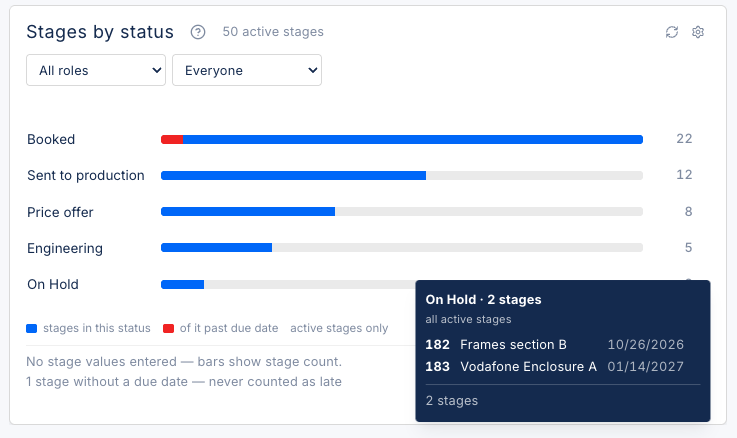
Stages by status shows every active project stage grouped by its status, such as fabrication, on hold, booked and pre-production. For each status you see how many stages are in it and their total value. The part of each bar in red is the value that is already past its due date. The widget overview line gives the total, for example “11 active stages, $256k in active stages”, and stages without a value are counted separately so they don’t skew the totals.
You can filter this widget by:
- Role, which lets you see through the eyes of a project manager, engineer or a technologist.
- Specific person, which narrows it to one name, so a project manager sees “my jobs” in one click.
What you can do with it: spot a jam before it becomes a bigger problem. A lot of value sitting on hold, a big red slice in fabrication or an empty booked row (the pipeline is drying up) are all things you want to know as soon as possible, not at month end. Hover over a bar and you can open those stages straight in the project list to dig deeper.
4. Revenue: invoiced and forecast by month
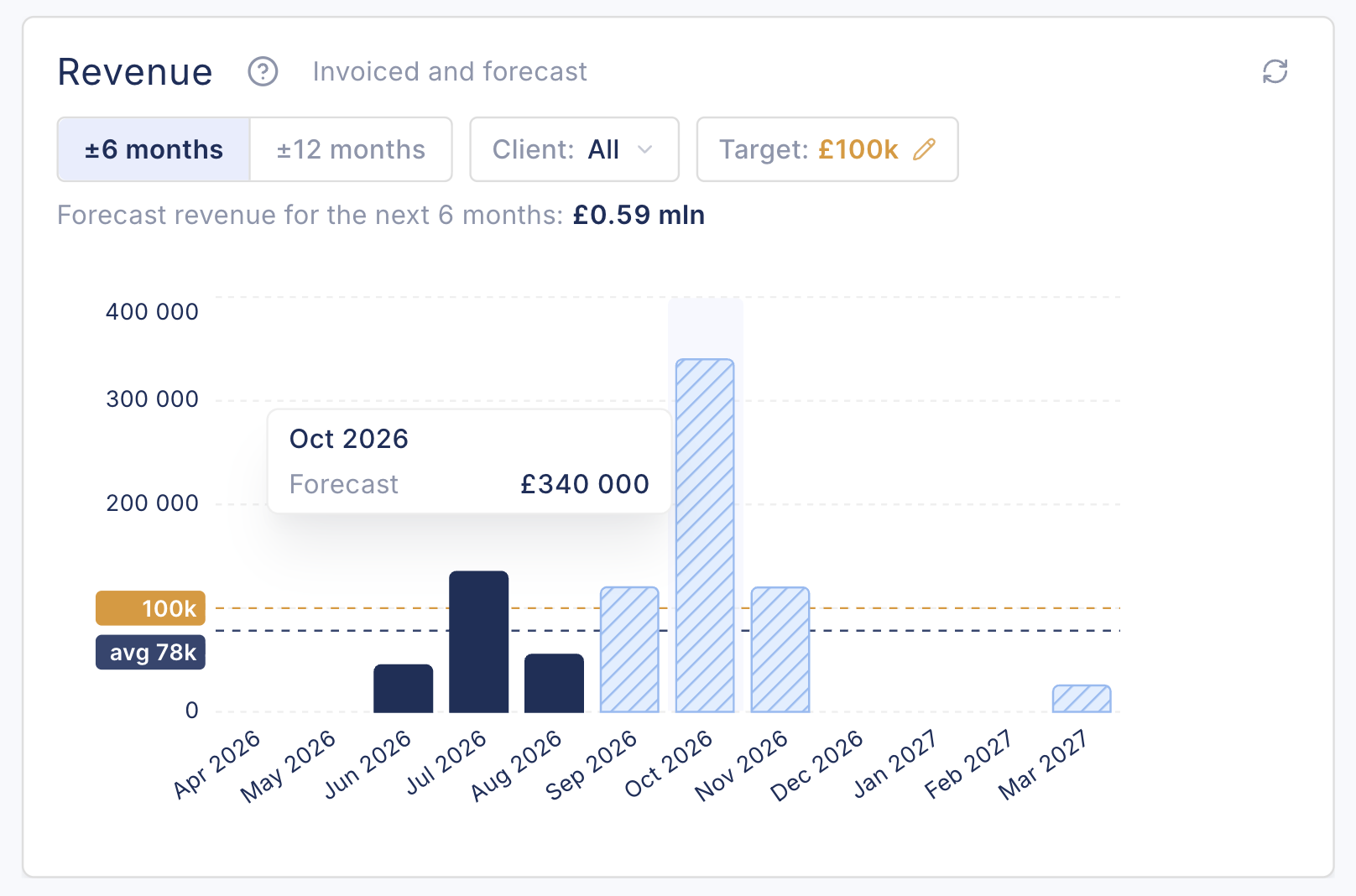
The revenue widget shows money by month over the past and coming months. Solid bars are work you have completed and the hatched bars are the forecast, built from the values and due dates of your open stages. To benchmark and get better context quickly, you can see your monthly average, and a target you set yourself. Above the chart you see the forecast total for the next six months, and you can filter by client.
EZIIL treats a finished stage as revenue you’ve earned. It does not read your accounting system or check which invoices went out. So a past month with a hatched bar means work that should have been finished and closed, but hasn’t been yet.
Which jobs count? Active stages that are in your plan, plus delivered ones. Quotes, jobs on hold and cancelled jobs are left out by default, so the forecast reflects committed work. You can put a value on each stage, or put one value on the project and let EZIIL split it across its stages.
What you can do with it: get a good overview of revenue distribution over a period and spot the slow, under-booked month coming. If October is forecast well under target and November is double, you know to chase work for October or pull a job forward, months before the cash gap shows up. This is specifically useful for fabricators working as subcontractors: 82% of US contractors report payment delays of more than 30 days, so knowing what lands when is an important part of smart cash planning.
5. Real-Time Shop Floor Reporting feed
The reporting feed is a live list of what’s happening on the shop floor now. Every start, pause and finish a worker reports in the EZIIL mobile app appears here with the time, the worker, the operation, the project and the department. Blue means started or resumed, yellow means paused and green means finished.
Filter by department to watch one area and set the feed to refresh itself at certain intervals.
What you can do with it: a welding foreman can keep an eye on the welding bays from the office, and a production manager can check whether a rush job actually started this morning without walking out to look. As one EZIIL customer, APS Group, put it: “Now we can see exactly what the workers are doing in the workshop and how many hours they are spending on each process.“
Reportings feed
Recent starts, ends, and pausesLiam DoyleEnded
Welding — B-104
Kasia NowakStarted
Painting — ST-A01, ST-A02
Dean CarterPaused
Drilling — PB-12, PB-13
Ryan HoltEnded
Plasma — 301, 302, 305
Ryan HoltStarted
Plasma — 301, 302, 305
Tomas ReidEnded
Sawing — P_218_14, P_218_22
Aaron PikeStarted
Assembly — BK-07
Liam DoyleStarted
Welding — B-104
Dean CarterStarted
Drilling — PB-12, PB-13
Priya ShahEnded
QC inspection — ST-B01
Tomas ReidStarted
Sawing — P_218_14, P_218_22
Kasia NowakEnded
Shot blasting — ST-A01, ST-A02
Priya ShahStarted
QC inspection — ST-B01
Kasia NowakStarted
Shot blasting — ST-A01, ST-A02
Aaron PikeEnded
Fitting — BK-03, BK-04
6. Welding weight report
In steel fabrication, tonnage is how shops measure themselves. A fabricator will describe itself as a shop that does 30 tonnes a month, or 100. The welding weight widget shows exactly that: kilos welded per month, against your average, so you see at a glance whether output is steady, growing or dipping.
Click through to the full report to see which projects the kilos went to and who reported them, by week or month.
The welding weight report is available with the EZIIL BOM (bill of materials) module, because it adds up the weights of the parts in your BOM as welding is reported against them. Before it starts working, you choose which operation counts as welding in your BOM settings. Weights come from the BOM and are calculated from part dimensions, so read the report as a steady measure of output and its trend rather than a weighbridge reading.
What you can do with it: see a drop in output as it happens, then open the report to find out why. For a well-planned fabrication shop, the chart should show a nearly flat line. A sudden dip is a question worth digging into.
EZIIL’s New Production dashboard at a Glance
| Widget | The question it answers | Calculated from | Filters | Who checks it most |
|---|---|---|---|---|
| Next deadlines | Which jobs are late, and what's due next? | Stage due dates and completion dates | Project manager | Project managers, production manager |
| On-time delivery | Are we keeping our promises? | Completed on or before due date ÷ all completed | Month, quarter, year | Owner, production manager |
| Stages by status | Where is the work sitting? | Stage statuses, values, due dates | Role, person | Production manager, project managers |
| Revenue | What's coming in, and is it enough? | Stage values, due dates, completion dates | Client, ±6 or ±12 months, target | Owner, managing director |
| Reporting feed | What is the floor doing right now? | Start, pause and finish reports from the mobile app | Department, rows, refresh interval | Foremen, production manager |
| Welding weight | How much did we weld this month? | BOM part weights for the operation set as welding | Period, project, worker (in report) | Owner, production manager |
Who is EZIIL’s production dashboard for and how it helps
The new production dashboard is built for the people who run the shop. Here is how fabricators typically use it.
- Owner: the two-minute Monday check. Look at the on-time delivery trend, revenue against target for the next few months, and anything overdue with a TOP tag. That tells you whether the business is on track and where to step in, without opening a single report.
- Production manager: the daily start. Open Next deadlines and Stages by status to see what’s late and where work is stuck, then glance at the reporting feed for your departments. If you use the BOM module, the welding weight report shows whether this month’s output is on pace.
- Project manager: my jobs only. Filter Next deadlines by your name and Stages by status by your person, and you have your own to-do list: what’s due, what’s on hold and which customer needs a call today.
Make it yours
Customize each widget to arrange the production dashboard around your role. You can move widgets, resize them, and add or remove them, so the owner and the production manager each see what they need first. We’ll keep adding new widgets over time.
Access to the production dashboard is set per person. Most shops give it to the office and management team, and keep the shop floor on the simple mobile reporting app. With per-person access, you decide.
What keeps the numbers trustworthy
A production dashboard is only as good as what goes into it. EZIIL dashboard needs very little: three habits in the office, and start and stop on the floor.
- Give every stage a due date. It is what Next deadlines sorts by and what on-time delivery measures against.
- Close stages with a completion date. Finishing a stage with its real completion date is what moves it off the overdue list, counts it as on time or late, and turns forecast revenue into completed revenue. If a job is done but not closed, the production dashboard will tell you, because it stays overdue.
- Put a monetary value on your work. Add a value to each stage, or one value to the project, so the revenue and status widgets can add up money as well as counts.
On the floor, workers only press start, pause and finish in the EZIIL mobile app. The production dashboard reads those reports as they come in. There is no extra report to fill in and no spreadsheet to update at the end of the day.
A five-minute check at the end of each week keeps it clean: filter for finished work without a completion date, close it, and your on-time delivery and revenue figures stay honest.
Why this matters: manufacturers who adopt data-driven practices see real gains. In a 2025 Smart Manufacturing Survey of 600 executives, respondents reported 10%-20% improvements in production output and 10%-15% of capacity unlocked from smart manufacturing initiatives.
EZIIL Production dashboard vs whiteboard vs spreadsheet vs BI tool
Most shops already have some kind of production dashboard. It might be a whiteboard in the office, a job list in Excel, or a Power BI report. Here is how they compare for a custom fabrication shop.
| Comparison | Whiteboard | Spreadsheet | Generic BI tool (Power BI, Excel dashboards) | EZIIL dashboard |
|---|---|---|---|---|
| Updates itself as work is reported | No | No | Only if someone builds and maintains the data feeds | Yes, from floor start and stop reports |
| Who keeps it current | One person, by hand | One person, by hand | An analyst or IT | Nobody extra |
| Survives the key person leaving | No | Rarely | Partly | Yes, the data lives in the system |
| Shows late jobs before the customer calls | Only if updated | Only if updated | If configured | Yes, Next deadlines |
| On-time delivery trend | No | Manual formula | If configured | Yes, built in |
| Revenue forecast by month | No | Manual | If configured | Yes, built in |
| Live floor activity | No | No | Rarely | Yes, reporting feed |
| Tonnes welded per month | No | Manual | If configured | Yes, with BOM |
| Setup effort | None | Low, then constant upkeep | High | Part of your EZIIL setup |
A whiteboard is free and everyone understands it, and that’s why it lasts so long. But it only knows what was written on it this morning. A spreadsheet adds history, but someone has to keep typing. A BI tool can show anything, if you have someone to build and maintain it, which most 30-person fab shops don’t.
The EZIIL production dashboard is different because it isn’t a separate reporting project. It comes with the system you already use to plan jobs and report time, so the picture updates as the work moves. As the Purchasing Manager at FLI Structures, said about EZIIL: “It is a hub of information that is extremely easy to navigate, giving a full picture of all live jobs.”
Real-time vs end-of-day reporting
| Comparison | End-of-day reporting | Real-time dashboard |
|---|---|---|
| When you learn a job is late | Tomorrow, or when the customer calls | As soon as the due date passes |
| What drives decisions | Memory and yesterday's paper | Today's reports from the floor |
| Effort to produce | Someone compiles it | None, it updates as work is reported |
| Best for | Month-end review | Daily decisions and reprioritising |
How to get EZIIL Production dashboard running in your shop
If you already use EZIIL, it will be your start screen the next time you log in, filled with the jobs, dates and reports you’ve already entered. Nothing underneath changes: your data, projects and way of working stay the same.
If you’re not on EZIIL yet, the production dashboard works from your first week, because it reads the same basics you set up on day one: projects, stages, due dates and start and stop reports from the floor.
EZIIL is set up with you and configured to your specific needs:
- Go live in under a week with one module, and add more (such as BOM for the welding weight report) only when you’re ready.
- Personal onboarding from people who understand fabrication, including setup, training and regular check-ins.
- Flat pricing by team size, with no per-user fees, so adding the whole office to the production dashboard doesn’t cost more. See EZIIL pricing.
Want to see your own shop on one screen? Take a free product tour and look inside EZIIL yourself, or book a demo and we’ll walk you through the production dashboard with your kind of jobs.
Why fab shops lose sight of their jobs
Most small fabricators don’t have a dedicated and trustworthy place where their data connects. Job status sits on a whiteboard, hours sit on paper timesheets, due dates sit in a spreadsheet and the real picture sits in someone’s head.
In a 2026 survey of more than 600 US manufacturing leaders, 50% said their plants still rely on manual frontline input such as logs, paper and spreadsheets, and 74% said reporting delays hold them back. A separate study of manufacturers found half still use Excel or paper planning alongside their ERP.
The typical US structural steel fabricator is a family-owned business with 10-100 people. At that size the status quo usually breaks in three ways:
- The whiteboard is out of date by lunch
- Spreadsheets drift from reality
- The info lives in one person’s head and leaves the business if and when they do
FAQ
What is a production dashboard in manufacturing?
A production dashboard is one screen that shows the key production numbers from live shop data, so managers can see how work is going at a glance. For a fabrication shop, that means late and upcoming jobs, on-time delivery rate, work by status, revenue forecast, live floor activity and output in tonnes.
What KPIs should a small steel fabrication shop track?
Start with five: on-time delivery rate, overdue jobs, planned versus actual hours per job, work in progress by status, and output (kilos or tonnes per month). Add revenue against target if the owner watches cash flow. Our guide to metal fabrication KPIs goes deeper.
How do you calculate on-time delivery rate?
Divide the number of jobs or stages delivered on or before their due date by the total delivered in the same period, then multiply by 100. For example, 18 on time out of 20 delivered is 90%. EZIIL calculates this automatically from due dates and completion dates.
What is a good on-time delivery rate?
APQC’s benchmark puts the median on-time delivery rate at 90% across 4,648 organisations. For a custom steel fabricator, the more useful target is your own trend. In EZIIL you set your own thresholds and see whether you’re improving or slipping.
What is the difference between OTD and OTIF?
OTD (on-time delivery) only asks whether the delivery arrived by the due date. OTIF (on time in full) also asks whether it was complete, with the right quantity. EZIIL’s production dashboard measures on-time delivery per project stage.
Can I build a production dashboard in Excel?
Yes, but someone has to keep the data current by hand, and research finds errors in the large majority of spreadsheets. A dashboard built into your production software updates itself as work is reported, which is what makes it live.
Do my welders need to do anything extra for the EZIIL Production dashboard to work?
No. Workers keep pressing start, pause and finish in the EZIIL mobile app. The production dashboard reads those reports. The office keeps due dates, completion dates and values up to date.
Who can see the EZIIL Production dashboard?
Access is set per person. Most shops give it to owners, managers and project managers, and keep shop floor staff on the mobile reporting app.
Can I change what’s on my EZIIL Production dashboard?
Yes. With Customize you can move, resize, add and remove widgets, so each person arranges the production dashboard around their own role.