
Prices checked on vendor websites in October 2026.
Disclosure: EZIIL makes one of the tools on this list. To keep the comparison fair, every tool is checked against the same six criteria, prices come from vendor pages on the date above, every third-party estimate is labeled as one, and there is a section on when EZIIL is the wrong choice.
The best job costing software for a metal fabricator is the one that gets real labor hours onto each job, and that depends on where the hours come from. Accounting tools such as QuickBooks Online and Xero cost a job from timesheets and bills, after the work is done. Manufacturing and steel ERPs (enterprise resource planning systems) such as JobBOSS², Fulcrum, Genius ERP, ProShop, MRPeasy, Cetec, Tekla PowerFab and STRUMIS cost it from operation clock-ins, and usually take months to implement. Shop-floor production systems such as EZIIL and Statii record hours per job or operation from the floor and sit next to the accounting system you already use.
This guide is for owners and production managers of custom steel, metal fabrication and job shops with roughly 10 to 150 people. It compares 12 tools in those three groups, with prices as of October 2026, a side-by-side table, year-one costs for a 20-person shop, and a short test you can run on your current job costing before you buy anything.
Quick picks: the best job costing software by type of shop
| Your situation | Best pick | Why | Price as of October 2026 |
|---|---|---|---|
| Project-based custom steel or metal shop, 15 to 150 people, wants hours per operation from the floor without an ERP project | Best pickEZIIL | WhyPhone or tablet reporting per assembly and operation, support time kept off jobs, hours confirmed once for costing and payroll | Price as of October 2026$140 / $210 / $338 a month by team size (€120 / €180 / €290), plus a one-off $350 (€300) onboarding fee |
| Small UK make-to-order shop that wants a monthly contract | Best pickStatii | WhyClock on and off per job on a tablet, costing against the estimate, rolling monthly terms | Price as of October 2026£110 a month system licence plus £57.50 per main user and £8.50 per shop-floor user a month |
| Established US job shop with time for a rollout of several months | Best pickJobBOSS² | WhyLong job-shop heritage, estimated vs actual job cost, accounting included | Price as of October 2026Quote only |
| High-mix US job shop that wants automated scheduling | Best pickFulcrum | WhyLive estimate vs actual per operation, actual margin on the sales order | Price as of October 2026Quote only |
| Engineer-to-order manufacturer with 20 or more people designing in CAD | Best pickGenius ERP | WhyEstimates built from the BOM and operations, real-time estimate vs actual, accounting included | Price as of October 2026Quote only |
| Machining-heavy shop that needs certification-grade quality | Best pickProShop ERP | WhyLive job costing tied to quality and compliance records | Price as of October 2026Quote only |
| Shop making repeat products in batches on a budget | Best pickMRPeasy | WhyTrue actual costing per manufacturing order at a published price | Price as of October 2026From $49 a user a month, with bulk pricing above 10 users |
| Shop that wants a full ERP with a published price | Best pickCetec ERP | WhyActual costing by default, Estimated vs Actual Time report | Price as of October 2026$50 per user and $25 per shop-floor user a month, plus optional support plans |
| Structural shop detailing in Tekla Structures | Best pickTekla PowerFab | WhyEstimated vs actual hours and material tied to the model workflow | Price as of October 2026Quote only |
| Structural shop that wants estimating, nesting and contract budgets in one suite | Best pickSTRUMIS | WhyContract budget vs actual cost alongside production control | Price as of October 2026Quote only |
| US shop under about 10 people that needs job cost in the books | Best pickQuickBooks Online + QuickBooks Time | WhyProject profitability in the accounting system most US shops already use | Price as of October 2026$340 a month for Advanced (needed for estimates vs actuals) plus Time Elite |
| UK, Australian, New Zealand or EU shop under about 10 people | Best pickXero Projects | WhyProject costing inside the accounting system | Price as of October 2026Top plan only: US $97, UK £70, NZ NZ$135 a month |
What is job costing software, and how is fabrication job costing different?
Job costing software assigns material, labor and overhead to each job and compares the total with the estimate. In steel fabrication job costing the hard part is labor, because every job is different and the hours are recorded by people.
Material is the easier half. Steel is bought against a job, the purchase order has a price on it, and the errors are mostly about remnants and consumables. Overhead is a rate you set once and review. Labor is where job costs go wrong, because the hours usually come from a weekly timesheet, a paper production log or one job number that the whole crew clocks to. If you want the definition and the formulas first, start with what job costing means in steel fabrication and the job cost calculator, which walks through shop rate and overhead.
So when you compare job costing software, the most useful question is where each tool gets its labor hours, and how close to the work those hours are recorded.
The three kinds of job costing software (and where each one gets its hours)
Accounting tools, manufacturing ERPs and shop-floor production systems all show a job cost. They get labor hours from different places, and that decides how accurate the cost is and how early you see it.
| Group | Where labor hours come from | When you see the job cost | Typical price for a 20-person shop | Typical time to go live | Best for | Main trade-off |
|---|---|---|---|---|---|---|
| Accounting toolsQuickBooks Online, Xero | Timesheets per person per job or project, plus payroll | After timesheets and bills are entered, usually after the work | About $1,200 to $7,500 a year in list prices | Days, self-serve | Shops under about 10 people running one or two jobs at a time | No operations, assemblies or work in progress; costs arrive late |
| Manufacturing and steel ERPsJobBOSS², Fulcrum, Genius ERP, ProShop, MRPeasy, Cetec, Tekla PowerFab, STRUMIS | Operators clocking on and off operations at terminals, tablets or phones | While the job runs, if the floor clocks in reliably | About $6,800 a year (MRPeasy) to five figures and more, most quote only, plus implementation | One month to a year | Shops that want finance, inventory and production in one system and can staff the rollout | Price, implementation effort, and a system that is often built around parts and repeat orders |
| Shop-floor production systemsEZIIL, Statii | Workers starting and stopping jobs or operations on a phone or tablet | While the job runs, after the office confirms the day’s hours | About $2,900 (EZIIL) to £6,300 (Statii) a year | Under a week for EZIIL’s first module (per EZIIL); not stated by Statii | Project-based shops that want accurate hours per job without replacing their accounting | Accounting stays in a separate system |
Scroll sideways to see all seven columns.
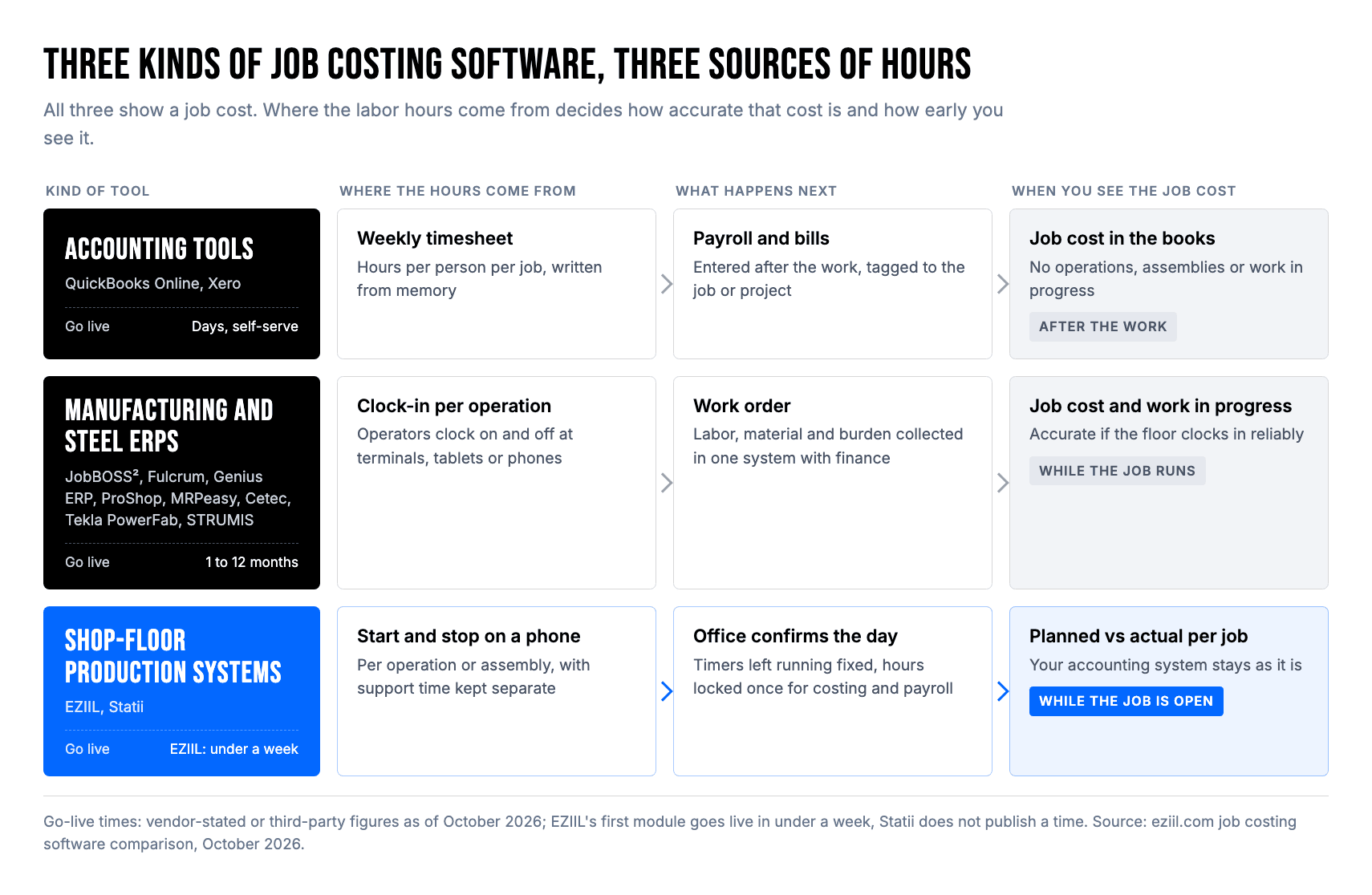
Most small fabricators start in the first group, often without the software: a weekly timesheet, a production log on a clipboard, or a spreadsheet the owner reconciles at month end. Manufacturing ERPs and shop-floor production systems exist to move the recording of hours closer to the work.
How we evaluated these tools
We checked each tool on where its labor hours come from, whether it fixes the three common ways fab shop hours go wrong, how it handles material, whether you can see estimate vs actual while the job is still open, price transparency and time to go live.
| Criterion | Weight | What we looked for |
|---|---|---|
| Where labor hours come from, and at what level | Weight30% | What we looked forHours recorded at the moment of work, per operation or assembly, instead of a weekly total per person |
| The three-hours test | Weight20% | What we looked forSee below |
| Material actual vs plan | Weight15% | What we looked forActual material cost booked to the job, and planned vs used quantities |
| Estimate vs actual while the job is open | Weight15% | What we looked forA report or view you can read before the job ships |
| Price transparency and year-one cost | Weight10% | What we looked forPublished prices, minimums, required support plans and implementation fees |
| Time to go live for a 10 to 150 person shop | Weight10% | What we looked forVendor-stated implementation time, or labeled third-party estimates |
How tools were chosen and ordered. We researched 20 tools that fabrication and job shops consider for job costing, and kept the 12 that record labor against a job or project, compare actual cost with the estimate, and fit a 10 to 150 person shop. The other eight, and why we left them out, are listed under “Tools we considered but left out”. The weights above show which criteria counted most when we wrote each “best for” label; we did not add them up into a single ranking. The list is grouped by type of tool, and the numbers are there for navigation, not as a rank order. EZIIL is listed first in its group because we make it; use the “Best for” line under each tool to find your fit.
The three-hours test. In EZIIL’s product demos with fabrication shops in 2026, inaccurate job costs came back to three habits again and again. We checked each tool against all three:
- Support time. Can forklift work, loading, cleaning and waiting be recorded as their own activity, so those hours stay off the job a worker happens to have open?
- Work after the machine. Are hours captured for grinding, fit-up, deburring and handling, or only for the machine’s run time?
- One job number for the whole crew. Can hours be tied to an assembly or an operation, so you can see which part of a job lost money?
The full method, with examples of how each habit moves cost between jobs, is in the three ways fab shop hours go wrong.
How the research was done. This is a desk evaluation. We read each vendor’s pricing page and job costing documentation in October 2026, used summaries of user review themes from G2, Capterra, Software Advice and TrustRadius (themes only; we do not quote ratings), and compared what we found with what fabricators told us they need. We did not run hands-on trials of the competing products. Where a vendor does not document something, the table says “not stated”, and that is a good question to ask in their demo. No vendor paid to be included, and EZIIL makes one of the tools.
The 12 best job costing software tools for fabricators in 2026
The 12 tools fall into three groups: two shop-floor production systems (EZIIL and Statii), eight manufacturing and steel ERPs, and two accounting tools (QuickBooks Online and Xero). Each entry shows how the tool costs a job, how it does on the three-hours test, its price as of October 2026 and how long it takes to go live.
Shop-floor production systems
These tools sit between the shop floor and your accounting. Workers report hours on a phone or tablet as they work, and the office checks the hours before they become cost. You keep your accounting system.
1. EZIIL: best for project-based custom steel and metal shops that want real hours per operation without an ERP project
Best for: custom steel and metal fabricators with 15 to 150 people, running many one-off projects at once, who want hours per assembly and operation from the floor and a planned vs actual view while jobs are open.
Not for: shops that want accounting, invoicing and full profit and loss in one system, or that need quoting from drawings, nesting or a quality approval module.
How it costs a job. Workers start and stop operations on a phone or a shared tablet, and can sign in with an RFID tag. Each operation is set to a mobile view, so welding and assembly can be reported per assembly and laser or saw work per detail. Support activities such as loading, cleaning, maintenance or waiting for drawings are a separate entry, so that time stays off the project unless you link it to one (rework is usually project-linked).
Next morning, one person in the office reviews the hours in Working Time Confirmation, fixes timers left running, applies a rounding rule and confirms. Confirmed hours feed progress and payroll export, and operation hourly rates turn them into labor cost per job.
Material moved to a project shows its actual cost, and the material cost report compares the quantities planned in the bill of materials with what was moved to production. The Planned vs Reported report compares planned hours with the hours actually reported, by worker and date.
Three-hours test: support time, yes (support activities). Work after the machine, yes (every operation the shop defines can be reported, not only machine operations). Per assembly or operation, yes (Assembly view and per-operation reporting).
Price as of October 2026: $140, $210 or $338 a month (€120, €180 or €290) for 1 to 15, 16 to 50 or 51 to 150 users, with every Starter feature in every tier and no per-user fees. There is a one-off onboarding fee of $350 (€300). Modules such as the bill of materials, procurement and subcontractor management are optional add-ons. See EZIIL pricing.
Time to go live: under a week for the first module, per EZIIL. A full rollout across the shop takes longer: “It only took us a few weeks to roll out EZIIL internally, as the learning curve was minimal.” (Syed Raza Hashimi, APS Group)
What customers say: “Now we can see exactly what the workers are doing in the workshop and how many hours they are spending on each process. This has given us tighter control of active jobs, better-informed estimating and concrete profit/loss insights per job.” (Syed Raza Hashimi, Planner / Control Manager / QA-QC, APS Group). B&W Metall reached 100% shop-floor adoption, with every worker reporting in EZIIL, through a step-by-step rollout.
Limits to know. A job’s cost in EZIIL contains what is recorded in EZIIL: labor, support time, material booked to the project and subcontract purchase orders. Costs that live only in your accounting package stay there. Workers see their reporting screen, not the full plan, on their phones.
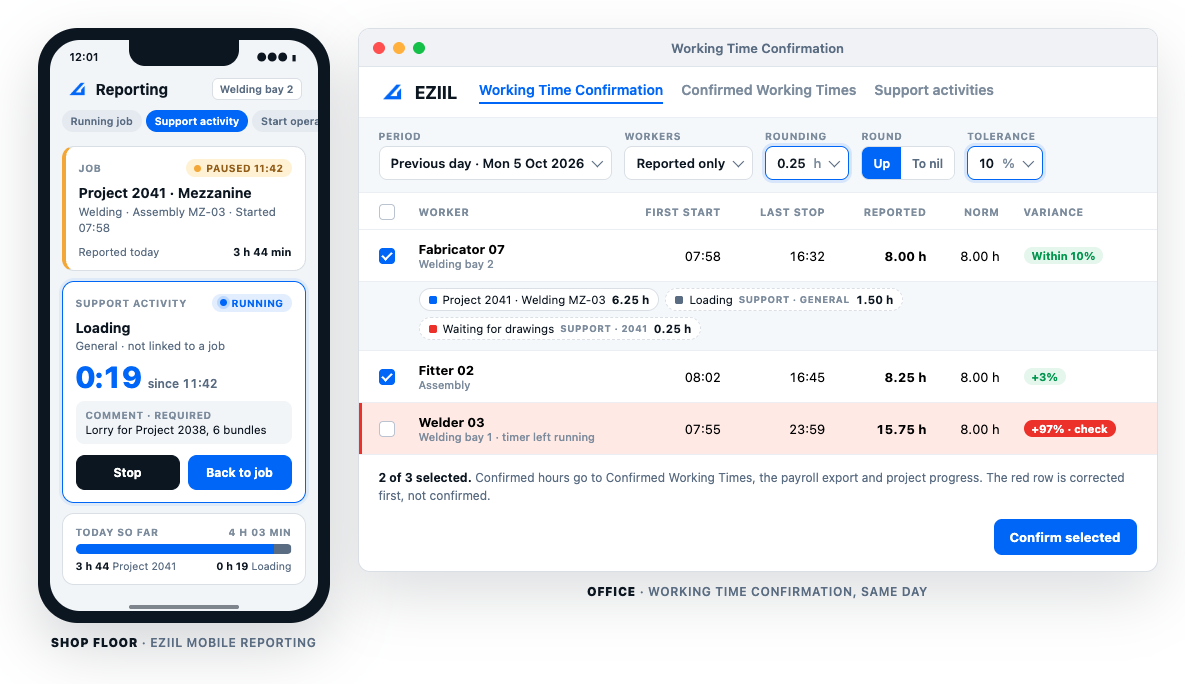
More detail: job costing software for manufacturing, how workers report time from their phones and how APS Group sees hours per process.
2. Statii: best for small UK make-to-order shops that want a monthly contract
Best for: UK subcontract engineering, CNC and fabrication shops with roughly 5 to 40 people that quote most jobs and want to compare actual time with the quote.
Not for: larger structural projects, or shops that need Sage integration.
How it costs a job. Quotes and estimates are built in the Enquiry module. Shop-floor users clock on and off jobs on a tablet, withdraw stock and accept deliveries there, and job costing compares the incoming data with the estimate.
Three-hours test: support time, not stated. Work after the machine, yes (clocking is per job, not tied to a machine). Per assembly or operation, partly (clocking is documented at job level).
Price as of October 2026: a £110 monthly system licence plus £57.50 per main user and £8.50 per shop-floor user a month, on a rolling monthly contract with 30 days’ notice (Statii’s pricing on G2). Statii’s pricing page says phone support carries no extra fee.
Time to go live: not stated by the vendor.
What users say: reviewers describe detailed insight into project costings and time per job, easy quotes and paperwork, and very good human support. The common complaints are that every job needs a quote, some screens take too many clicks, purchase orders and sales orders are not well linked, and there is no Sage integration.
Full comparison: Statii vs EZIIL.
Manufacturing and steel ERPs
ERPs combine finance, inventory, purchasing and production in one system, and most take labor from operators clocking on and off operations. You get one system of record. You also take on an implementation project, and most of these vendors do not publish prices.
3. JobBOSS²: best for established US job shops that want deep job costing heritage
Best for: US make-to-order job, machine and fabrication shops that want estimated vs actual job cost inside a full ERP with accounting.
Not for: shops outside the US, or shops that cannot spend several months on an implementation.
How it costs a job. JobBOSS² has more than a dozen job costing reports you can filter by customer or by job, and it compares estimated with actual costs while the job is still running (SoftwareConnect’s 2026 job shop software roundup). Labor comes from digital shop-floor data collection, through terminals or a mobile time app. Online reviewers note that re-costing jobs after rate changes needed a separately purchased utility and that custom reports often need a consultant.
Three-hours test: support time, not stated. Work after the machine, yes (shop-floor data collection per job operation). Per assembly or operation, yes at operation level; assembly level not stated.
Price as of October 2026: quote only. Third-party estimates put it at $3,000 to $30,000 a year, with $5,000 to $40,000 for implementation (ERP Research, estimate).
Time to go live: about 2 to 5 months, per a third-party estimate (ERP Research, estimate); ECI does not publish a standard timeline.
What users say: reviewers credit the job cost reports with improving profitability and like seeing job costs sooner. Complaints are about paid add-ons and consultants for custom reports, reports that are hard to find, a learning curve and mixed support. Many reviews refer to older versions. E2 Shop System, which ECI also owns, is being moved onto JobBOSS².
Full comparison: JobBOSS² vs EZIIL.
4. Fulcrum: best for high-mix US job shops that want automated scheduling with live estimate vs actual
Best for: US CNC, sheet metal and job shops that want an automatically adjusting schedule and job costing in the same cloud system.
Not for: EU structural steel shops, or shops that want a published price.
How it costs a job. Estimates come from the bill of materials (BOM) and routing. Operators clock labor and machine time against each operation on the shop floor, and that time feeds straight into real-time job costing (ERP Focus’s Fulcrum profile). Fulcrum’s own product pages describe a job costing view with estimate vs actual by labor, material and machine, KPIs that turn red on overrun and an operation-level breakdown. Since an August 2026 product update, Fulcrum says its sales orders also show actual profit and margin next to the quoted estimate. Accounting runs in QuickBooks or a similar package.
Three-hours test: support time, not stated. Work after the machine, yes (labor timers per operation). Per assembly or operation, yes (operation level).
Price as of October 2026: quote only. Fulcrum’s pricing page is now password-protected; it has historically priced by company revenue with unlimited users. One third-party estimate starts at $800 a month (SelectHub, estimate).
Time to go live: not stated by the vendor.
What users say: reviewers praise live shop-floor visibility, scheduling, inventory accuracy and frequent product updates. The main complaints are early reporting limits (since improved) and an imperfect accounting integration.
Full comparison: Fulcrum vs EZIIL.
5. Genius ERP: best for engineer-to-order manufacturers with 20 or more people designing in CAD
Best for: North American custom and engineer-to-order manufacturers, including sheet metal, machinery and pressure vessel shops, that design in SolidWorks or Inventor and want ERP-grade costing with accounting.
Not for: 10 to 20 person shops, or shops outside North America.
How it costs a job. An estimated job cost is generated from the BOM and operations, and Genius tracks labor, materials and overhead on every job in real time (The CFO Club’s Genius ERP review). Genius’s own job costing page adds estimated vs actual comparisons by job or by group, including machine time and subcontracting. Labor comes from the ShopFloor module, where operators start and stop jobs at workstations by barcode, mobile or touchscreen.
Three-hours test: support time, not stated. Work after the machine, yes (start and stop per job at workstations). Per assembly or operation, partly (job and workstation level documented).
Price as of October 2026: quote only, through an emailed estimate or pricing calculator. Third-party estimates put it at $80 to $175 per user a month (ERP Research, estimate), plus implementation.
Time to go live: not stated by the vendor.
What users say: reviewers like the job costing, quoting and scheduling, and find implementation teams responsive. Some find it complex, with reporting and automation more limited than they expected and custom work costly.
Full comparison: Genius ERP vs EZIIL.
6. ProShop ERP: best for machining-heavy shops that need certification-grade quality
Best for: CNC and precision shops in aerospace, defense or medical work, where job costing and quality records belong in one system.
Not for: structural or custom steel shops without heavy machining or certification needs.
How it costs a job. ProShop breaks each job’s cost down into labor, materials and overhead so you can see which work makes money (Software Finder’s ProShop ERP overview). ProShop itself calls this live job costing, with jobs monitored against their target profitability and profit and loss reported by job, customer or period. Labor comes from operators clocking on operations inside ProShop.
Three-hours test: support time, not stated. Work after the machine, yes (clocking per operation). Per assembly or operation, yes (operation level).
Price as of October 2026: quote only, priced by number of users and scope for each shop (Software Finder’s ProShop pricing guide). Third-party estimates from Software Finder and ITQlick, gathered in July 2026, suggest about $500 a month for 7 to 8 seats, $5,000 to $50,000 for implementation and a 12-month minimum contract.
Time to go live: not stated by the vendor.
What users say: reviewers value one source of truth with live costing tied to quality. Costing accuracy depends on staff clocking in consistently, and several reviewers mention a steep learning curve and a long-term commitment.
Full comparison: ProShop ERP alternative.
7. MRPeasy: best for low-cost actual costing on repeat products
Best for: small manufacturers that make products in batches and want actual cost per manufacturing order at a published price.
Not for: one-off project work, cut-to-length steel, or shops where every worker needs to report time without a paid seat.
How it costs a job. MRPeasy costs each manufacturing order from actual material, labor and overhead and tracks the variance per order (ERP Research’s MRPeasy manufacturing review). Per MRPeasy’s user manual, workers report time in the shop-floor interface, labor is reported operation time multiplied by the worker’s hourly rate, overhead comes from the workstation’s hourly rate, and the costs by manufacturing order report shows estimated vs actual for finished orders.
Three-hours test: support time, not stated. Work after the machine, yes (time is reported per operation). Per assembly or operation, yes (operation level within each manufacturing order).
Price as of October 2026: $49, $69, $99 or $149 per user a month (Starter to Unlimited; Unlimited needs at least two users). From the 11th user, each extra block of 10 users costs a flat $79 a month on every plan, which makes 20 to 50 users much cheaper than “per user” suggests (MRPeasy’s plan prices on G2). Optional Advanced Support costs $199 to $499 a month for 1 to 4 hours, billed quarterly, per MRPeasy’s pricing page.
Time to go live: about 2 months at the median, or about 1 month for companies with 10 or fewer employees, per MRPeasy’s own customer research.
What users say: reviewers value the actual costing and the price, and one custom fabrication user singled out the simple shop-floor labor reporting. Complaints include costs rising as plans and users grow, thin onboarding, and awkward handling of cut lengths.
Full comparison: MRPeasy vs EZIIL.
8. Cetec ERP: best full ERP with a published per-user price
Best for: US small and mid-sized manufacturers that want a full cloud ERP with accounting and can see the price up front.
Not for: shops that need a lot of hand-holding without paying for a support plan.
How it costs a job. Operators start and stop work orders by scanning a barcode on the printed traveler or with a Start Work button, and built-in reports compare estimated with actual labor cost and show job and employee efficiency (Products Finishing on Cetec ERP’s time tracking). Cetec’s own documentation adds that actual costing is the default, a work in progress (WIP) aging report shows current labor and material per job, and indirect labor stays in payroll rather than on work orders.
Three-hours test: support time, partly (indirect labor is kept in payroll, off work orders). Work after the machine, yes (start and stop per work location). Per assembly or operation, yes (work order and operation level).
Price as of October 2026: $50 per standard user a month with a five-user minimum and $25 per shop-floor user, and support plans cost $0 (forum only), $650 or $3,200 a month (Cetec ERP’s plan pricing on G2; the minimum per Top10ERP’s Cetec pricing guide). Add-ons such as the QuickBooks Online integration ($300 a month, per Cetec’s pricing page) are extra. Do-it-yourself implementation is free; assisted implementation is quoted.
Time to go live: not stated on Cetec’s pricing page; do-it-yourself implementation is free and assisted implementation is quoted.
What users say: reviewers see it as a lot of ERP for the money with good support. The interface feels dated, custom reports take work and the QuickBooks integration is fiddly to set up.
Full comparison: Cetec ERP vs EZIIL.
9. Tekla PowerFab: best for model-driven structural shops in the Trimble ecosystem
Best for: structural steel fabricators that detail in Tekla Structures and want estimating, production control and purchasing tied to the model.
Not for: 10 to 30 person shops without a model-based workflow.
How it costs a job. According to Trimble’s PowerFab documentation, estimating jobs hold hours by labor group, production control collects actual hours by station, and linking them to a project management job lets you compare estimated with actual hours and material in the Full Project Summary report. Independent overviews describe the same pairing of estimating, job cost tracking and production control that tracks labor, machine and operation progress (Tekla PowerFab overview). Trimble’s PowerFab 2026i release notes say several workers can now clock into the same assembly, including across shifts, so work-in-progress costs reflect actual labor.
Three-hours test: support time, not stated. Work after the machine, yes (actual hours by station). Per assembly or operation, yes (assembly clocking since 2026i).
Price as of October 2026: quote only, as a named-user subscription through Trimble or resellers.
Time to go live: not stated by the vendor.
What users say: there are few public reviews. Users value the Tekla integration and production tools; long-time FabTrol users find it familiar. The main complaints are price and a steep learning curve.
Full comparison: Tekla PowerFab vs EZIIL.
10. STRUMIS: best for structural shops that want estimating, nesting and contract budgets in one suite
Best for: mid to large structural steel fabricators that want estimating, nesting, purchasing, production control and contract budgets from one vendor.
Not for: small shops, which one directory listing advises against.
How it costs a job. The production control module records process timing and labor time, and in a published case study fabricators start and stop timers per job on workshop devices while foremen approve the hours. Contract management tracks each contract and compares estimated with actual costs, and the QS Analysis module breaks down project costs and sales values (STRUMIS feature overview).
Three-hours test: support time, not stated. Work after the machine, yes (process and labor time recording). Per assembly or operation, partly (timers per job documented).
Price as of October 2026: quote only. No reliable public figure.
Time to go live: not stated by the vendor.
What users say: reviewers praise BIM (building information modeling) integration, nesting, BOM import and fast service. Online reviewers criticize the budget vs actual cost tracking, including that labor hours and machine hours are hard to separate.
Full comparison: STRUMIS vs EZIIL.
Accounting tools
Accounting tools put job cost into your books. Hours come from timesheets, costs from bills and payroll, and you see the result after the fact. For a very small shop that can be enough. For a shop with a dozen jobs on the floor, it usually needs a production system next to it.
11. QuickBooks Online + QuickBooks Time: best for US shops under about 10 people
Best for: small US shops that already run QuickBooks and want job-level profitability in the books.
Not for: shops that need hours per operation or assembly, routings or work in progress.
How it costs a job. Projects are available on the Plus and Advanced plans. Labor cost comes from payroll or from hourly cost rates applied to project timesheets, and bills and expenses are tagged to projects. The Estimates vs Actuals report needs QuickBooks Online Advanced (Insightful Accountant on QuickBooks Online Advanced’s project reports). QuickBooks Time adds mobile and kiosk clock-in per customer or job, and its hours-based estimates vs actuals report is on the Elite tier.
Three-hours test: support time, partly (depends on how carefully people code their timesheets). Work after the machine, partly (time is logged to the job, not to a step). Per assembly or operation, no (customer and job level only).
Price as of October 2026: QuickBooks Online Plus $140 a month, Advanced $340 a month (Fit Small Business’s QuickBooks Online plan comparison). QuickBooks Time Elite $40 a month plus $12 per user (ERP Research’s QuickBooks Time pricing). Promotional discounts are excluded.
Time to go live: days, self-serve.
What users say: reviewers find it fine for contractors and service work. For manufacturing, job costing tends to need workarounds, and overruns on custom assemblies often show up only after the fact.
12. Xero Projects: best for UK, Australian, New Zealand and EU shops under about 10 people
Best for: small shops outside the US that already use Xero and want project costing in the books.
Not for: shops that need shop-floor reporting per operation or work in progress.
How it costs a job. You set an hourly cost rate per staff member and estimates per project. Xero Projects tracks labor costs and expenses against each project, and its reports compare actual results with estimates and show project profitability (Fit Small Business’s Xero review). Xero says time can be entered by timer, manually or in its mobile app.
Three-hours test: support time, partly (timesheet discipline). Work after the machine, partly (time per project, not per step). Per assembly or operation, no.
Price as of October 2026: project tracking is on the top plan in each region: US Established $97 a month and UK Ultimate £70 a month (Xero plan prices by country, October 2026), and NZ Ultimate NZ$135 a month, which covers projects for up to 10 people (Xero NZ price changes from 1 October 2026), all excluding tax. Per Xero’s own pricing pages, extra project users beyond the first 10 cost £5 a month in the UK and NZ$7 in New Zealand.
Time to go live: days, self-serve.
What users say: reviewers find it fine for service projects. Time capture feels clunky, purchase orders cannot be tied to a project, and most fabricators pair it with a workshop app.
Tools we considered but left out
- Global Shop Solutions: deep ERP-grade job costing across freight, labor, overhead, outside services and material, but sold per concurrent user with an upfront license plus quarterly fees, which makes it a large purchase for a 10 to 30 person shop.
- Jobscope: strong project and engineer-to-order costing, aimed at mid-market manufacturers.
- MIE Trak Pro: a US job-shop ERP; see MIE Trak Pro vs EZIIL and our full metal fabrication software comparison.
- Empower: New Zealand fabrication workshop software with job costing, quote only.
- Jolted: a flat-priced job costing and work order tool for small manufacturers, with no independent reviews yet.
- Fishbowl: inventory-first, with manufacturing costs settled when the work order closes.
- DELMIAworks: built for larger, repetitive manufacturing.
- Katana: built for product and SKU businesses, with pricing above the free plan now quote only.
Job costing software comparison table (2026)
The table below sets the 12 tools side by side on where labor hours come from, the three-hours test, material actuals, estimate vs actual while a job is open, price as of October 2026 and time to go live.
| Tool | Where hours come from | Support time kept off jobs | Work after the machine | Per assembly or operation | Material actual vs plan | Estimate vs actual while job is open | Price as of Oct 2026 | Time to go live |
|---|---|---|---|---|---|---|---|---|
| Shop-floor systemEZIIL | Phone or tablet start/stop per operation, RFID sign-in, confirmed daily | Yes | Yes | Yes | YesBOM planned vs moved quantities | YesPlanned vs reported, progress from confirmed hours | $140 to $338 a month by team size + $350 once | Under a week, starting with one module (vendor) |
| Shop-floor systemStatii | Tablet clock on/off per job | Not stated | Yes | Partly | PartlyStock withdrawn to jobs | Yes | £110 licence + £57.50 main user + £8.50 shop-floor user a month | Not stated |
| ERPJobBOSS² | Shop-floor data collection, terminals or mobile | Not stated | Yes | PartlyOperation yes, assembly not stated | Not stated | Yes | Quote (est. $3k to $30k a year) | 2 to 5 months (est.) |
| ERPFulcrum | Labor and machine timers per operation | Not stated | Yes | Yes | Yes | Yes | Quote (est. from $800 a month) | Not stated |
| ERPGenius ERP | ShopFloor start/stop at workstations | Not stated | Yes | Partly | Yes | Yes | Quote (estimates conflict) | Not stated |
| ERPProShop ERP | Operators clock on operations | Not stated | Yes | Yes | Not stated | Yes | Quote (est. about $500 a month for 7 to 8 seats, July 2026) | Not stated |
| ERPMRPeasy | Operation time reported in shop-floor interface | Not stated | Yes | Yes | YesConsumed material, finished orders | PartlyCost builds as time is reported; the estimated vs actual report covers finished orders | $49 to $149 per user a month, $79 per extra 10 users from user 11 | About 1 to 2 months |
| ERPCetec ERP | Start/stop per work order by barcode | Partly | Yes | Yes | PartlyCurrent material per job in WIP aging | Yes | $50 per user, $25 per shop-floor user a month + support plan | Not stated |
| Steel suiteTekla PowerFab | Actual hours by station; assembly clocking in 2026i | Not stated | Yes | Yes | Yes | Yes | Quote | Not stated |
| Steel suiteSTRUMIS | Workshop timers per job, foreman approval | Not stated | Yes | Partly | Not stated | YesContract budget vs actual | Quote | Not stated |
| AccountingQuickBooks Online + Time | Job-coded timesheets and payroll | Partly | Partly | No | PartlyAfter the fact (bills tagged to projects) | PartlyAdvanced plan only | $140 or $340 a month + Time from $40 + $12 per user | Days |
| AccountingXero Projects | Project timesheets | Partly | Partly | No | PartlyAfter the fact (bills assigned to projects) | NoAfter the fact only | Top plan: $97 / £70 / NZ$135 a month | Days |
YesPartlyNoNot stated in public documentation (October 2026)
Scroll sideways to see all columns. The tool column stays in place.
“Not stated” means the vendor’s public documentation did not cover it in October 2026. It does not mean the feature is missing.
How much does job costing software cost for a 20-person fab shop?
For a 20-person shop, published list prices in October 2026 run from about $1,200 a year for Xero’s US plan with project tracking (plus project usage charges Xero does not publish) to about $15,300 a year for a full ERP with a paid support plan, before implementation. Most ERPs on this list are quote only.
The table below uses only prices vendors publish. It assumes 20 people, of whom 5 work in the office and 15 report from the floor, excludes promotional discounts, and adds implementation fees only where the vendor lists them.
| Tool | How we calculated it | Year-one list price |
|---|---|---|
| Xero (US Established) | How we calculated it$97 × 12; time app and Xero’s monthly project usage charges (amount not published) not included | Year-one list price$1,164 plus project usage charges |
| Xero (UK Ultimate) | How we calculated it£70 + 10 extra project users × £5, × 12 | Year-one list price£1,440 |
| EZIIL | How we calculated it$210 × 12 (16 to 50 users) + $350 onboarding | Year-one list price$2,870 (€2,460) |
| Statii | How we calculated it(£110 licence + 5 × £57.50 + 15 × £8.50) × 12 | Year-one list price£6,300 |
| QuickBooks Online Plus + Time Elite | How we calculated it($140 + $40 + 20 × $12) × 12, no estimates vs actuals report | Year-one list price$5,040 |
| MRPeasy Starter to Professional | How we calculated it(10 users × $49 or $69 + $79 for users 11 to 20) × 12; check which plan includes the costing reports you need | Year-one list price$6,828 to $9,228 |
| QuickBooks Online Advanced + Time Elite | How we calculated it($340 + $40 + 20 × $12) × 12 | Year-one list price$7,440 |
| Cetec ERP | How we calculated it(5 × $50 + 15 × $25) × 12, self-supported; with the $650 Standard support plan | Year-one list price$7,500; $15,300 with support |
List prices checked on vendor websites in October 2026. 20 people, 5 in the office and 15 reporting from the floor. Promotions excluded; implementation excluded unless the vendor lists it.
Quote-only tools for comparison, using linked third-party estimates only: JobBOSS² at $3,000 to $30,000 a year plus $5,000 to $40,000 implementation; ProShop at about $500 a month for 7 to 8 seats plus $5,000 to $50,000 implementation (estimates gathered in July 2026); Fulcrum from about $800 a month; Genius ERP from $80 to $175 per user a month plus implementation. Tekla PowerFab and STRUMIS have no current public estimate. None of these are list prices.
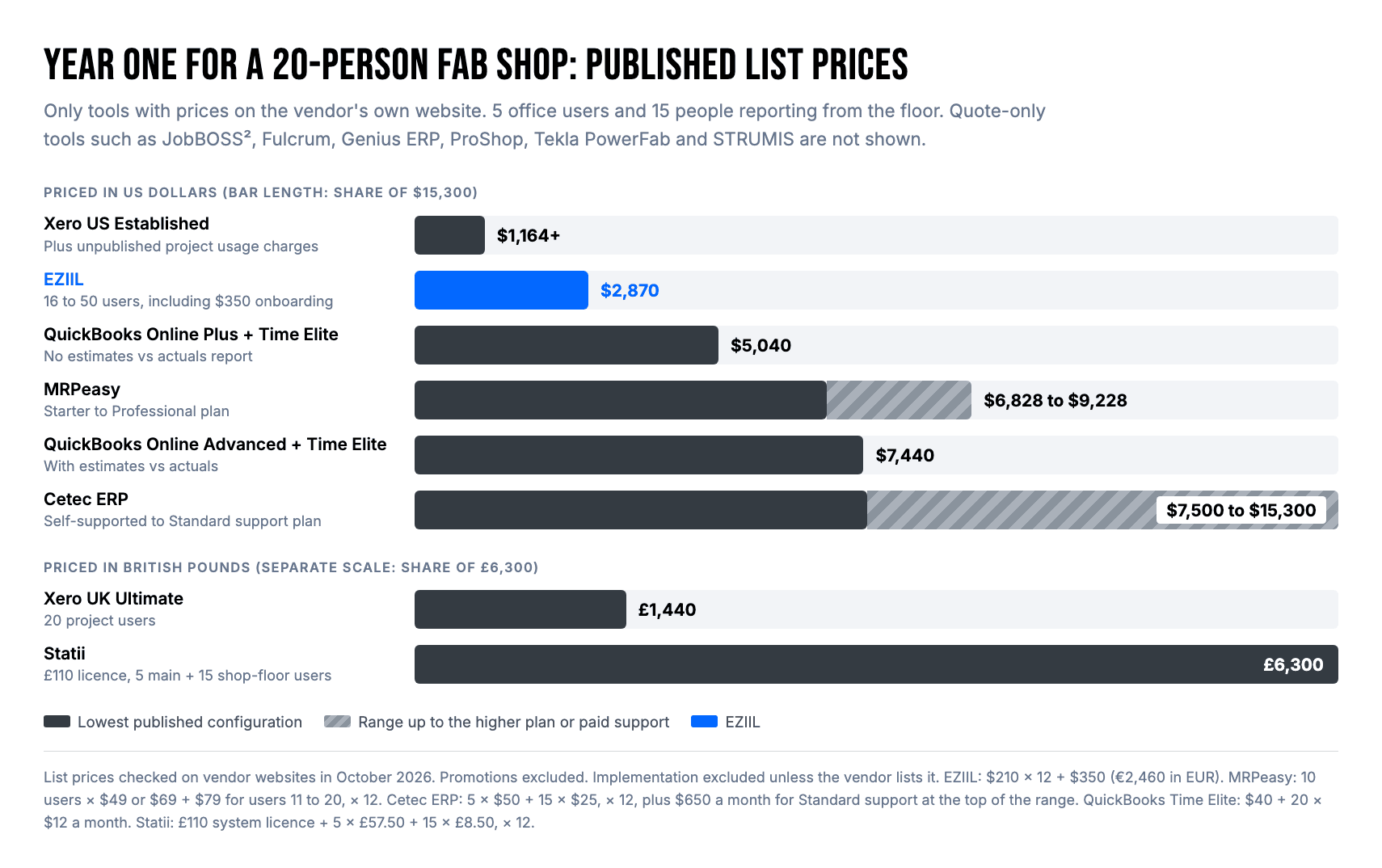
The license is only part of the cost. Your office also spends time setting the system up, and the floor spends time learning it, which is why time to go live sits next to price in the comparison table.
Can QuickBooks or Xero handle job costing for a fab shop?
Yes for the books, partly for the shop. Both assign timesheet hours, bills and expenses to a job or project, but neither records hours per operation or assembly, and QuickBooks Online only shows estimates vs actuals on the $340 a month Advanced plan.
Accounting-only job costing works when the shop is small, runs one or two jobs at a time, and the owner knows where every hour went. It starts to break when a dozen jobs share the floor, because a timesheet records which job a person remembers working on, not which operation or assembly. That is the gap manufacturing ERPs and shop-floor production systems fill. Fab shops that outgrow QuickBooks or Xero job costing usually keep it for the books and add a shop-floor system for hours, or move to an ERP that includes accounting, such as JobBOSS², Genius ERP or Cetec ERP.
How to choose job costing software for your shop
- Count the jobs on your floor at once. One or two, and an accounting tool plus the job cost calculator may be all you need. Ten or more, and you need hours recorded closer to the work.
- Look at where your hours come from today. If it is a weekly timesheet, the first fix is recording at the time of work. Any ERP or shop-floor production system on this list does that.
- Decide whether finance must live in the same system. If yes, you are choosing an ERP. If your accounting works and the problem is the hours, a shop-floor system is the smaller step.
- Be realistic about the rollout. If nobody in the office can spend several months on an implementation, rule out the tools that need it.
- Check how you design. Model-driven structural shops in Tekla Structures should look at Tekla PowerFab first. Most custom shops working from drawings do not need a model-driven suite.
Test your current job costing before you buy anything
You can find out in one week whether your job costs are wrong, and why, without any new software:
- Support time. Look at last week’s timesheets. If there is no line for loading, cleaning, maintenance or waiting, those hours were booked to whatever job each person had open.
- Work after the machine. Pick five finished parts and list every person who touched them after cutting. Compare that with what your production log recorded.
- One job number. Ask what one assembly on your biggest current job has cost so far. If nobody can answer, your hours are pooled at job level.
If two of the three come back wrong, look for software that changes how and when hours are recorded. A better report on the same timesheets will show the same wrong numbers. The full method, with a worked example of how the three habits move cost between jobs, is in why your job costing is wrong.
When EZIIL is not the right choice
EZIIL is production management software for small custom steel and metal fabricators, and it is the wrong tool in several situations:
- You want accounting, invoicing and a full profit and loss per job in one system. EZIIL’s job cost contains what is recorded in EZIIL, and your accounting stays where it is. Look at JobBOSS², Genius ERP, Cetec or Global Shop Solutions.
- You need quoting from drawings or a configure-price-quote tool.
- You nest in the same tool. EZIIL does not nest; shops that nest do it in their CAM software.
- You need a quality approval step that blocks downstream work until inspection passes. In EZIIL, quality checks are operations.
- You make repeat products in batches. MRPeasy is built for that.
- You are a five-person shop running one job at a time. A spreadsheet and the job cost calculator may be all you need, and we would rather say so.
Which job costing software should a fab shop choose?
Job costing accuracy is decided by where your labor hours come from, so pick the group before you pick the tool. Accounting tools put job cost in your books after the fact. ERPs record hours per operation and bring finance with them, at the price of a longer rollout. Shop-floor production systems record hours per operation and assembly from the floor and leave your accounting alone.
If you run a project-based custom steel or metal shop with 15 to 150 people and want to see where the hours on each job go, read how EZIIL handles job costing, take a free product tour of EZIIL or book a 30-minute demo with the EZIIL team.
FAQ
What is the best job costing software for a small metal fabrication shop?
It depends on where your hours come from and how many jobs run at once. For a project-based custom shop with 15 to 150 people that wants hours per operation from the floor without an ERP project, EZIIL is built for that. For a small UK make-to-order shop, Statii. For an established US job shop that wants accounting in the same system, JobBOSS². Under about 10 people with one or two jobs at a time, QuickBooks Online or Xero may be enough.
Can QuickBooks handle job costing for a fabrication shop?
Partly. QuickBooks Online assigns payroll, timesheet hours, bills and expenses to projects on the Plus plan ($140 a month as of October 2026), and the Estimates vs Actuals report needs the Advanced plan ($340 a month). It does not record hours per operation or assembly, routings or work in progress, so most fab shops with several jobs on the floor pair it with a shop-floor system.
What is the best accounting software for job costing?
For small fabricators, QuickBooks Online Advanced in the US and Xero’s top plan in the UK, Australia, New Zealand and Europe both offer project costing with estimates compared to actuals. Both cost a job from timesheets and bills. If you need accounting and production costing in one system, a manufacturing ERP such as JobBOSS², Genius ERP or Cetec ERP includes its own accounting.
Which metal fabrication software tracks material and labor actuals against estimates during production?
Nine of the 12 tools on this list compare actual job cost with the estimate while the job is still open, as long as the floor reports time as it works: EZIIL, Statii, JobBOSS², Fulcrum, Genius ERP, ProShop ERP, Cetec ERP, Tekla PowerFab and STRUMIS. Fulcrum, Genius ERP and Tekla PowerFab document material as well as labor in that comparison, and EZIIL compares the material quantities planned in the bill of materials with what was moved to production. MRPeasy builds actual cost as time is reported, but its estimated vs actual report covers finished orders. QuickBooks Online and Xero show actuals after timesheets and bills are entered.
Which job costing software also handles estimating from drawings?
Tekla PowerFab and STRUMIS put estimating, production control and job cost in one structural steel suite, and both work from the model or an imported bill of materials. Genius ERP builds the estimated job cost from the bill of materials and operations, and Statii builds quotes in its Enquiry module. EZIIL does not estimate from drawings; shops using it estimate in a separate tool and compare the estimate with the hours reported from the floor.
Which job costing software ties purchase orders for raw material to the job?
The ERPs on this list, including JobBOSS², Fulcrum, Genius ERP, ProShop, MRPeasy and Cetec ERP, run purchasing in the same system as the job, so material cost reaches the job without re-keying. In EZIIL, the procurement module buys material against the project’s bill of materials, material moved to a project shows its actual cost, and subcontract purchase orders become part of the job cost with the subcontractor management module. In Xero, purchase orders cannot be tied to a project, and QuickBooks Online assigns bills and expenses to projects after they arrive.
How much does job costing software cost for a 20-person shop?
Using published list prices as of October 2026, a year costs about $1,200 for Xero’s US Established plan before its unpublished project usage charges, $2,870 for EZIIL including onboarding, £6,300 for Statii, $6,828 to $9,228 for MRPeasy, $7,440 for QuickBooks Online Advanced with QuickBooks Time Elite, and $7,500 to $15,300 for Cetec ERP depending on the support plan. JobBOSS², Fulcrum, Genius ERP, ProShop, Tekla PowerFab and STRUMIS are quote only.
Is there free job costing software for fabricators?
Not for shop-floor job costing. A spreadsheet with the free job cost calculator covers the method, MRPeasy offers a free trial, and EZIIL offers a free product tour of a demo account. EZIIL does not offer a self-serve free trial, because the team helps each shop set up its data.
How long does it take to set up job costing software?
Accounting tools take days. For shop-floor systems, EZIIL goes live in under a week starting with one module, and Statii does not publish a time. ERPs take longer: about one to two months for MRPeasy by its own customer research, and about two to five months for JobBOSS² by a third-party estimate. Most other ERP vendors on this list do not publish a timeline.
What is the difference between job costing in accounting software and in production software?
Accounting software costs a job from what is entered afterwards: timesheets, payroll and bills. Production software records hours as the work happens, per operation or assembly, and compares them with the plan while the job is still open. Many shops use both: production software for hours and progress, accounting software for invoices and the ledger.