
Job costing software for manufacturing: see planned vs actual cost before the job ships
Most custom fab shops find out what a job cost after the invoice goes out. EZIIL records hours per operation on the shop floor and keeps support time off the job, so you see planned against reported cost while there is still time to do something about it.
Take a free product tourBuilt for custom steel and metal fabricators with 15 to 150 people. Live in under a week. From €120 / $140 a month, flat, so the whole floor can report and you can see profit per job without per-user math.
Live in under 1 week
Start with EZIIL Starter. Add BOM, procurement and inventory when you are ready.
From €120 / $140 a month, flat
Priced by team size, not per user. Everyone on the floor can report.
Hours recorded on the floor as they happen
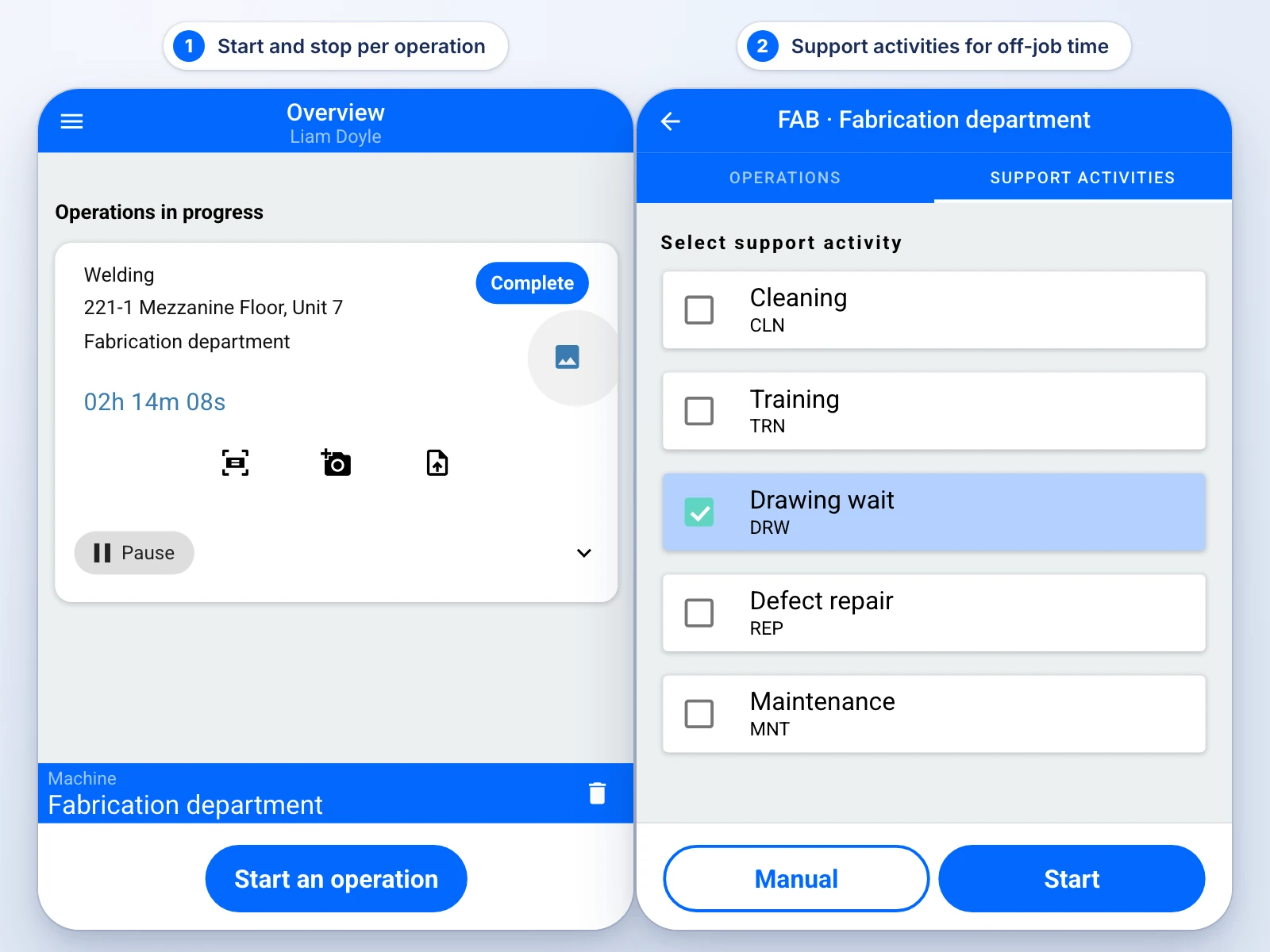
Workers start and stop a timer on a phone or with an RFID tag, per operation and per assembly.
Planned vs reported, per job
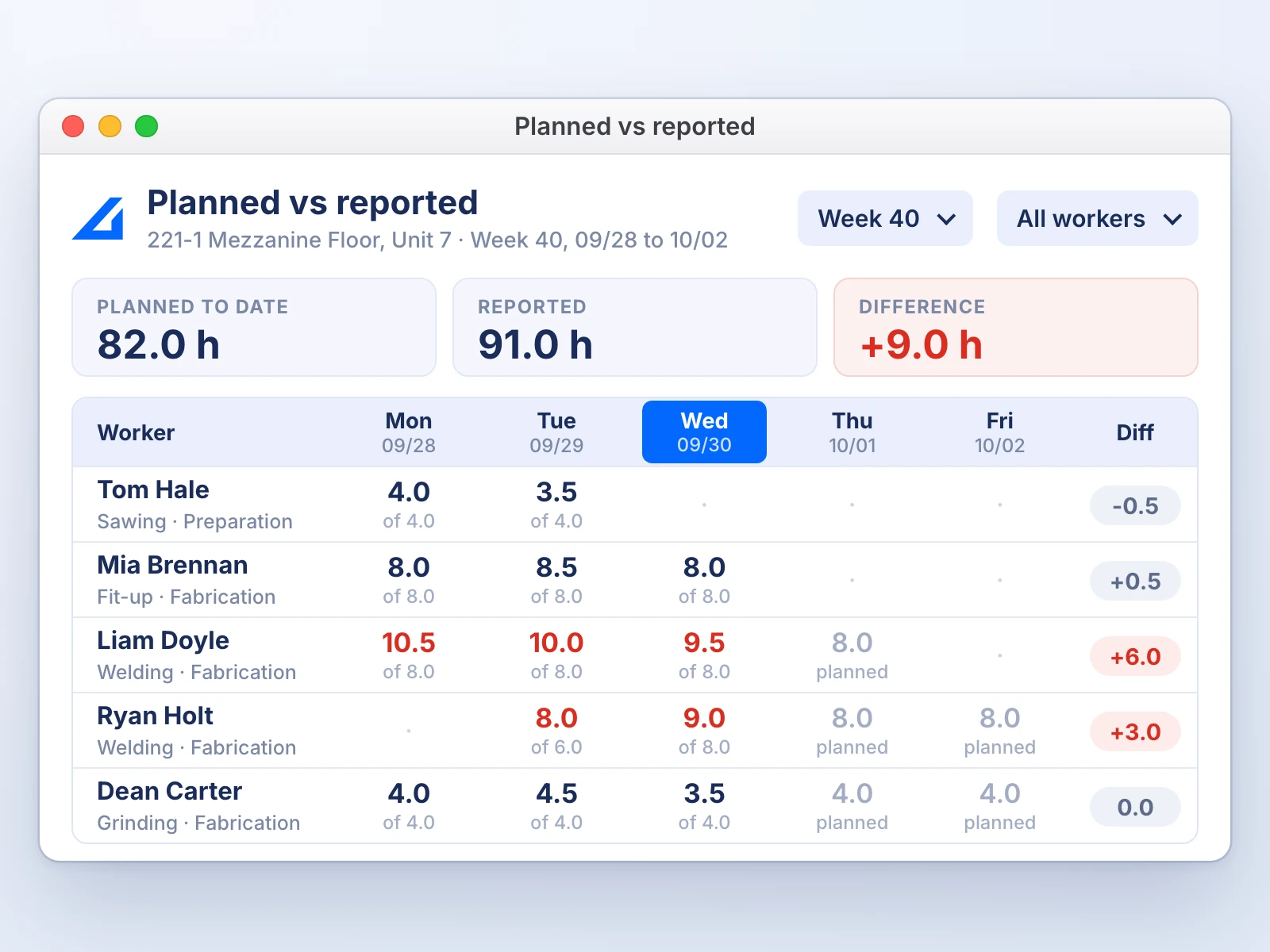
Compare the hours you planned with the hours that were reported, by job, worker and day.
Why the numbers in your job costing are wrong
Job costing in most custom fab shops is built on hours that were never recorded against the job. Weekly timesheets are filled in from memory, paper production logs record machine time but not the grinding, and one job number is shared by ten people. The total looks precise, but the hours under it were reconstructed after the fact.
Weekly timesheets book support hours to the job
A welder’s forklift run, the drawing he waited an hour for and the Friday cleanup all end up on whichever job was open that week. The job looks slower than it was, and the next quote carries the error.
In EZIIL: that time goes to a support activity, not to the job.
Paper logs record machine time, not the finishing
Say the log shows the laser ran 40 minutes and says nothing about the deburring, fit-up and grinding that followed. Those hours cost money and have nowhere to land.
In EZIIL: every operation on the bill of materials gets its own start and stop.
Ten people on one job number
Say the whole crew reports to one job number and the job shows 300 hours. You do not know which assembly took 200 of them, so the next quote repeats the mistake.
In EZIIL: hours are reported per operation and per assembly.
Three records, one wrong report
Each record captures something other than the work that happened, and all three feed the same job cost report.
Read the full diagnosis, with the three shops it comes from: Why your job costing is wrong
How EZIIL turns shop-floor hours into job cost
EZIIL is production management software for custom steel and metal fabricators with 15 to 150 people. It records hours per operation and per assembly on the shop floor, keeps support time off the job, and compares planned against reported hours per project. It is the loop the product is built on: register the job, plan it, let the floor report, see the result against the plan.
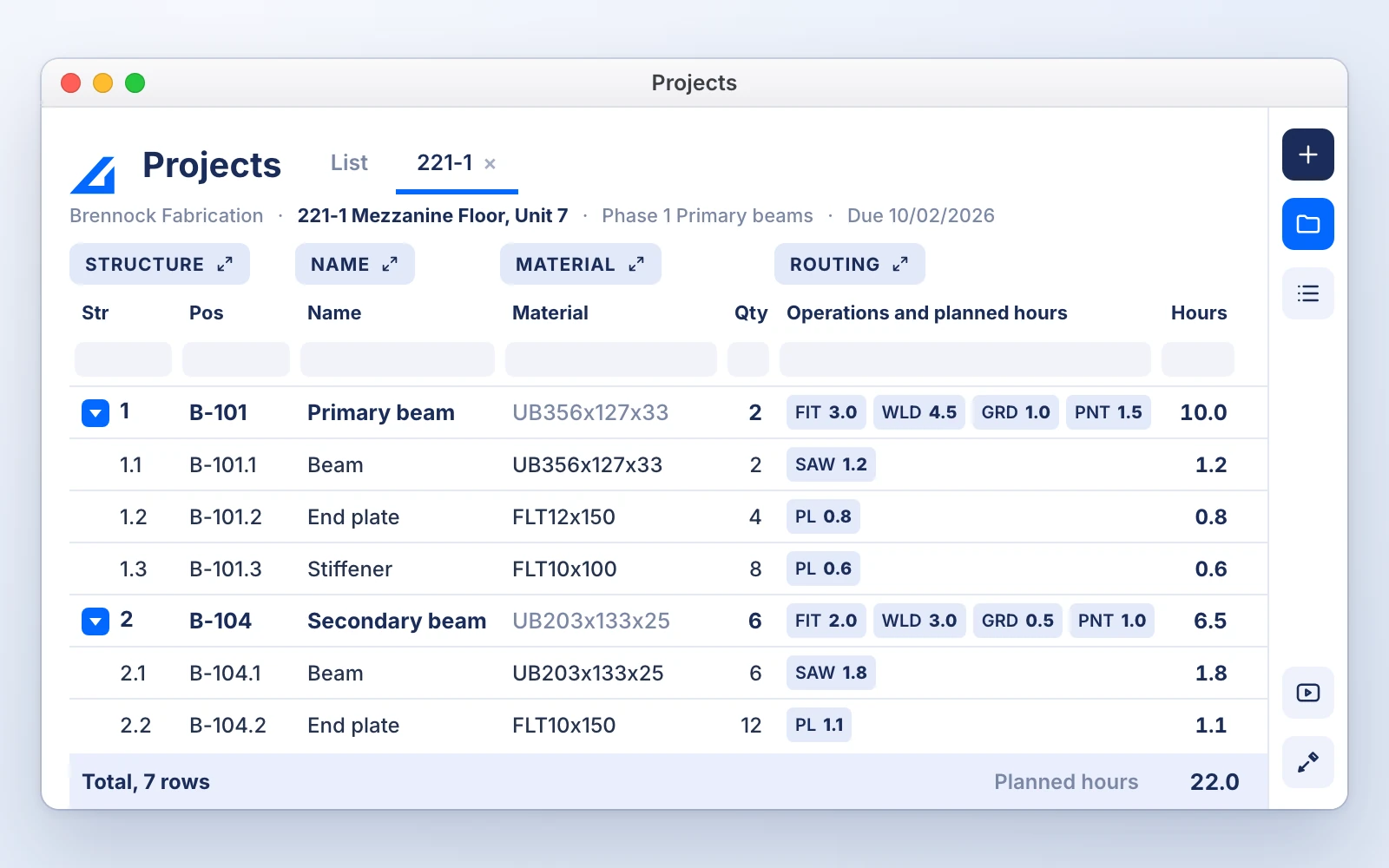
Register the job and its plan
Customer, project, phase. Each phase carries its own due date and price. The bill of materials under it lists the material and the operations with planned hours, so the plan is already in the shape you will measure against.
The floor reports as it works
Workers start and stop a timer per operation and per assembly in the mobile app, signed in with a password or an RFID tag. Cleaning, training, waiting for drawings and rework go to Support activities, so that time never lands on the wrong job.
The office confirms the hours
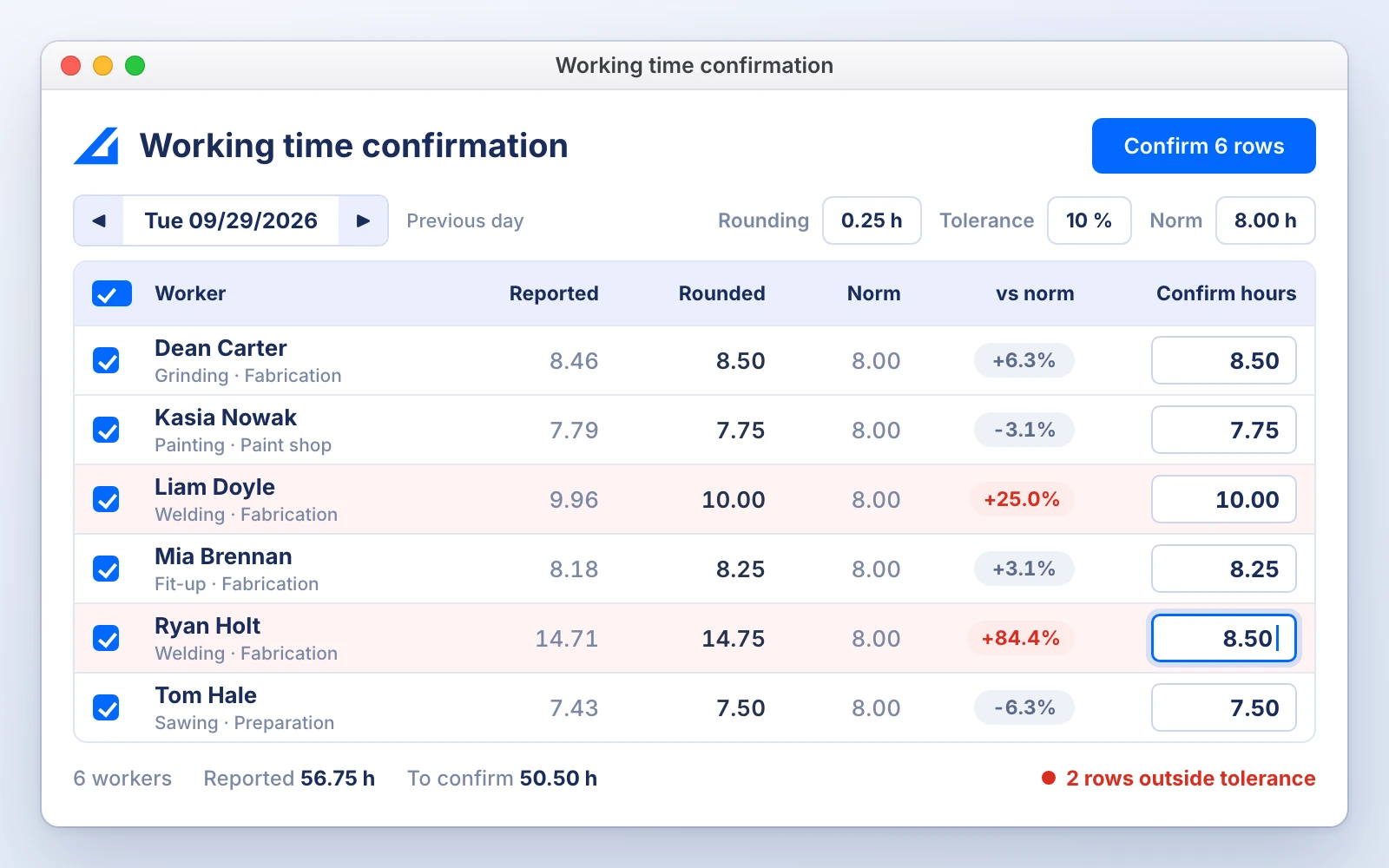
Each morning the office opens Working Time Confirmation and sees yesterday’s reported time per worker, with rounding and a tolerance percentage flagging the rows that need a look. Confirmed hours feed progress, the payroll export and the cost reports, and with an hourly rate on each operation they become cost in money.
You see the gap while the job is open
Planned vs Reported shows planned hours against reported hours by job, worker and day. With the BOM and inventory modules, the Material Cost tool shows the material actually booked to the project, and the consumption report compares the planned quantity with what was moved to production.
Real-time job costing vs after-the-fact job costing
Real-time job costing records hours and material against the job while it is running. After-the-fact job costing adds them up from timesheets and invoices after the job ships. The table shows what that changes for a custom fab shop.
| Question | Spreadsheet, after the job | EZIIL, while the job runs |
|---|---|---|
| When you learn the margin | After the job ships and the invoice goes out | While the job is still running |
| What you can do about it | Quote the next one higher | Fix this one: move people, clear the bottleneck, have the scope conversation |
| Where the hours come from | Timesheets keyed in from memory at the end of the week | Start and stop at the machine, confirmed by the office the next morning |
| Where the material cost comes from | Reconciled from invoices at close | Booked to the project at goods receipt or issue, at the received price |
| Support and rework time | Hidden inside the job’s hours | Recorded as a support activity, on the project or off it |
| Estimating accuracy over time | Stays a guess | Planned vs reported history per operation feeds the next quote |
What changes is the window of time in which you can still protect the margin.
Job costing features built for custom fabrication
Everything below is in EZIIL Starter unless a module is named. Together it is the manufacturing job costing software layer of EZIIL: job cost tracking from the first reported hour, without a separate costing tool.
Planned vs Reported report
Planned hours against reported hours by job, worker and day.
Working Time Confirmation
Review yesterday’s time, apply rounding and tolerance, confirm it in one pass.
Confirmed Working Times and payroll export
Confirmed hours feed progress, cost and the payroll file. Exported rows lock.
Support activities
Cleaning, training, drawing wait and defect repair, on a project or off every job.
Operation hourly rates
Set a rate per operation in production settings and confirmed hours show as cost.
Mobile reporting
Start and stop per operation and assembly, today’s tasks, drawings on the phone, RFID sign-in.
Actual material cost per project
The Material Cost tool shows what was booked to the project, in money. BOM and inventory modules
Material consumption, planned vs moved
Per project, the BOM quantity against what went to production, overruns highlighted. BOM and inventory modules
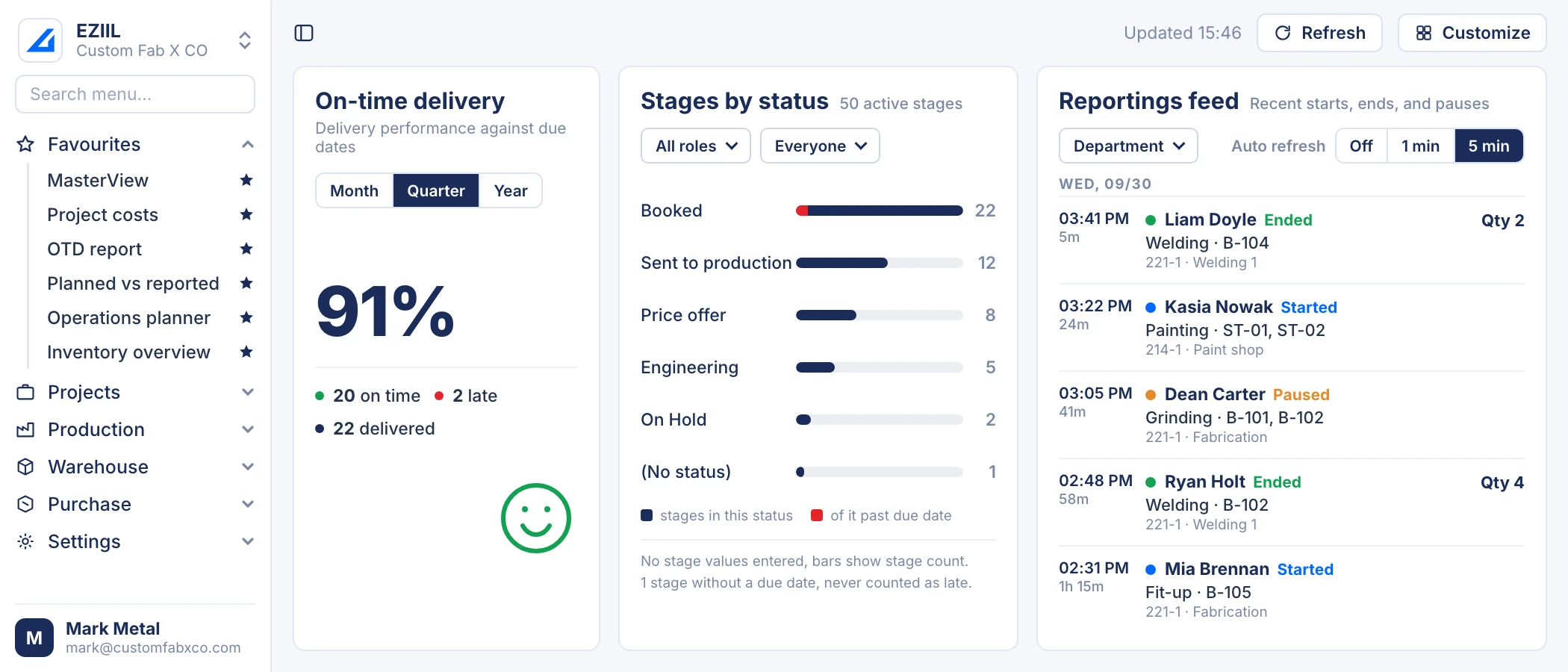
Live reporting feed
The dashboard shows recent starts, pauses and finishes from the floor as they happen.
What is in the job cost, and what is not
EZIIL’s project cost contains what is recorded in EZIIL: labor hours, support and rework time, material booked to the project and subcontract purchase orders. Overhead, invoices and the profit and loss stay in your accounting system.
Recorded in EZIIL
- Labor hours per operation and per assembly, at the operation’s hourly rate
- Support and rework time, per project or off every project
- Material received or issued to the project, at the received price BOM and inventory modules
- Subcontracted work such as painting and galvanizing, through a subcontract purchase order Subcontractor management module
Stays where it is
- Overhead and your shop rate. Work them out with the free fabrication cost calculator.
- Sales and purchase invoices, and the profit and loss. They stay in your accounting system. EZIIL has an invoicing and accounting integrations module (Directo, among others).
- Nesting and offcut optimization. Your CAM tool does that.
If a cost type is not recorded in EZIIL, the project cost does not pretend it is.
Customer results

Profit and loss per job
Now we can see exactly what the workers are doing in the workshop and how many hours they are spending on each process. This has given us tighter control of active jobs, better-informed estimating and concrete profit/loss insights per job.
Syed Raza Hashimi, Planner / Control Manager / QA-QC, APS Group
100% of the floor reports
Every worker at B&W Metall reports in EZIIL, regardless of age or role, after a step-by-step rollout. Hours that everyone reports are hours you can cost a job from.
B&W Metall, steel fabrication, Estonia

12 Excel sheets deleted
The whole team can now work in one system and we deleted 12 different Excels that we had to update otherwise every day.
Rait Kalda, Chairman of the Board, Enefit Solutions
Built for custom fabrication, not for every manufacturer
EZIIL fits if you
- Run project-based or engineer-to-order work with 15 to 150 people
- Quote and build one-off jobs: structural steel, sheet metal, machinery frames, stairs and railings
- Want the floor to report from a phone, with no per-user fee
- Need EN 1090-2 traceability Module
Look elsewhere if you
- Run high-volume repeat production. A batch MRP fits better.
- Mainly need job costing inside your accounts. QuickBooks and Xero have it.
- Want nesting or a quoting engine. EZIIL plans and costs the job; it does not nest or price it for you.
Comparing options? See 12 job costing tools for metal fabricators compared, EZIIL vs JobBOSS and MRPeasy alternatives for steel fabricators.
EZIIL job costing at a glance
EZIIL Starter costs €120 / $140 a month for up to 15 users, goes live in under a week and records labor, support time and material per job from the shop floor.
Price
EZIIL Starter: €120 / $140 a month for 1 to 15 users, €180 / $210 for 16 to 50, €290 / $338 for 51 to 150. One-off onboarding €300 / $350. No per-user fees.
Go-live
Under a week, starting with one module. Modules added when you are ready, with personal onboarding.
Shop-floor reporting
Mobile app on the App Store and Google Play, also as a web page. Start and stop per operation and assembly. Password or RFID sign-in.
Cost data recorded
Labor per operation and assembly, support and rework time, material booked to the project, subcontract purchase orders.
Reports
Planned vs Reported, Working Time Confirmation, Confirmed Working Times with payroll export, Material Cost tool, material consumption planned vs moved, production dashboard.
Modules
Bill of materials, procurement, inventory, EN 1090-2 compliance, subcontractor management, invoicing and accounting integrations, and more.
Integrations
Directo and ProNest, among others. Custom API connections per customer. BOM import from Excel or IFC.
Prices and product facts as of October 2026. Last updated October 2026.
Job costing software questions
What is job costing software for manufacturing?
Job costing software for manufacturing records the labor, material and subcontract cost of each individual job and compares it with what was planned or quoted. It fits make-to-order and custom work, where every job is different. Continuous production uses process costing instead, which spreads cost over identical units. For a custom fab shop the useful version records hours as they happen on the floor instead of from timesheets at the end of the week.
If you are still choosing between types of tool, compare 12 job costing tools side by side.
How does EZIIL track labor and material actuals against the estimate during production?
Planned hours live on the operations in the bill of materials. Workers report start and stop per operation and per assembly from the mobile app, the office confirms the hours, and the Planned vs Reported report shows the difference by job, worker and day while the job is running. With the BOM and inventory modules, material booked to the project appears in the Material Cost tool, and the consumption report compares the planned quantity with what was moved to production.
Does EZIIL connect purchase orders for raw materials with job costing?
Yes, with the procurement and inventory modules. Material need is calculated from the bill of materials and netted against stock, purchase orders go to suppliers, and goods are received with their batch or heat numbers. Material moved to the project is booked as project cost at its received price. Subcontracted work such as painting or galvanizing goes out on a subcontract purchase order and its price lands on the project too.
Can workers’ hours end up on the wrong job?
Only if they are reported there. Each report is tied to a specific operation and assembly, and off-job time has its own place: Support activities such as cleaning, training, waiting for drawings or defect repair. A support activity can be linked to a project, so rework lands on the job that caused it, or left unlinked, so cleaning the hall stays off every job.
Do I need an ERP to do job costing in a 20-person fab shop?
No. You need planned hours and reported hours in the same structure, and a way to capture hours as they happen. EZIIL Starter does that for a flat €120 / $140 a month for up to 15 users, or €180 / $210 for 16 to 50, with go-live in under a week. Modules for BOM, procurement, inventory and accounting integration come later, only if you need them.
How is this different from job costing in QuickBooks or Xero?
Accounting software costs a job from what was invoiced and what was paid, after the fact. EZIIL costs the job from the shop floor as the work happens: hours per operation, support time separated, material booked at receipt. Keep your accounting system for invoices and the profit and loss, and let EZIIL supply the hours and the material cost your accounts never see.
See one of your jobs costed in EZIIL
Take the free product tour, or book a 30-minute demo and bring one job’s numbers. Team EZIIL’s experts will show you where the hours went.
- Your planned hours against reported hours, per operation
- Support time kept off the job, rework kept on it
- Flat price by team size, live in under a week
Take a free product tour
Enter your email to see inside EZIIL in a demo version. No sales call needed first.
EZIIL job costing is part of the same system as metal fabrication software for the whole shop, job shop software for scheduling and tracking, shop floor management software for mobile reporting, job tracking software for status from the floor, and the full feature list and pricing. For the definition, see job costing in steel fabrication; for the diagnosis, why your job costing is wrong.