
ChatGPT can draft a usable AI cut list for steel bars, tubes, angles and beams, as long as you give it your stock lengths, saw kerf and trim, and then check its numbers before the first cut. A plan only covers what to cut, though. It won’t tell anyone which parts have been cut, which assemblies are ready for welding, or what is left on the rack.
This guide is for owners, foremen and production managers in fabrication shops of about 5 to 50 people who cut linear stock on a band saw or cold saw and don’t run dedicated nesting software. It covers how to get a better AI cut list, a four point check before you cut, when to move to a proper optimizer, and how to track the parts that come off each bar, so the next station starts on time. EZIIL is our own product: production management software for small custom steel fabricators that shows where every job stands. It doesn’t make cut plans, and we say below exactly where it fits.
In short: Use ChatGPT to write and run the calculation, not to guess the layout. Check every bar for kerf, trim and part counts before cutting. After that, the plan is finished and the tracking starts: the sawyer reports which parts are cut, partial counts included, and the next station can see what is ready.
Can ChatGPT make a usable cut list for steel?
Yes, for linear stock such as bars, tubes, flats, angles and beams, ChatGPT can produce a workable first draft of a cut list. It isn’t a nesting engine, so treat its plan as a draft you check, and don’t use it for plate nesting on a laser or plasma table.
The risk is that the answer looks right. In a thread on the OpenAI developer forum, a user who asked ChatGPT for a board cutting layout got plans that didn’t fit the stock and kept getting the same faulty plan after pointing out the errors. Another thread reports the same kind of miscount. Those examples are wood, but the arithmetic is the same for steel, and a chat model can write a confident list of bars where one of them is 40 mm too short.
The fix is to make it calculate instead of guess. As of November 2026, ChatGPT can write and run Python code inside the chat, and OpenAI’s own help page says to review the code, outputs and assumptions before relying on the result. Ask it to solve the problem in code and print the result per bar, so you have numbers you can check.
What to give it, every time:
- Stock on the rack: profile, grade, stock length and how many bars you have (6,000 mm or 12,000 mm, plus any remnants you want used first)
- Saw kerf: the width of material the blade removes on every cut (take it from your blade’s datasheet or measure a test cut)
- Trim cut: how much you square off the end of each bar before the first part
- Minimum usable remnant: the length you keep; anything shorter is scrap
- Rules: never mix profiles or grades on one bar; mitred parts need their own allowance
- The part list: mark, profile, grade, length, quantity and cut type, copied from your bill of materials (BOM), not retyped
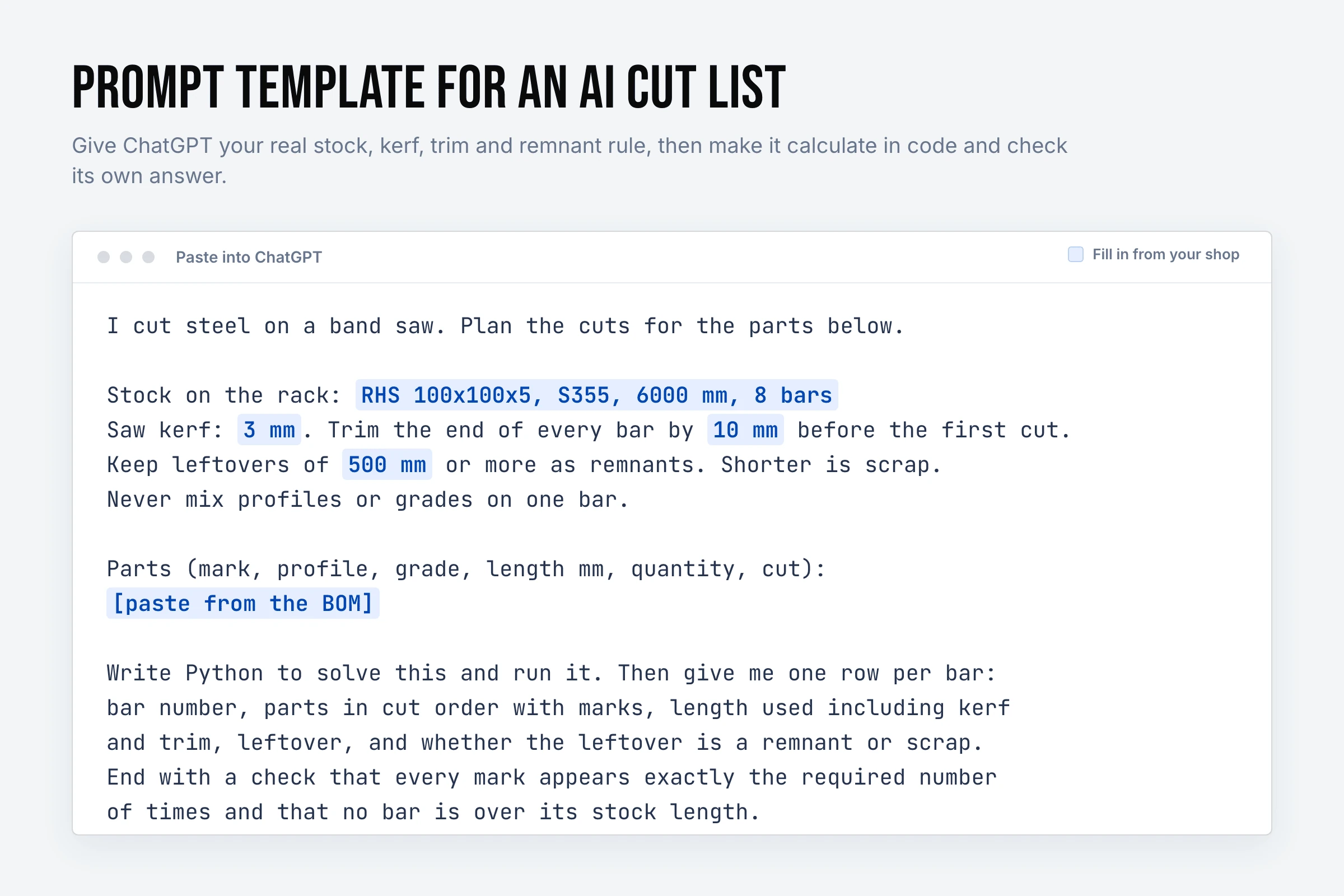
I cut steel on a band saw. Plan the cuts for the parts below.

Stock on the rack: RHS 100x100x5, S355, 6000 mm, 8 bars.
Saw kerf: 3 mm. Trim the end of every bar by 10 mm before the first cut.
Keep leftovers of 500 mm or more as remnants. Shorter is scrap.
Never mix profiles or grades on one bar.

Parts (mark, profile, grade, length mm, quantity, cut):
[paste from the BOM]

Write Python to solve this and run it. Then give me one row per bar:
bar number, parts in cut order with marks, length used including
kerf and trim, leftover, and whether the leftover is a remnant or scrap.
End with a check that every mark appears exactly the required number
of times and that no bar is over its stock length.
How do you check an AI cut plan before cutting?
Run four checks on the plan before the first bar goes on the saw: bar length, part count, profile and grade, and the leftover on each bar. It takes a couple of minutes, which beats finding the mistake at the saw with the last bar on the rack.
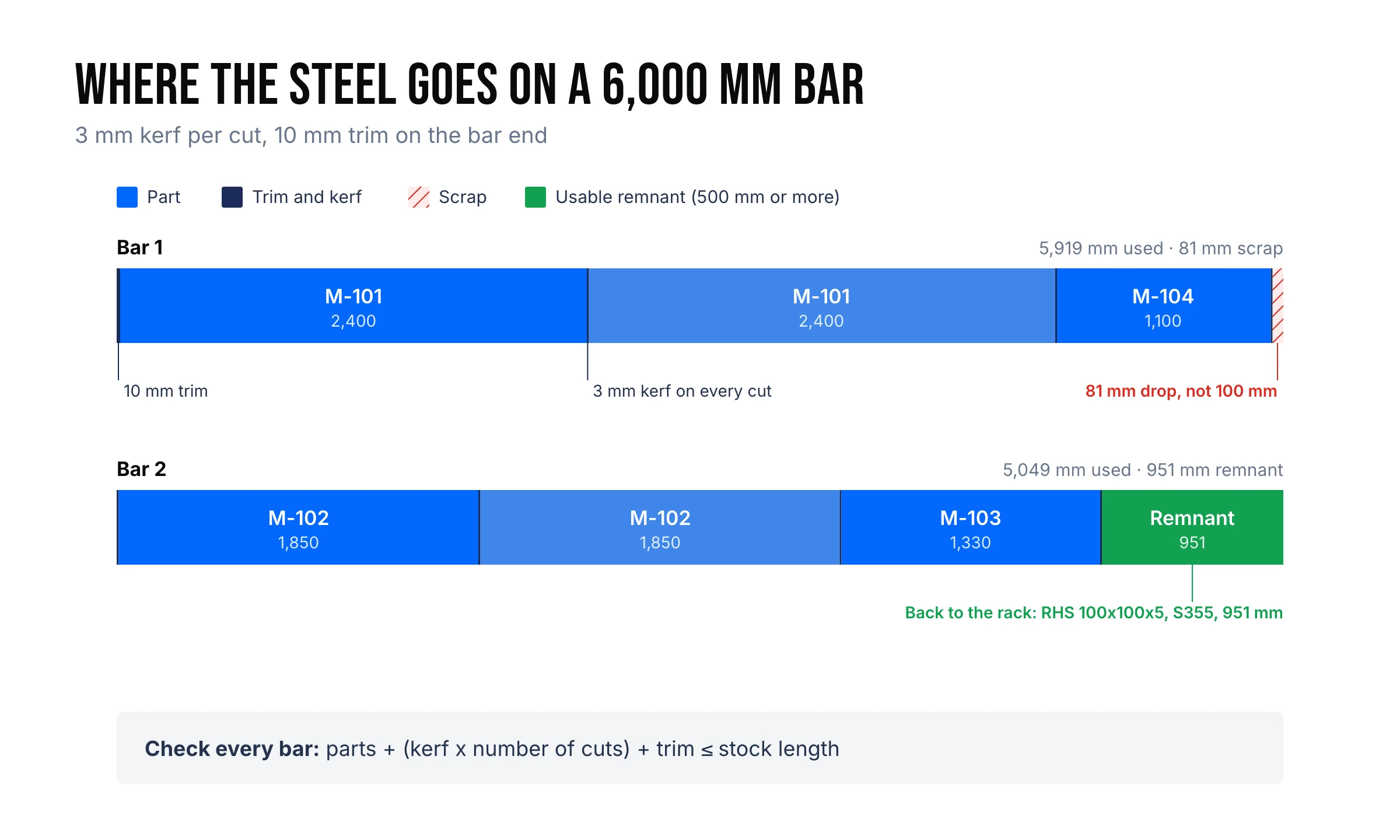
- Every bar fits. Parts plus one kerf per cut plus the trim must be no more than the stock length. With a 3 mm kerf and a 10 mm trim, a 6,000 mm bar with parts of 2,400, 2,400 and 1,100 mm uses 5,900 mm of parts, 10 mm of trim and 9 mm of kerf (three cuts at 3 mm), so 5,919 mm in total. A plan that ignores kerf and trim shows 100 mm left over. The real drop is 81 mm.
- Part counts match the BOM. Count each mark in the plan against the drawing or BOM, not against the list you pasted. Ten pieces of mark 104 means ten in the plan.
- No mixed profiles or grades. One bar, one profile, one grade. If you work to EN 1090 (the European standard for executing steel structures), you’ll want to know which bar, and so which heat number, each part came from.
- Every leftover has a label. Each bar ends in scrap or a usable remnant. If the plan doesn’t say which, you’ll find out when someone throws away a 900 mm piece you needed next week.
ChatGPT, a cut list optimizer or nesting software: which do you need?
Use ChatGPT for occasional linear jobs, a dedicated linear optimizer when you cut every day or yield really matters, and CAM nesting software for plate on a laser or plasma table. None of the three tracks what happens to the parts once they’re cut. That is a job for production software.
| Tool | Good for | Not good for | Typical shop |
|---|---|---|---|
| ChatGPT (with code) | Occasional linear jobs, quick what-ifs, explaining a plan | Plate nesting, guaranteed best yield, repeat daily use | Small shop, a few saw jobs a week |
| Linear cut list optimizer | Daily saw work, mixed stock lengths, using remnants first | 2D plate layouts, tracking parts after cutting | Shop with a busy saw line |
| CAM nesting software | Plate on laser, plasma or waterjet; machine code | Linear saw work in most cases; production tracking | Shop with a CNC cutting table |
| Production software (such as EZIIL) | Following parts after cutting: what is cut, what is ready, who did it | Making the cut plan or the nest | Any shop where parts go missing between stations |
Scroll sideways to see all columns.
The 1D cutting stock problem (cutting bars into parts with the fewest bars and the least waste) is a well studied optimization problem with its own body of research, which is why dedicated optimizers beat a chat model as volume grows. For plate work, our guide to nesting software for laser and plasma cutting compares the main tools.
Why does the cut plan stop at the saw?
The cut plan ends when the last part comes off the bar. What breaks in most small shops happens after that: cut parts sit on a cart or a pallet, marks rub off, and nobody can say which assemblies have all their parts.
You’ve probably seen some version of this:
- Drawings printed and left on a table, and each fitter takes one and starts. Halfway through, a part is missing and the drawing goes back on the pile.
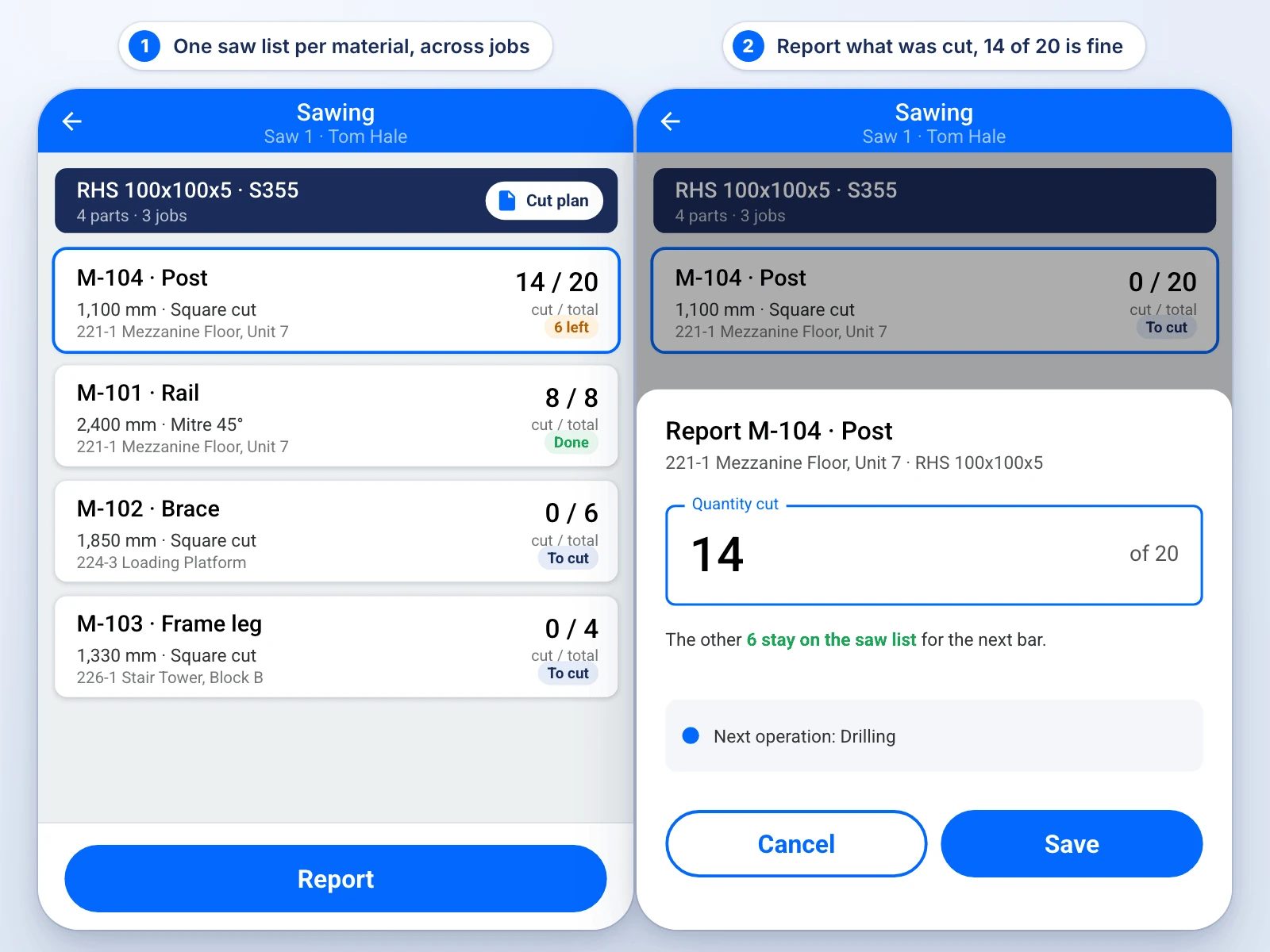
- The saw has cut 14 of 20 pieces of one mark, and the bar ran out. The six missing pieces live in the sawyer’s head.
- The fitter is waiting for parts that were cut yesterday and are sitting by the saw.
- A part gets cut twice because nobody knew it was already done.
- A good remnant goes in the scrap bin because nobody wrote it down.
The plan itself was usually fine. What the shop lacks is a record of what came out of it, somewhere the next station can see it. That record is what job tracking software is for.
How do you track the parts from an AI cut plan on the shop floor?
Tie the plan to your BOM, give the sawyer one list per material, and have them report part quantities as they cut. Then the next station can see which parts are done and what can be assembled now.
These steps work with any system, even a well kept spreadsheet. Here is what each one looks like in EZIIL.
- Start from the BOM, not the plan. Every part has a mark, profile, grade, length, quantity and drawing (see these BOM examples for fabrication shops). The cut plan refers to those marks; it doesn’t replace them. In EZIIL you can type the BOM in or import it from Excel.
- Make sawing an operation on every part. Then the saw is a step in the job you can plan and report, not something that happens off the books. In EZIIL, operations sit on each BOM row in shop order, for example saw, drill, fit, weld.
- Put the one detail the sawyer needs on the operation. If the sawyer keeps opening the drawing to check whether a cut is square or mitred, put it on the saw operation instead. EZIIL operation attributes do this, so the work list shows the cut type next to the part.
- Give the sawyer one list per material, not per job. A sawyer cuts by profile across jobs, not job by job. In EZIIL the saw operation can show the work grouped by material, so all the RHS 100x100x5 parts from different jobs appear together.
- Attach the cut plan to the saw operation. Save the AI plan as a PDF and attach it to the saw operation, so the sawyer opens it right there in the reporting app. On that screen the file takes the place of the drawing, so if the sawyer needs both, combine them into one PDF.
- Report what was cut, including partial counts. The sawyer reports on a phone, tablet or shop PC which parts were cut and how many. If 14 of 20 are done, they report 14 and the other 6 stay open on the list. (More on collecting data from the shop floor.)
- Let the next station see it. In EZIIL, the next operation on a part, such as drilling, shows red while sawing is still open and turns green once it’s done. Assembly works the same way, so the fitter can see which assemblies have all their parts. Red only warns; it doesn’t lock anyone out.
If your sawyer still prefers paper, EZIIL prints a cut list worksheet per operation with the cut quantity per material, the next operation, the due date, the drawings and a material summary. You can sort the detail worksheet by width for saw work, and every printout carries the date and time it was printed, so you can tell which version someone worked from after a plan change.
Part level tracking like this needs EZIIL’s Bill of Materials (BOM) module and the operation planner, which add on to EZIIL Starter. With Starter alone, workers report time against jobs and stages but don’t get a part list.
What about offcuts and remnants?
Record every usable remnant with its profile, grade, length and heat number, and feed that list into the next cut plan. A cut plan can only use the stock you list, and a remnant nobody wrote down won’t be on that list.
Research on the cutting stock problem draws the same line every shop draws: a usable leftover can be reused for new demand, while a loss is discarded. In practice:
- Set a minimum usable length per profile and put it in your prompt. Above it is a remnant, below it is scrap.
- Keep remnants in one place: a remnant rack, marked with profile, grade, length and heat number where it matters.
- Keep the list where the planner can see it, and paste it into the next ChatGPT prompt as stock to use first.
- For EN 1090 work, keep the heat number on the remnant, or the next part cut from it loses its material traceability.
EZIIL holds profile stock in running meters and doesn’t calculate remnants or track individual offcut pieces. Shops using EZIIL’s warehouse keep remnants on their own shelf location; others keep a simple remnant list next to it.
How much steel should you order when the plan comes from ChatGPT?
Order from the plan’s bar count for that job, and don’t add a second allowance on top. If your production or purchasing software adds its own waste percentage, lower it for parts you nest, or you’ll buy extra steel twice.
EZIIL’s material summary shows two figures: the clean quantity from the BOM and a quantity with a flat consumption allowance, set per article group (by default +7% on profiles and +20% on sheet). The same setting drives EZIIL’s purchasing suggestions. Because EZIIL doesn’t nest, shops that nest or plan cuts elsewhere should set those allowances to match their real yield.
Frequently asked questions
Can ChatGPT do plate nesting for a plasma or laser table?
Not in any way you’d want to cut from. Plate nesting is a 2D layout problem tied to your machine, so it belongs in CAM nesting software that produces the machine program. Use ChatGPT for linear saw work.
Is a ChatGPT cut list accurate?
It can be close, but it isn’t guaranteed. Ask it to write and run code, give it kerf, trim and stock lengths, and check every bar for length and part count before cutting.
What is kerf, and why does the cut plan need it?
Kerf is the width of material the saw blade removes on each cut; it depends on the blade, so take it from the datasheet or measure a test cut. Leave it out and every bar in the plan is a little short, and on a full bar of parts that can mean the last part doesn’t fit.
Does EZIIL do nesting?
No. EZIIL doesn’t make cut plans, nest parts or calculate remnants. It tracks the work after the plan: which parts are cut, which operations are done, and what the next station can start.
Can I attach my AI cut plan to a job in EZIIL?
Yes. Save the plan as a PDF and attach it to the saw operation, and the sawyer opens it in the reporting app at that operation. The file replaces the drawing on that screen, so combine the two into one PDF if the sawyer needs both.
How do I track which parts are cut?
Make sawing an operation on each part in the BOM and have the sawyer report part quantities as they cut, partial counts included. The parts still to cut stay on the list, and the next operation shows when sawing is done.
What is the best way to track offcuts in a small shop?
Set a minimum usable length per profile, keep remnants on one marked rack, record profile, grade, length and heat number, and feed the remnant list into your next cut plan as stock to use first.
Keep the plan in ChatGPT, put the tracking where everyone sees it
If ChatGPT already makes your cut plans, keep using it. The time goes elsewhere: finding out which parts came off the saw and which assemblies are complete. Start with one job: put the saw on the BOM as an operation, attach the plan and have the sawyer report as they cut. For quoting, paperwork and the other ways fab shops use AI, see our guide.
Take a free product tour to see saw reporting in EZIIL, or book a 30 minute demo and team EZIIL’s experts will walk through one of your own jobs.