
AI in metal fabrication is mostly an office tool so far. Small shops use it to quote faster, draft letters and requests for information (RFIs), write standard operating procedures (SOPs), cross-check welding paperwork and build small tools of their own. It saves real hours when a person checks what it produces. It goes wrong when it reads drawings, counts parts or makes up numbers, and that happens more often than the hype suggests.
This guide is for owners, production managers and estimators at custom steel and metal fabrication shops of about 5 to 50 people. It collects 12 uses from real shops and the trade press, shows what went wrong for some of them, and ends with a short plan for where to start. We ran our own test too, giving ChatGPT and Claude the same steel drawing and the same welding procedure specification (WPS) with its procedure qualification record (PQR), and we publish what each got right and wrong. EZIIL is our own product: production management software for custom steel fabricators. EZIIL doesn’t use AI itself. It records the plan, the hours and the job status that AI tools need to give useful answers, and we say near the end where it fits.
In short: Use AI for the words and the checking around your jobs, where a person reviews every answer. Don’t trust it with tonnage, take-offs or code clauses without checking against the source. And get your real hours and job status into one place first, because any AI quoting or costing idea depends on numbers you can trust.
How are metal fabrication shops using AI right now?
Small fab shops mostly use AI for office work: quoting, paperwork, letters, research and small home-built tools. Very little of it touches the shop floor yet, and scheduling by AI is still mostly something people hope for.
The surveys say the same. In a June 2026 Make UK report, back-office work made up 83% of AI use in UK manufacturing, production 11% and quality control 6%. Only 2% of manufacturers had AI widely embedded. In the US, the Census Bureau’s business survey put AI use at about 12% of manufacturing businesses in April 2026, and 17% of firms with fewer than 20 employees. In the EU, Eurostat counted 17% of small enterprises using AI in 2025.
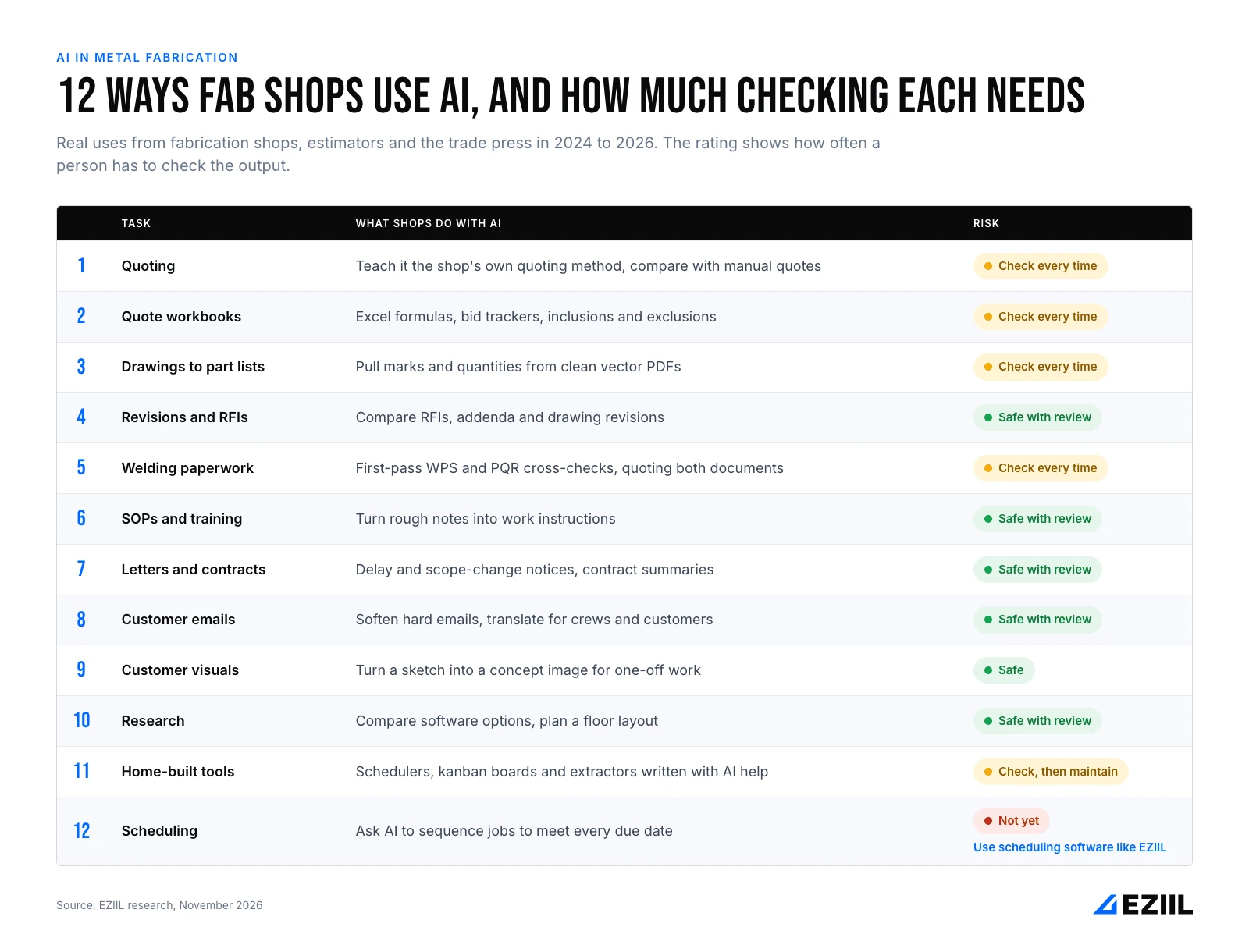
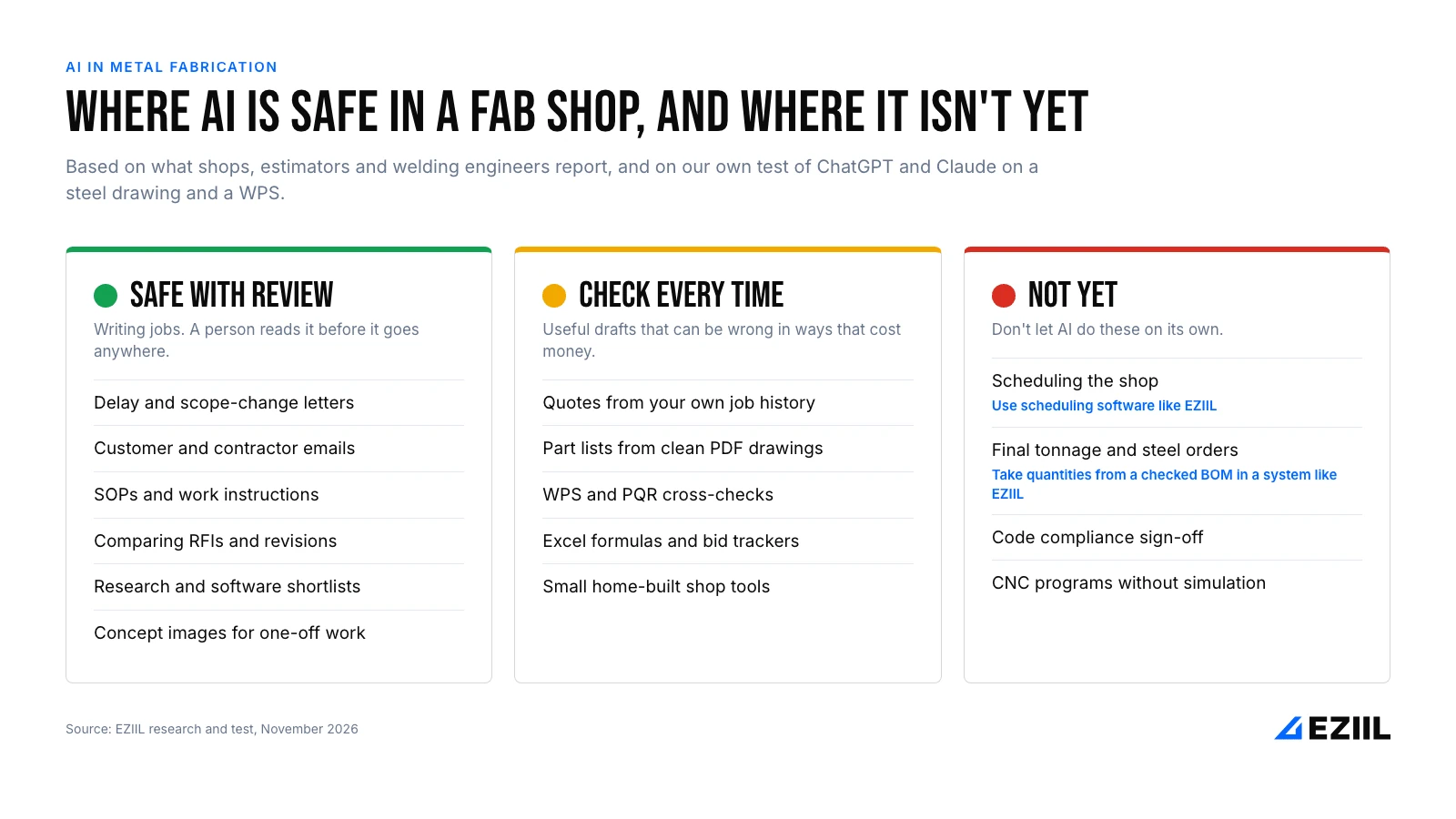
Here are the 12 uses we found, with how much risk each carries.
| # | Task | What shops do | Real example | Risk |
|---|---|---|---|---|
| 1 | Quoting | Teach the AI your own quoting method, then check it against manual quotes | US architectural metals shop: AI quotes within 7% of manual ones | Check every time |
| 2 | Quote workbooks | Excel formulas, bid trackers, scope sheets with inclusions and exclusions | Estimators building bid trackers and quote formulas | Check every time |
| 3 | Drawings to part lists | Pull marks, quantities and materials from clean PDF drawings | Piping fab shop: about 10 minutes per drawing down to about 1 | Check every time |
| 4 | Revisions and RFIs | Compare RFIs, addenda and drawing revisions | Estimators logging what changed between issues | Safe with review |
| 5 | Welding paperwork | First-pass WPS and PQR cross-checks | A 70-page package with 46 documents checked against RCC-M and ISO 15614-1 | Check every time |
| 6 | SOPs and training | Turn rough notes into work instructions and manuals | A small Swedish manufacturer writing work instructions | Safe with review |
| 7 | Letters and contracts | Delay and scope-change notices, contract summaries | A lawyer’s talk to a steel fabricators’ association | Safe with review |
| 8 | Customer emails | Rewrite hard emails, translate for crews and customers | Estimators softening emails to general contractors | Safe with review |
| 9 | Customer visuals | Turn a sketch into a concept image for one-off work | US welding shops rendering gates and feature work | Safe |
| 10 | Research | Compare software, plan a floor layout | Texas fabricator researching ERP options in 15 to 20 minutes | Safe with review |
| 11 | Home-built tools | Schedulers, kanban boards, extractors written with AI help | Indiana manufacturer cut overtime from about 50 hours to almost zero | Check, then maintain |
| 12 | Scheduling | Ask AI to sequence jobs to meet every date | Job-shop tests: “a start”, “not much luck” | Not yet. Use scheduling software such as EZIIL |
Scroll sideways to see all columns.
Where does AI save the most time in quoting and estimating?
AI saves the most estimating time when you teach it your own quoting method and check its answers against quotes you did by hand. Asking it to price a fabricated job from nothing gives you a confident number with no basis.
The clearest example comes from Maker Table, a US architectural metals shop with about 13,000 square feet of shop space. On the Welding Business Owner Podcast in July 2026, its owner described spending about four months teaching ChatGPT how the shop quotes. According to the owner, the AI quotes now land within 7% of the shop’s manual quotes. At least half of the bid work is gone, and closer to 80% by the owner’s estimate. The shop went from bidding about $1 million of work a month to about $3 million. These are the owner’s own figures, but the method is what’s worth copying: a long training period on the shop’s own jobs, then a side-by-side check.
Estimators online describe smaller wins that don’t need months of setup:
- Scope sheets. One estimator types bullet lists of inclusions and exclusions while working through an estimate, then has ChatGPT tidy them into a clean list. The same estimator never lets it read the documents they should be reading themselves.
- Workbooks. Formulas for quote sheets, and bid trackers with customer, value, margin and award status. Several say the formulas need testing, and one said checking them can eat the time saved.
- A second opinion. Some run their finished estimate past the AI for a review. One said they “often” have to correct what it comes back with.
The failures are just as concrete. One estimator stopped using AI for estimating after it gave the wrong tonnage per square foot. On a machinists’ forum, a 22-machine production shop said it was working with an AI firm on its own ERP data, and another member summed up the difference: AI works when it is given a specific task and accurate data, while general chatbots scraping the web are garbage in, garbage out. Dedicated AI take-off tools for structural steel exist, and their vendors report take-off time falling by half or more, but those figures come from the vendors.
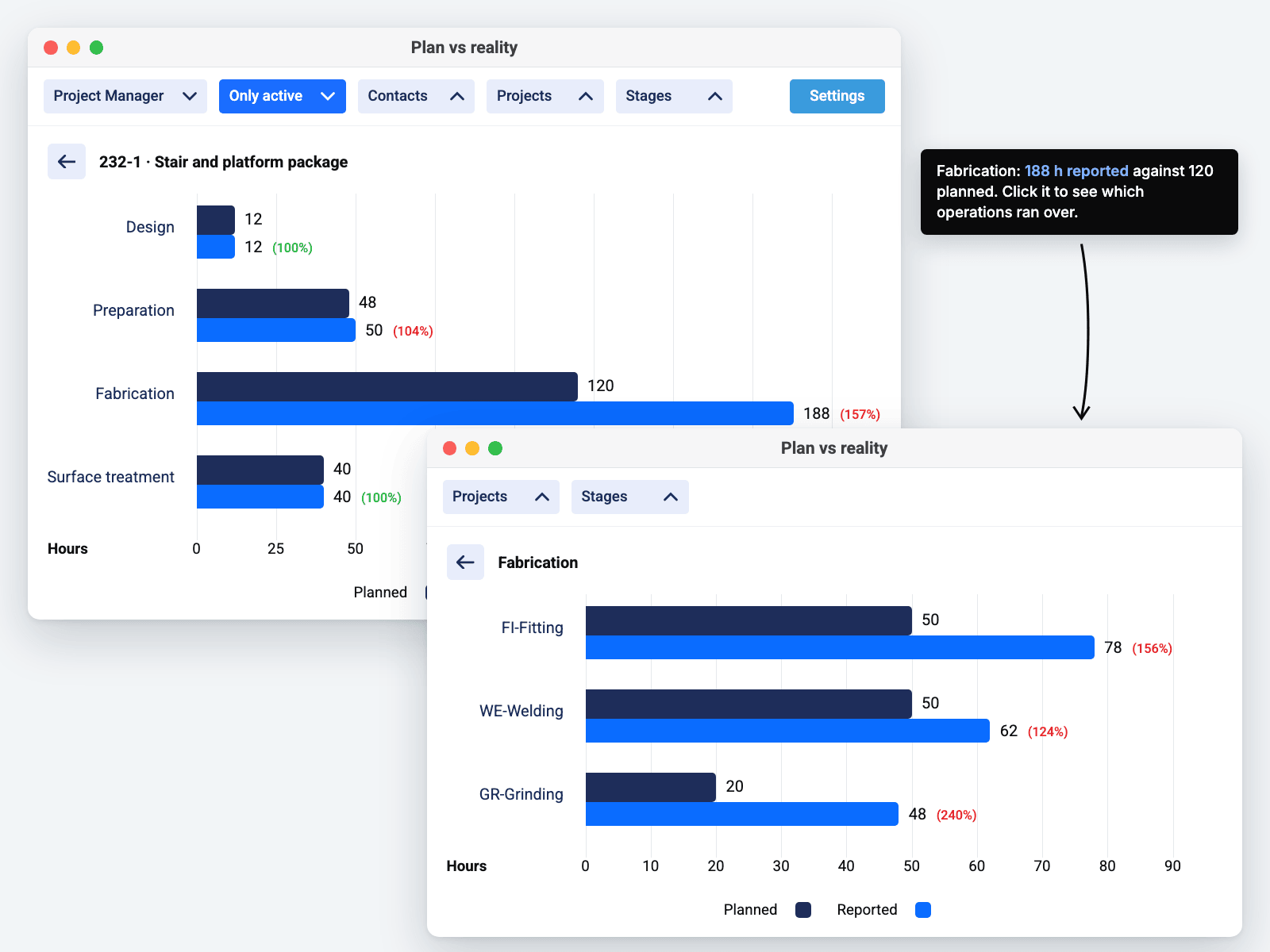
Most shops run into the same limit here. An AI quote is only as good as the hours you feed it, and in most small shops the hours per job live in someone’s head or on timesheets nobody trusts. If you want AI to quote from your history, you first need a record of what past jobs took. Comparing planned and reported hours per job, as in EZIIL’s Planned vs Reported report, is how a shop finds out where its estimates drift. Our guide to what happens after you win the job covers the handoff from estimate to schedule, and job costing covers checking the margin on each job.
Can AI read fabrication drawings and do take-offs?
Partly. AI can help turn clean vector PDF drawings into part lists, especially when it writes a script to pull the data out. It is unreliable at reading geometry, counting symbols or measuring off busy sheets, so check its output against the drawing before you order steel.
What works:
- Extraction tools built with AI. An industrial piping contractor’s fabrication shop built a tool with Claude Code that reads PDF isometric drawings and pulls out weld counts, material specs and commodity codes into a CSV file. The builder says it cut about 10 minutes per drawing to about one minute. Commenters on Hacker News pushed back on how quickly it was said to have been built, which is a good reminder that these posts are written by enthusiasts.
- Scripts for vector PDFs. On the engineers’ forum Eng-Tips, a practitioner described a workflow for old drawing packs with no bill of materials (BOM): have ChatGPT or Claude write a short Python script that pulls every tag with its page and position into Excel, then count with a pivot table. For scanned sheets, upload one sheet at a time and ask for anything unreadable to be marked UNVERIFIED.
What fails:
- Checking eats most of the saving. An estimator who was trained on AI take-off software said that even on clean plans, reviewing and correcting its output took 70 to 80% of the normal take-off time, so the real saving was 20 to 30%. On scanned or messy plans, they’d rather start the take-off from scratch.
- Schedules drawn as tables. One estimator had low accuracy getting ChatGPT to count doors off a door schedule, even though it looks simple. Another said it can’t do a proper take-off, but a very specific question about a drawing usually gets a useful answer.
A few rules come up again and again: keep drawings as vector PDFs where you can, crop to one view or one sheet, and hand-check at least two sheets before trusting the rest. If you use ChatGPT for saw cut plans, our guide on checking and tracking AI cut lists covers kerf, trim and bar counts.
This is the step before your BOM, and it is still a person’s job to sign off. EZIIL doesn’t read drawings or build BOMs with AI. Its BOM takes Excel or CAD imports, so a checked part list is what goes in.
We tested ChatGPT and Claude on a real steel drawing and WPS
In our test, both tools counted panels and metres of rail correctly off a real steel drawing and caught all five errors we planted in a WPS. Both also made mistakes a fabricator would pay for: a miscounted panel type, a wrong kg/m on the rail weight, and small dimensions misread from the scan.
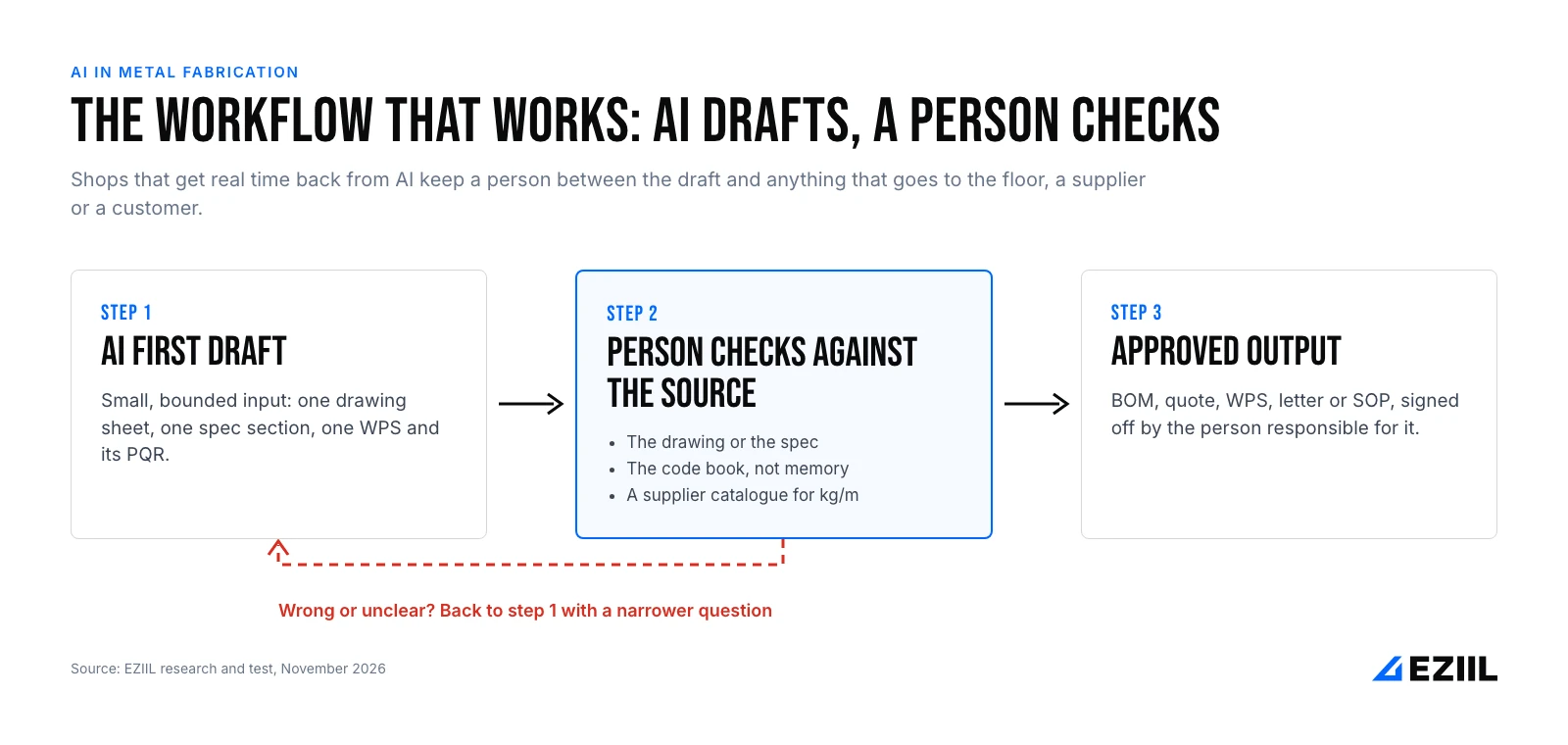
To see how far AI gets on its own, we gave ChatGPT and Claude the same documents and the same prompts, each in a fresh chat with no help along the way. We ran three tests:
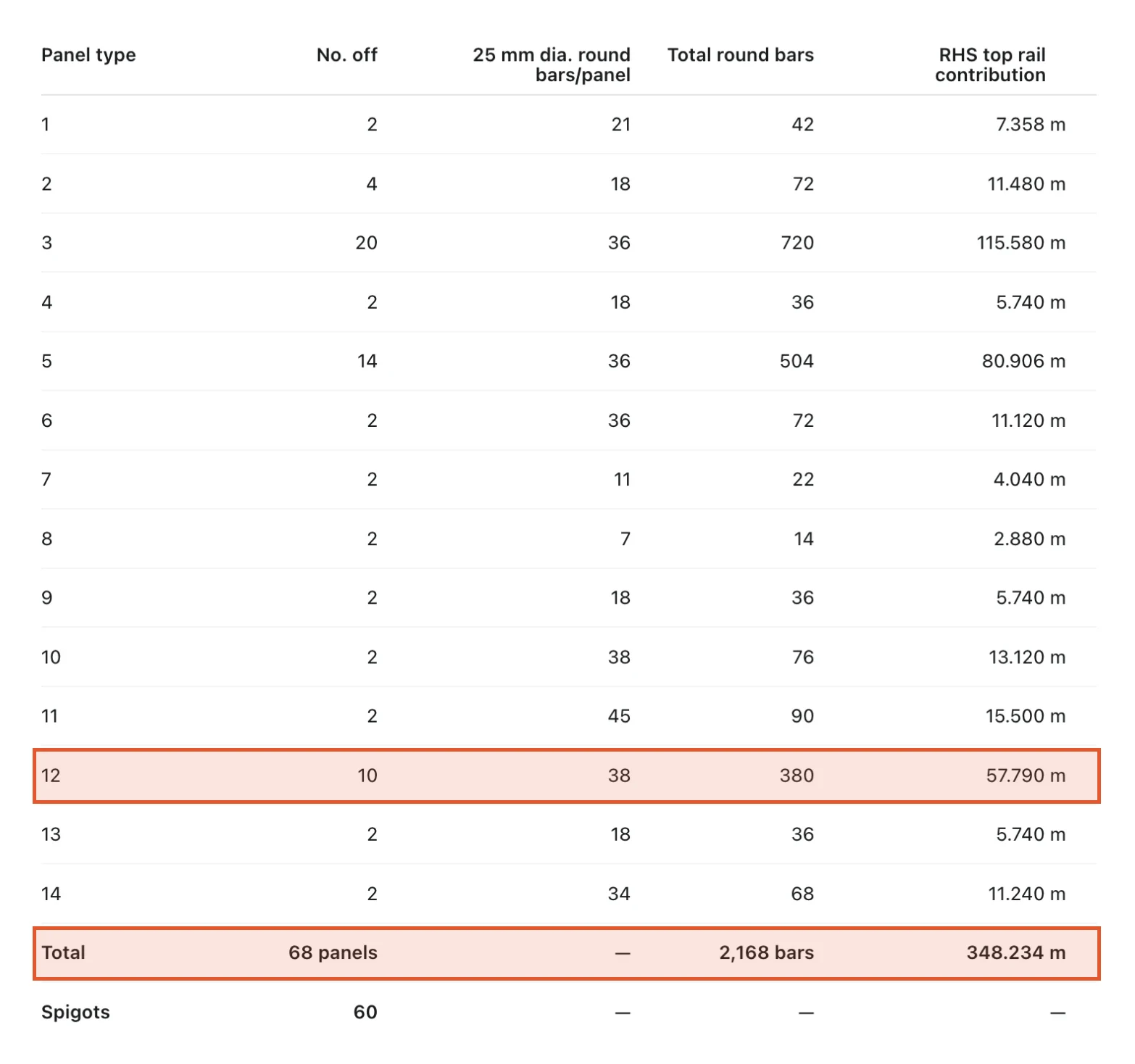
- A take-off from a real steel drawing. We used a three-sheet balustrade drawing for a bridge in Queensland: 14 panel types, 68 panels, rectangular hollow section (RHS) top rails, square hollow section (SHS) posts and 25 mm round bars. We asked for the panel count, the round bars per panel type and in total, the metres and weight of top rail, the spigot count, the notes, and anything missing for a cut list.
- A real WPS checked against its PQR. This was an AWS D1.1 flux-cored procedure for A36 steel with its procedure qualification record, published by NASA’s Stennis Space Center. We asked for every variable to be compared, with values quoted from both documents.
- A WPS with five planted errors. We wrote our own WPS that claims to be supported by the same PQR, then changed five variables (gas, electrode, positions, voltage and preheat) to see whether each tool catches them.
We scored every answer against our own take-off from the drawing and the values on the forms. Anything that depends on an AWS D1.1 clause, we only counted as “flagged for checking”. We didn’t judge code compliance ourselves.
| ChatGPT | Claude | Right answer | |
|---|---|---|---|
| Panels (14 types) | 68 | 68 | 68 |
| 25 mm round bars, whole job | 2,168 | 2,148 | 2,148 |
| 100 x 50 x 4 RHS top rail | 348.2 m | 348.2 m | about 348.2 m |
| Top rail weight | 3,105 kg (8.92 kg/m) | 3,085 kg (8.86 kg/m) | about 2,990 kg (8.59 kg/m) |
| Spigots | 60 | 60 | 60 |
| Said when it was unsure of a count | No | Yes, on 6 panel types | n/a |
| Real WPS: gaps found (of 7 we expected) | 4 to 5 | 7 | 7 |
| WPS with 5 planted errors: errors found | 5 | 5 | 5 |
| Code clause numbers made up | None | None | None |
Scroll sideways to see all columns.
We ran ChatGPT (“5.6 Terra Medium”) and Claude (Opus 5.5) once each, on 24 November 2026. Answers vary between runs, so treat this as a single check, not a benchmark. We aren’t affiliated with OpenAI or Anthropic.
The drawing. Both read the 14 panel types and their quantities correctly, worked out the same 348.2 m of top rail, and found the 60 spigots. ChatGPT read one panel type as having 38 round bars instead of 36, which put its total 20 bars high, and it didn’t flag any count as uncertain even though we asked it to. In fairness, that label is blurry in the scan and does look like 38. The two bays of “17 spaces @ 150” right next to it show it has to be 36, and that cross-check is exactly what a person does and the AI didn’t. Claude got every count right and marked the six it was unsure of. It also misread two small dimensions on the details sheet and then reported a dimension error on the drawing that wasn’t there, because of its own misreading. ChatGPT misread the welding consumable on the notes (W51X for W50X).
The weight. Both were about 3 to 4% high on the rail weight because neither used a catalogue mass per metre for the RHS. ChatGPT worked it out from a sharp-cornered section and told us to confirm the supplier’s figure. Claude called its number a catalogue mass, which it wasn’t. On this one section that’s about 100 kg, and the same mistake repeats on every section in a full steel order.
The paperwork. On the real WPS and PQR, Claude found all seven gaps we expected, including a WPS that gives no amperage or wire feed speed and a PQR that belongs to a different company. ChatGPT found four of them plus part of a fifth, and it called a wire diameter range “consistent” when the PQR only tested one size. On the WPS with five planted errors (wrong gas, electrode, positions, voltage and preheat), both found all five. ChatGPT rated the untested positions only as “should check”. Neither tool stated a code clause number as fact, because the prompt told them not to.
What we took from it: both tools are good at the checking work when you make them quote both documents. Neither is safe to order steel from without a person checking the counts, the small dimensions and the kg/m against a supplier catalogue.
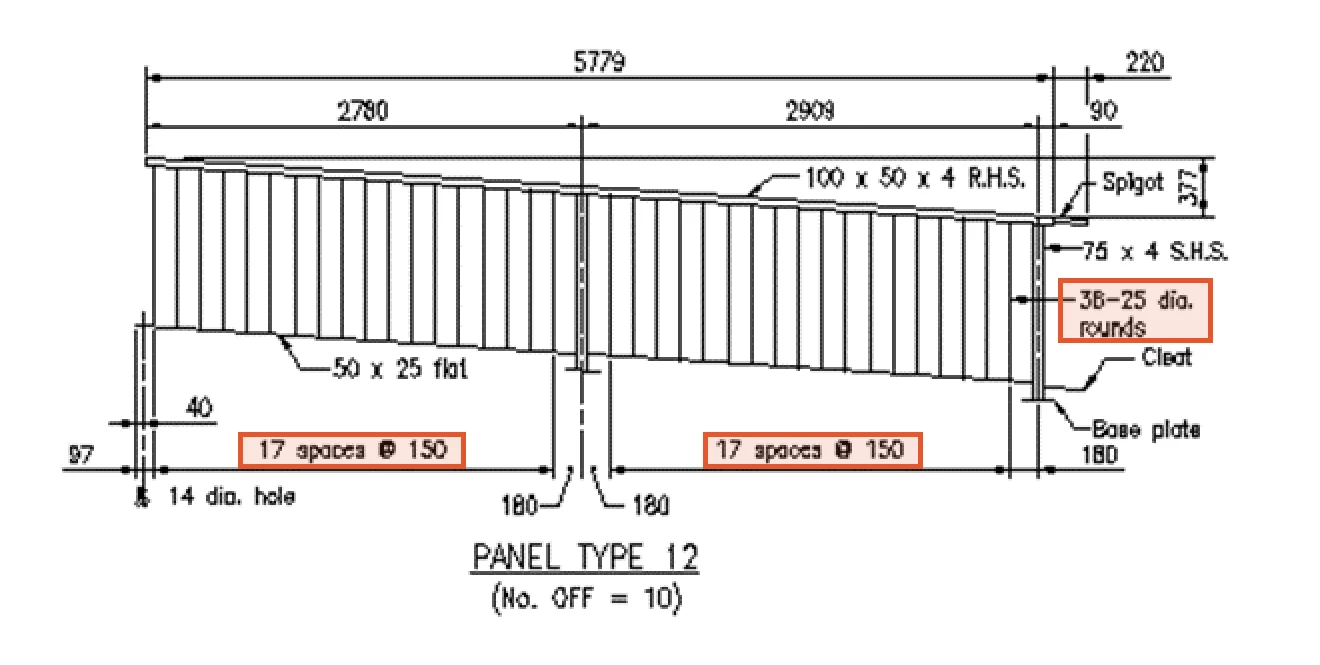
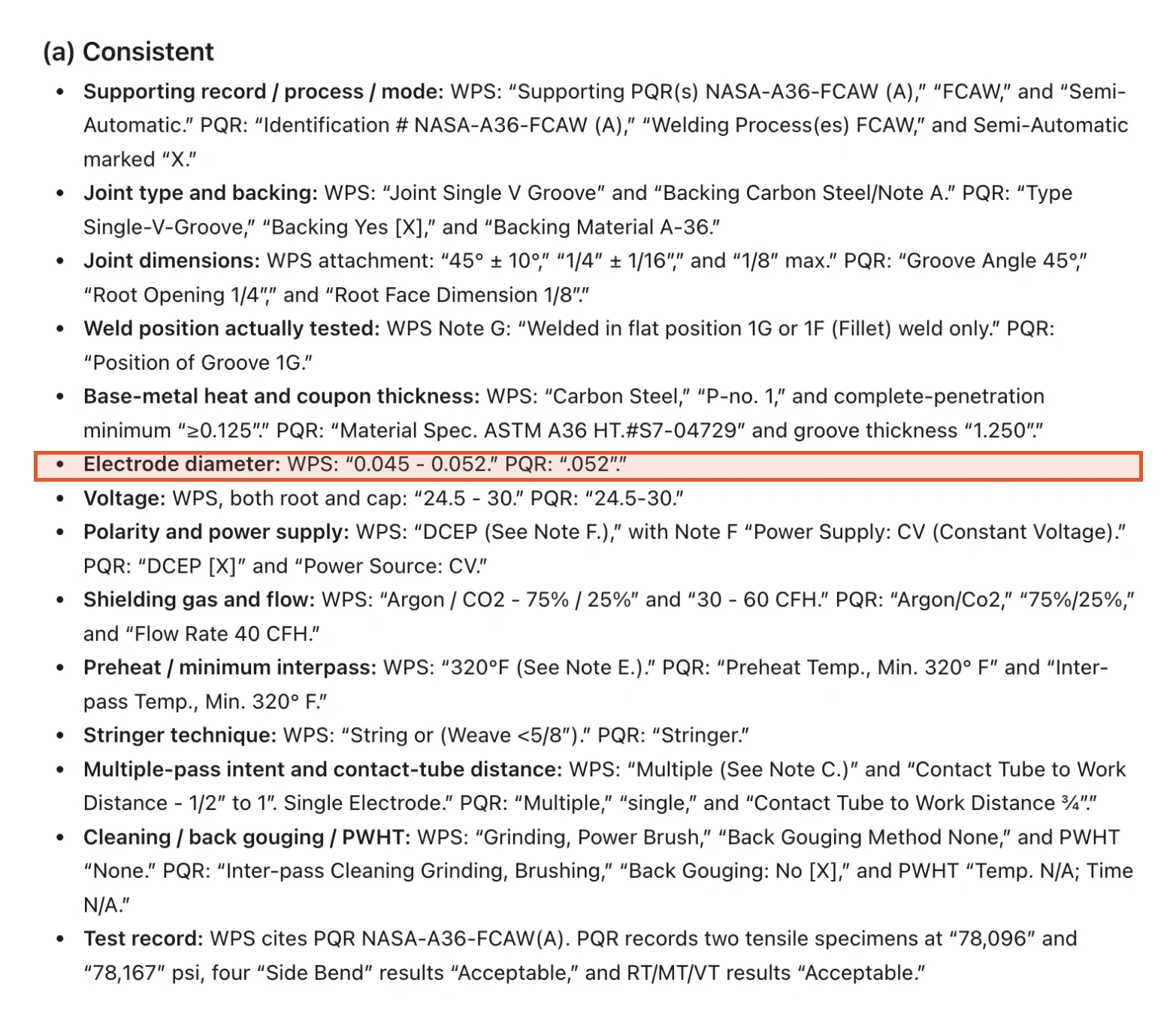
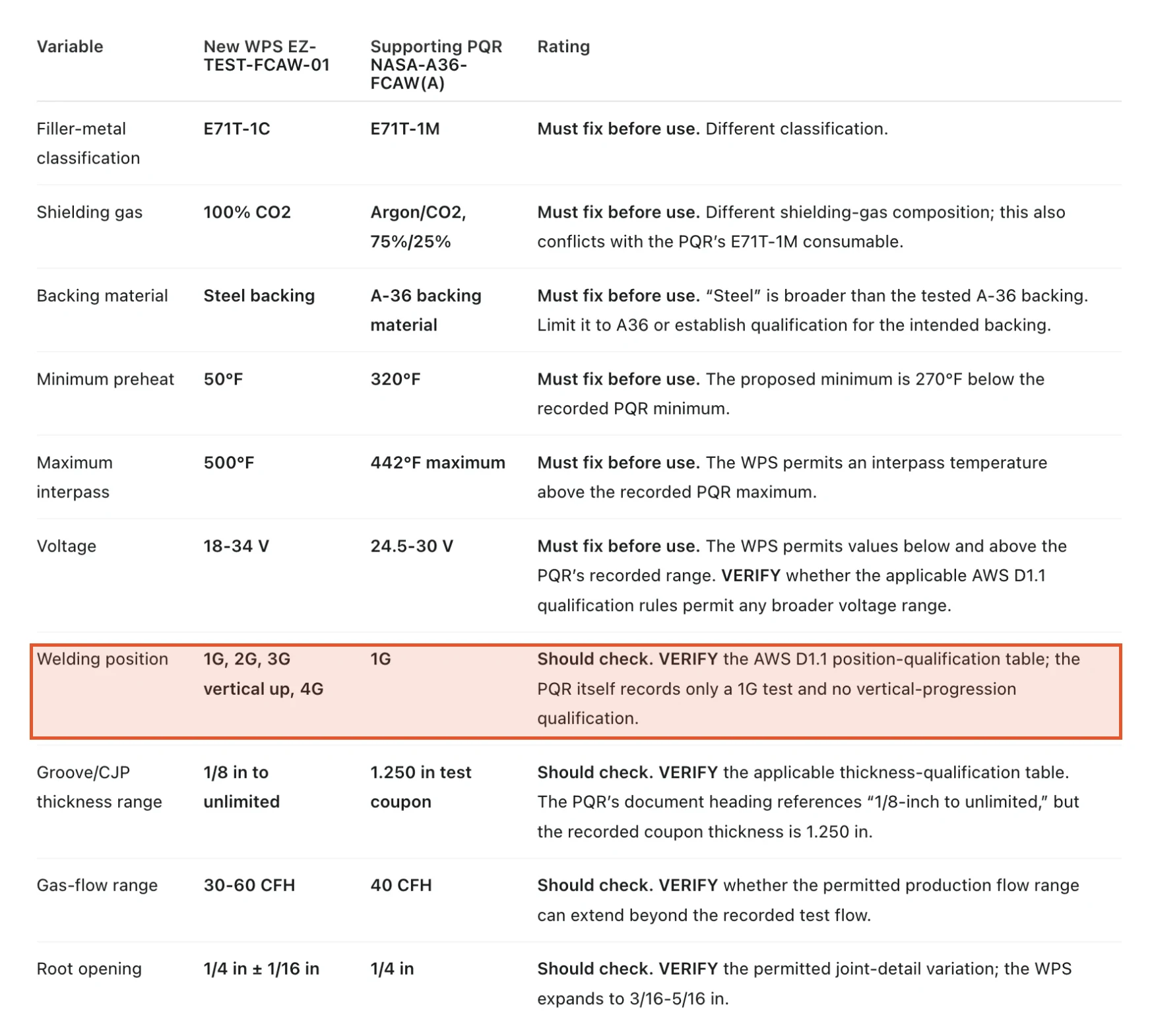
Test documents: the balustrade drawing is from the Queensland Department of Transport and Main Roads Drafting and Design Presentation Standards Manual, Volume 3, Chapter 19, Appendix F, © State of Queensland (Department of Transport and Main Roads), CC BY 3.0 AU. The WPS and PQR are from NASA Stennis Space Center standard SSTD-8070-0137-WELD, a US government publication; names and signatures are blurred in our screenshots. The test WPS with planted errors is our own. The WPS prompt in the next section follows the same pattern as the one we used for test 2.
Can AI check WPS, EN 1090 and quality paperwork?
Yes, as a first-pass checker. Tell it to check every document, quote both sources for each finding, and mark anything that relies on a code clause as “verify”. A qualified person still signs off, because AI tools invent code requirements that look convincing.
The best example we found is an engineer who reviews welding documentation for nuclear work. In July 2026 they posted on Eng-Tips about giving a high-reasoning GPT model a 70-page welding package with 17 PQRs and 29 WPSs, and asking it to check every one against the French nuclear code RCC-M and ISO 15614-1. It found real errors:
- welding positions on a WPS that the PQR didn’t cover
- TIG gas and tungsten data copied into stick welding rows
- a thickness typo (4.17 mm instead of 4.71 mm)
- WPS numbers in a summary table that didn’t exist
Other models the engineer tried wrote polished reports that turned good practice into invented code requirements, and those false alarms cost review time. Replies in the thread said that restricting the AI to the uploaded files, for example with Google’s NotebookLM, cuts the invention down, but scanned paper PQRs still cause false positives.
A Certified Welding Inspector set out a similar method in the American Welding Society’s Inspection Trends. Give the AI the role, the WPS, the drawings and the code. Ask it to sort findings into compliant, noncompliant and needs clarification. Then challenge every finding, and keep the inspector’s final review. The article also suggests running an open-source model on a local computer if you don’t want customer documents leaving the building.
A prompt you can copy:
You are checking welding procedure documents for a structural steel fabricator.
Documents attached: WPS [number], PQR [number], and the job's welding requirements.
1. Check every essential variable on the WPS against the PQR's qualified range.
2. For each finding, quote the exact line from BOTH documents.
3. Sort findings into: compliant / outside qualified range / needs clarification.
4. If a finding depends on a code clause, write VERIFY and do not state the clause from memory.
5. List anything you could not read.
A later reply in the same thread gives a rule worth copying into any prompt: list only inconsistencies you can quote from both documents, mark anything that needs the code book as VERIFY, and never state a code requirement from memory. Then open every cited page and check your own licensed copy of the code before raising an issue.
For shops working to EN 1090 or ISO 3834, missing or wrongly referenced WPS and WPQR documents are a common audit finding, according to the Danish certification body FORCE Technology. A first-pass AI check before the audit can catch some of these. In EZIIL, the execution class is recorded on the job so everyone sees it with the work. Our guide to material traceability covers what an EN 1090 shop needs to record, and the WPS glossary entry covers the basics.
Which office jobs can AI take off the owner’s desk?
The safe wins are writing jobs, where a person reads the output before it goes anywhere: letters, emails, SOPs, translations and research. In a 10 to 25 person shop these often land on the owner, so they are where AI gives time back fastest.
- Delay and scope-change notices. In a May 2025 talk to the Mid-Atlantic Steel Fabricators Association, a construction lawyer showed AI tools such as ChatGPT drafting notice letters for documented delays and scope changes, summarizing documents and analyzing contract documents.
- RFIs and revisions. Estimators compile and compare RFIs against addenda and specs, so it is clear what changed between drawing issues.
- Difficult emails. Estimators use ChatGPT or Microsoft Copilot to soften emails to general contractors.
- SOPs and work instructions. Spinova, a small Swedish manufacturer, uses ChatGPT to turn raw notes into work descriptions and manuals, and its advice reported by Företagarna is to always ask whether the answer is reasonable.
- Translation. A large Pennsylvania foundry uses AI to translate SOPs and safety signs and gives supervisors earpieces to talk with Arabic-speaking workers, Manufacturing Dive reported. We found no small-shop example yet, but the use carries over to mixed-language crews.
- Customer visuals. Small US welding shops turn a pencil sketch or a phone photo into a concept image with ChatGPT, so customers who struggle to describe a gate or railing can react to something. One owner said it takes about 15 minutes a render and never quite matches the picture in the owner’s head.
- Research. On FMA’s Next-Gen Metal Fab podcast, a third-generation member of the family behind All Metals Fabricating in Texas said ChatGPT’s deep research wrote a white paper comparing ERP (business management system) options for a shop their size in 15 to 20 minutes. They were also loading the floor plan into ChatGPT to look for room for another laser, though they hadn’t seen the result yet.
Should you build your own shop tools with AI?
You can, and some shops have, with good results. It takes longer than the posts suggest, it needs someone who understands the process, and the tool depends on the one person who built it.
The strongest example is Dayton-Phoenix, an Indiana manufacturer with fabrication and seam welding departments. According to Purdue MEP, an employee and an intern spent three months writing a Python scheduler with AI help. It load-levels machines, gives each operator a sequence and looks 10 days ahead for material shortages. Before it, the supervisor counted jobs by hand and released jobs were pink cells in a spreadsheet. Overtime went from 50 hours in fabrication and 48 in seam welding to virtually zero. The AI wrote the code; it didn’t make the scheduling decisions.
Smaller shops on machinists’ forums describe the same thing at a smaller scale, and the problems that come with it:
- An owner with 22 machines built an offline scheduling chart with the free version of Claude, after failing to find time to build one in Microsoft Access. Replies warned that Claude makes assumptions it doesn’t tell you about.
- A machinist running a one-person home shop had AI set up a server with an open-source ERP in about four hours. It worked, and the AI then listed what it had got wrong, including publishing the server password in the front-end code.
| Build it yourself with AI | Buy a system | |
|---|---|---|
| Time to first version | An evening to three months | Days to weeks of setup |
| Who maintains it | The person who built it | The vendor |
| When that person leaves | The tool often stops being updated | Support stays |
| Security | Your responsibility | The vendor’s responsibility, check their terms |
| Fit to your process | Exact, if you know your process well | Close, with some settings to adjust |
Scroll sideways to see all columns.
The approach that holds up is to keep the record of the work (the plan, the hours, the job status) in one system the whole shop uses, and build small AI helpers around it. If you are still planning in a spreadsheet, our production schedule template covers when a spreadsheet stops being enough.
Can AI schedule a fab shop?
Not on its own, not yet. AI can suggest a sequence only after you give it routes, run times, machine limits, people’s skills, due dates and current work in progress, and most small shops don’t have those written down anywhere.
The examples are consistent:
- A job-shop practitioner loaded routes, run times, machine constraints, staff skills and promised dates into ChatGPT and asked how to meet every date. The result was “not perfect, but a start”, and it needed tuning to understand the shop.
- A custom manufacturer running schedules and inventory in spreadsheets tried the same and had “not much luck”. Replies said any scheduling system is only as good as the data you feed it.
- The founder of OSH Cut, a US high-mix laser and bending service, said on the Next-Gen Metal Fab podcast that good scheduling comes from first principles and statistics, not chatbots.
- The All Metals Fabricating co-host hopes AI scheduling will get 80 to 90% of the way, but still expects people on the floor to stop departments grabbing work that clogs the next station.
Make UK’s figure fits: 11% of AI use in manufacturing is in production. For now, the schedule in a custom fab shop is still made by the people who know the jobs. EZIIL works that way. The planner drags jobs onto the schedule and the whole team sees the same live plan, without automatic planning rules deciding for them. Our guide to finite and infinite capacity scheduling covers how to tell whether the plan fits the hours you have.
Why does AI need real shop data before it helps?
Because every useful AI idea in a fab shop, from quoting off past jobs to costing to scheduling, runs on what actually happened on the floor. If your hours, job status and completion dates are guesses, AI turns them into confident wrong answers.
The National Association of Manufacturers found in 2025 that 65% of manufacturers lack the right data for AI and 62% say their data is unstructured. In a small fab shop that usually means the same few things: timesheets filled in at the end of the week, a whiteboard with job status, “how far are we?” answered by walking the floor, and a quote that nobody compares with the real hours afterwards.
Getting that data is mostly a matter of routine. Workers report start, pause and finish on each operation from a phone, tablet or the desktop. The planner compares planned hours with reported hours per job. Completion dates get recorded, so on-time delivery is a number, not a feeling. Our guide to shop floor data collection compares five ways to do it, from paper to tablets.
This is the part EZIIL does. In EZIIL:
- the floor app records who worked on which operation and for how long, on a phone, tablet or desktop
- the Planned vs Reported report compares planned hours with reported hours, by worker and date
- the reported operations raw data exports to Excel by period, job, operation, worker or machine, which gives you a clean file to pivot, or to hand to an AI assistant if you want to ask questions of it
- the dashboard shows on-time delivery and the stages of every job, from data the shop already enters
None of that is AI, but it gives an AI tool something true to work from. The growth comes from the planning itself: VMT, a Viljandi metal group, raised turnover by 30% without hiring new people after moving its BOM and planning into EZIIL. If you are trying to increase throughput without hiring, knowing where the hours really go is the first step, with or without AI.
What about AI welding robots?
AI welding robots and cobots are real, but most of the named results so far come from pipe spool shops and larger plants. For a 15-person stairs and railings shop, the office uses above usually pay back sooner.
- WPF, a pipe fabricator in Western Australia, cut weld time by 40 to 60% (“geometry dependent”) and kept repairs under 1% with an AI seam-tracking spool robot, AMTIL reported.
- Nexlam, an Italian sheet metal job shop with ten welding stations, uses a cloud tool that generates robot programs with AI to cut programming time, according to an IFR case study. No figures were given.
- Small US manufacturers such as EK Machine and Mid-Land Enterprises rent AI welding robots on a monthly subscription instead of buying a cell, Sherwood News reported.
Most of these reports were placed by the robot makers, so read the numbers as best cases. Robots help with the shortage of welders, and a robot still needs the right parts, cut and fitted, at the station on time.
Where does AI go wrong in a fab shop?
AI goes wrong in the same few places: reading geometry, doing steel arithmetic, quoting codes, and agreeing with you too easily. Knowing them lets you use AI where it is safe and check it where it isn’t.
| Task | What goes wrong | Example | What to do |
|---|---|---|---|
| Take-offs | Messy output that needs correcting | An estimator trained on AI take-off software still spent 70 to 80% of the normal time checking it | Use AI to extract, never as the final count. Hand-check two sheets |
| Steel numbers | Weights, strengths and table values wrong | Yield given when tensile was asked; a member weight 50% off; values read from the wrong column of a load table (engineers on Eng-Tips) | Make it show the calculation and the source table. Check units |
| Codes and specs | Clauses that don’t exist | Models inventing code requirements in a WPS review | Quote the source for every finding. Mark code items VERIFY |
| Agreeable answers | Praise, then changing the answer when challenged | Photo assessments of a weld repair that opened with compliments and missed defects | Ask for what is wrong, not whether it is good |
| Home-built tools | Hidden assumptions, security holes | A server password exposed in front-end code | Have someone review the code. Keep the tool small |
| Customer data | Confidential drawings in a public tool | Estimators whose companies won’t allow specs or bids in public AI tools | Write a one-page policy. Use business accounts |
| CNC programs | Code that looks right but isn’t checked | A machinist who built shop software with AI on Practical Machinist: AI can program CNCs now, but without the knowledge to check it, don’t expect it to hold up on demanding work | Don’t run AI-written G-code without simulation and review by a programmer |
Scroll sideways to see all columns.
How should a 10 to 25 person shop start with AI?
Start with two writing jobs, a simple data policy and a baseline you can measure. Leave quoting and costing until your hours and job status are recorded properly.
- Write a one-page AI policy. What may be uploaded, by whom, with which customer details removed, and in which tool. Use business accounts, not personal ones.
- Pick two text jobs. RFIs and revision logs, delay letters, customer emails or SOPs are good first choices.
- Set a baseline. Time from invitation to quote, time to build an RFI log, number of revisions caught. Measure it for two weeks before you start.
- Keep inputs small. One spec section, one drawing sheet, one template, one question at a time.
- Check every answer against the source. Make it quote the drawing, spec or code it relied on.
- Get hours and job status into one system. Reported start and finish per operation, planned against reported hours, real completion dates.
- Then try quoting from your own history. Compare AI quotes with manual quotes side by side for a few months before you trust them.
- Review after 30 days. Keep what saved time, drop what needed more checking than it saved.
If step 6 is where your shop is stuck, take the free tour of EZIIL or book a 30-minute demo to see how fab shops record hours and job status without adding paperwork.
Frequently asked questions
Will AI replace welders in fab shops?
No, not in custom fabrication any time soon. AI welding robots are taking on repeat work in pipe spool and high-volume shops, but one-off structural and misc metals work still depends on skilled welders and fitters. In small shops today, AI mostly takes over office work.
Can ChatGPT do a steel take-off accurately?
Not reliably on its own. In our test on a real balustrade drawing, ChatGPT got the panel count and rail length right but miscounted the round bars on one panel type, and both ChatGPT and Claude used a wrong kg/m for the rail weight. An estimator trained on AI take-off software said checking its output still took 70 to 80% of the normal take-off time. Use AI as a first pass and check against the drawing and a supplier catalogue before ordering steel.
Is it safe to upload customer drawings to ChatGPT or Claude?
Only if your customer contract allows it and you use a business account with data training turned off. Some companies don’t allow specs, bids or drawings in public AI tools at all, and others use Microsoft Copilot set up so that answers drawn from company files stay inside the company. Remove names and project details where you can, or run a local model for sensitive work.
Which AI tool is best for a small fab shop?
For office work, the business versions of ChatGPT, Claude or Microsoft Copilot all handle letters, emails, SOPs and Excel formulas. For checking documents, a tool that answers only from the files you upload, such as NotebookLM, invents less. Pick one, write your policy around it, and test it on your own documents.
Can AI check my WPS against AWS D1.1 or EN 1090?
As a first pass, yes. Ask it to check each variable against the PQR, quote both documents and mark anything code-related for verification. A qualified welding inspector or coordinator still has to review it, because AI tools invent clauses.
Do I need production software before AI is useful?
Not for writing jobs. For quoting, costing or scheduling, yes: you need a record of real hours, job status and completion dates. Without it, AI works from guesses. That record can be a spreadsheet at first, but it has to be kept up to date by the people doing the work.
Use AI for the words, keep the numbers real
AI already saves fab shops time on quotes, paperwork, letters and small tools, as long as a person checks what comes out. It isn’t ready to read your drawings, quote your codes or plan your shop on its own. The shops getting the most from it are the ones that know their real hours and job status, because that is what AI quoting and costing need. Start with two writing jobs and a policy, and get the shop’s data into one place in parallel.