
Shop floor data collection in a fab shop means recording who worked on which job and operation, for how long, and how many pieces got done, at the station, while the work happens. Most custom fabricators still do it on paper timesheets, a whiteboard or a spreadsheet someone fills in on Friday. Then they wonder why the job cost never matches the quote.
This guide is for owners and production managers of custom fabrication shops with roughly 10 to 150 people. It covers the five things worth collecting, five ways to collect them (with what each one costs you), how to get the crew to report, and what to do with the data once you have it.
In short: Shop floor data collection is how a fabrication shop records the work done on each job: who did it, which operation, how long it took and how many pieces are finished. In a custom fab shop that data comes from people, not machines, so the method has to be quick enough for the crew to use every day.
What is shop floor data collection in a fab shop?
Shop floor data collection is the routine of capturing work as it happens on the floor, so the office knows where each job stands and what it took. In a custom fab shop the record that matters is the labor report per job and operation, not a machine signal.
In a plant that runs the same part all day, “data collection” usually means reading counts and cycle times off machines. A custom fab shop works differently. Every job is a one-off that moves through cutting, fitting, welding, grinding and painting, often on manual stations, and the same welder may touch four jobs in a shift. The useful record is the one a person makes: I worked on job 2417, assembly B, welding, from 7:10 to 11:40, and finished three of the five frames.
Without that record, a job closes and nobody can say what it really took. The next quote gets priced from memory, and the same overrun happens again.
What data should you collect from the shop floor?
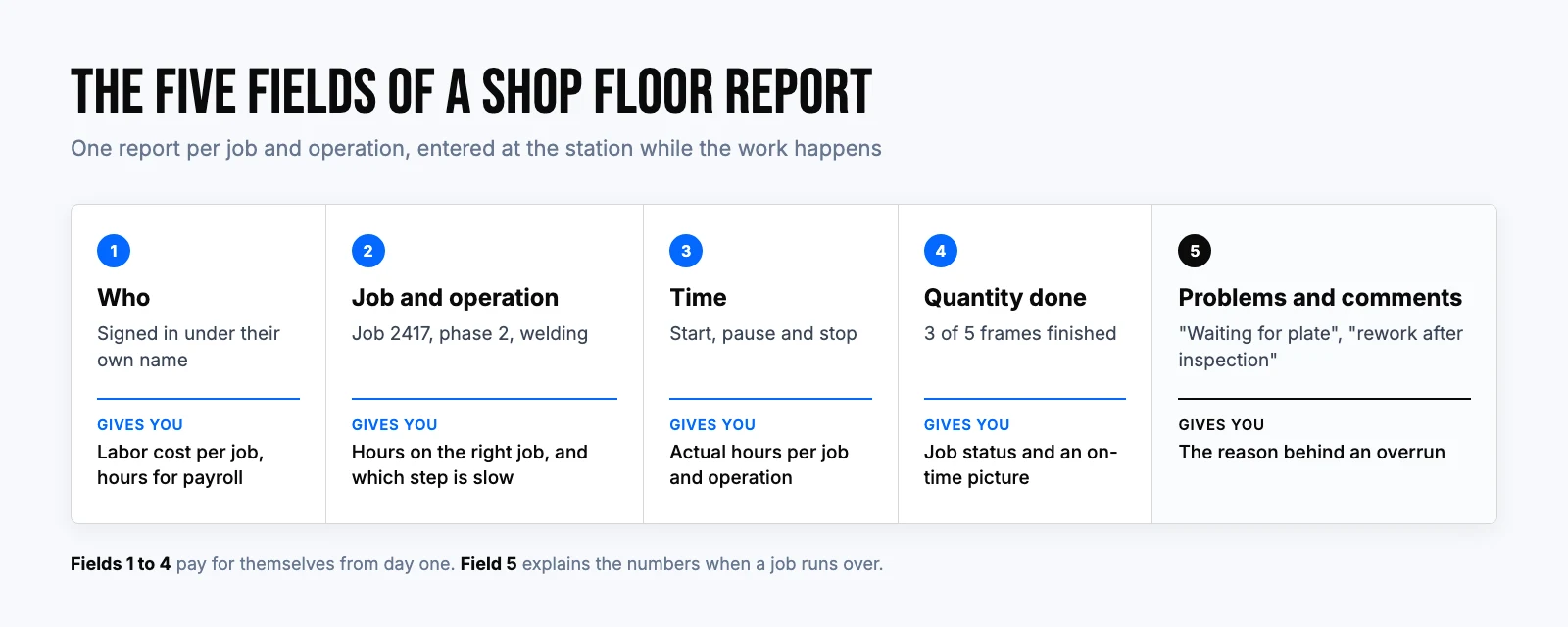
Collect five things in every report: who did the work, which job and operation it was for, the start and stop time, the quantity finished, and any problems or comments.
The four fields that pay for themselves
| Field | What it looks like | What it gives you |
|---|---|---|
| Who | The worker, signed in under their own name | Labor cost per job, hours per person for payroll |
| Job and operation | Job 2417, phase 2, welding | Hours land on the right job, and you can see which step is slow |
| Time | Start, pause and stop, recorded by the system | Actual hours per job and per operation |
| Quantity done | 3 of 5 frames finished | Job status, and an on-time picture you can trust |
Each field answers a question someone in the office asks every week. Who was on it, which job ate the hours, how long it took, how far along it is.
The fifth field: problems and comments
A short comment (“waiting for plate”, “hole pattern wrong on drawing rev B”, “rework after inspection”) explains the hours that the numbers alone cannot. You will not read every comment. The ones on overrun jobs are worth reading.
What to leave out at the start
Shops that try to capture everything on day one often struggle to get even the basics reported. Scrap reason codes, piece-level genealogy and machine states can come later, once the crew reports the basics without thinking about it. Most shops we talk to want to start small, and with floor reporting that is the right call.
Time that is not tied to a job
Cleaning the bay, maintenance, training and waiting for drawings all take real hours. If there is nowhere to put them, they end up booked to whatever job was open, and that job looks worse than it was. Give the crew a short list of non-job activities to clock against. In EZIIL these are called support activities.
Machine data or people data: which one does a fab shop need?
Machine monitoring reads signals from CNC controls and PLCs. People-reported data follows the job through every station, manual ones included. Most custom fab shops need the second one first.
| Machine data collection | People-reported data | |
|---|---|---|
| What it records | Spindle on/off, cycle counts, downtime, OEE | Who worked on which job and operation, hours, quantity done, comments |
| Hardware | Sensors or controller connections per machine | A phone, tablet or shop PC at the station |
| Covers manual work (fitting, welding, grinding) | No | Yes |
| Answers | “How busy is the laser?” | “What did job 2417 cost, and is it on time?” |
| Good fit | High-volume CNC cells running repeat parts | Project-based fabrication with one-off jobs |
Some shops need both. A shop running several lasers may add machine monitoring later to watch utilization. The job record, the one that feeds job cost and quotes, still comes from people, because a laser does not know which job the next sheet belongs to after it leaves the table. EZIIL works on the people side: it does not read machine signals.
If you came here looking for real time manufacturing data collection from machine controllers, OEE tools are what you want. If you want to know where your jobs stand and what they cost, keep reading.
How do you collect data from the shop floor? 5 methods compared
Fab shops collect floor data in five ways: paper timesheets or job travelers, a whiteboard, a shared spreadsheet, a time clock, or a shop floor app on a phone, tablet or shop PC. They differ most in how late the data reaches the office and whether the hours land on the right job.
These are the same five setups we hear about again and again when fabricators describe how they track work today. According to the Manufacturing Leadership Council’s 2025 data survey, 79% of manufacturers still rely in part on manually entered data, and Excel is still the analysis tool they use most.
| Method | What the crew does | When the office sees it | Hours on the right job? | Good for | Breaks when |
|---|---|---|---|---|---|
| 1. Paper timesheet or job traveler | Writes hours by hand, often at the end of the day or week | Days later, after someone types it up | Often not: hours get rounded and guessed | Very small shops, a handful of jobs | You have more jobs than you can remember, or someone has to re-key it |
| 2. Whiteboard and verbal updates | Tells the foreman, who updates the board | When someone walks over and looks | No hours at all | Seeing today’s work in one room | You need a history, or the person who keeps the board is off sick |
| 3. Shared spreadsheet | Usually nothing: the office fills it in | When the keeper updates it | Only as good as what the keeper was told | One person tracking a few big jobs | Two people edit it, or nobody on the floor opens it |
| 4. Time clock or time-and-attendance system | Clocks in and out at the door | Same day | No: it records attendance, not jobs | Payroll and attendance | You want job cost, because the hours are not split by job |
| 5. Shop floor data collection app (phone, tablet or kiosk) | Starts and stops the operation, reports quantity | As soon as it is reported | Yes, per job and operation | Shops with many parallel jobs that need job cost | There is no device at the station, no Wi-Fi, or no one checks the hours |
1. Paper timesheets and job travelers
The traveler rides with the job and each person writes their hours on it, or everyone fills in a weekly timesheet. It costs nothing and everyone understands it. The problem is timing. Hours written on Friday for Monday are a guess, and someone in the office has to type them up before they are any use. Shops we talk to describe a paper production log that gets copied to a flash drive, and hours that arrive too late to change anything on the job.
2. Whiteboard and verbal updates
A board by the office door shows what is in progress. It works for seeing today’s work in one room, and it is quick. It holds no hours, no history and nothing you can cost a job from. And it is only as current as the last person who walked past with a marker. When status lives in the foreman’s head, the shop is one sick day away from not knowing where anything is.
3. Shared spreadsheet
A spreadsheet is a step up from the board because it keeps a history. In practice one person maintains it, usually from what they heard on the floor, so it is a record of the conversation rather than of the work. Once two people edit it, versions drift. And the crew rarely opens it, so the numbers are always second-hand.
4. Time clock or time-and-attendance system
A time clock gets attendance right and makes payroll easier. What it does not record is which job the hours went to. A worker who clocks in at 7 and out at 3:30 could have spent those hours on three different jobs, and the clock cannot tell you which. Shops that use one for payroll and try to work out job cost by hand end up reconciling two systems that never quite agree.
5. Shop floor data collection app on a phone, tablet or kiosk
The worker picks the job and operation, starts it, and reports what got done. The hours land on the right job and the office sees it straight away. The costs are real too: you need a device at the station (shared or personal), Wi-Fi where people work, a few minutes of training, and someone in the office who checks the hours. The next sections cover how to get those right.
Shop floor time tracking: why job hours go wrong
Job hours go wrong when they are written down late, booked to the wrong job, or recorded against a job number too broad to learn anything from.
Late hours are guesses. Hours on the wrong job make one job look cheap and the next one look like a disaster. And when ten people book to one job number for a whole project, you know the total but not which step overran. We go through all three in detail in the three reasons the hours on a job are wrong.
The fix is simple to describe, though it takes some discipline: record the time at the station, against the operation, and have one person in the office check it the next morning. Most shops skip it: in the same Manufacturing Leadership Council survey, only 39% of manufacturers said they have a process to verify that their data is accurate.
What should “real time” mean for shop floor data?
Real time is for status: what is being worked on now and what is finished. Hours are better checked by a person before they drive job cost and payroll.
It helps to think of floor data in two layers:
- Live. Who started what, which operation is in progress, the quantity reported and any comment. This should appear in the office the moment it is reported, because that is what answers “where is my job?”
- Confirmed. The hours, after someone has looked at them. Timers left running over lunch, a job picked by mistake, a missed stop at the end of a shift: these happen every week in every shop. A quick review the next morning catches them before they reach the job cost or the payslip.
Give the review to one named person. If two people confirm the same day, hours can be counted twice.
In EZIIL the Reporting feed and the quantities update as the floor reports. The hours, and the progress percentage on Master View, move once the office confirms them in Working Time Confirmation.
How do you get the crew to actually report?
Keep reporting to a few taps, put a device where the work is, start with two or three stations, and let the office fill the gaps for anyone who does not report.
Give the rollout one owner, too: someone in the shop with time in their week to chase it, not the owner who also quotes, buys steel and runs the floor. In the rollouts we see, that is the difference between reporting that sticks and a system that stalls.
“We don’t want phones on the floor”
Plenty of shops discourage phones on the floor, for safety and for focus. You do not need them. A shared tablet or shop PC at the station works, and each worker signs in under their own name, so the hours stay personal. In EZIIL a worker can sign in with a login or by tapping an RFID tag, and one person is signed in per device at a time, so a clean sign-out between people matters.
Older workers and “we’ve always done it this way”
This worry comes up in almost every conversation we have. The evidence from shops that have done it is better than people expect. B&W Metall, a structural steel shop handling around 100 tons a week, reached 100% shop floor adoption: every worker reports in EZIIL, whatever their age or role. They got there with a step-by-step rollout, not a big-bang launch.
Crew work and people who won’t report
When four people work one assembly together, decide before the job starts who reports the quantity and who closes the operation. Otherwise everyone waits for someone else to close it. For anyone who does not report at all, the office can type their hours against the job and operation. In EZIIL those confirmed hours move the plan the same way floor reports do. You lose the exact start and stop times, but the job still shows the hours.
Wi-Fi in a steel building
Steel buildings swallow Wi-Fi signals. The EZIIL app needs a connection to report, so walk the floor with a phone before rollout and check the signal at each station. Fix the dead spots before you blame the software.
Mixed-language crews
Each worker can pick the app’s language from the menu. Operation names show the way you type them, so name your operations in the language most of the crew reads.
Our article on shop floor control covers what floor teams need to keep using a system.
What do you do with shop floor data once you have it?
The same hours feed four things: job cost, the next quote, job status and payroll.
Job cost and the next quote
Put reported hours next to planned hours for each job and operation, and overruns show up while the job is still running, not after the invoice. Over a few months you get real hours per operation to quote from, rather than optimistic ones. As a planner and QA/QC lead at APS Group put it: “Now we can see exactly what the workers are doing in the workshop and how many hours they are spending on each process. This has given us tighter control of active jobs, better-informed estimating and concrete profit/loss insights per job.” For how labor hours roll into the full cost of a job, see total manufacturing cost and job costing.
Status without walking the floor
When quantities are reported at the station, “how far along is it?” has an answer on screen. At B&W Metall, the project manager used to walk to the machine and ask. Now he checks job status from his desk. A production dashboard puts the next deadlines and the on-time picture on one screen.
Payroll
Confirmed hours can go straight to payroll, so nobody types them a second time from a timesheet.
Drawings go the other way
The station that reports the work should also get the right drawing. A technologist at VMT said that on a week-long project he used to spend about 25% of his time printing work tasks and drawings, and that it now takes seconds.
How to choose shop floor data collection software: 6 questions
Ask six questions before you buy. The answers tell you whether the crew will use it and whether the hours will be good enough for costing.
- Can a worker start and stop an operation in a few taps on the hardware you already have? Phone, shared tablet or shop PC, without buying a fleet of rugged devices first.
- Does every report land on a job and an operation, not just a day? If not, you are buying a time clock.
- Is there an office review step before hours reach job cost and payroll? Without one, every forgotten timer goes straight into your numbers.
- Can the office or a foreman enter hours for people who do not report? Every shop has someone who won’t, at least at first.
- Does the right drawing reach the station? Check which file types the floor can actually open on the devices you will use.
- What does it cost as you add floor users, and can you start small? Per-user pricing gets expensive fast when every welder needs a login. Ask whether you can start with one module and add more later.
Production reporting software, a time clock or an ERP terminal?
Production reporting software records work against jobs and operations, which is what job cost needs. A time clock records attendance. An ERP’s shop floor terminal can do the job, but it usually comes with the full ERP, its setup project and its price. For a side-by-side look at named tools, see our comparison of production and job tracking software for steel fabricators.
How EZIIL collects shop floor data
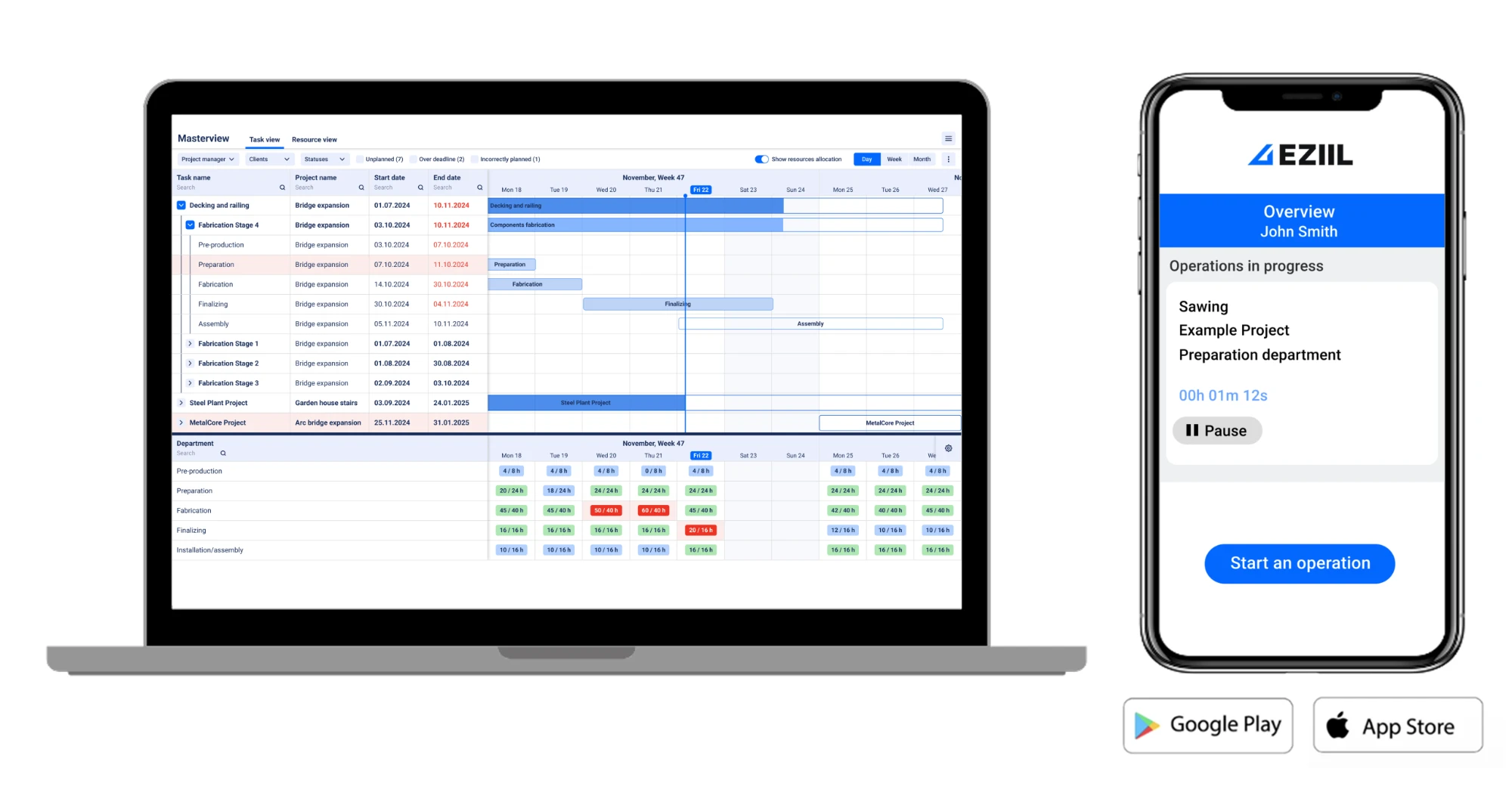
EZIIL is our own product. EZIIL is job tracking software for custom steel and metal fabricators with 10 to 150 people: workers start and stop operations on a phone, tablet or shop PC, the office confirms the hours each morning, and every job’s status, deadline and cost update from the same reports, from EUR 120 a month priced by team size, not per user.
How the data gets from the floor to the office:
- Sign in. The worker opens the EZIIL mobile reporting app (Android, iPhone or a web browser on a shop PC) and signs in with a login or an RFID tag.
- Pick the job. They choose the project, phase and operation. The drawing attached to that operation opens on the screen as a PDF or image. You can set a station to show only the jobs planned for that machine.
- Report. Start, pause, report the quantity done, add a comment and complete. At the end of a shift they stop without closing the operation, so the next shift carries on. Time that is not tied to a job goes on a support activity.
- Confirm. Each morning the office checks the previous day in Working Time Confirmation, fixes anything odd and confirms. Hours for people who did not report can be typed in here.
- See it. The Reporting feed shows what happened as it happens. Confirmed hours move progress on Master View, the Planned vs Reported report shows the gap down to the operation, and the Production dashboard shows next deadlines and on-time delivery. Confirmed hours also go to payroll export.
The app is for reporting. Planning, prices and costs stay in the office application. For the full walkthrough, floor side and office side, see job tracking software for manufacturing.
Pricing. Mobile reporting and time tracking are included in EZIIL Starter: EUR 120 / USD 140 a month for up to 15 users, EUR 180 / USD 210 for 16 to 50, and EUR 290 / USD 338 for 51 to 150, priced by team size rather than per user, plus a one-off onboarding fee of EUR 300 / USD 350. You can go live in under a week, starting with one module, and add more only when you are ready.
Who it suits. Project-based custom fabricators running jobs that take days or weeks: structural steel, stairs and railings, architectural metalwork, tanks and enclosures. It is not built for sequencing many sub-hour jobs within a single day, and it does not read machine signals.
You can take a free product tour to see the floor app and the office screens with real data, or book a 30-minute demo.
Frequently asked questions
What is shop floor data collection software?
Shop floor data collection software records work as it happens on the shop floor: who worked on which job and operation, for how long, and how many pieces were finished. In a fabrication shop it usually runs on a phone, tablet or shop PC at the station, and it sends that data to the office for job status, job cost and payroll.
How do you collect data from the shop floor?
There are five common ways: paper timesheets or job travelers, a whiteboard, a shared spreadsheet, a time clock, or a shop floor app on a phone, tablet or kiosk. Only the app records hours against the job and operation at the time the work happens. The others either arrive late or do not split hours by job.
How do you compare shop floor data collection systems?
Compare them on five points: how late the data reaches the office, whether hours land on a job and operation, whether the office can review hours before they count, whether it runs on hardware you already have, and how the price grows as you add floor users.
Is shop floor data collection the same as OEE or machine monitoring?
No. OEE and machine monitoring read signals from machine controllers to measure how busy machines are. Shop floor data collection in a fab shop records the work people do on each job, including manual operations like fitting and welding that no machine sees.
What is shop floor data capture?
Shop floor data capture is another name for shop floor data collection, used more often in the UK and in ERP terminology. It means the same thing: recording work, time and quantities at the point where the work is done.
Do workers need their own phones?
No. A shared tablet or shop PC at the station works, as long as each worker signs in under their own name. In EZIIL workers can sign in with a login or an RFID tag. One person is signed in per device at a time, so they sign out when they hand over.
Does shop floor data collection work without Wi-Fi?
It depends on the system. The EZIIL app needs a connection to report, so check the signal at every station before you roll it out. Steel buildings often have dead spots near heavy structures.
How much does shop floor data collection software cost for a small fab shop?
Prices vary mostly by how a vendor counts users. Per-user pricing adds up fast once every welder has a login. EZIIL is priced by team size: EUR 120 / USD 140 a month for up to 15 users, with mobile reporting and time tracking included, plus a one-off EUR 300 / USD 350 onboarding fee.