
Job tracking software for manufacturing: see where every job is without walking the floor
EZIIL is job tracking software for custom steel and metal fabricators with 10 to 150 people. Workers start and stop operations on a phone, tablet or shop PC, the office confirms the hours each morning, and every job’s status, deadline and cost update from the same reports. From EUR 120 a month, priced by team size, not per user, live in the first week.
Start and stop on any device, hours confirmed by the office each morning, deadlines and on-time delivery read from the same reports. EUR 120 / USD 140 a month at the first tier.
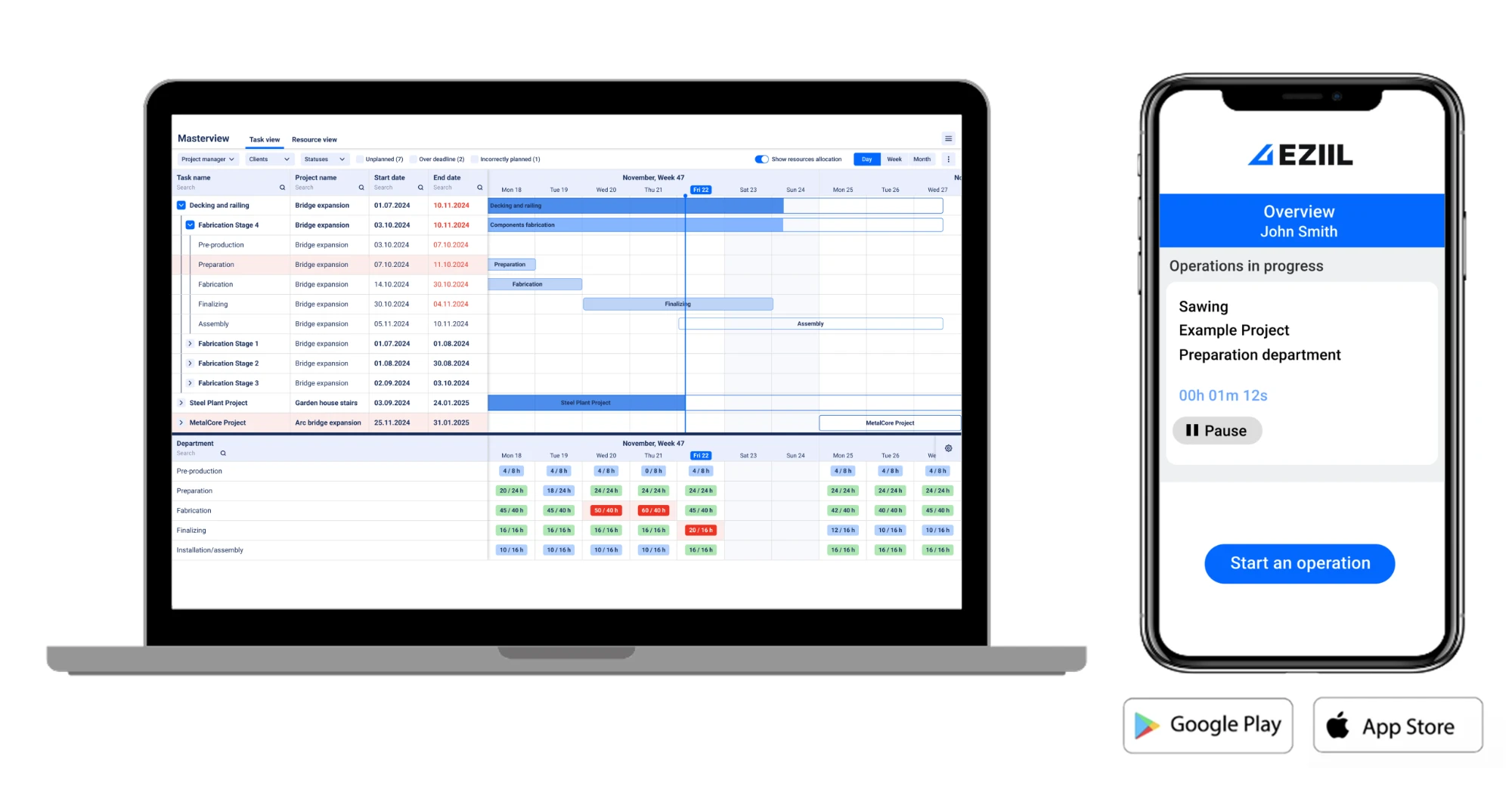
Live in under a week
Start with projects and shop-floor reporting. Add modules later.
Mobile reporting included in Starter
No per-user fee for the floor. Everyone who works on a job can report on it.
From EUR 120 / USD 140 a month
Priced by team size, 1 to 15 users at the first tier. Flat, not per user.
Phone, tablet or shop PC
The EZIIL mobile app on Google Play and the App Store, or the web app in a browser.
Why walking the floor stops telling you where jobs are
Walking the shop feels like control. It is the slowest way to find out where fifty jobs stand, and the least reliable.
It is a snapshot
You see where the job is now, not whether it is ahead of or behind where it should be.
It interrupts the work
Every “how’s that one going” pulls a welder off the weld.
It does not scale
One person cannot walk 30 open jobs across four departments often enough to catch a slip early.
It depends on memory
Status collected by asking is only as good as what people remember to mention.
How most fab shops track jobs before EZIIL
- A whiteboard
- Two owners talking several times a day
- Paper travellers
- The planner’s notebook
- Weekly timesheets
- A production log on a flash drive
Most fab shops that come to EZIIL run on some mix of these, and some keep a production log that somebody in the office retypes on Friday. All of it works at five jobs. At thirty, the backlog lives in one head and the first sign of a late job is the customer’s phone call.
How does EZIIL track a job on the shop floor?
Workers open the EZIIL mobile app on a phone, tablet or shop PC, pick the project, phase and operation, and press start. They stop at shift end without closing the job, or complete it, fully or with “complete and continue” when part of the quantity is done. That is the whole floor-side routine.
-
Log in
The EZIIL mobile app from Google Play or the App Store, or the same screen in a browser on a shop PC. One login per worker; the office sets the password.
-
Find the job
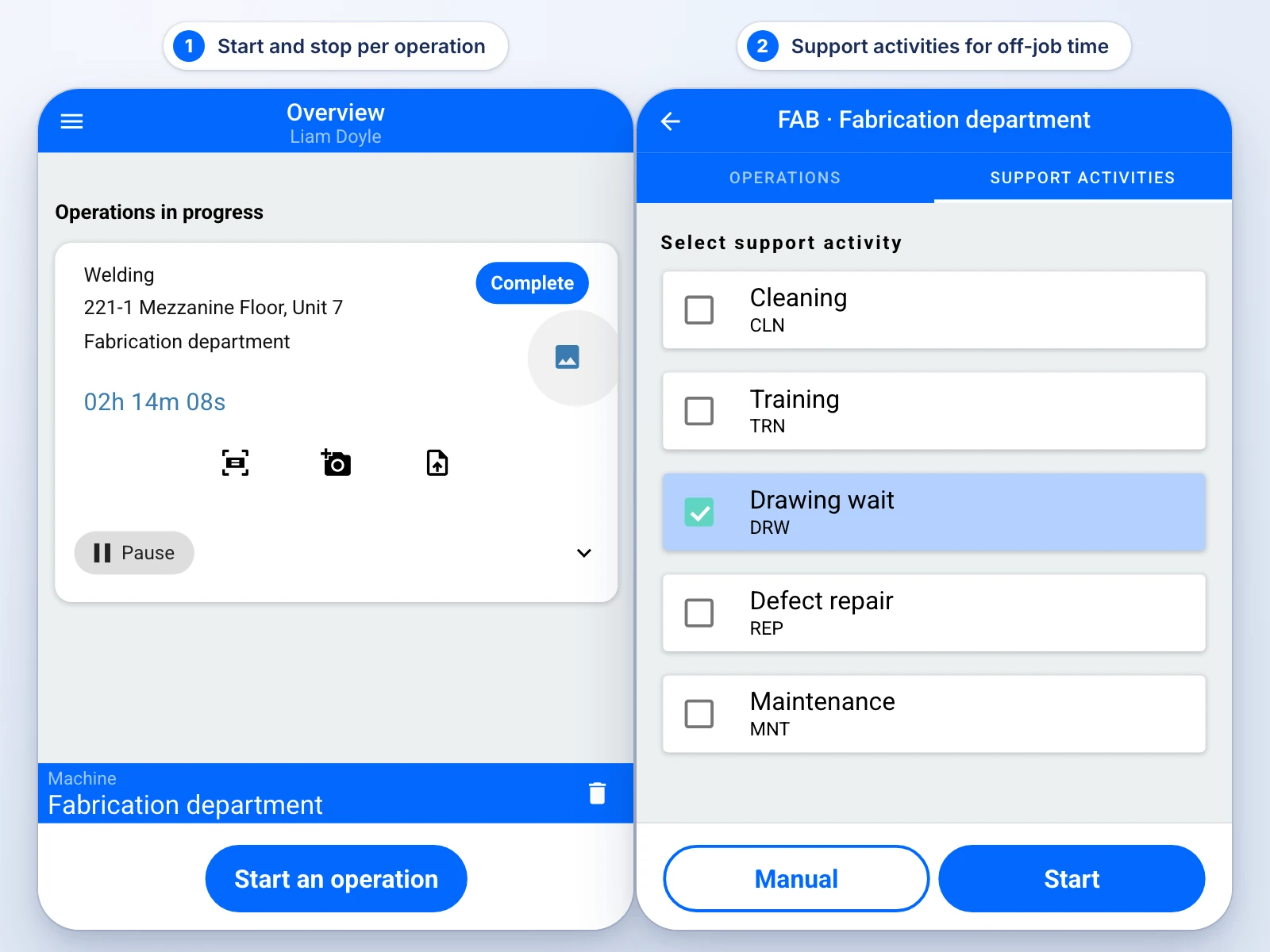
The queue shows project, detail, dimensions, due date and the operation comment, with the PDF drawing attached. Pick the mode that fits the station: simplified reporting (project and operation, start the timer), the detail list (every row of the job in due-date order), or support activities (forklift, yard, cleaning, maintenance, with a comment).
-
Start
One tap starts the timer against that operation. Time attaches to the job, the operation and the worker.
-
Report what happened
Enter the quantity finished, add a photo or a note if something needs explaining, pause for a break, resume, or run a second operation in parallel when two jobs genuinely overlap (practical for three or four at once).
-
Stop or complete
Stop at the end of the shift and the operation stays open for the next shift. Complete it when the pieces are done. Completing stops that worker’s timer only; the phase and its status do not move until the office moves them.
When a foreman says “the guys can’t see the job”, it is almost always the status
A job appears on the floor only when its phase is in a works-type status such as fabrication or site installation. In pre-production the job is editable in the office and invisible on the floor.
B&W Metall, a structural fabricator turning out roughly 100 tons of steel a week with 10 to 15 orders running in parallel, rolled this out station by station: every worker reports in EZIIL, whatever their age or role. The same rollout cut their dispatch paperwork from a five-hour job to about twenty minutes. Read the B&W Metall story.
What does the office see while the job is running?
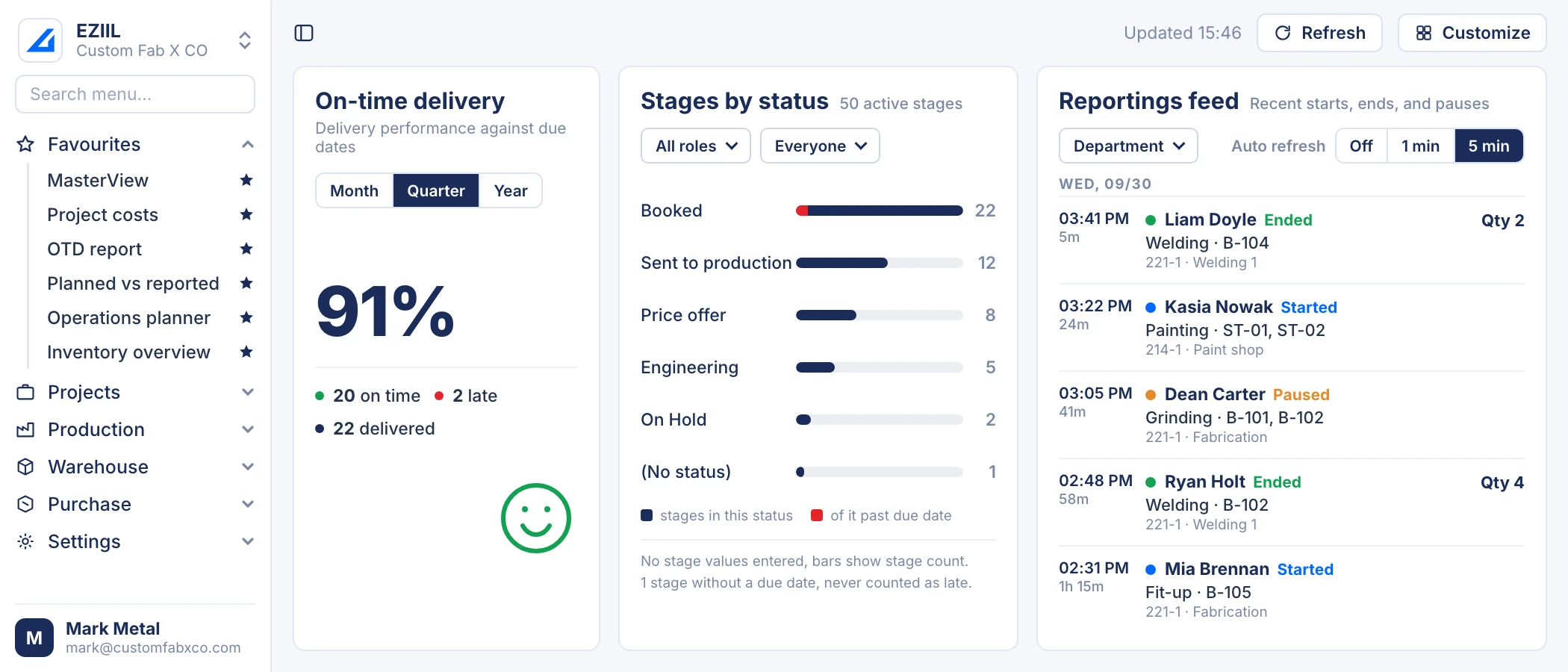
The Reporting feed on the EZIIL dashboard lists every start, pause and finish by worker, operation, project and department as the floor reports it. Hours and the Master View progress bars update after the office confirms the day’s times in Working Time Confirmation, usually the next morning.
The floor reports
Start, pause, stop, quantity finished, photo or note, per operation and per worker.
LiveReporting feed and job status update
The feed shows the event, the operation turns blue, yellow or green, and reported quantities count against the plan.
LiveThe office confirms the hours
In Working Time Confirmation a supervisor reviews yesterday per worker, fixes the anomalies and confirms the day.
Next morningProgress, widgets, payroll and cost update
Master View percentages, the dashboard widgets, the payroll export and the job cost all read the confirmed hours.
After confirmationLive: what happened
The reported events, the operation colours on the job and the quantities finished are live. A welding foreman can watch the welding bays from the office as the reports come in.
After confirmation: how many hours it took
The hours behind the events become official once a supervisor has looked at yesterday, fixed the timer somebody left running over lunch, and confirmed the day.
The four screens the office runs the week from
All four are in EZIIL Starter. They read the same floor reports, so nobody retypes anything between them.
The Reporting feed
Blue is started or resumed, yellow is paused, green is finished. Filter by department, set it to refresh every 1 to 10 minutes, and a welding foreman can watch the welding bays from the office. It is read-only; nothing is actioned from it.
Master View
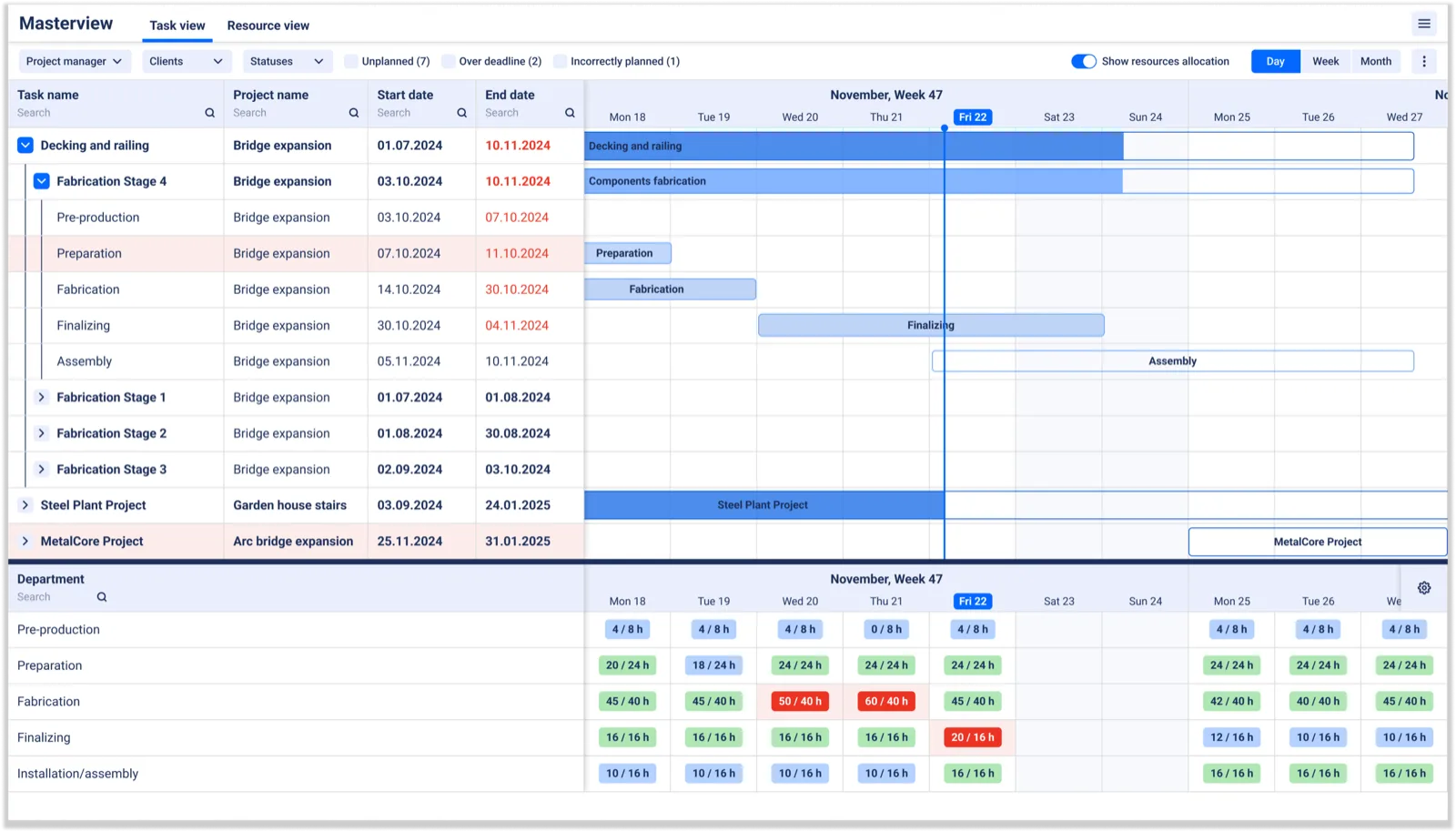
Master View holds every live project by department, with bars that show done versus remaining hours against the plan. Red means a date has passed or was never set. The difference-from-deadline overlay shows how far each stage sits from the date the project manager promised. Many production managers run their week from this one screen.
Working Time Confirmation
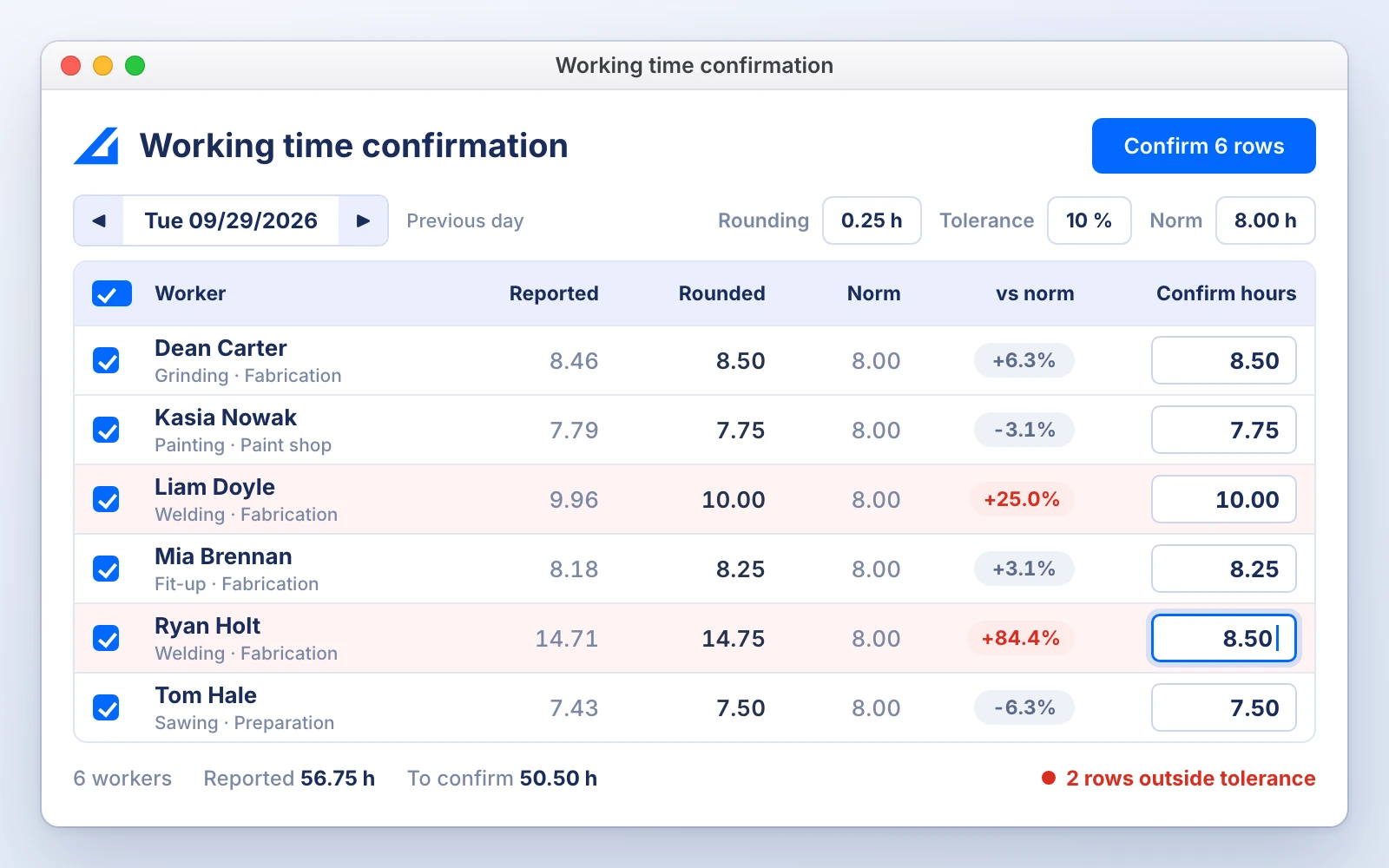
The office opens yesterday or last week, sees reported time per worker, applies rounding and a tolerance band, corrects the anomalies and confirms. Users with the Reporting supervisor role do the confirming. Confirmed times feed three things at once: the payroll export, the progress percentage in Master View, and every hours report.
Reports by department, operation and worker
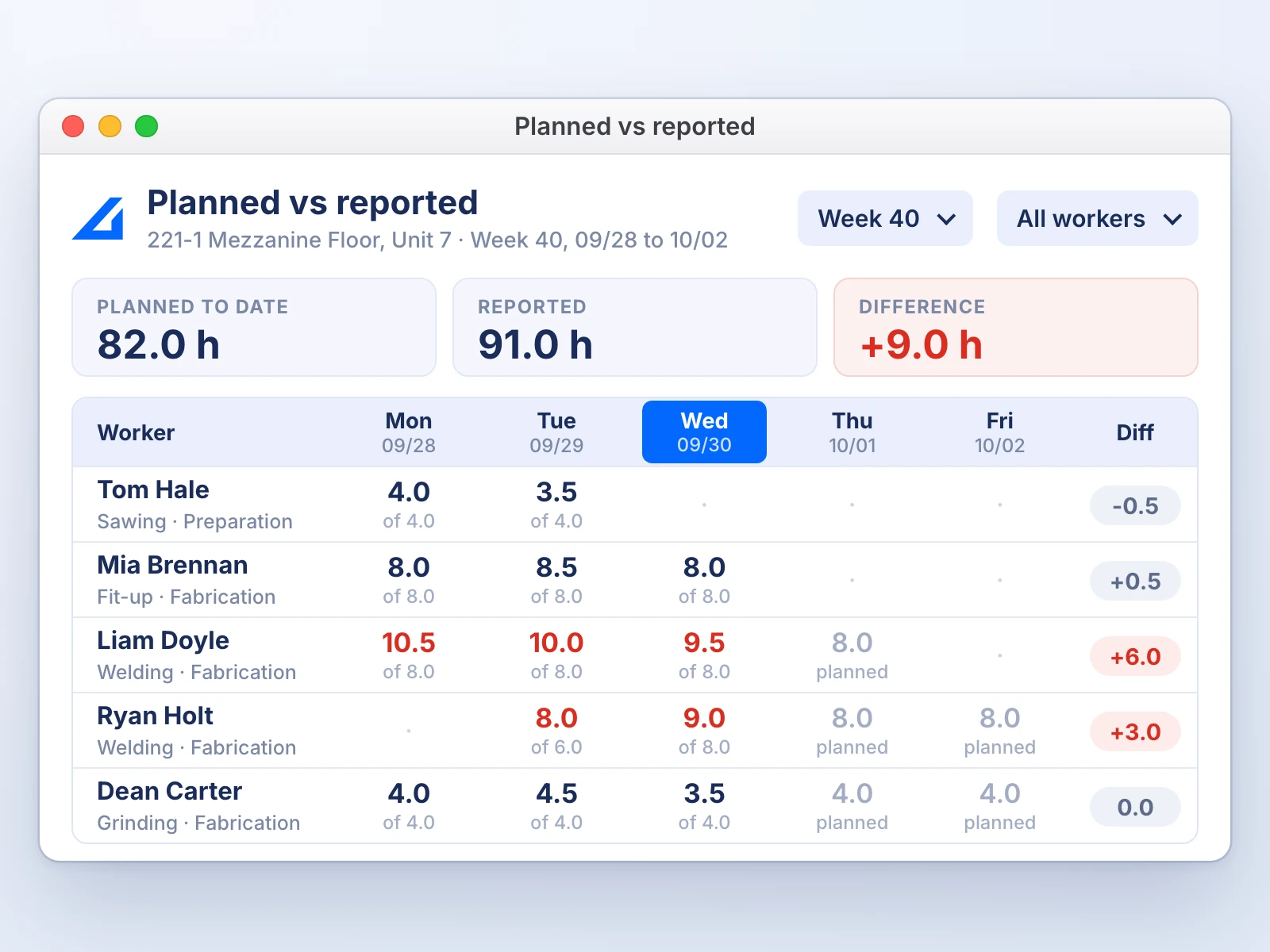
The Planned vs Reported report compares the hours planned on each job with where time was actually reported, by worker and by date. Reported pieces, kilograms and square metres per operation sit in the same report as confirmed hours, so output per hour can be read from one screen instead of calculated on Friday.

Syed Raza Hashimi, Planner / Control Manager / QA-QC, APS Group, an Australian industrial fabricator with 20 or more active projects at any time. Read the APS Group story.
Now we can see exactly what the workers are doing in the workshop and how many hours they are spending on each process. This has given us tighter control of active jobs, better-informed estimating and concrete profit/loss insights per job.
How does job tracking move the schedule and the deadlines?
Confirmed hours move the Master View bars against each job’s planned hours, so a stage that is behind shows red before its due date passes. The Next deadlines and On-time delivery widgets read the same phases, so tracking, scheduling and on-time delivery come from one data set.
Next deadlines
Splits stages into overdue and upcoming, shows days left or days late, and tags the high-value stages so an expensive late job is never buried in the list.
On-time delivery
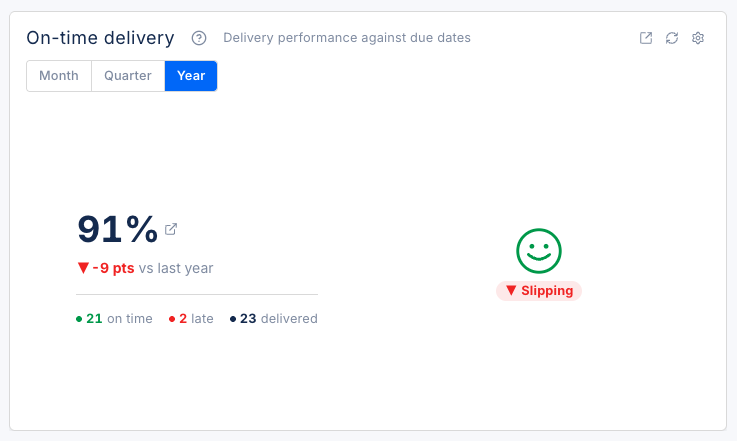
Compares each finished stage’s completion date with its due date. On or before counts as on time, later counts as late, with no grace days and no partial credit. You pick the month, quarter or year and set your own colour thresholds.
Difference from deadline
Sits on the plan as an overlay. It never moves the promised date by itself. The project manager owns the commitment; the planner fits the work inside it.
One rule keeps those numbers trustworthy
A finished stage gets a completion date when it is moved to a finished status. A stage closed without a date stays on the overdue list and never counts toward on-time delivery. EZIIL can make the date mandatory for your company so the widgets correct themselves.
For the method behind the numbers, see how to improve on-time delivery in a fab shop, and the production dashboard that shows all six widgets.
WIP tracking for job shops and fab shops
EZIIL tracks work in progress by phase status and by reported quantity per operation. The shipped statuses are booked, pre-production, fabrication, site installation, finished and on hold, and the list is configurable. The Stages by status widget shows how many stages and how much value sit in each status at any moment.
Three things matter for a job shop with 20 to 50 jobs open:
- The unit is the phase. A phase is one delivery commitment with its own due date, customer PO and value. One project can be in several statuses at once, which is how a stair flight in fabrication and a handrail package in site installation stay separate.
- Quantities count the moment the floor reports them. A job’s rows turn yellow when part of the quantity is reported and green when the reported quantity reaches the plan, without waiting for the office.
- Statuses lock and unlock. Booked, pre-production and on hold let the office edit the job. Fabrication, site installation and finished lock it and let the floor report against it.
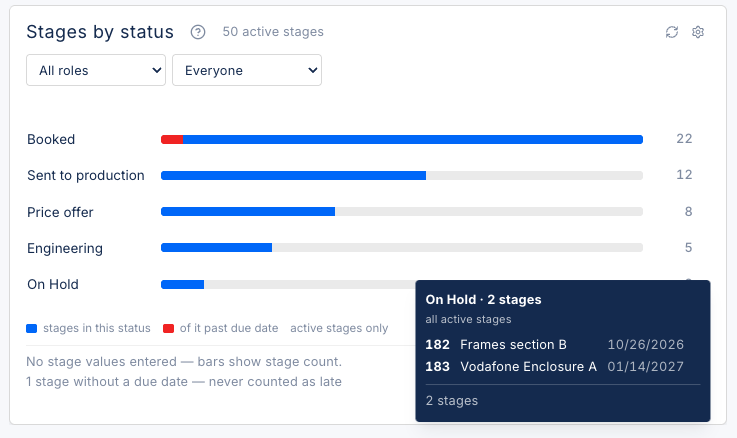
The shipped status list. Your own statuses can be added or renamed.
A whiteboard can hold the same list. It cannot tell you the value sitting in pre-production, which stages have no due date, or which ones have been “nearly finished” for three weeks. For the definition and the usual control problems, see work in progress in custom steel fabrication.
Why the hours in your timesheets are wrong, and what tracking per operation fixes
Weekly timesheets book a whole day to one job number, so yard work, forklift time and grinding land on the wrong job or on no job at all. Reporting per operation, with support activities kept separate, splits project hours from support hours while the job is still open. That is what makes job tracking data usable for job costing and for the next quote.
Pattern one: the weekly timesheet
A fabricator books 40 hours to one project in the weekly sheet.
- Booked to the job
- Really on the job
- Moving material in the yard
The job looks a third more expensive than it was, and the yard work looks free.
Pattern two: the production log
A laser shop’s log records machine run time and scrap, and nothing else.
- In the log
- Missing from the log
The next quote is wrong in the other direction: the labour that took longest never appears.
What changes with EZIIL
The same worker reports the weld as an operation on the job and the forklift run as a support activity. Both land in Working Time Confirmation. One becomes job cost, the other becomes overhead you can see. When ten people log to one job, Planned vs Reported shows it per operation and per worker instead of one lump.
That data is the input to job costing software for manufacturing, which compares planned cost with actual cost per job while the job is open. If you want to know why the numbers in a typical job costing sheet are wrong, start with why your job costing is wrong.
Who is it for, and who should look elsewhere?
Best fit: custom steel and metal fabricators, structural and miscellaneous metals, industrial equipment builders and engineer-to-order shops with 10 to 150 people and 5 to 50 jobs open at once, in the US, UK, Ireland, Australia and the EU. Not the right fit: high-volume repeat production, plants whose main question is machine utilisation, or buyers who want an accounting-first system.
A good fit if
- You run project-based work where every job is different and several are in the shop at once.
- Status today lives on a whiteboard, in a spreadsheet, in paper travellers or in someone’s head.
- You want the floor to report with a start and stop button instead of a form.
- You want hours you can trust for payroll, progress and job cost from one entry.
- You are a fabrication-heavy machine shop, or a UK workshop looking for job tracking without a per-user licence.
Look elsewhere if
- You build the same product in volume and schedule by takt time.
- Machine utilisation and OEE are the numbers you need first.
- You want an all-in-one ERP with accounting, CRM and field service inside it.
Job tracking in EZIIL compared with the usual alternatives
| Question | Whiteboard and verbal updates | Weekly timesheets or paper travellers | Machine monitoring software | EZIIL job tracking |
|---|---|---|---|---|
| Where is each job right now? | Walk and ask | Friday, if the sheets came back | Per machine, not per job | Per operation, as the floor reports |
| Who worked on it and for how long? | Memory | One lump per day per job | Machine time only | Per worker, per operation, confirmed daily |
| Is it on track for its due date? | Gut feel | No | No | Master View bars, difference from deadline, Next deadlines |
| Hours usable for job costing? | No | Partly, with yard work mixed in | No labour | Yes, support activities separated |
| Covers welding, fitting, painting and site work? | Yes | Yes | No | Yes |
| Set-up | None | None | Sensors and integration | Under a week for projects and reporting |
| Price | Free, until a job is lost | Free, plus the Friday retyping | Per machine, quoted | From EUR 120 / USD 140 a month, flat by team size |
Swipe sideways to see all four columns.
For a side-by-side of eight tools, including the machine-oriented ones, see the production and job tracking software comparison for steel fabricators.
Customer results
Fabricators tracking jobs in EZIIL, in their own words and numbers.
Dispatch paperwork: five hours to twenty minutes
Dispatch paperwork went from a five-hour job to about twenty minutes per project once every worker was reporting in EZIIL after a station-by-station rollout.
B&W Metall, structural steel fabrication, Estonia
Read the storyHours per process across 20+ projects
Hours per process visible across 20 or more active projects, with tighter control of active jobs and better-informed estimating.
Syed Raza Hashimi, Planner / Control Manager / QA-QC, APS Group, Australia
Read the story
12 Excel sheets deleted
The whole team can now work in one system and we deleted 12 different Excels that we had to update otherwise every day.
Rait Kalda, Chairman of the Board, Enefit Solutions
All customer stories
No duplicate data entry
No more wasting time on duplicate data entry.
125 people across three factories report into one system.
Martin Lehemets, COO, VMT Tehased
Read the story
A full picture of all live jobs
A hub of information that is extremely easy to navigate, giving a full picture of all live jobs.
Lynn Smith, Purchasing Manager, FLI Structures, UK
Read the storyPricing and getting started
EZIIL Starter costs EUR 120 / USD 140 a month for 1 to 15 users, EUR 180 / USD 210 for 16 to 50 and EUR 290 / USD 338 for 51 to 150, plus a one-off onboarding fee of EUR 300 / USD 350 that covers database set-up, training and support sessions in the first month. Mobile reporting and time tracking are part of Starter at every tier.
| Price | EUR 120 / USD 140 a month for 1 to 15 users, EUR 180 / USD 210 for 16 to 50, EUR 290 / USD 338 for 51 to 150. Flat by team size, no per-user fees. |
|---|---|
| One-off onboarding | EUR 300 / USD 350: database set-up, training and support sessions in the first month. |
| Included in Starter | Mobile reporting and time tracking at every tier, Master View, Working Time Confirmation, the dashboard widgets and the reports on this page. |
| Go-live | Projects and shop-floor reporting in under a week. Modules added one at a time once the first step has become routine. |
| Devices | Phone, tablet or shop PC. The EZIIL mobile app on Google Play and the App Store, or the web app in a browser. |
| Add later | Bill of Materials, procurement, inventory and EN 1090-2 modules, when you need them. |
| Full detail | Prices as of October 2026. See the pricing page. |
Rollout advice from live implementations
What team EZIIL’s experts tell every shop before the tablets are bought.
- Start with two or three stations and widen from there.
- Give their own device to the long-operation roles (welder, saw operator, lifter) and share one between stations with short operations.
- Use a shop PC where a tablet on a bench keeps falling asleep.
- Keep paper drawings where printing an A3 wins. Count the stations that need a drawing on screen before buying tablets for all of them.
Syed Raza Hashimi, APS Group
It only took us a few weeks to roll out EZIIL internally, as the learning curve was minimal.
Job tracking software questions
What should job tracking software for a small fabrication shop do?
It should show where every job is by operation and department, who is working on it, whether it is on track for its due date, and how many hours it has used against the plan, without anyone walking the floor. For a 10 to 150 person custom shop it also needs a floor-side routine simple enough to survive a busy Tuesday: start, stop, quantity, done.
Is EZIIL’s job tracking real time?
Partly, by design. The Reporting feed, the operation colours on each job and the reported quantities update as the floor reports. Hours and the Master View progress percentage update after the office confirms the day’s times in Working Time Confirmation, usually the next morning, so the number on the dashboard is one somebody has checked.
Will my shop-floor team actually use it?
If they can use a smartphone, they can use EZIIL. For the floor it is start and stop a timer and see today’s jobs with the drawing attached. B&W Metall reached 100% adoption across every age group by rolling out station by station. Shops that prefer a slower start begin with one person per station reporting and widen from there.
How is job tracking different from production tracking or machine monitoring?
Job tracking follows each job through its operations and people: who did what, for how long, and whether the job is on schedule. Production tracking is the wider term for the same idea at department or plant level. Machine monitoring reads signals from CNC equipment to report utilisation and OEE; it does not know about welding, fitting or site work. EZIIL does job and production tracking by people and operations, and no machine monitoring.
Does job tracking replace timesheets?
Yes. Each worker’s starts, stops and support activities become reported time, the office confirms it in Working Time Confirmation, and the confirmed hours export for payroll. The same confirmed hours drive progress and job cost, so there is one entry instead of a timesheet plus a job card plus a spreadsheet.
Can I track jobs on a phone, and does it work for site installation?
Yes. The EZIIL mobile app runs on Android and iOS, and the same screen runs in a browser on a shop PC or tablet. Phases in the site installation status show on the floor app exactly like fabrication, so an installation crew reports from site with the same start and stop.
Does it work with QuickBooks, Xero or our accounting system?
Confirmed hours export to a spreadsheet, and EZIIL builds custom accounting integrations per customer; there is no public API or app marketplace. Day to day, most shops keep invoicing and payroll in their accounting package and use EZIIL for the hours and job data that feed it.
See your own jobs tracked in EZIIL
Take a free product tour and watch a job move from the floor to the dashboard, or book a 30-minute demo with team EZIIL’s experts and bring one of your live jobs.
- Start and stop per operation on a phone, tablet or shop PC
- Confirmed hours feeding progress, deadlines and job cost
- Flat price by team size, live in the first week
Take a free product tour
Enter your email to see inside EZIIL in a demo version. No sales call needed first.
EZIIL job tracking is part of the same system as job shop software for scheduling and tracking, shop floor management software for mobile reporting, job costing software for planned against actual cost, metal fabrication software for the whole shop, and the full feature list and pricing. For the dashboard behind the widgets on this page, see the production dashboard for steel fabrication; for the definition, work in progress in steel fabrication.