
Steel inventory management is the practice of knowing what material you own, which job each piece is committed to, and what it costs you when it is consumed. In a custom fab shop it is less about stock levels than about attribution: the same bar can sit in your yard as an asset, get cut into a job as a cost, and come back as a remnant worth keeping, and most shops cannot see any of those three states clearly.
This article is written for small and mid-size custom fabricators, doing one-off or low-volume project work. If you buy most of your steel when you win the job rather than holding it on the shelf, the standard inventory advice about reorder points and demand forecasting does not really apply to you. What follows is the version that does apply: how material actually moves through a project shop, the five moments where it can quietly stop being trackable, and what changes at each one. It covers both sides of the building, because the office and the shop floor have very different jobs here, and confusing the two is the most common reason this goes wrong.
We wrote about how purchase orders get raised from a BOM previously. This article is about the half that follows this and picks up the moment the truck arrives.
The Importance of Steel Inventory Management
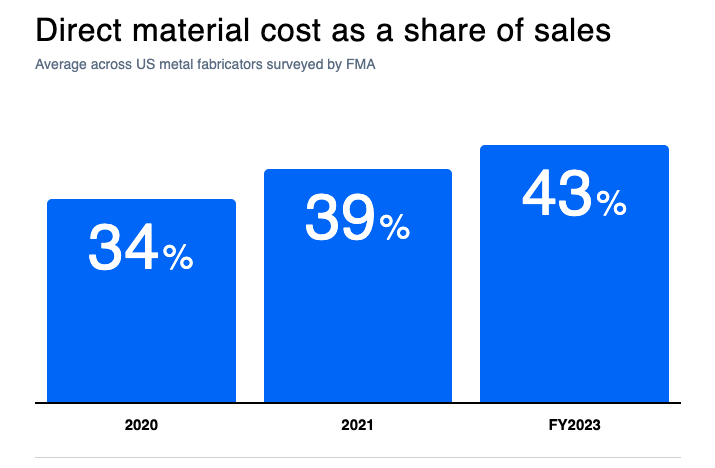
Material has quietly become the largest line in a fabricator’s cost base. In the Fabricators & Manufacturers Association’s financial benchmarking survey, direct material costs reached an average of 43% of sales, the highest the survey has recorded. Two years earlier the same survey put it at 39% of sales, up from 34% the year before that. That is a third of your revenue becoming nearly half of it in three years.
The pressure has not eased. In the National Association of Manufacturers’ second-quarter 2026 outlook survey, 83.1% of manufacturers named increased raw material costs as their top business challenge, ahead of everything else on the list. Steel mill product prices in the US producer price index rose from 341.6 in April 2026 to 381.2 in August, roughly twelve percent in four months. Deliveries are slowing too: the Institute for Supply Management’s August 2026 reading put the supplier deliveries index at 59.3, and anything above 50 means material is taking longer to arrive.
This is exactly the reason to be able to answer one question confidently: when a job comes in under margin, can you tell whether it was the steel? Right now, in most shops, the answer is no. The same survey found on-time delivery averaging 84% and inventory turns falling from 18.5 to 10.3. Material is both the biggest number and the least visible one.
Why steel is not normal inventory
Most inventory software is built on an assumption that does not hold in a fab shop: that a unit is a unit. One box of M8 bolts is interchangeable with the next box of M8 bolts, so the system only has to count them.
Steel does not behave like that, for three reasons.
A ton is not a ton. Grade, alloy, thickness, length and heat all travel with the material. Two bars of the same nominal size from different heats are not substitutes if the job needs traceable material, and the certificate that proves it belongs to a specific batch, not to the pile.
It changes shape as you use it. A twelve metre length that gives up two metres to a job is not “ten metres of stock” in any useful sense. It is one ten metre piece sitting somewhere specific, and if your system just decrements a number, you have lost the thing that made it findable.
It is usually bought for a job, not for the shelf. This is the one that breaks the standard advice. Project fabricators buy on award. The reorder point, the safety stock, the demand forecast, the turnover target: these are tools for repeat production, and applying them to a shop where every job is drawn from scratch produces numbers nobody acts on.
That last point matters enough to say plainly. If you deliberately hold very little stock because you would rather not tie up cash in steel that may not fit the next job, you are not doing inventory management badly. You are doing something different, and it needs a different approach. What you actually need to see is not “how much do we have” but “what is committed to what, and what has it cost us.”
5 moments that decide whether your numbers are right
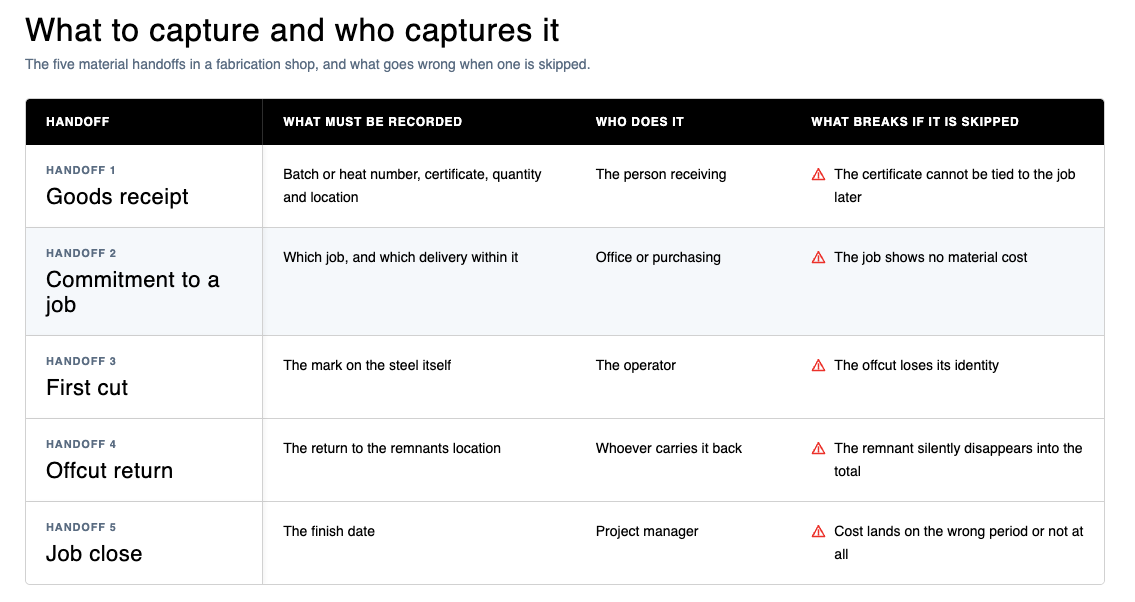
Material passes through five points on its way from a supplier’s truck to a closed job. Each one is a place where the trail either holds or breaks. Almost every wrong material cost traces back to one of them.
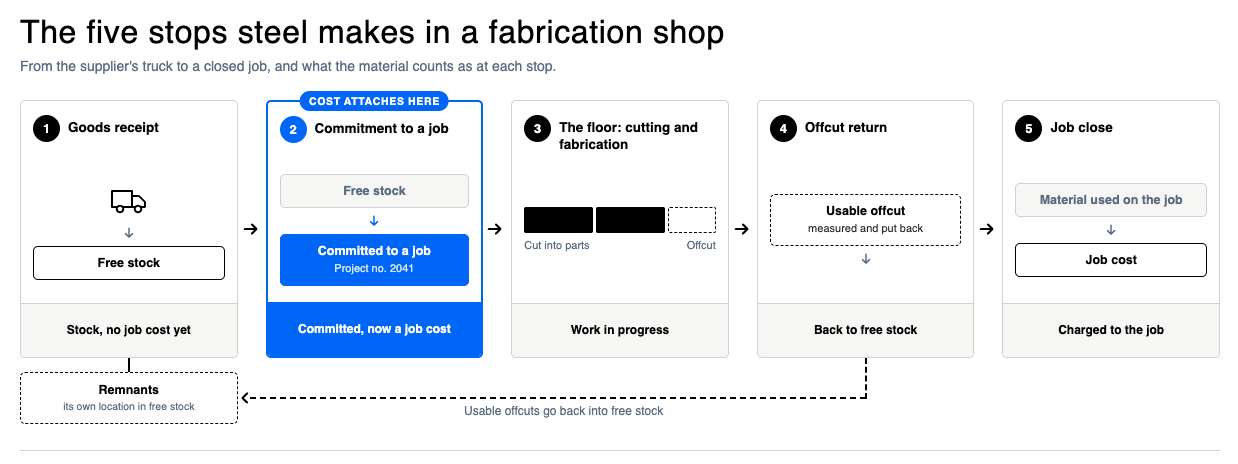
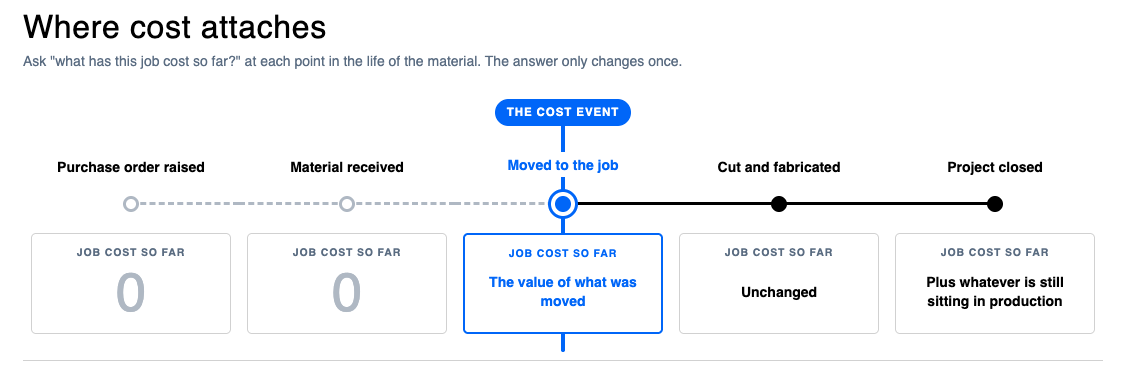
The important thing to notice before we walk through them is that the job usually gets charged at step two, not step one. Buying the steel is a commitment to a supplier. Receiving it makes the steel yours. Neither of those, in most project-based setups, puts a cost on the job. That happens when somebody issues the material to a particular job.
This is a convention rather than a law. Some shops charge at receipt when the steel was bought against a specific job. Some charge at the cut. Some carry it as work in progress and relieve it at completion. Where your own setup draws the line determines when your job costs move, and a surprising number of shops have never consciously decided. Step two is where EZIIL draws it, and where most project-based systems draw it, which is why it gets the most attention below.
1: The material arrives
The goods receipt is a small piece of admin that decides how much you can know later. It is worth doing properly, and it takes about a minute per delivery line.
Here is the sequence, and it holds whether you are working in software or on a paper receiving log:
- Start from the purchase order, not from a blank page. If your system can pull the ordered lines through so nobody retypes sizes and quantities, use it. On paper, receive against a printed copy of the PO for the same reason.
- Correct the quantity to what actually arrived. Partial deliveries are normal. If you ordered sixty metres and twelve turned up, receive twelve. A receipt that says sixty when twelve arrived is worse than no receipt, because now your records are confidently wrong.
- Decide whether it is free stock or already spoken for. Most deliveries go into general stock. If the steel was bought for one named job and will never be anything else, many systems let you receive it straight onto that job, which charges the job immediately and skips the commitment step covered below. That is a legitimate shortcut, not a contradiction, but be consistent about when you use it or your job costs will be charged at two different moments depending on who received the delivery.
- Record where it physically is. A rack or shelf address costs nothing to enter and saves the walk later.
- Capture the batch or heat number, and attach the certificate. This is the only moment when this is easy. After the material has been cut and moved, reconstructing which heat a piece came from is guesswork.
- Deal with the financial side separately, when the invoice lands. Transport is the part people forget. If you paid for a truck, that cost belongs spread across the material it delivered, so the value of the steel reflects what it cost to have on site rather than just what the mill charged. Systems vary in whether they do this for you.
Splitting the physical receipt from the financial confirmation is worth a sentence, because it solves a practical headache. The material is here, it is accepted, and the floor may need it today. The invoice might arrive in three weeks. You should not have to wait for the paperwork to use the steel, and you should not have to guess at the cost forever either. Receive now, confirm later. Some shops book a flat figure per load for transport rather than waiting for the carrier’s invoice, and that is a perfectly reasonable trade of precision for speed.
How EZIIL handles it
EZIIL splits this into two named steps. Receipt means the material is here and accepted, and it is what makes the stock available to use. Confirmation is the financial pass once the invoice lands, and it is where transport cost gets spread proportionally across the lines on that delivery, so the stock value reflects what the steel cost to have on site rather than just the mill price. Confirmation locks the lines. You can skip straight to confirmation if you already know the invoice.
Traceability starts here, and it is not automatic
If you work to EN 1090, the execution class sets how far the trail has to go. The British Constructional Steelwork Association’s guidance describes EXC2 as carrying a partial or batch traceability requirement, with full traceability being an EXC3 requirement, and notes that for most UK buildings EXC2 is the appropriate class. Either way, the chain starts at receipt.
It is worth quickly going over what a system can and cannot do for you here. Software records the identity you give the material. It does not verify it. On the engineering forums this comes up regularly. For example an engineer, in a thread on transferring heat numbers to received material, put it this way: “My point is it is dangerous to assume that just because you have a piece of paper with a heat number on it does not mean the material is from that heat.“
The paint pen in the yard is doing the real work. The system’s job is to make sure that once someone has marked the steel, the mark survives every subsequent handling and the certificate can be found again in seconds instead of in an afternoon of digging. That is a big improvement, and it is a smaller claim than “guaranteed traceability”, which no software can honestly make.
2: The move that charges the job
This is the one that matters most. The general principle first. At some point a piece of steel stops being something your business owns and starts being something a particular job owns. Even a shop running on a whiteboard draws that line, the moment someone chalks a job number on a length.
Many project-based systems, ours included, draw it with two stock locations. One holds free stock: steel you own that is not promised to anyone. The other holds committed stock: steel assigned to a specific job. Moving a piece from the first to the second is the moment the job gets charged.
Not the purchase order. Not the goods receipt. Not the delivery note. Not shipping the finished assembly out of the door. The commitment.
That sounds like a technicality until you see what it explains. If nobody makes that move, the job runs to completion showing no material cost at all. The BOM says the job should have consumed two sheets. Both sheets are still showing as free stock, because nobody issued them. The job closes with a material cost of zero. The margin looks wonderful, and it is fiction.
The bill of materials is a plan, not an instruction to consume. A BOM says what the job ought to need. The issue record says what it actually got. They are different numbers, and the gap between them is where your real margin lives. It is also the first thing to check when you compare inventory software with BOM management.
The failure mode is predictable and forgivable. On early jobs, especially in a shop that has just started using a system, people skip the movement because the steel is right there. It is faster to just use it. And it is faster, once. The cost is that you lose project-level material accounting for that job permanently, and you usually only notice at the end of the quarter when the numbers do not reconcile.
There is a second, more ergonomic way to do the same thing that is worth knowing about, because it removes most of the friction. Rather than creating movements one at a time, you can open the job’s material list, let the system compare what the BOM planned against what has actually been booked, tick the lines that still need committing, and create all the movements in one action. The quantities pre-fill from the BOM. The lines you can actually cover from stock are flagged. It takes a couple of minutes for a whole job.
This is also, incidentally, the moment where you stop two jobs fighting over the same steel. Once a length is committed to job A, it is visibly committed. Nobody walks past and cuts into it for job B because it happened to be nearest the saw.
How EZIIL handles it
EZIIL names the two locations the material warehouse and the production warehouse, and the move between them is called a warehouse movement. “Warehouse” here means a stock location rather than a building: the production warehouse is usually the rack by the saw, not a second site. The movement carries the job, so one movement line ties to one job only, and splitting a twenty four metre length across two jobs is two lines.
The movement is a record, made at a desk. Whether the steel also physically moves is a decision about how your yard works, not something the software requires. Most shops do stage committed material somewhere separate, because that is what stops it being cut into by mistake, but the two are not locked together.
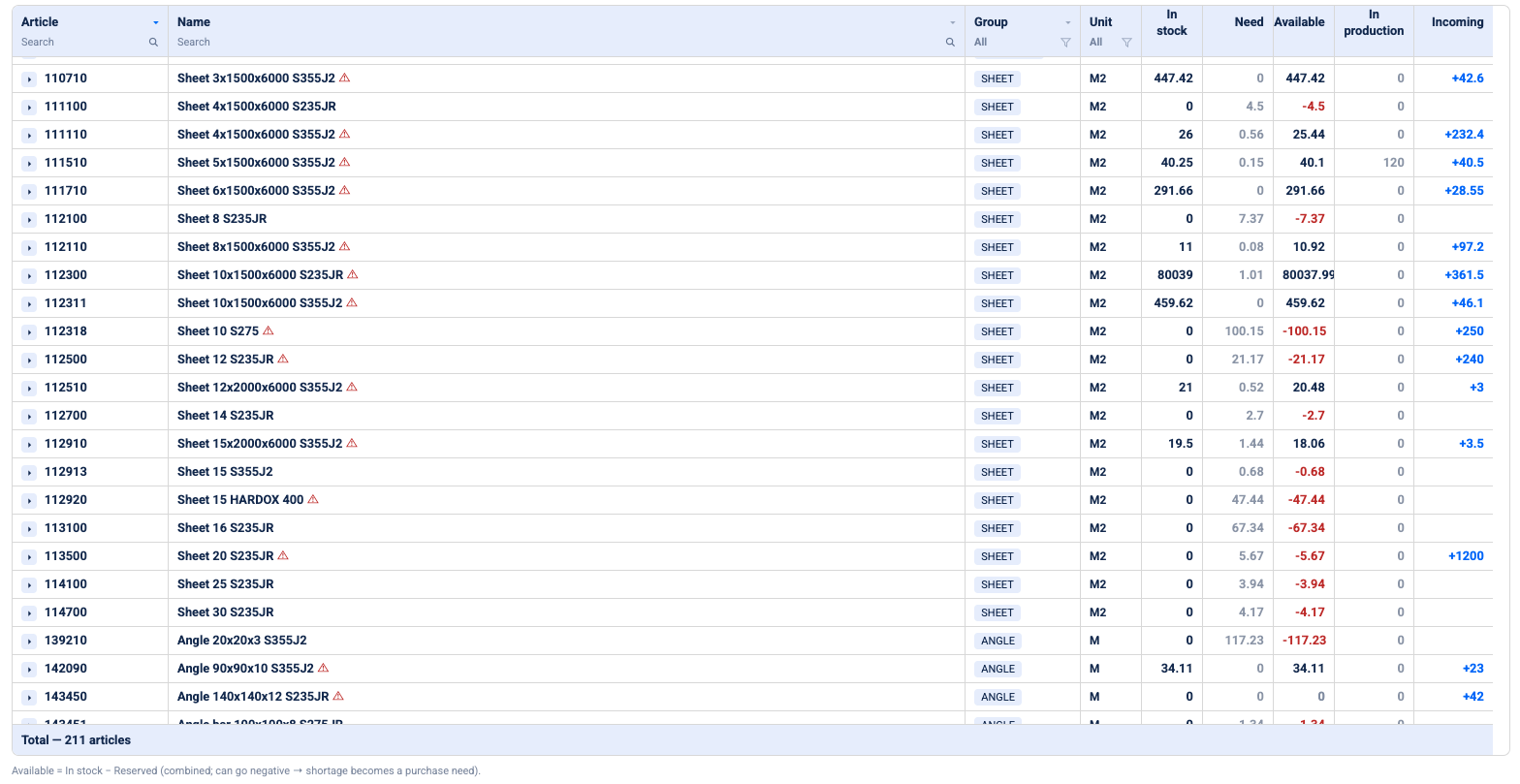
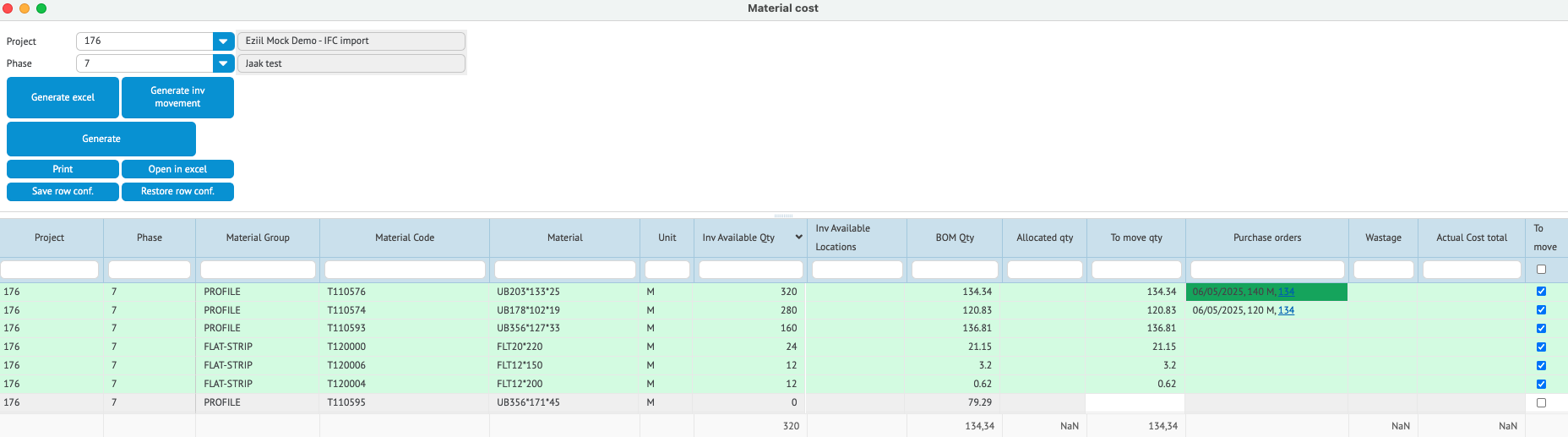
Doing this one movement at a time is tedious, so there is a faster path, shown in the screenshot below. Open the job’s Material Cost screen, and EZIIL lists every material on the BOM next to what is in stock and what has already been committed to the job. Lines that current stock can cover show in green. Tick them, and the quantities to move fill in from the BOM. Then click Generate inv movement, confirm, and every ticked line is committed to the job in one go.
You can see it in EZIIL’s Material Cost dashboard below. The beams at the top are in stock and two of them were bought on a purchase order, yet the job’s allocated quantity and actual cost total both still read zero. Nothing has been committed, so nothing has been charged.
One thing to know: EZIIL does not force you to match the BOM quantity. You can commit more or less than planned, deliberately, because real jobs do that. It is a control point rather than a guard rail.
3: What the shop floor actually has to do
Here is where most inventory projects die. It usually surfaces as a fair question: is a fabricator’s job to make product, or to record data for the office? Every minute spent entering something is a minute not spent cutting or welding, and the person being asked to do it rarely sees the report it feeds. Plenty of small shops have looked at that trade honestly and decided they would rather carry a bit more steel than run a daily tracking discipline. That is a reasonable call, not a failure of will, and any system that does not respect it will quietly stop being used.
So the answer is to be deliberate about how much of this lands on the floor, because that is the variable that decides whether the whole thing survives.
There are two schools here and both work. One puts a scanner at the saw and has the operator record material movements as they happen, which gives you the most accurate picture and asks the most of the person holding the scanner. The other keeps stock transactions in the office and asks the floor only for the things nobody else can do, which are physical: mark the steel, put the offcut where it belongs, and say when work started and stopped. Which suits you depends less on your size than on whether you have someone who will own the discipline.
How EZIIL handles it
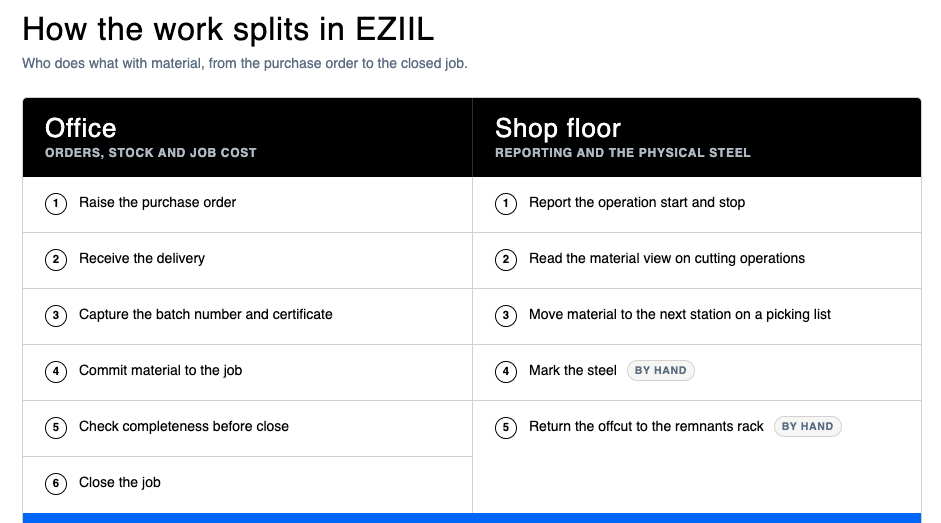
EZIIL takes the second approach. The floor does not run stock transactions at all. Committing material to a job and writing it off are office actions, done at a desk by whoever owns materials. Goods receipts are usually restricted to one or two named people on purpose, because receiving is where both money and traceability enter the building, and undo rights are often deliberately split so a second person reviews. None of that touches a welder.
What the floor does touch is four things:
- Reporting the operation. Start and stop on the job they are working, on a tablet or a screen at the machine. This is what drives progress and labour cost, and it is the one habit that has to stick. Our note on shop floor control goes into what that looks like in practice.
- A material-oriented screen on cutting operations. On sawing, plasma and laser work, the operator sees the material and the pieces to be taken from it, grouped by material code, rather than a flat parts list.
- A picking list. For the material handler or forklift driver, the instruction is “take this from here to there”, routed either from the operation plan or to a fixed drop point per department.
- Marking the steel and putting the offcut back in the right place. This is physical, not digital, and it is the part that actually determines whether any of the above is true.
The rollout question is separate from the software question, and it is the one that predicts success. B&W Metall, a structural fabricator working to EN 1090-2, now has every worker reporting in the system regardless of age or role. They got there step by step, starting with one screen at one machine and the person they thought would take to it best, rather than switching everyone on at once. That is the pattern that works, and it is worth more than any feature comparison.
4: The offcut
Ask a fabricator where the money leaks and this comes up fast. One shop owner evaluating systems described it better than we could: the cutoff has value, but it falls into a grey area where it just disappears, and then that is that. The material is gone from the job, gone from the certificate trail, and gone from anyone’s idea of what the shop owns.
The principle is simple enough. When a job is finished and there is usable steel left over, it has to go back to being free stock, available to the next job, with its identity intact. The hard part is not the idea, it is that most ways of recording stock cannot express what a remnant actually is.
The first thing to work out is how your own records carry stock. Many systems, EZIIL included, carry it as a running length or area. Where that is how it works, a returned two metre offcut dissolves into the total: you have “twelve metres” again, but nothing tells you that it is one ten metre piece and one two metre piece. For a fab shop that difference is the whole point, and it is why remnant racks quietly silt up with steel nobody can find a use for on paper. Some systems, particularly those built for service centres and stockholders, do track remnants as individual pieces with their own identity. If that matters enormously to you, it is a fair reason to look at one of those, and it is worth asking about on any demo.
If your records work in running lengths, the practical workaround is to separate by location rather than by unit. Designate a remnants rack with its own address, land every return there, and read the two locations separately. Now “full lengths” and “offcut pieces” are two visible numbers rather than one misleading one. You can do this in any system that supports stock locations, and you can do it on a whiteboard.
It is a discipline, not an automation, and it is only as true as the person carrying the piece. The offcut reads as a remnant because somebody put it on the remnants rack and said so. If that habit does not hold, the location tells you nothing.
How EZIIL handles it
The return is a reverse movement, production warehouse back to material warehouse, and the steel rejoins free stock. EZIIL carries stock in running metres or square metres, so it cannot express a remnant as an individual piece. The location workaround above is what our customers use. If piece-level remnant tracking is the feature you are shopping for, we are not the tool.
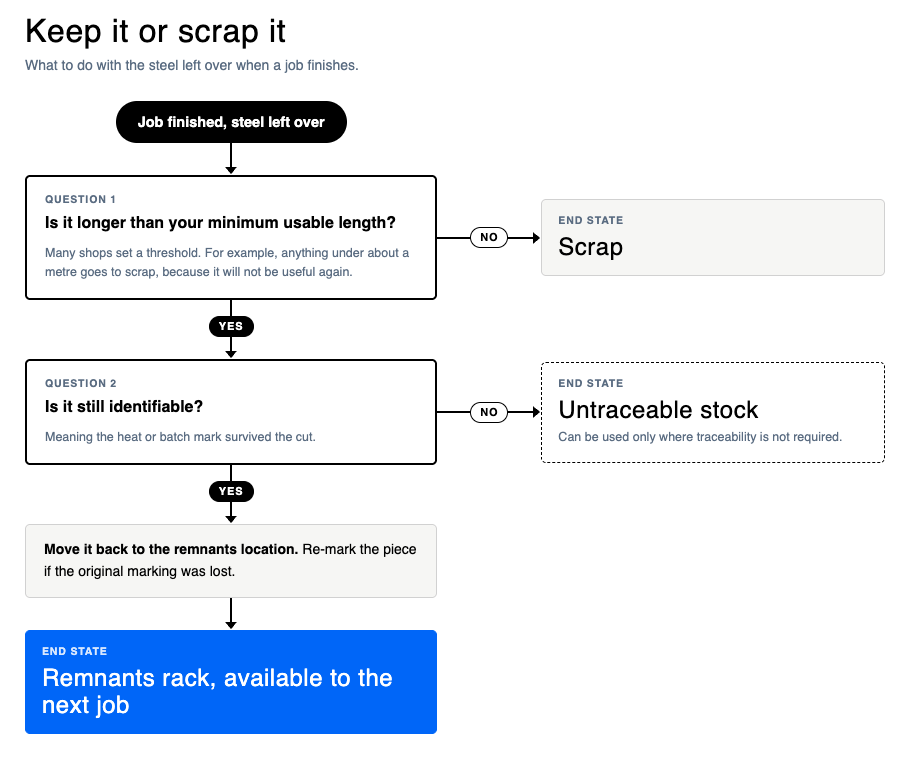
There is a useful audit signal hiding in here too. If what the system says came back does not match what is physically on the remnants rack, you have learned something. Either an offcut went somewhere it should not have, or the returns are not being recorded. Both are worth knowing, and neither is visible in a shop that does not record returns at all.
One practical warning: return your offcuts before you close the job. Once the job is closed the remaining material is written off to it, and pulling a remnant back out afterwards is not possible. Two minutes of tidying before close is the difference between a remnant you can sell against the next job and steel you have already paid for twice.
Scrap and rework, for scale, ran at 1.4% of sales in the FMA benchmarking survey, up from 1% in earlier editions. Cross-industry, APQC’s benchmarking puts scrap and rework costs at a median of 1% of sales across just over a thousand companies. On a five million turnover, that is seventy thousand a year, and a meaningful slice of it is steel that was perfectly usable when someone put it down.
5: Closing the job
Closing a job is the point where the material it consumed finally lands as cost. The general habit worth building, regardless of what you run, is a two minute check before you close anything: compare what the BOM planned against what was actually issued to the job, and deal with the difference. Sometimes the answer is to book the last few lines. Sometimes the answer is that the job genuinely used less than planned and the plan was wrong, which is useful to know for the next quote. Either way you are looking at it once, deliberately, rather than discovering it in the year-end numbers.
How EZIIL handles it
Closing a project stage writes off everything sitting in that job’s production warehouse as material cost, automatically, on the date you set. Two things have to be true for it to fire:
- The material has to have been committed. Skip the movement, and there is nothing to write off.
- The stage has to be marked finished, with a finish date. Skip that, and the write-off never fires.
Both gates, every time. It catches people out, because the job is done in every sense that matters on the floor and yet the cost has not landed.
Three guardrails come with it. A finish date earlier than the date material moved into production is refused, because material cannot be consumed before it existed on the job. You get a warning if someone’s time reporting is still running on the project. And after close, material cost cannot be attached to that job at all, so it genuinely is a one-way door.
The pre-close check has its own screen: EZIIL shows the BOM quantity next to what was actually booked, flags in green the lines you can still cover from stock, and lets you create the outstanding movements in one go before you close.
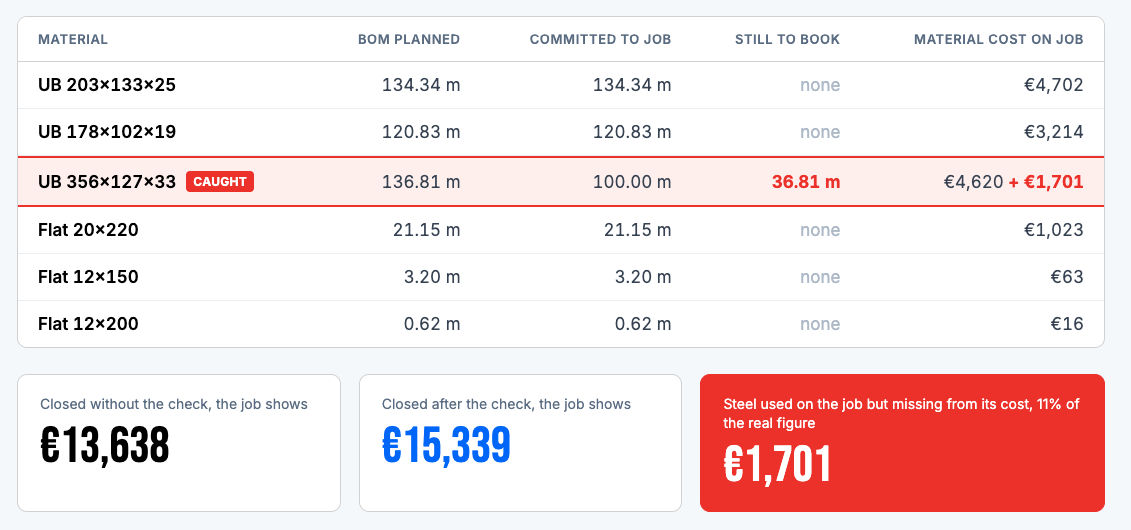
Then the number you have been trying to get to all along is available: what this job actually cost in steel. Not the estimate, not the BOM, the real figure. Which is the input your next quote needs, and the thing our job costing guide is built around.
Keeping the numbers right without doing a full stock take
There is a question worth asking before anyone starts counting: do you want to formally compile an inventory, or do you want the stock balance to be right?
Those are different jobs, and most of the time it is the second one. If you know you have twelve metres of something and the system says twenty four, you do not need a stock take. You need a correction. Book the difference in or out with a comment saying what it is, leave it unlinked to any project so it does not distort a job cost, and move on. Thirty seconds.
The formal inventory, with count sheets and a booking date, is a different instrument. It is for when your accountant asks for one. Reaching for it to fix a wrong number is like calling a surveyor because a door sticks.
| Situation | What to do |
|---|---|
| Loading your stock for the first time | Count it physically, then enter it as an ordinary goods receipt with a comment saying “opening balance”. Separate full lengths from remnants as you go. |
| The number is wrong and you know the right one | Book in or out, no project link, comment “balance correction”. |
| Your accountant needs a formal stock take | Use the inventory module, with count sheets, and book it properly. |
Two practical notes. Until you have loaded your opening stock, every availability and purchase-need figure the system gives you will over-suggest buying, because as far as it knows you own nothing. And corrections are daily work, not an annual event. Catching up retroactively across months is genuinely hard, and the effort grows faster than the backlog does.
For a sense of what “right” looks like, the Institute for Supply Management’s benchmarking puts average inventory accuracy at 91%, with the lowest performers at 67%. One practitioner quoted in the same piece called 90% good and 95% world class. If you are starting from a spreadsheet, that is the target, and it is a reachable one.
Where to start if you have never tracked material
Pick the one handoff that hurts most, which is almost always receiving, and make that habit solid for a month before adding anything else.
A workable order looks like this:
- Load your opening stock. Count what is actually in the yard, enter it as a receipt marked as an opening balance, and put remnants in their own location from day one.
- Restrict receiving to one or two people, and make the batch number and certificate part of the routine rather than something done later.
- Add the commitment step, one movement per job. This is the one that fixes your job costing.
- Add the pre-close check. Two minutes per project.
- Only then think about anything more.
That sequencing is the difference between a system that is still in use in a year and one that is not. More than a quarter of ERP projects in Panorama Consulting’s 2026 survey ran over budget, and almost a quarter over schedule, and those were mostly large companies with implementation teams. A ten person fab shop does not have that slack, which is an argument for a smaller first step rather than a bigger one.
Whatever you end up using, look for something you can take in stages rather than all at once. In EZIIL’s case materials is a module you add when the receiving habit is solid, so you can run the base product for months before touching it, and pricing is by team size rather than by module count.

Frequently asked questions
When does material become a job cost? When it is committed from free stock to the job, not when it is purchased or received. A purchase order is a commitment to a supplier, a goods receipt makes the material yours, and issuing it to a job is what charges the job. Systems draw this line in different places, so it is worth checking where yours draws it. In EZIIL it is the warehouse movement from the material warehouse to the production warehouse, and if that movement never happens the job closes showing no material cost even though the steel was clearly used.
How do I stop two jobs from using the same steel? Commit it to one job, so it visibly leaves free stock, and make sure anyone looking at stock can see what is spoken for rather than just what is present. In EZIIL that is the movement from the material warehouse to the production warehouse, and one movement line ties to one job only, so splitting a length across two jobs is two lines.
Does my shop floor have to do stock transactions? That depends entirely on the system, and it is worth asking before you buy anything. In EZIIL they do not: the stock ledger is an office job, and the floor reports operations, works picking lists, marks the steel and returns offcuts to the right place. Keeping stock transactions off the floor is a deliberate design choice on our side, not a gap, because the fastest way to kill a system is to make fabricators into clerks.
What is the difference between a material warehouse and a production warehouse? These are EZIIL’s names for the two stock locations. The material warehouse holds free stock you own but have not promised to anyone. The production warehouse holds material committed to a specific job, usually physically near the floor. The move between them is what ties steel and cost to a job. Other systems use different terms for the same split, and some do not make it at all.
How do I track offcuts and remnants? It depends on what your records can express. Some systems, mainly those built for service centres and stockholders, track each remnant as an individual piece with its own identity. Systems that carry stock as a running length cannot, and there the practical approach is to return offcuts to a dedicated remnants location and read that location separately from full lengths. EZIIL works the second way. In EZIIL, do the returns before the job closes, because after close the material has been written off to it and cannot be pulled back.
Can I receive material without a purchase order, or material my customer supplied? In EZIIL, yes. Goods receipts without a PO cover three normal cases: loading your opening stock, taking in customer-supplied or free-issue material, and receiving something bought outside the usual purchasing route. Customer-supplied steel is received the same way and simply carries no supplier cost, so it shows on the job without inflating your material spend.
Does EZIIL do nesting? No. Material allowance in EZIIL is a flat consumption percentage per material group, which is good enough to drive purchasing but is not a true offcut calculation. Shops that nest use their CAM software, and we would not suggest replacing it.
Will EZIIL tell me how many finished units I have on the floor? No. EZIIL’s warehouse is a materials warehouse. If you build a standard product and hold completed units, that is a different kind of stock and you should ask us about it directly rather than assume it is covered.
How long does it take to get material tracking running? The realistic answer depends on how much stock you are loading and how clean your material data is. The sensible approach is modular: start with the base product, add materials when the receiving habit is solid, and expect the counting of your existing yard to be the longest single task.
To sum it up
Material is now close to half of what a fabricator sells, it is the biggest number in your business and usually the least visible, and the fix is not a bigger system. It is five small habits, and none of them need our software: receive properly and capture the heat number while it is easy, be deliberate about the moment a job gets charged, decide consciously how much you are asking of the floor, give offcuts a home and put them back in it, and check the job against its BOM before you close it.
If you want to see how this looks in practice rather than on a page, you can take a free product tour and look around inside, or book a walk-through and we will go through your own material flow with you. If you are still earlier than that, the buyer’s guide to metal fabrication software covers the landscape, including the tools that are not ours.