
In this article, we’ll look at how the purchase order process works in EZIIL’s purchasing software, what a purchase request is versus a purchase order, and how a buyer and an owner each see the same purchasing data in EZIIL. It also covers the problems custom steel fabricators bring up most in our conversations: buying the same material twice or not at all, placing several orders a day with the same supplier, and not knowing what has to be paid next week.
Purchasing is one module. The base product covers job shop software for custom work, manufacturing scheduling software and shop floor management software; steel inventory management explains what happens after the order is received, and the metal fabrication software roundup compares EZIIL with 15 other tools.
How Most Steel fab shops buy steel today
Most custom fabrication shops buy material the “old school” way. Someone in the office notices a job is coming up, or the foreman walks in and says the flat bar is gone. The buyer, who may also be the estimator or a project manager, pulls the bill of materials from a drawing, a Word document or a spreadsheet, retypes the lines into a purchasing sheet, emails three suppliers, waits for prices, picks one, and raises a purchase order in Word or the accounting system. Confirmation comes back to an inbox. The delivery date lives in the buyer’s head.
This way of running a purchasing process works until the shop grows past the point where one person can hold it all.
Here are some examples of what it can look like when the purchasing system is actually leaking:
Orders go out job by job
Before implementing EZIIL, FLI Structures, a 70-person UK fabricator, described placing five, six, sometimes ten separate orders with the same supplier in a single day, because each job was bought on its own. Every one of those orders turned into an invoice for the accounts team to match.
You buy twice, or not at all
For example: “Can I book a purchase against a job before I have a BOM, and when the BOM comes in, do I get an over or short flag? I bought 100 feet of 2×2 angle, I need 75.” If your purchasing sheet cannot answer that, you will double buy and miss buys sooner or later.
Material arrives late and the week gets reshuffled
Many custom steel fabricators have specifically asked us, while evaluating software for their shops, if EZIIL has a separate “red flag” to indicate in the schedule that the parts are not ready yet. When material does not arrive on time, the planned fabrication has to move to something else. The problem on the floor is that nobody could see what was on order or when it was due.
Nobody knows what is due next week
The buyer knows what was ordered. The accountant knows what has been invoiced. The owner finds out what the shop owes when the invoices land, which is the worst time to find out.
Purchasing stops when the buyer is off
When one person holds the supplier list, the prices and the delivery dates, a two-week holiday is a production risk.
These leaks hurt a small shop more than a large one. Custom metal fabricators run on thin margins, about 4% net on average after materials, labour, overhead and sales costs. Material is the biggest single line inside that margin, and it is getting dearer: 83% of manufacturers named rising raw material costs as their top business challenge, up from 58% a quarter earlier, with input costs expected to rise a further 5.8% over the next year. The cash cushion is thin as well. The median small business holds about 27 days of cash, and metal and machinery businesses about 28. When a month of cash is all you have, a badly timed steel order becomes a payroll problem.
Most of the steel fabrication shops we talk to still run purchasing on spreadsheets and email, and McKinsey’s work on mid-size procurement found that even well-run medium enterprises “often fail to identify basic price variances” because their buyers spend the day on transactional work. The “old school” way just stops scaling past a certain number of jobs, and most shops reach that number sooner than they expect.

Purchase request vs purchase order, in fab-shop terms
A purchase request (also called a purchase requisition, an enquiry or an RFQ, request for quotation) asks one or more suppliers what they would charge for a list of materials. A purchase order commits your shop to one supplier for those materials at agreed prices, delivery terms and a delivery date. The purchase request is not binding but the purchase order is.
In a fabrication shop the difference is practical more than legal. The request is where you shop around: one list of profiles, plate and fasteners goes to three suppliers and three prices come back. The order is where you stop shopping and start planning: this supplier, this price, this delivery date, this payment term. Everything downstream, from the warehouse to the schedule to the cash flow view, hangs off the order.
| What it contains | Who it goes to | What it triggers | |
|---|---|---|---|
| Step 1 Purchase request (RFQ) You are asking for prices | Material lines and quantities, sent to one or more suppliers | Your usual suppliers for that material group | Quotes coming back |
| Step 2 Purchase order (PO) You are committing to buy | The same lines with one supplier’s prices, delivery terms, delivery date and payment term | The supplier you chose | A commitment to buy |
| Step 3 Confirmed purchase order The supplier has agreed | The PO plus the supplier’s confirmation | Back to you, by email or phone | Incoming material for the warehouse and a payment date for the cash flow view |
Scroll sideways to see all columns.
In EZIIL the request is created first and the purchase order is generated from it once you have picked a supplier, so the two cannot drift apart.
The purchaser’s view in EZIIL: from BOM to purchase order in six steps
This is the day-to-day flow for whoever does the buying, whether that is a dedicated buyer, the estimator, or a project manager covering while the buyer is away. It assumes you are using EZIIL’s Bill of Materials and inventory modules alongside procurement, because that is where the time saving comes from. You can raise requests and orders without a BOM, for the ten bolts you would otherwise email about, but the proper path starts with the BOM.
EZIIL overview dashboard
Step 1. Let the BOM calculate what you actually need
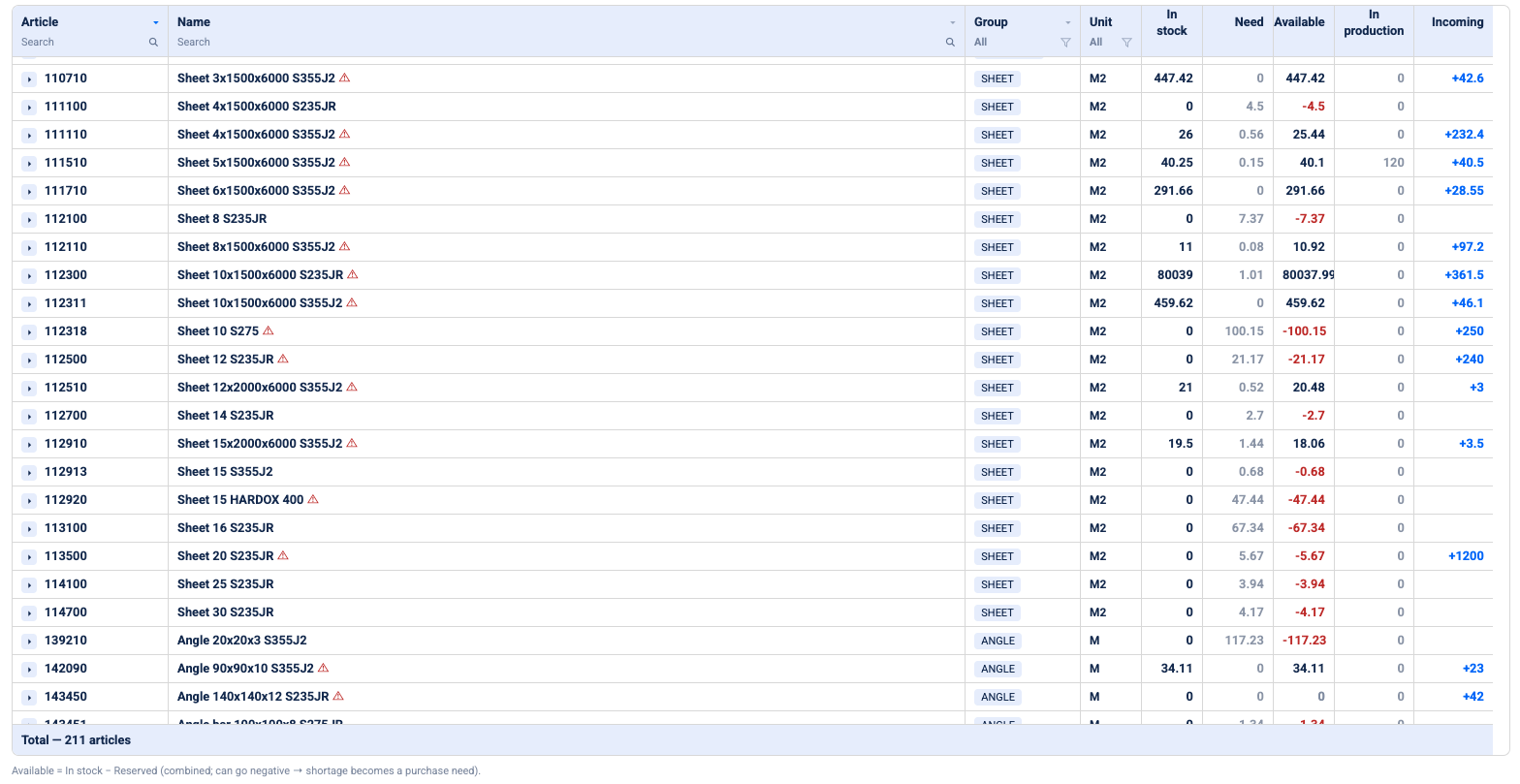
Pick a project and a product group, and EZIIL calculates the purchase need from the bills of materials on that project, checked against what is already in stock and what is already on order, so an open request or order for the same material is not bought again. The need comes out grouped the way a fabricator buys, as sheet material, profiles, fasteners and so on, rather than a flat list of part numbers. You buy only what you do not already have. That is the biggest single change from the spreadsheet method, where the stock check is a walk to the rack.
This is also where the time goes. For example, the Engineer Lead at Nordic Shelter said: “Time invested into EZIIL brings us 24X return: 1 hour invested in EZIIL BOM saves 8 hours in procurement and 16 hours in production.” The eight hours are the retyping and rechecking that a clean BOM makes unnecessary. If your BOMs are not yet in shape for this, our guide to BOM management for small steel fabricators is the place to start, and the BOM workflow guide for a 25-person shop covers the handoff to purchasing as part of the whole shop.
Step 2. Turn the need into a purchase request
From the calculated need EZIIL generates purchase previews, and from a preview you create a purchase request. The material lines and quantities carry over, so nothing is retyped. This is the moment the FLI Structures team was describing when they said the data their buyer has “is exactly what comes from the drawing office, directly from the model,” and that it “has completely removed that material bottleneck we were struggling with before“.
Step 3. Ask your Approved Suppliers
EZIIL keeps an approved supplier list with contact cards, and you can set three or four default suppliers per material group, so when a request for profiles is created your profile suppliers are already on it. You can add or remove suppliers on any request.
Anyone who has been through a customer audit knows why an approved list matters. Your customers ask you for material certificates and written procedures, and you should be able to ask the same of the people you buy from. The default list also protects you from the most common purchasing mistake in a busy shop, which is buying from whoever replied first because the job is already late. Asking your usual three every time, even in a hurry, is how small shops keep prices honest without a full-time procurement person. Price still decides most buys, and that is fine. You just want three prices to decide between.
Step 4. Send the purchase request from the system and keep the record
The request goes out by email straight from EZIIL, one email per supplier, with the request attached as a PDF, or as an Excel file if a supplier would rather fill in a spreadsheet for a long list. Sent emails land in an outbox, so the record exists whether or not the buyer remembers to file it. Email templates mean the covering text is written once.
The shops that work with EZIIL, usually buy from a mix of stockholders, merchants and fastener suppliers who all still quote by email, and for them a clean email flow with a record is important.
Step 5. Enter the quotes, pick the supplier, create the purchase order
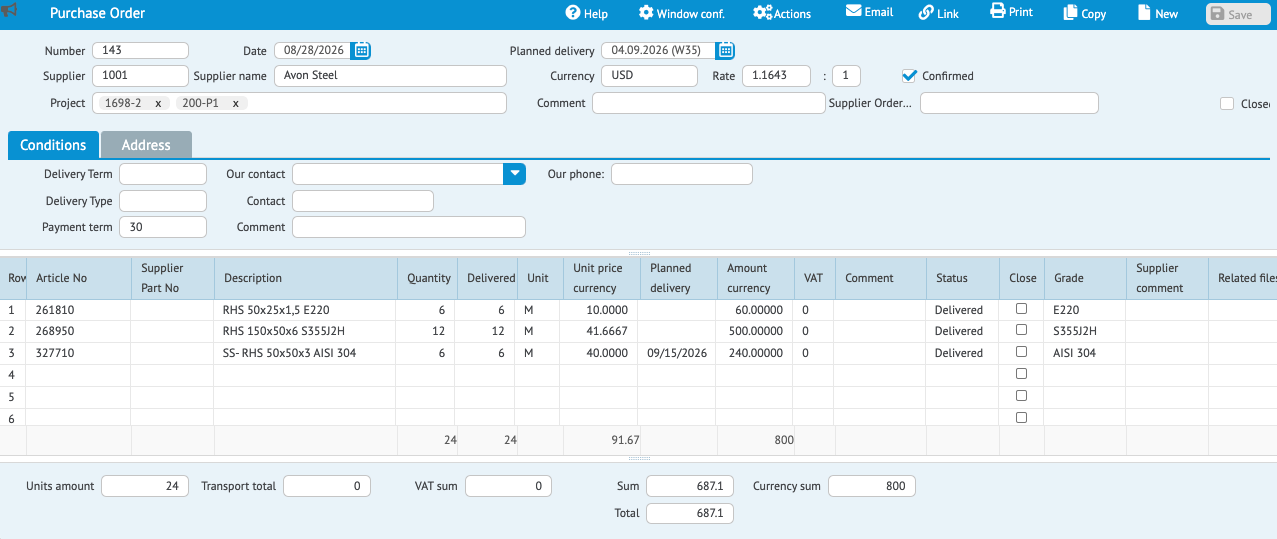
Prices come back by email or in a spreadsheet. You enter them against the request lines (copy and paste from Excel works for long lists) and pick the supplier you want for that request. Then one action, “create purchase order,” generates the PO for that supplier with the prices and quantities already filled in.
On the PO you add what the supplier and your own team need to know: delivery terms (DAP if the supplier delivers to you, FCA if you collect), a free “delivery type” field for whatever your shop wants to record (truck, van, collection), the supplier’s own order number, the planned delivery date, the payment term (for example 30 days) and the currency. Each of those fields does a job later: the delivery date feeds the warehouse and the schedule, and the payment term feeds the cash flow view.
Step 6. Send it, confirm it, and let the warehouse know
The PO goes out the same way the request did. The supplier confirms by email or by phone, and the buyer ticks the order as confirmed. From then on the material shows as incoming for its project, with a planned date, and anyone planning the week can see it without asking the buyer. When the truck arrives, whoever takes the delivery marks it as received in EZIIL, usually the person running the warehouse, and the material moves from incoming to in stock. What happens after that, from batches and certificates to reserving stock for a job, belongs to the warehouse and inventory side, which we will cover in a separate article.
The following statements from FLI Structures showcase what the six steps add up to in practice. The Projects Team Manager sait that “It used to happen that we placed five orders with the same supplier in a day. Now, with EZIIL, we can see that, it doesn’t matter about the job, we just need this material, and it means we place less orders.” The second is from the Purchasing Manager at FLI Structures: “The admin work has reduced dramatically, I now have the flexibility to focus on procurement at the best price, and on time delivery.” Fewer orders, fewer invoices for accounts, and a buyer with time to shop around.
The management view in EZIIL: see next week’s cash out before the invoices land
The management view in EZIIL, is for the person who signs off the money, and you do not need to open a single purchase order to use it.
The purchase order cash flow view
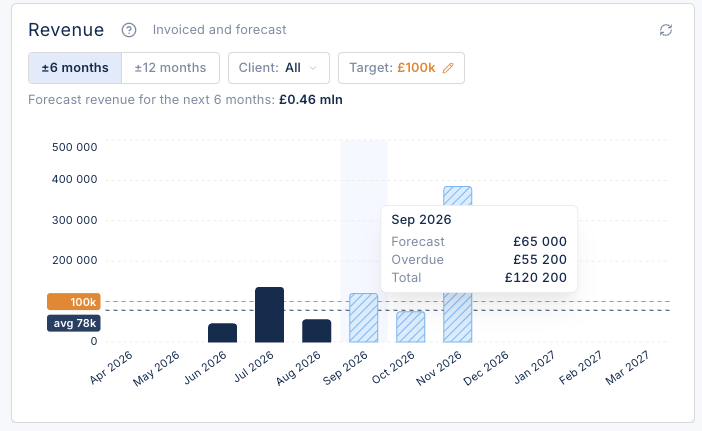
EZIIL has a cash flow report for purchasing. It shows, by week or by month, how much money is going out against the purchase orders the buyer has raised, with a table by supplier underneath. Click a supplier and you see the orders behind the number and when each one is due.
Nobody types anything into this view. It comes from the purchase orders the buyer already raised: planned delivery date plus payment term gives the payment due date. For example, an order delivered on the 4th of September on 30-day terms shows as $800 due on the 4th of October. If one line on an order is planned for a later delivery, that line’s amount moves to its own week, so a split delivery shows as a split payment rather than one lump on the wrong date. Orders in another currency are converted into your base currency so the weeks add up.
What is the EZIIL management view for
However, this view is not meant for accounting. It does not include wages, sales invoices or anything you have not raised a purchase order for, and it will not remind you to pay anyone. In most shops the buyer does not pay invoices anyway; the accountant does. What the view does is let the buyer and the owner see the coming weeks’ commitments in one place before they turn into invoices.
It exists because of a conversation that happens in a lot of small shops. The owner tells the buyer something like “do not put more than 40,000 through in one week,” and the buyer then has to pace purchases against the money coming in from customers. Without a view like this, pacing is done from memory and from the accountant’s reminders. With it, the buyer can see that two big orders have landed in the same week and move one, or split a delivery so the payment splits with it. That is the whole job of the view: no spending spikes and no surprises at month end.
The Goal: fewer orders, fewer invoices
Because the view groups commitments by supplier and by week, it shows a pattern most shops do not see until they look: five orders to the same supplier, all due on the same date. Could that have been one order, one delivery and one invoice? Often it could, and the supplier table shows you where. For FLI the result was fewer orders and, as Lynn Smith put it, dramatically less admin. For the accounts team it is fewer invoices to match, which rarely makes it into a software brochure but is felt every month.
VMT adopted EZIIL BOM in 2018, raised its supply security from 45% to 98%, meaning the material the plan needed was there when the plan needed it. It came from a buyer working from EZIIL’s live BOM, with confirmed orders and dates that everyone else could see. If you are choosing a system for this, start with our comparison of BOM management software for small manufacturers.
Why this matters more in a 15-50 person Steel shop
A large fabricator with a strong balance sheet may never open this view. If there is always enough in the bank, the timing of supplier payments is an accounting question rather than an operations one. The shops that use it are the ones where the month has to be planned: a couple of large material buys, a payroll date, a customer who pays late, and about a month of cash to bridge the gaps. The Fabricator’s benchmarking makes a point worth reading twice if you run a growing shop: companies often fail during rebounds rather than downturns, because rising demand strains the cash needed to buy material for the extra work. Seeing purchase commitments by week is a modest tool against exactly that.
Where purchasing sits in the EZIIL workflow
Purchasing is one link in a chain, so it helps to see the whole chain. A project is created and its bills of materials are entered or imported. The purchase need is calculated from those BOMs against stock. Requests go out, orders come back confirmed, and the material shows as incoming for its project. When it arrives it is received into the warehouse, reserved for the job, and released to the floor through operation planning and the shop-floor app. Hours and progress report back against the same project, so the owner can see plan versus actual as the job runs.
A few things to note about EZIIL’s purchasing module:
- Purchasing is an add-on module, not part of EZIIL Starter core features. Starter is the base product (projects, scheduling, the Master View, shop-floor reporting and profit tracking) priced by team size from €120/$140 a month plus a one-off €300/$350 onboarding fee, with no per-user fees. The procurement module, like Bill of Materials and inventory, is added when you are ready. Most shops start with Starter and add BOM and procurement once the schedule is running; see the pricing page for the plans.
- It works best with BOM and inventory. You can raise requests and orders without a BOM, but the material need calculation, the stock check and the “buy only what you do not have” step depend on the BOM and inventory modules being in use.
- It does not read supplier prices out of emails. Quotes are typed in or pasted from a spreadsheet.
- It is not accounting software. Purchase orders and the cash flow view sit alongside your accounting system, not instead of it. EZIIL integrates with Directo and ProNest, among others; see ERP integrations.
- EZIIL does not nest material. Purchase quantities use a percentage buffer over the net BOM quantity and manual stock lengths. If in-house nesting is a hard requirement, you will run a nesting tool alongside EZIIL.
What’ to choose’s the best choice: Spreadsheet, accounting system, or purchasing tied to the BOM
Most shops are choosing between three ways of running purchasing, and each one is right for somebody.
| Email plus spreadsheet | Accounting or generic ERP purchasing | Purchasing tied to the BOM (EZIIL) | |
|---|---|---|---|
| Need calculated from the BOM | No, retyped by hand | No, entered by hand | Yes, per project and material group |
| Stock checked before buying | Walk to the rack | Sometimes, if inventory is maintained | Yes, buy only what you do not have |
| RFQ to several suppliers | Separate emails, prices in a sheet | Usually PO only, no RFQ step | Request to default suppliers, then PO from the winning quote |
| Consolidating orders across jobs | Only if the buyer remembers | Possible, but blind to jobs | Visible per supplier and per week |
| Planned delivery feeding the schedule | No | No | Yes, incoming material per project |
| Cash out by week from purchase orders | Manual forecast | In accounts payable, after the invoice | Derived from POs before the invoice |
| Works when the buyer is away | Rarely | If someone knows the system | Yes, project managers can pick it up |
| Right for | Under about ten jobs at once | Shops whose purchasing is mostly repeat stock items | Project-based shops of 15 to 150 people |
Scroll sideways to see all columns.
A simple rule on when to switch: if you are placing more than one order a day with the same supplier, or you cannot say what your shop owes suppliers next week without asking the accountant, purchasing has outgrown the spreadsheet.
Frequently asked questions
What is the difference between a purchase request and a purchase order in a fab shop? A purchase request (requisition, enquiry or RFQ) asks one or more suppliers to quote for a list of materials and is not binding. A purchase order commits the shop to one supplier at agreed prices, delivery terms and a delivery date. In EZIIL the request is created first, often from the calculated need on a project, and the purchase order is generated from it once a supplier is chosen.
Can I use EZIIL’s inventory module without the purchasing module? Yes. The modules are separate add-ons to EZIIL Starter, so a shop can run inventory on its own and add procurement later, or the other way round. It is a little more work to run inventory without purchasing, because incoming material has to be entered by hand, so most shops that use both add them together.
Does EZIIL send requests for quotation to multiple suppliers? Yes. A purchase request can be sent to several suppliers at once, one email per supplier, with the request attached as a PDF or an Excel file. Default suppliers can be set per material group so the usual ones are pre-selected.
Does EZIIL pull supplier prices from emails automatically? No. Quotes come back by email or spreadsheet and are typed in against the request lines, or pasted from Excel for long lists. There is no supplier portal or EDI link.
Is the cash flow view an accounting tool? No. It shows committed purchase spend by week or month, derived from purchase orders (planned delivery date plus payment term). It does not include wages or sales invoices and does not issue payment reminders. It sits alongside your accounting system so the buyer and the owner can pace purchases against incoming cash.
Is purchasing included in EZIIL Starter? No. Starter is the base product for projects, scheduling and shop-floor reporting. Procurement, Bill of Materials and inventory are optional modules added when you are ready, at the same flat team-size pricing model with no per-user fees.
Does EZIIL nest material or calculate net versus gross quantities? No. Purchase quantities use a percentage buffer over the BOM quantity and manually entered stock lengths. EZIIL exports cut lists to nesting tools such as ProNest rather than nesting itself.
Does the cash flow view change when material actually arrives? No. The view is built from the planned delivery date and payment term on each purchase order, not from goods receipts. A late or partial delivery does not move the payment week on its own; the buyer updates the planned dates on the order if the schedule changes.
Who marks material as received? Whoever takes the delivery, usually the person running the warehouse, marks the order line as received in EZIIL. That moves the material from incoming to in stock for its project. The warehouse side of the flow is covered in a separate article.
How does a purchase order affect the production schedule? Once a purchase order is confirmed, its material shows as incoming for the project with a planned delivery date, so the planner can see whether a job’s material will be there before it is scheduled, without asking the buyer.
Can I raise a purchase order against a job before the BOM is finished? Yes. Purchase requests and orders can be created directly, without a calculated need, and assigned to a project. The BOM-driven need calculation is the usual path, not the only one.
Where to next
If your buyer is retyping BOMs, if orders go out job by job, or if the first time you see next week’s supplier payments is when the invoices arrive, a bigger spreadsheet will not fix it. Purchasing that starts from the BOM and ends in a view the owner can read will.
Read how FLI Structures went from five orders a day to a buyer with time to shop around, or start one step earlier with the BOM workflow guide. When you want to see the purchasing module on a real project, take a free product tour or book a walkthrough call with someone who has set it up for shops like yours. EZIIL is month to month and priced by team size with no per-user fees. We set it up with you rather than handing over a login and a manual, because every shop’s supplier list and material groups are different.