
Fabrication scheduling software for small steel shops
- Shop floor progress communication
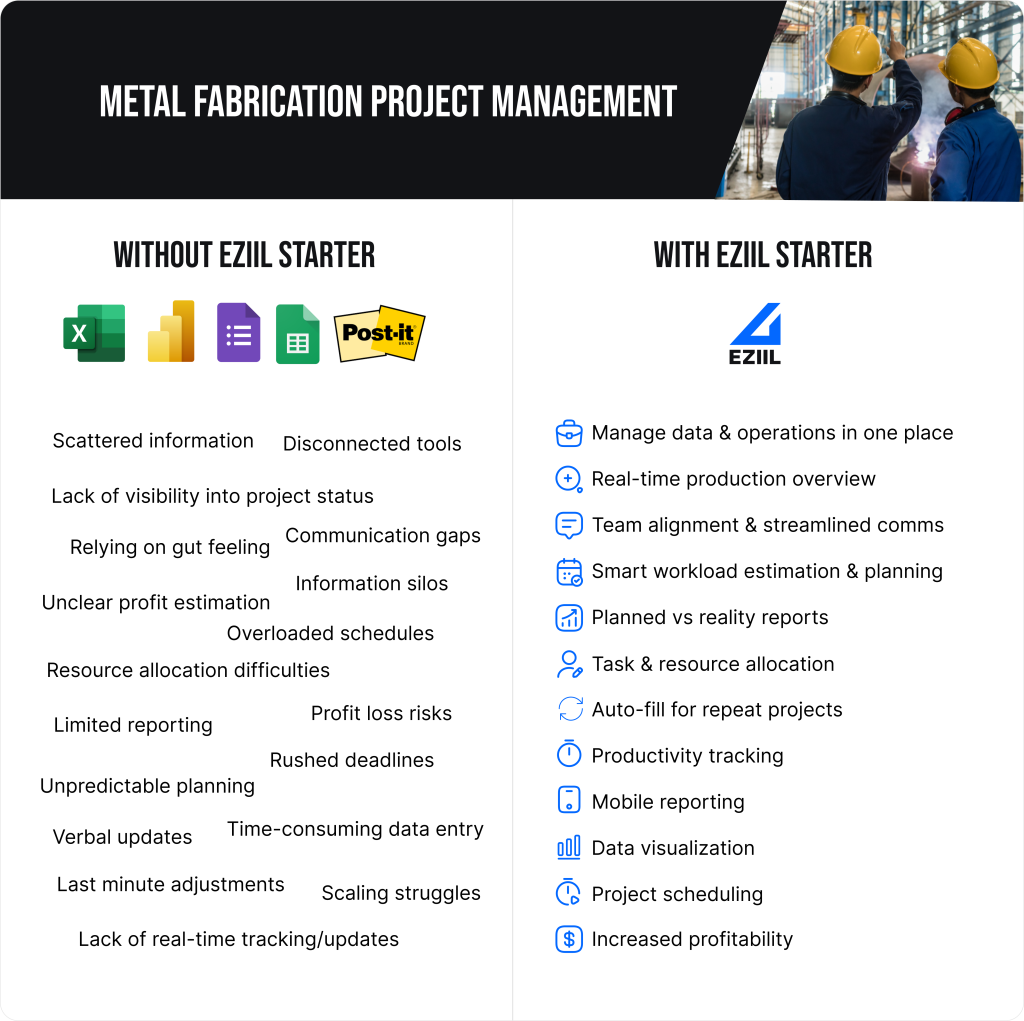
- Manage data in one place
- Single source of truth
- Smart capacity planning
- Data visualization
- Real-time production overview
- Task and resource allocation
- Project scheduling
- Mobile reporting
- Productivity tracking
- Production routing
- Project profitability analytics
- Workload estimation
- Planned vs reality reports
- Bottleneck detection
fabrication scheduling software for custom metal fabricators
EZIIL is fabrication scheduling software for custom steel and metal fabricators with 10 to 150 people. You give each job its operations and planned hours by department, and EZIIL sets first dates from those hours and your department’s capacity. Overloaded weeks show up red on one screen, and you drag work to fix them.
It’s manufacturing scheduling software built for one-off project work, at a flat price by team size from €120 / $140 a month.
Scheduling is one part of EZIIL. The same system gives you job shop software for custom work, shop floor management software that reports real hours back to the plan, engineer-to-order software for one-off projects, MES software for execution tracking, manufacturing project management software and purchasing software for steel fabrication, with steel fabrication ERP software modules added when you need them, job tracking software for where every job stands, and job costing software that turns reported hours into cost per job. Comparing options? See the best production scheduling and planning software for metal fabricators, our guide to finite capacity scheduling, and the metal fabrication software roundup. For how scheduling connects to the rest of the shop, see EZIIL’s fabrication shop management software.
- Cloud-based access
- Intuitive interface
- Built for metal fabricators
- Real-time updates
- Team alignment
- Google and Microsoft SSO
- Measure each operation in production
- Scalable implementation
- Quick and easy adoption
- Monthly subscription, cancel any time
How does fabrication scheduling work in EZIIL?
EZIIL builds a first schedule from the hours you plan per department, then you adjust it by hand.
- Add the job. A project has one or more phases, each with its own due date, customer PO and price.
- Add planned hours. List the operations by department, such as cutting, welding and painting, with the hours from your estimate. A rough number per department is enough to start.
- Generate a first draft. EZIIL reads when the previous department’s work ends and divides the planned hours by that department’s capacity. 70 hours in a department with 24 hours a day takes about three days. It’s a rough draft, and you review it.
- Drag to replan. Move work in Master View by day, week or month, by project or by department.
- Let the floor report. Workers start and stop operations on a phone, tablet or shop PC. Confirmed hours build progress against the budget, so you can see which jobs are running over.
Why a fabrication schedule falls apart in a spreadsheet
A spreadsheet doesn’t add up the load across jobs, and it doesn’t know what the floor actually did.
A custom fabrication shop schedules a mix of one-off jobs through cutting, welding, painting and assembly, and the hours per job are an estimate until the job is done. Many shops we talk to keep this on a whiteboard, or in an Excel Gantt chart built from what the team knows about how long tasks take.
That works until two project managers promise the same two weeks. Before EZIIL, FLI Structures would sometimes commit two or three jobs to the same dates, which forced overtime, weekend work or night shifts. At UPFab, a 35-person shop in Michigan, the single source of truth was the supervisor’s memory, and five projects could fall due in the same week.
1. prepare
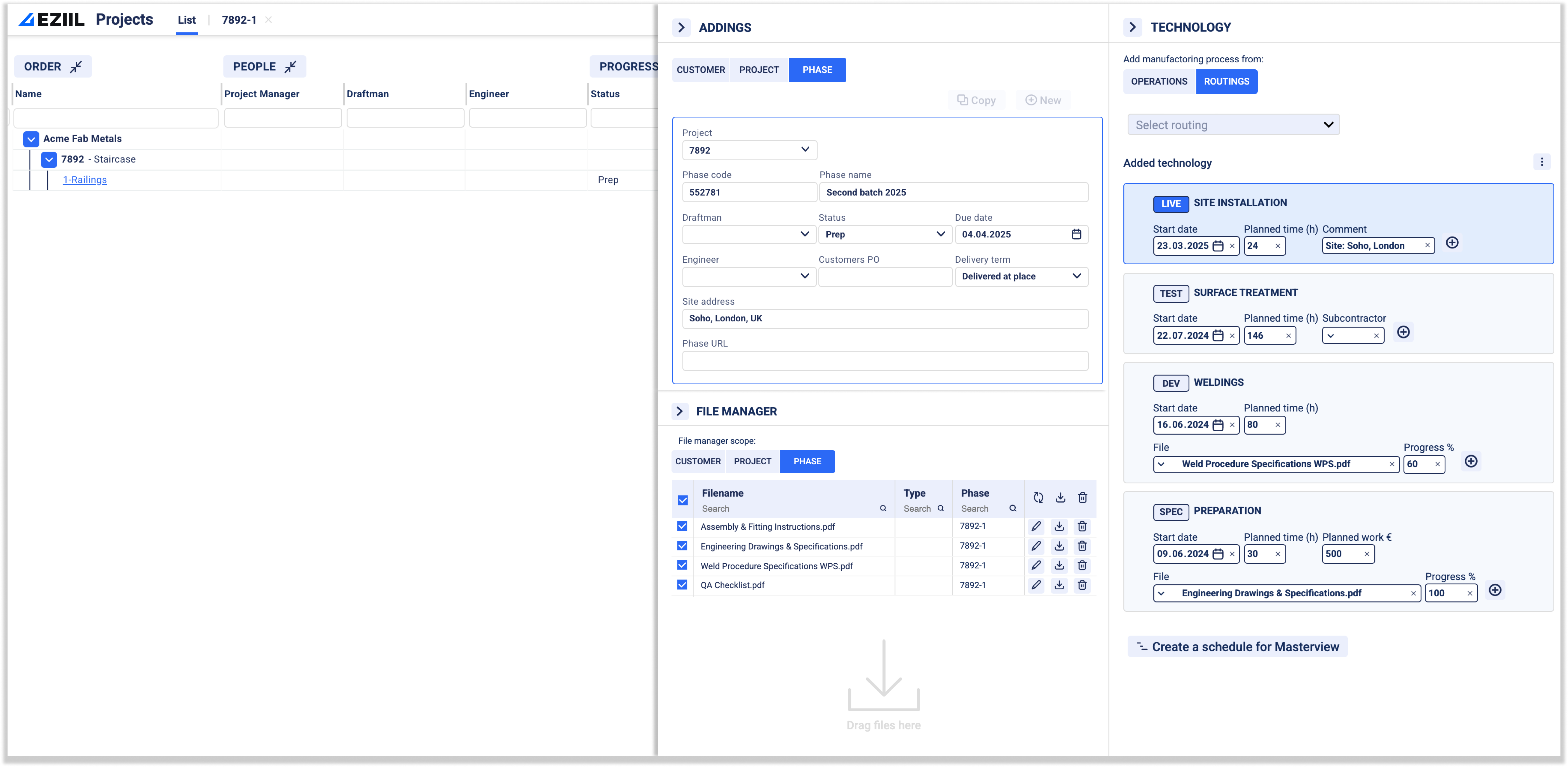
Organize all project related information such as client data, budget, due dates, project documentation and requirements, workers and phases in one place.
Ensuring clarity and alignment throughout every project.
Centralized information hub
Store all project related info, tasks and docs in one place
Custom data fields
Tailor inputs to capture project-specific details
Quick set up for repeat projects
Duplicate similar projects in minutes, no tedious data entry
Production routing
Pre-built fabrication processes’ routing and task templates to save time
File attachments
Drag and drop any files; blueprints, drawings, and docs related to the project directly into EZIIL
Assign roles and permissions
Each team member will have access to the information they need
List of clients
Store all your clients’ data securely in the system and import necessary info to new projects with one click
Organize clients
Group, filter and view projects by client
Arrange projects
Split big projects into sub-projects and phases in one view
2. plan and spot bottlenecks early
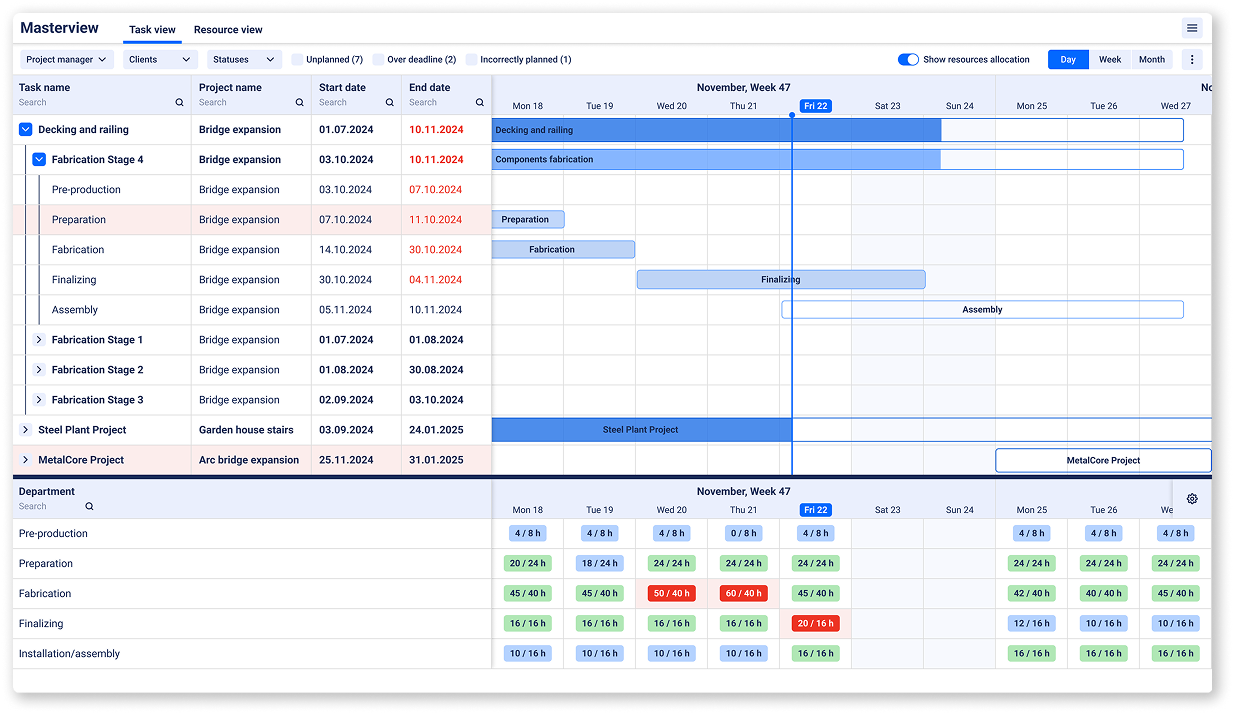
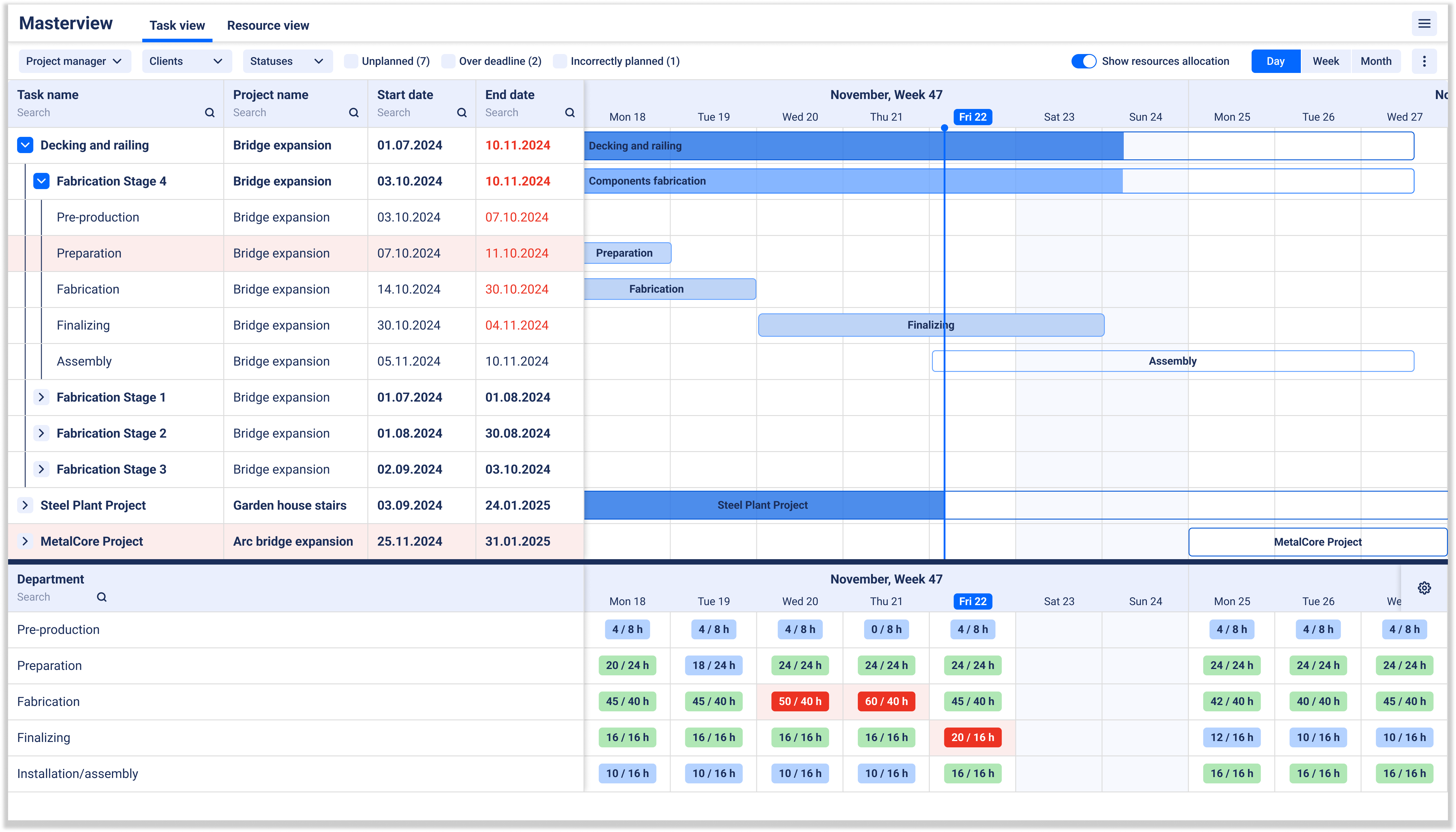
Master View adds up the planned hours per department, week by week, across every live job. Resource bars are green within about 20% of available hours, blue below that and red when a department is over. Open the resource view for one department to see the jobs behind the number.
You can look at welding for the next few weeks and see the problem before anyone promises a date. When a customer asks for a lead time, you can answer from the plan instead of from memory. At UPFab, all seven project managers and accounting now see capacity on one screen, 3 to 6 months ahead.
You can also set capacity exceptions for a date range, for holidays, extra shifts or a shutdown.
Schedule project stages
Drag-and-drop scheduler built specifically for metal fabrication timelines
Resource planning
Accurately plan capacity and prevent bottlenecks and idle time
Task assignment
Assign project managers and tasks to departments
Real-time resource overview
Uncover bottlenecks and workload conflicts through a visual map of resources
Team alignment
Keep instructions, and notes tied to specific jobs or tasks
Workflow steps
Plan cutting, welding and painting by department, in the order you choose
Progress on the plan
Progress builds from confirmed hours against the budget
Semi-automatic first draft
EZIIL sets first dates from each task's planned hours and your department's capacity, then you review and adjust.
Override project progress
Override reported hours to reflect real needs without having to change project configuration
Next deadlines
See overdue and upcoming phases on your start screen
What happens when a fabrication job slips?
EZIIL shows it in three places. On the plan, bars turn red when reported hours pass the planned hours. On your start screen, the next deadlines list shows overdue and upcoming phases. In the reporting feed, you can see who has started and finished what, as our job tracking software page explains. Then you decide what moves: EZIIL won’t reshuffle other jobs on its own.
3. report
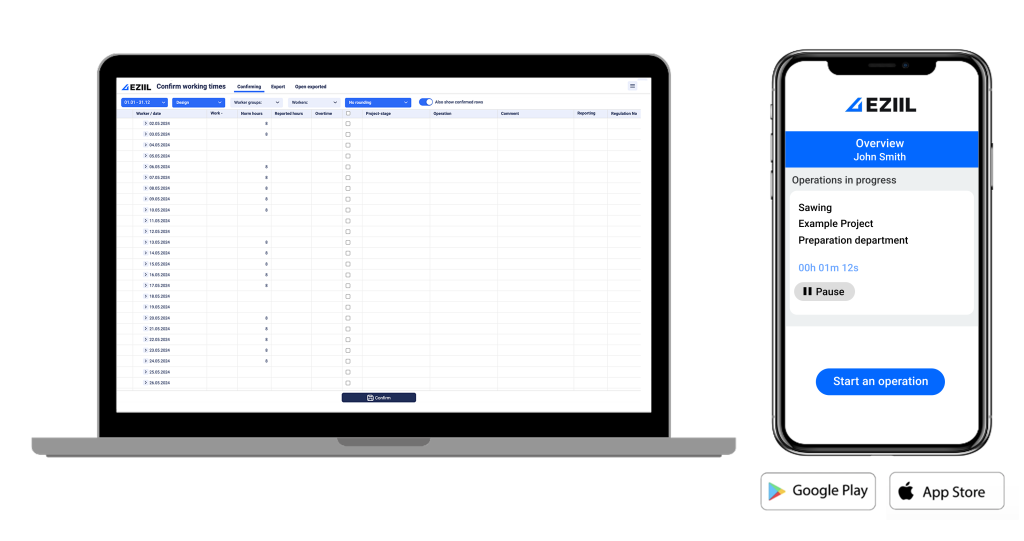
Workers report time and status on a phone, tablet or shop PC, and the office sees progress come back against the plan.
Mobile reporting
Shop floor can log hours and update job statuses from their iOS or Android devices
Real-time progress tracking
Understand which tasks are in progress, completed, or delayed at a glance
Accurate labor time logs
Capture real-time labor logs to ensure accurate reporting and improved cost control
Additional work log
Record non-project-related tasks for complete operational oversight
Jobs by department
Workers see the jobs that carry an operation for their department, and report on them.
Export work hours to payroll
Edit and confirm logged shop floor work time for accurate payroll calculation
EN 1090 traceability (add-on)
Record who worked on what and when with the BOM and production modules
Chip-based access
Fast and simple worker sign-in for seamless job tracking
View blueprints and QC images
Instant access to crucial quality control images and drawings for shop floor workers
4. analyze
Evaluate performance, track profitability and spot inefficiencies to fine tune workflows and quoting for future projects in order to drive continuous improvement.

Planned vs reality reports
Spot inefficiencies to optimize workflows and quoting for future projects
Estimate workloads
Learn from past data to take on and schedule future projects efficiently
Project profit overview
Identify where you’re losing money or which types of projects yield the highest returns
Performance metrics
Analyze completion rates and team efficiency to improve performance
Trend analysis
Uncover recurring issues and understand exactly what to focus on
Time spent analysis
Get insights on the duration of each operation in production to optimize future processes
Pricing and getting started
EZIIL Starter costs €120 / $140 a month for 1 to 15 users, €180 / $210 for 16 to 50 and €290 / $338 for 51 to 150. It’s a flat price, so the whole floor can report. There is a one-off onboarding fee of €300 / $350, and our team sets up the system and imports your data.
You can go live in under a week, starting with one module, and roll out one department at a time, so the switch doesn’t have to compete with a full order book. The full onboarding plan, with setup, team training and go-live, takes about 3 weeks. Add modules such as BOM, procurement and machine planning only when you need them.
- Beginner friendly, no steep learning curve
- Team training and onboarding support
- Involves every department
- No heavy up-front costs
- Roll out one department at a time
- Go live in under a week, starting with one module
- Add on modules at your own pace
- Our team handles setup and imports your data
week 1
Initial set up

week 2
Team training
week 3
Go live and optimize
What EZIIL scheduling does not do, and who it suits
- It isn’t a finite capacity engine. There are no hard planning rules: double-booking is allowed, and operations can overlap or sit in the wrong order. EZIIL shows the overload and you resolve it, which some planners prefer in a shop where overtime and rush jobs are normal. Our guide to finite capacity scheduling explains the difference.
- It doesn’t reschedule dependent work for you. Moving one job doesn’t move the jobs behind it.
- It plans by the day and by department in Starter. There is no view of every worker across several weeks, and you can’t set crew size per job.
- Workers don’t see the schedule in Starter. They see the jobs they can report on, not planned dates.
- It doesn’t optimize sequences. If you need constraint-based optimization across machines or nested programs, look at a dedicated scheduler.
A good fit: custom steel and metal fabricators doing project work, who schedule in Excel or on a whiteboard and want one shared plan they can change by hand. Machine shops and job shops fit too if they plan project work by department. See our job shop software.
Probably not a fit: high-volume repetitive production, shops that want software to work out the best sequence for them, or anyone looking for all-in-one estimating. EZIIL takes the hours from your estimate; it doesn’t produce the estimate.










Fabrication scheduling software questions
What is fabrication scheduling software?
It’s software that plans fabrication jobs against the hours each department has available, so you can see overloads and late jobs across every project. In custom fabrication that usually means scheduling by project and department, because each job differs and hours are estimates.
Does EZIIL schedule automatically?
Partly. EZIIL sets first dates from each operation’s planned hours and your department’s capacity, then you review and adjust them by hand. It doesn’t work out an optimal sequence for you.
Does it work alongside QuickBooks, our accounting system or our ERP?
Confirmed hours export to a spreadsheet. EZIIL also builds accounting integrations per customer, and setups with QuickBooks, Xero, Merit and Microsoft Dynamics run at customers today. They are not part of Starter and are priced separately.
Can it replace our Excel schedule?
Yes, if you plan by job and department. Send us your current data in Excel and our team imports it during onboarding.
Can workers see the schedule on the shop floor?
Not in Starter. Workers report time and status, and see the jobs for their department. Ordered per-person work lists come with the add-on modules.
We keep a rough plan and a daily plan. Can EZIIL hold both?
Yes. Master View holds the committed stage dates and department load. The add-on modules bring the Operations Planner, which fits daily work to people or machines inside those dates. The two are kept apart on purpose, so a change to the daily plan doesn’t move a date you’ve promised.
Can several project managers work from one plan?
Yes. Everyone works from the same plan and sees the same department capacity.
Is there a free trial or demo available?
There is no self-serve free trial, because your setup needs our onboarding team. You can take a free product tour in a demo version, or book a 30-minute demo.
Can’t find the answer you’re looking for?
Our team of experts is always here to help you.
Get in touch via email.